
1. መግቢያ
Thank you for choosing the Petlibro Automatic Pet Feeder. This device is designed to provide consistent and timely meals for your pet, ensuring they are fed according to a set schedule, even when you are away. Please read this manual thoroughly before use to ensure proper operation and maintenance of your feeder.
2. ጠቃሚ የደህንነት መረጃ
እባክዎ በምርቱ ላይ ጉዳት ወይም ጉዳት እንዳይደርስ ለመከላከል የሚከተሉትን የደህንነት ጥንቃቄዎች ይጠብቁ፡-
- Read all instructions carefully before operating the feeder.
- ምግብ ሰጪውን በማይጠቀሙበት ጊዜ ወይም በሚሰበሰቡበት ጊዜ ከልጆችና ከቤት እንስሳት ያርቁ።
- ዋናውን ክፍል በውሃ ወይም በሌሎች ፈሳሾች ውስጥ አታስቀምጡ.
- Use only dry pet food with a diameter between 5-15mm. Do not use wet, canned, or moist food.
- መጋቢው በተረጋጋና ደረጃ ባለው ቦታ ላይ መቀመጡን ያረጋግጡ።
- Unplug the feeder before cleaning or performing any maintenance.
- መጋቢውን እራስዎ ለመጠገን ወይም ለማሻሻል አይሞክሩ። ለእርዳታ የደንበኞች ድጋፍን ያነጋግሩ።
- በአካባቢያዊ ደንቦች መሰረት ባትሪዎችን በሃላፊነት ያስወግዱ.
3. የጥቅል ይዘቶች
ሁሉም እቃዎች መኖራቸውን ለማረጋገጥ እባክዎ የጥቅል ይዘቱን ያረጋግጡ፡-
- Petlibro Automatic Pet Feeder Main Unit
- የምግብ ሳህን
- USB-C Power Adapter and Cable
- የቆሻሻ ማስወገጃ ቦርሳ (ቀድሞ የተጫነ ወይም የተለየ)
- የተጠቃሚ መመሪያ
4. ምርት አብቅቷልview
Familiarize yourself with the different parts of your Petlibro Automatic Pet Feeder:
- የምግብ ማጠራቀሚያ; Stores dry pet food.
- ክዳን፡ Covers the food tank to keep food fresh.
- የቁጥጥር ፓነል Buttons and display for setting schedules and manual feeding.
- የምግብ መውጫ; Where food dispenses into the bowl.
- የምግብ ጎድጓዳ ሳህን፦ Detachable bowl for your pet to eat from.
- Power Port (USB-C): ከኃይል አስማሚ ጋር ይገናኛል.
- የባትሪ ክፍል፡ Holds backup batteries (not included).
5. ማዋቀር
Follow these steps to set up your Petlibro Automatic Pet Feeder:
5.1 ስብሰባ
- ማሸግ ፦ ሁሉንም ንጥረ ነገሮች ከማሸጊያው ውስጥ በጥንቃቄ ያስወግዱ.
- Install Food Bowl: Place the food bowl securely at the base of the feeder.
- Install Food Tank: Align the food tank with the base and twist to lock it into place.
- የማስወገጃ ቦርሳ ያስገቡ፡ If not pre-installed, open the desiccant compartment (usually under the lid) and insert the desiccant bag to keep food fresh. Replace every 15-30 days.

Image: Step-by-step assembly guide for the Petlibro Automatic Pet Feeder. It shows how to twist open the lid, take out the food bowl, put the desiccant bag into its compartment, install the food tank, put the lid back on, and finally install the food bowl.
5.2 የኃይል አቅርቦት
The feeder can be powered by a USB-C adapter or backup batteries.
- ዋና ኃይል: Connect the USB-C power adapter to the feeder's power port and plug it into a wall outlet.
- የባትሪ ምትኬ (አማራጭ) ለስልጣን አንተtages, install 3 D-cell batteries (not included) into the battery compartment at the bottom of the feeder. This ensures continuous operation.
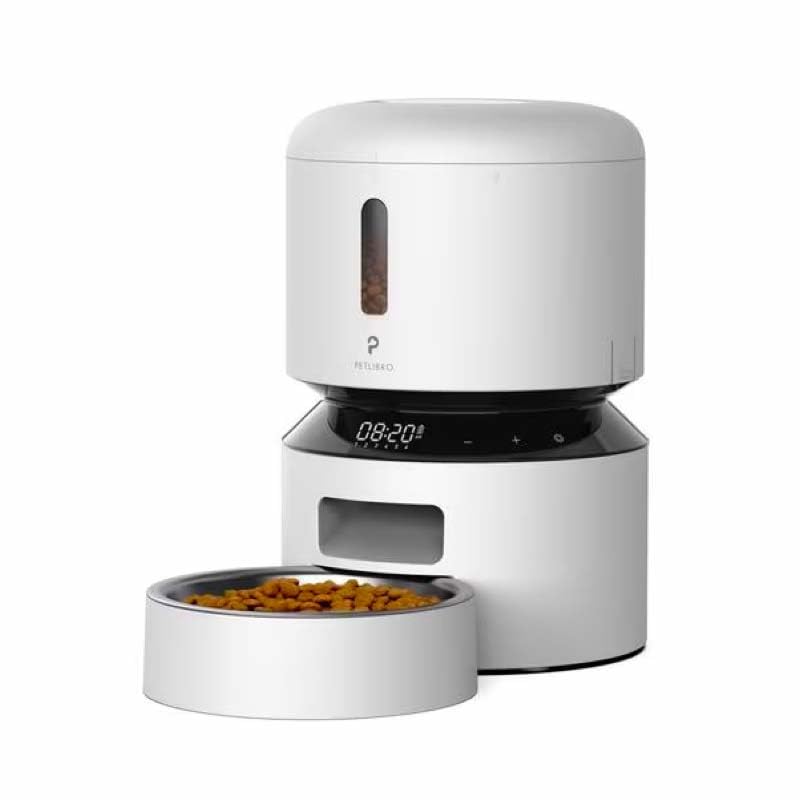
Image: Diagram illustrating the dual power supply system of the Petlibro Automatic Pet Feeder. It shows the USB-C adapter connected for primary power and the battery compartment for backup power. A note indicates that batteries are not included.
6. የአሠራር መመሪያዎች
Once assembled and powered, you can begin programming your feeder.
6.1 የምግብ ማጠራቀሚያውን መሙላት
- Open the lid of the food tank.
- Pour dry pet food into the tank. Ensure the food is within the recommended size (5-15mm diameter).
- ትኩስነቱን ለመጠበቅ ክዳኑን ደህንነቱ በተጠበቀ ሁኔታ ይዝጉ።
6.2 የምግብ መርሃ ግብሮችን እና ክፍሎችን ማዘጋጀት
The feeder allows you to schedule up to 6 meals per day, with 1 to 50 portions per meal.

Image: A cat eating from the Petlibro Automatic Pet Feeder, illustrating the feeder's function. Text overlays indicate "Portion: 1-50" and "Meals: 1-6", highlighting the customizable feeding schedule.
- የአሁኑን ጊዜ ያዘጋጁ፡ Use the control panel buttons (e.g., "SET", "UP", "DOWN") to set the current time.
- የፕሮግራሙ የምግብ ሰዓት፡ Press the "MEAL" button to enter meal programming mode. Select the desired meal number (e.g., Meal 1) and set the feeding time.
- Set Portions: For each programmed meal, set the number of portions (1-50) using the "PORTION" or "UP/DOWN" buttons.
- Repeat for all meals: Program up to 6 meals as needed.
- ቅንብሮችን አስቀምጥ፡ Ensure all settings are saved according to the feeder's specific interface (usually by pressing "SET" or waiting for auto-save).
6.3 በእጅ መመገብ
To dispense food instantly, press the manual feed button (often labeled "FEED" or a paw icon) on the control panel. Each press typically dispenses one portion.
7. ጥገና እና ጽዳት
አዘውትሮ ማጽዳት ንፅህናን ያረጋግጣል እና የመመገቢያዎን ዕድሜ ያራዝማል።
- ይንቀሉ፡ Always unplug the feeder from the power outlet before cleaning.
- መበተን Remove the food bowl and food tank.
- ንጹህ አካላት፡- Wash the food bowl and food tank with mild soap and water. Rinse thoroughly and dry completely before reassembling.
- ዋናውን ክፍል ይጥረጉ; ዋናውን ክፍል ለስላሳ, መamp ጨርቅ. ዋናውን ክፍል በውሃ ውስጥ አታስቀምጡ.
- ዲሲካንትን ይተኩ፦ Replace the desiccant bag every 15-30 days to maintain food freshness.
- እንደገና ሰብስብ፡ Ensure all parts are dry before reassembling the feeder.
8. መላ መፈለግ
If you encounter issues with your feeder, refer to the following common problems and solutions:
| ችግር | ሊሆን የሚችል ምክንያት | መፍትሄ |
|---|---|---|
| መጋቢው እየበራ አይደለም። | No power connection; batteries depleted or incorrectly installed. | Check power adapter connection; replace batteries or ensure correct polarity. |
| ምግብ አለማሰራጨት። | Food tank empty; food jammed; dispenser blocked; incorrect schedule settings. | Refill food tank; clear any food jams; check dispenser for blockages; verify meal schedule and portion settings. |
| Food dispenses too much/too little. | የተሳሳተ የክፍል ቅንብሮች። | Adjust portion settings for each meal. |
| ማሳያ አይሰራም። | የኃይል ጉዳይ; የማሳያ ብልሽት. | የኃይል አቅርቦቱን ያረጋግጡ፤ ችግሩ ከቀጠለ የደንበኛ ድጋፍን ያነጋግሩ። |
9. ዝርዝሮች
| ባህሪ | ዝርዝር |
|---|---|
| የምርት ስም | Petlibro Automatic Pet Feeder |
| ሞዴል | 3L አውቶማቲክ የቤት እንስሳ መጋቢ |
| አቅም | 3 ሊትር |
| ቁሳቁስ | Food-grade ABS plastic |
| የኃይል አቅርቦት | USB-C adapter (5V/1A); 3 x D-cell batteries (backup, not included) |
| በቀን ምግቦች | Up to 6 meals |
| ክፍሎች በእያንዳንዱ ምግብ | 1-50 portions (approx. 5-10g per portion, depending on food density) |
| የሚመከር የምግብ መጠን | 5-15mm dry kibble |
| ቀለም | ነጭ |
10. ዋስትና እና ድጋፍ
Your Petlibro Automatic Pet Feeder comes with a standard manufacturer's warranty. For detailed warranty information, please refer to the warranty card included in your package or visit the official Petlibro webጣቢያ.
If you have any questions, require technical support, or need assistance with your product, please contact Petlibro customer service. Contact details can typically be found on the product packaging, the official website, or by searching for "Petlibro customer support" online.


