1. መግቢያ
The ZdalaMit XRT020 is a pre-programmed replacement remote control designed for various Vizio TV models. This remote offers a straightforward, ready-to-use solution without the need for complex programming or pairing procedures. Simply insert the batteries, and it is ready for operation.
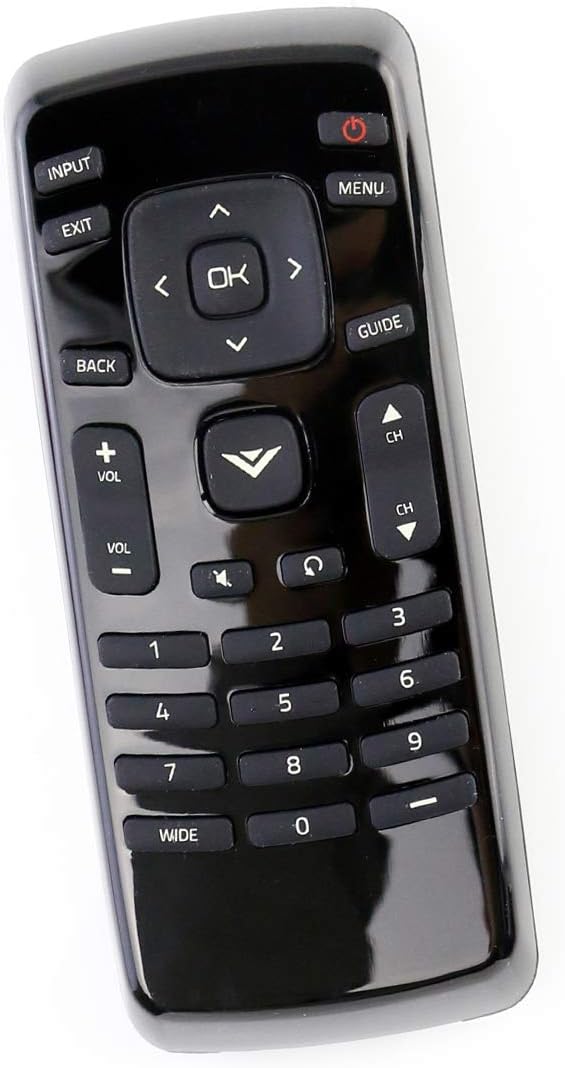
ምስል 1: የፊት view of the XRT020 Remote Control.
ቁልፍ ባህሪዎች
- አስቀድሞ የተዘጋጀ፡- No setup required, ready to use out of the box.
- ዘላቂ ግንባታ; ከፍተኛ ጥራት ካለው ABS ቁሳቁስ የተሰራ።
- የተራዘመ ክልል፡ Operates effectively up to 30 feet (10 meters).
- ምላሽ ሰጪ አዝራሮች፡- Designed for quick response times (0.2 seconds) and long-lasting use (over 160,000 clicks).
2. ማዋቀር
የባትሪ ጭነት;
- የባትሪውን ክፍል ከርቀት መቆጣጠሪያው ጀርባ ያግኙት።
- ተንሸራታች የባትሪውን ክፍል ሽፋን ይክፈቱ።
- Insert two (2) 1.5V AAA alkaline batteries, ensuring correct polarity (+ and -) as indicated inside the compartment.
- የባትሪውን ክፍል ደህንነቱ በተጠበቀ ሁኔታ ይዝጉ።
The remote control is now ready for immediate use with your compatible Vizio TV. No additional programming or pairing is necessary.

ምስል 2፡ ለኤኤኤ ባትሪዎች የባትሪ ክፍል።
3. የአሠራር መመሪያዎች
The XRT020 remote control provides standard functions for your Vizio TV. Below are the primary buttons and their uses:
| አዝራር | ተግባር |
|---|---|
| ኃይል (●) | ቴሌቪዥኑን ያበራል ወይም ያጠፋል። |
| ግቤት | የቪዲዮ ግብዓት ምንጭን (ለምሳሌ፣ HDMI 1፣ AV) ይመርጣል። |
| ምናሌ | የቲቪውን ዋና ሜኑ ይደርሳል። |
| OK / Navigation Arrows | Confirms selections and navigates through menus. |
| ተመለስ / ውጣ | ወደ ቀዳሚው ማያ ገጽ ይመለሳል ወይም ከአሁኑ ምናሌ ይወጣል። |
| መጠን (+/-) | Adjusts the sound volume up or down. |
| Channel (CH ▲ / ▼) | የቲቪ ቻናሉን ወደላይ ወይም ወደ ታች ይለውጠዋል። |
| ድምጸ-ከል አድርግ | የቴሌቪዥኑን ድምጸ-ከል ያደርገዋል ወይም ያጠፋል። |
| የቁጥር ፓድ (0-9) | የሰርጥ ቁጥሮችን በቀጥታ ያስገባል። |
4. ጥገና
To ensure the longevity and optimal performance of your ZdalaMit XRT020 remote control, follow these maintenance guidelines:
- ማጽዳት፡ Wipe the remote with a soft, dry cloth. Avoid using liquid cleaners or abrasive materials, as they may damage the surface or internal components.
- የባትሪ መተካት፡ Replace batteries promptly when the remote's performance degrades. Always use new AAA alkaline batteries and dispose of old batteries responsibly.
- ማከማቻ፡ የርቀት መቆጣጠሪያውን ከፀሐይ ብርሃን፣ ከፍተኛ ሙቀት እና ከፍተኛ እርጥበት ራቅ ባለ ቀዝቃዛና ደረቅ ቦታ ያስቀምጡ።
- ጥበቃ፡ Avoid dropping the remote or subjecting it to strong impacts, which can cause internal damage or breakage.
5. መላ መፈለግ
If you encounter issues with your XRT020 remote control, please refer to the following common troubleshooting steps:
- የርቀት ምላሽ የማይሰጥ፡
- ባትሪዎች ከትክክለኛው ፖላሪቲ ጋር በትክክል መገባታቸውን ያረጋግጡ።
- አሮጌ ባትሪዎችን በአዲስ 1.5V AAA የአልካላይን ባትሪዎች ይተኩ።
- በርቀት መቆጣጠሪያው እና በቴሌቪዥኑ የኢንፍራሬድ ዳሳሽ መካከል ምንም አይነት እንቅፋት አለመኖሩን ያረጋግጡ።
- የሚቆራረጥ ተግባር፡
- Verify that the remote is within the operational range (up to 30 feet / 10 meters) of the TV.
- Ensure there are no strong light sources or other electronic devices interfering with the remote's signal.
- የተወሰኑ አዝራሮች የማይሰሩ ናቸው፦
- Inspect the buttons for any physical damage or debris that might be preventing them from pressing correctly.
Since this remote is pre-programmed, no manual programming or pairing is required. If issues persist after following these steps, please contact customer support.
6. ዝርዝሮች
| ባህሪ | ዝርዝር |
|---|---|
| የሞዴል ቁጥር | XRT020 |
| የምርት ስም | ዝዳላሚት |
| የምርት ልኬቶች | 5 x 1.5 x 0.6 ኢንች |
| የእቃው ክብደት | 1.59 አውንስ |
| የኃይል አቅርቦት | 2 x 1.5V AAA የአልካላይን ባትሪዎች (አልተካተቱም) |
| ልዩ ባህሪ | አስቀድሞ ፕሮግራም የተደረገበት፣ ምንም ማዋቀር አያስፈልግም |
| ቀለም | ጥቁር |
| ከፍተኛ የሚደገፉ መሣሪያዎች | 1 (ቴሌቪዥን) |
| የክወና ክልል | እስከ 30 ጫማ / 10 ሜትር |

Figure 3: XRT020 Remote Control dimensions.
7. Compatible Vizio TV Models
The ZdalaMit XRT020 remote control is compatible with a wide range of Vizio TV models, including but not limited to:
- D32hn-E0
- D39hn-E0
- D48n-E0
- D24H-C1
- E390-A1
- E280-A1
- E280-B1
- E291-A1
- D32hnx-E1
- D50n-E1
- D32hn-D0
- D39hn-D0
- D40n-E3
- D60n-E3
- D320-B1
- E241-A1
- D28H-C1
- D390-B0
- D32H-C1
- E221-A1
- E231-B1
- E320-A1
- E320-B0E
- E241-B1
- E320-B0
- E320-B2
- E320-B1
- E320-B1E
- E390-B1
- D32hn-E1
- E390-B1E
- D43n-E1

Figure 4: Partial list of compatible Vizio TV models.
8. ድጋፍ እና ዋስትና
For any questions, concerns, or support regarding your ZdalaMit XRT020 remote control, please refer to the seller's contact information provided at the point of purchase. While specific warranty details are not included in this manual, please retain your purchase receipt for any potential warranty claims.
"Please feel free to contact us if you have any query, thanks!"