
1. መግቢያ
This manual provides instructions for the proper setup, operation, and maintenance of your Acer B247Y 23.8-inch LED LCD Monitor. Please read this manual thoroughly before using your monitor to ensure optimal performance and to prevent damage.
The Acer B247Y is a 23.8-inch Full HD (1920 x 1080) monitor featuring an IPS panel for wide viewing angles, an anti-glare display, and a frameless design on three sides. It includes multiple connectivity options and an ergonomic stand for comfortable viewing
2. የጥቅል ይዘቶች
ሁሉም እቃዎች በጥቅልዎ ውስጥ መኖራቸውን ያረጋግጡ። ማንኛቸውም ነገሮች ከጠፉ ወይም ከተበላሹ፣ ቸርቻሪዎን ያነጋግሩ።
- Acer B247Y 23.8-inch LED LCD Monitor
- መቆሚያ (መሠረት እና አንገት) ተቆጣጠር
- Power Adapter (Internal) and Power Cable
- ቪጂኤ ገመድ
- DisplayPort 1.2 ገመድ
- HDMI ገመድ
- Audio-in Cable (if included)
- Audio-out Cable (if included)
- የተጠቃሚ መመሪያ (ይህ ሰነድ)
3. ማዋቀር
3.1 የሞኒተሪ ስታንድ ማሰባሰብ
The monitor comes with a detachable foot stand. Follow these steps to assemble:
- መቆጣጠሪያውን በጥንቃቄ ያስወግዱ እና ከማሸጊያው ውስጥ ክፍሎችን ይቁሙ.
- የማቆሚያውን አንገት ወደ መቆጣጠሪያ ፓነል ያያይዙት. ደህንነቱ በተጠበቀ ሁኔታ ወደ ቦታው ጠቅ ማድረጉን ያረጋግጡ።
- Attach the stand base to the stand neck. Tighten any screws if provided, usually located on the underside of the base.
- የተሰበሰበውን ማሳያ በተረጋጋ እና ጠፍጣፋ መሬት ላይ ያድርጉት።
ማስታወሻ፡- The monitor also supports VESA mount (100 x 100 mm) for wall or arm mounting. Refer to your VESA mount kit instructions for installation.
3.2 ተቆጣጣሪውን ማገናኘት
ተገቢውን ገመዶች በመጠቀም ማሳያውን ከኮምፒዩተርዎ ወይም ከሌሎች መሳሪያዎች ጋር ያገናኙ።
- የቪዲዮ ግንኙነት፡-
- Connect one end of the DisplayPort cable to the DisplayPort output on your computer and the other end to the DisplayPort input on the monitor.
- Alternatively, connect an HDMI cable from your computer's HDMI output to the monitor's HDMI input.
- For older systems, connect a VGA cable from your computer's VGA output to the monitor's VGA input.
- የድምጽ ግንኙነት;
- If using VGA or DisplayPort without audio, connect an audio cable from your computer's audio output to the monitor's audio-in port for integrated speakers.
- To connect external speakers or headphones, use the monitor's audio-out port.
- የኃይል ግንኙነት;
- የኃይል ገመዱን ከተቆጣጣሪው የኃይል ግብዓት ጋር ያገናኙ፣ ከዚያም ሌላውን ጫፍ ወደ መሬት ላይ ወዳለው የኤሌክትሪክ ሶኬት ይሰኩት።

Figure 3.2.1: Acer B247Y Monitor with Stand. This image illustrates the overall appearance of the monitor when fully assembled on its stand.
4. የአሠራር መመሪያዎች
4.1 ማብራት / ማጥፋት
ሞኒተሩን ለማብራት ወይም ለማጥፋት ብዙውን ጊዜ በማኒየሩ ታችኛው ቀኝ ወይም ጀርባ ላይ የሚገኘውን የኃይል አዝራሩን ይጫኑ። ሞኒተሩ ሲበራ የኃይል አመልካች መብራቱ ይበራል።
4.2 Adjusting Monitor Settings (OSD)
The monitor features an On-Screen Display (OSD) menu for adjusting various settings. Use the control buttons (typically located near the power button) to navigate and select options within the OSD menu.
የተለመዱ የ OSD ቅንብሮች የሚከተሉትን ያካትታሉ:
- ምስል፡ Brightness, Contrast, Color Temperature, Gamma, Acer eColor Management modes (e.g., Dark Room, Eco).
- ኦዲዮ፡ Volume control for integrated speakers or audio-out.
- ግቤት፡ Select the active video input source (VGA, DisplayPort, HDMI).
- OSD OSD timeout, language.
- አስተዳደር፡ ወደ ፋብሪካ ነባሪዎች ዳግም ያስጀምሩ።
4.3 Ergonomic ማስተካከያዎች
The Acer B247Y monitor stand offers several ergonomic adjustments to optimize your viewልምድ;
- ዘንበል Adjust the screen angle from -5 degrees to 25 degrees (forward/backward).
- ማወዛወዝ፡ Rotate the monitor horizontally up to +/- 45 degrees.
- የከፍታ ማስተካከያ; የማያ ገጹን ቁመት እስከ 120 ሚሜ ያስተካክሉ።
- ምሰሶ፡ ለቁም እይታ ማያ ገጹን 90 ዲግሪ አሽከርክር viewing
5. ጥገና
ትክክለኛ ጥገና የመከታተያዎን ረጅም ዕድሜ እና ጥሩ አፈፃፀም ያረጋግጣል።
- ማያ ገጹን ማጽዳት; ስክሪኑን በቀስታ ለስላሳ እና ከተሸፈነ ጨርቅ ይጥረጉ። ግትር ለሆኑ ምልክቶች፣ መampen the cloth with a small amount of water or a non-abrasive screen cleaner. Do not spray liquid directly onto the screen.
- ሲን ማጽዳትasing: መቆጣጠሪያውን ለማጽዳት ለስላሳ ደረቅ ጨርቅ ይጠቀሙ ሐasinሰ. ጠንካራ ሳሙናዎችን ወይም ሻካራ ማጽጃዎችን ከመጠቀም ይቆጠቡ።
- የአየር ማናፈሻ; ከመጠን በላይ ሙቀትን ለመከላከል በመቆጣጠሪያው ላይ የአየር ማናፈሻ ክፍተቶች አለመዘጋታቸውን ያረጋግጡ።
- ኃይል ዝጋ: Always turn off the monitor and unplug it from the power outlet before cleaning or when not in use for extended periods.
6. መላ መፈለግ
በእርስዎ ማሳያ ላይ ችግሮች ካጋጠሙዎት የሚከተሉትን የተለመዱ የመላ ፍለጋ ደረጃዎችን ይመልከቱ፡
- No Power / Monitor Does Not Turn On:
- የኃይል ገመዱ ደህንነቱ በተጠበቀ ሁኔታ ከሞኒተሪው እና ከሚሰራ የኤሌክትሪክ ሶኬት ጋር መገናኘቱን ያረጋግጡ።
- ሌላ መሳሪያ በመጫን የኃይል ማከፋፈያው የሚሰራ መሆኑን ያረጋግጡ።
- የኃይል አዝራሩን በጥብቅ ይጫኑ.
- No Image / "No Signal" Message:
- Check that the video cable (DisplayPort, HDMI, or VGA) is securely connected to both the monitor and your computer.
- ኮምፒውተርዎ መብራቱን እና በእንቅልፍ ሁነታ ላይ አለመሆኑን ያረጋግጡ።
- ትክክለኛውን የግቤት ምንጭ እራስዎ ለመምረጥ የ OSD ሜኑ ይጠቀሙ።
- ካለ ሌላ የቪዲዮ ገመድ ወይም ወደብ ይሞክሩ።
- Image is Distorted or Unclear:
- በኮምፒተርዎ ላይ ያለው የማሳያ ጥራት በሞኒተሩ ቤተኛ ጥራት (1920 x 1080) ላይ መዋቀሩን ያረጋግጡ።
- Adjust brightness, contrast, and other picture settings via the OSD menu.
- በስክሪኑ ወይም በኬብሎች ላይ አካላዊ ጉዳት ካለ ያረጋግጡ።
- ከድምጽ ማጉያዎች ምንም ድምፅ የለም;
- Increase the volume using the OSD menu or your computer's sound settings.
- Ensure the audio cable (if used) is properly connected.
- ትክክለኛው የድምጽ ውፅዓት መሳሪያ በኮምፒዩተራችሁ የድምጽ ቅንጅቶች ውስጥ መመረጡን ያረጋግጡ።
7. ዝርዝሮች
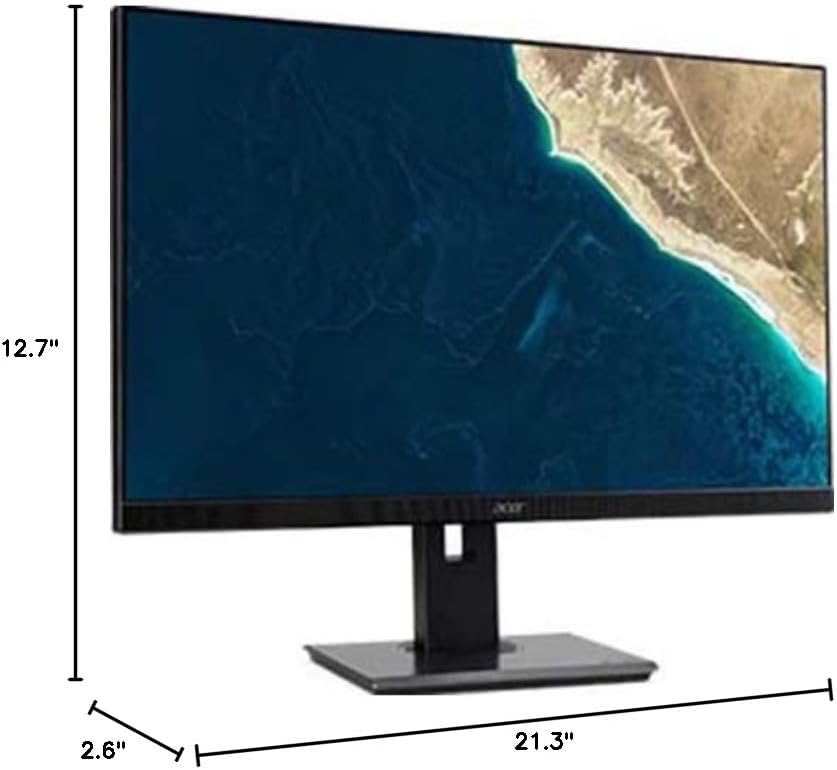
Figure 7.1.1: Acer B247Y Monitor Dimensions. This image shows the approximate height (12.7"), width (21.3"), and depth (2.6") of the monitor without the stand.
| ባህሪ | ዝርዝር መግለጫ |
|---|---|
| የሞዴል ቁጥር | B247Y |
| የስክሪን መጠን | 23.8 ኢንች (60.5 ሴሜ) |
| የማሳያ ዓይነት | LED LCD, IPS Panel, Anti-glare (AG) |
| ከፍተኛው ጥራት | 1920 x 1080 (ሙሉ ኤችዲ) |
| ምጥጥነ ገጽታ | 16፡9 |
| የማደስ ደረጃ | 75 Hz |
| የምላሽ ጊዜ | 4ms (gray-to-gray) |
| ብሩህነት (የተለመደ) | 250 ሲዲ/ሜXNUMX |
| ቤተኛ ንፅፅር ውድር | 1,000፡1 |
| ተለዋዋጭ ንፅፅር ሬሾ | 100,000,000፡1 |
| ViewAngles (H/V) | 178°/178° |
| ግንኙነት | VGA, DisplayPort 1.2, HDMI, Audio-in, Audio-out |
| የተዋሃዱ ተናጋሪዎች | 2 x 2.0 ዋ |
| Ergonomic ማስተካከያዎች | Tilt (-5° to 25°), Swivel (+/- 45°), Height Adjustment (120mm), Pivot (90°) |
| VESA Mount Support | 100 x 100 ሚ.ሜ |
| ከቆመበት ጋር ያሉ መጠኖች (W x H x D) | 21.3" x 14.9"~19.6" x 7.6" (54.0cm x 37.9cm~49.9cm x 19.3cm) |
| ከስታንድ ጋር ክብደት | 12.3 ፓውንድ (5.6 ኪግ) |
| የኃይል አስማሚ | ውስጣዊ |
| ቀለም | ጥቁር |
8. ዋስትና እና ድጋፍ
Your Acer B247Y monitor comes with a Limited Three-Year Warranty. Please retain your proof of purchase for warranty claims.
For technical support, service, or warranty inquiries, please refer to the official Acer support website or contact their customer service department. Contact information can typically be found on the Acer webጣቢያ ወይም ከምርትዎ ጋር በተካተተው የዋስትና ካርድ ውስጥ።
የኬንሲንግተን መቆለፊያ The monitor supports a Kensington lock for security. Attach a compatible Kensington lock (sold separately) to the security slot on the monitor to deter theft.


