
UMLIFE W3001
UMLIFE XH-W3001 Digital LED Temperature Controller Module User Manual
Model: XH-W3001
Brand: UMLIFE
ምርት አልቋልview
The UMLIFE XH-W3001 Digital LED Temperature Controller Module is a versatile thermostat switch designed for precise temperature control in various applications. It features a clear digital display and a waterproof NTC10K probe, making it suitable for both heating and cooling modes. Its robust ABS flame retardant housing ensures safety and durability.

Figure 1: UMLIFE XH-W3001 Digital LED Temperature Controller Module with probe and wiring.
ቁልፍ ባህሪያት
- የ LED አመልካች ብርሃን; Displays the current output status for easy monitoring.
- Digital Display Tube: Shows measuring temperature with high accuracy.
- ሁለት የሥራ ሁነታዎች; Supports both heating (start temperature < stop temperature) and cooling (start temperature > stop temperature) operations.
- ሰፊ የሙቀት መጠን; Operates from -50℃ to 110℃ with a control precision of 0.1℃.
- ዘላቂ መኖሪያ ቤት; Constructed with ABS flame retardant material for high safety, aging resistance, and durability.
- የውሃ መከላከያ ምርመራ; Equipped with a 1-meter NTC10K stainless steel probe that is waterproof and rust-resistant.
ማዋቀር እና ሽቦ
Proper wiring is crucial for the safe and correct operation of the XH-W3001 module. Ensure all connections are secure before applying power.

Figure 2: Wiring diagram for the 12V XH-W3001 model. Connect the 12V input (red/black wires) to your power source. The output (yellow/black wires) connects to your load (e.g., a light bulb or fan). The sensor probe connects to the designated port.
የገመድ መመሪያዎች፡-
- የኃይል ግቤት፡ Connect the red wire to the positive (+) terminal of your 12V DC power supply and the black wire to the negative (-) terminal.
- የጭነት ውጤት፡ Connect the yellow wire to the positive (+) terminal of your heating or cooling device (load) and the black wire to the negative (-) terminal of the load. Ensure the load's voltage matches the controller's input voltagሠ (12V)።
- የሙቀት ምርመራ; Insert the NTC10K waterproof probe into the designated two-pin connector on the module.
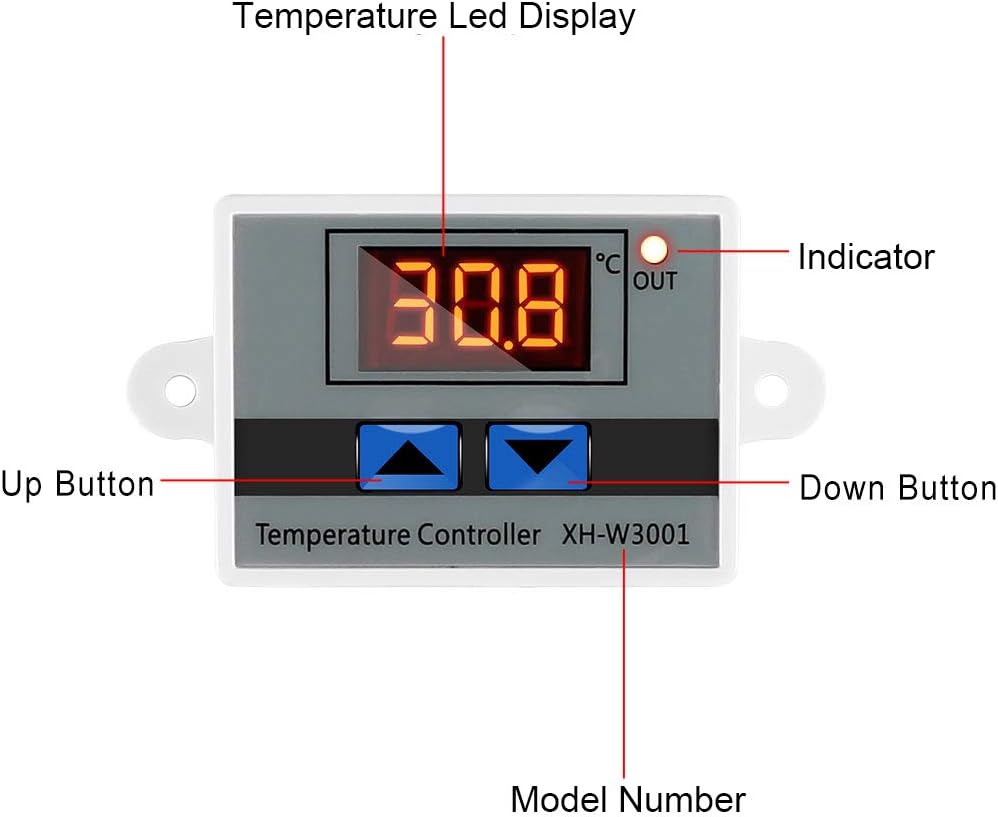
Figure 3: Labeled components of the XH-W3001 module, showing the temperature LED display, indicator light, up button, down button, and model number.
የአሠራር መመሪያዎች
The XH-W3001 has two main parameters to set: the start temperature and the stop temperature.
Setting Start Temperature:
- ተጭነው ይያዙት። ወደ ላይ ቁልፍ (left button) for approximately 3 seconds. The display will start flashing, indicating it's in setting mode.
- የሚለውን ተጠቀም Up እና የታች አዝራሮች to adjust the desired start temperature.
- የሚለውን ይጫኑ ወደ ላይ ቁልፍ again or wait for 3 seconds for the setting to be saved automatically.
Setting Stop Temperature:
- ተጭነው ይያዙት። የታች አዝራር (right button) for approximately 3 seconds. The display will start flashing.
- የሚለውን ተጠቀም Up እና የታች አዝራሮች to adjust the desired stop temperature.
- የሚለውን ይጫኑ የታች አዝራር again or wait for 3 seconds for the setting to be saved automatically.
የአሠራር ሁነታዎች፡-
- የማሞቂያ ሁነታ; If the Start Temperature is set ዝቅተኛ than the Stop Temperature, the module will operate in heating mode. The output will turn ON when the temperature drops below the Start Temperature and turn OFF when it reaches the Stop Temperature.
- የማቀዝቀዝ ሁኔታ; If the Start Temperature is set ከፍ ያለ than the Stop Temperature, the module will operate in cooling mode. The output will turn ON when the temperature rises above the Start Temperature and turn OFF when it drops to the Stop Temperature.
Note: The display shows temperature in Celsius only. There is no option to change to Fahrenheit.
ጥገና
The XH-W3001 module is designed for low maintenance. Regular checks can ensure its longevity and accurate performance.
- ማጽዳት፡ Keep the module and probe clean. Use a soft, dry cloth to wipe the display and housing. For the probe, ensure it is free from debris that might affect temperature readings.
- ግንኙነቶች፡ ሁሉንም የሽቦ ግንኙነቶች ደህንነታቸው የተጠበቀ እና ከዝገት የፀዱ መሆናቸውን ለማረጋገጥ በየጊዜው ያረጋግጡ። ልቅ የሆኑ ግንኙነቶች ወደ መቆራረጥ ወይም ጉዳት ሊያመሩ ይችላሉ።
- የምርመራ ሁኔታ፡ Inspect the temperature probe for any signs of damage to the cable or the sensor tip. Replace if damaged to maintain accuracy.
- አካባቢ፡ Ensure the module is installed in an environment within its specified operating temperature and humidity ranges to prevent premature failure.
መላ መፈለግ
If you encounter issues with your XH-W3001 module, refer to the following common problems and solutions:
| ችግር | ሊሆን የሚችል ምክንያት | መፍትሄ |
|---|---|---|
| Display not lighting up. | ምንም ኃይል፣ የተሳሳተ ሽቦ ወይም የተሳሳተ አሃድ የለም። | Check power supply connections. Ensure correct polarity. Verify power source is active. |
| የሙቀት መጠን ንባብ ትክክል አይደለም። | Damaged probe, probe not properly connected, or environmental interference. | Ensure probe is securely connected. Inspect probe for physical damage. Test with another known accurate thermometer if possible. |
| Output not switching ON/OFF as expected. | Incorrect start/stop temperature settings, load not connected, or faulty relay. | Review and re-set start/stop temperatures. Verify load connections. Ensure the load's power requirements are within the module's specifications (10A 120W for 12V model). |
| Display shows "LLL" or "HHH". | "LLL" indicates open circuit or probe not connected. "HHH" indicates short circuit or temperature exceeding range. | Check probe connection. Replace probe if damaged. Ensure temperature is within -50℃ to 110℃ range. |
ዝርዝሮች
| ባህሪ | ዝርዝር መግለጫ |
|---|---|
| የሞዴል ቁጥር | XH-W3001 |
| ጥራዝtage | 12 Volts (for this specific model) |
| የውጤት ወቅታዊ | ከፍተኛው 10 ኤ |
| የውጤት ኃይል | Max 120W (for 12V model) |
| የሙቀት መቆጣጠሪያ ክልል | -50 ℃ እስከ 110 ℃ |
| የሙቀት መለኪያ ትክክለኛነት | ± 0.2 ℃ |
| የሙቀት መቆጣጠሪያ ትክክለኛነት | ± 0.1 ℃ |
| የመመርመሪያ ዓይነት | NTC10K (Waterproof) |
| የማሳያ ዓይነት | LED ዲጂታል ማሳያ |
| የቤቶች ቁሳቁስ | ABS ነበልባል Retardant |
| የምርት ልኬቶች | 3.3 x 1.8 x 1.1 ኢንች |
| የእቃው ክብደት | 1.76 አውንስ (50 ግራም) |
ዋስትና እና ድጋፍ
For warranty information or technical support regarding your UMLIFE XH-W3001 Digital LED Temperature Controller Module, please refer to the product packaging or contact UMLIFE customer service directly. Contact details are typically provided with your purchase or can be found on the manufacturer's official webጣቢያ.
Ask a question about this manual
Ask about setup, troubleshooting, compatibility, parts, safety, or missing instructions. Manuals+ will review the question and use this page’s manual context to help answer it.