
1. መግቢያ
ስለገዙ እናመሰግናለንasing the FiiO K3 Type-C USB DAC Headphone Amp. This manual provides detailed instructions for setting up, operating, and maintaining your device to ensure optimal performance and longevity. The FiiO K3 is a high-performance digital-to-analog converter and headphone amplifier designed to enhance your audio experience with various devices, including computers and other audio sources.

Figure 1: FiiO K3 Type-C USB DAC Headphone Amp
2. ማዋቀር
Follow these steps to set up your FiiO K3 for the first time.
2.1 የጥቅል ይዘቶች
ከመቀጠልዎ በፊት፣ ሁሉም እቃዎች በጥቅሉ ውስጥ መኖራቸውን ያረጋግጡ፡
- FiiO K3 Unit
- የዩኤስቢ ዓይነት- C የመረጃ ገመድ
- Anti-slip Tape (4 pieces)
- ፈጣን ጅምር መመሪያ
- የዋስትና ካርድ

Figure 2: FiiO K3 and included accessories
2.2 ከኮምፒዩተር ጋር መገናኘት
Connect the FiiO K3 to your computer using the provided USB Type-C cable. The K3 draws power directly from the USB port.
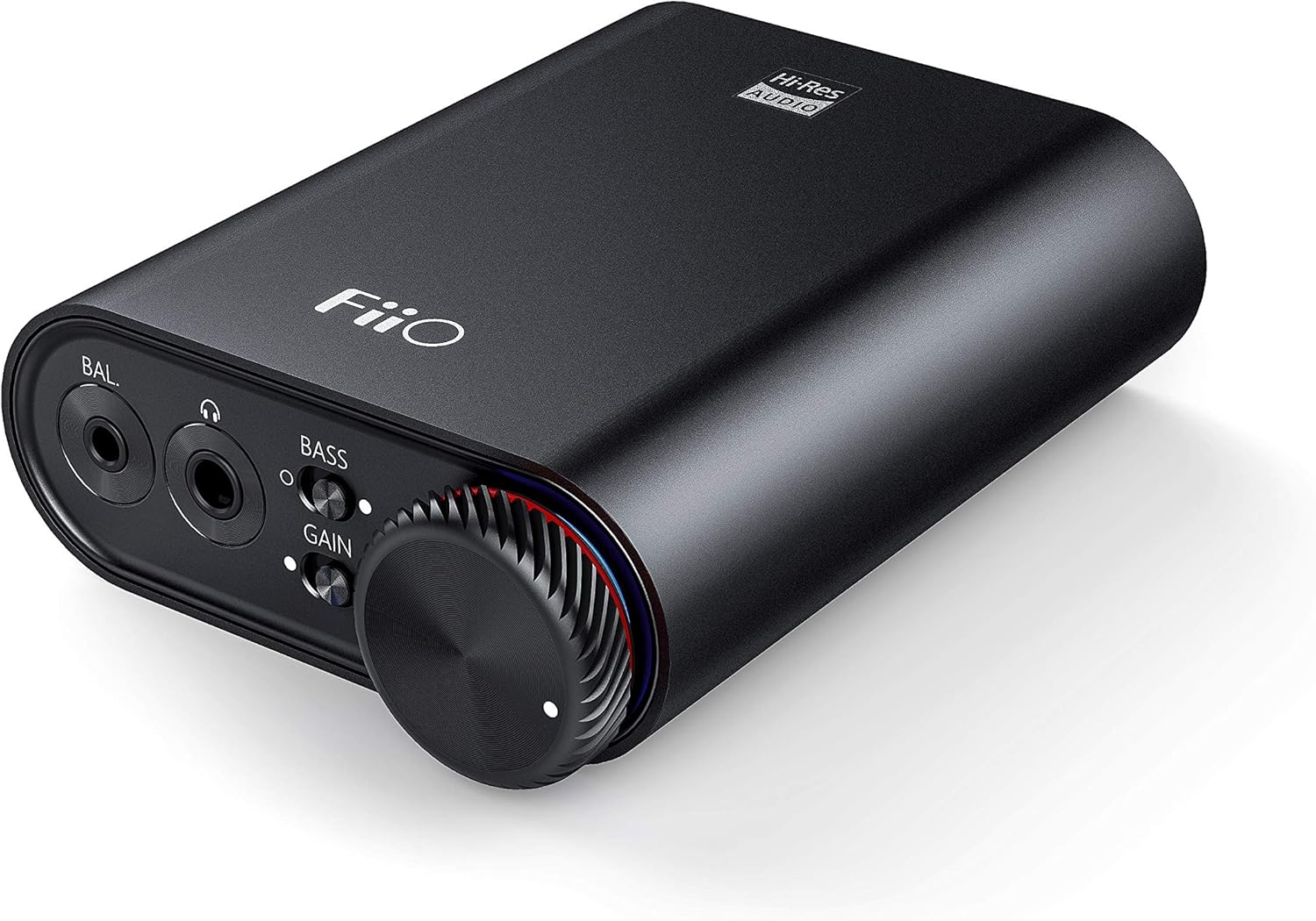
Figure 3: Front panel of FiiO K3 with headphone outputs and controls.
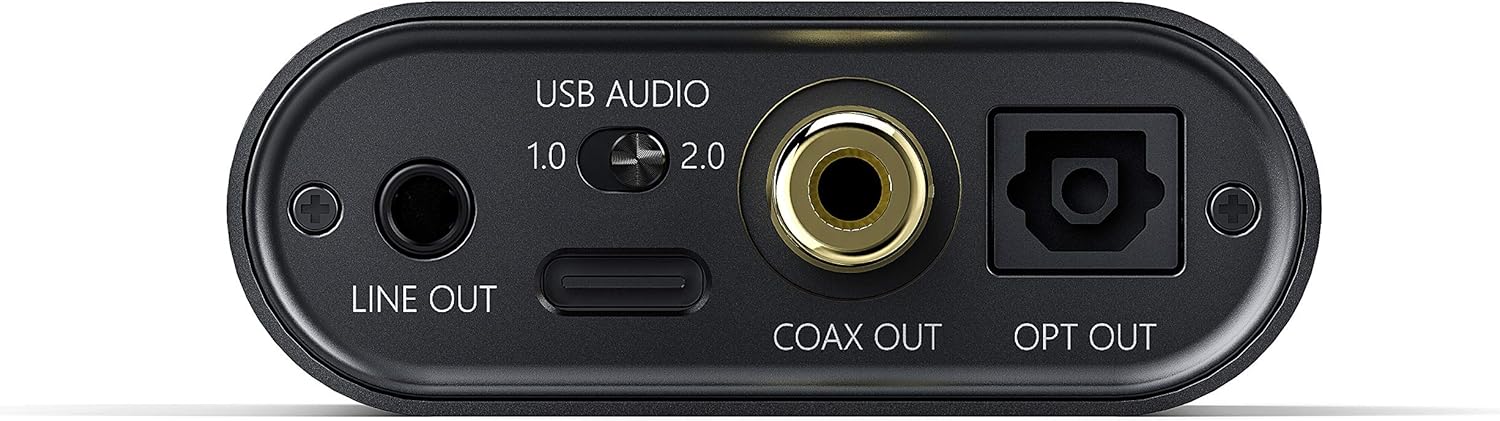
Figure 4: Rear panel of FiiO K3 with USB-C, Line Out, Coaxial Out, and Optical Out ports.
የዩኤስቢ ኦዲዮ ሁነታዎች
The FiiO K3 supports two USB Audio modes, selectable via a switch on the rear panel:
- USB Audio 1.0 (Driver-Free): This mode is plug-and-play and does not require driver installation. It supports up to 96kHz/24-bit PCM audio. Compatible with Windows, macOS, and Linux.
- USB Audio 2.0 (Requires Driver): This mode offers higher performance, supporting up to 384kHz/32-bit PCM and DSD256. For Windows operating systems, a specific driver must be installed. For macOS and Linux, it is typically driver-free.
To download the Windows USB 2.0 driver, visit the official FiiO support webጣቢያ፡ www.fiio.com/supports.
2.3 የጆሮ ማዳመጫዎችን ማገናኘት
The FiiO K3 features two headphone output jacks on the front panel:
- 3.5ሚሜ ነጠላ-ጫፍ ውጤት፡ ለመደበኛ የጆሮ ማዳመጫዎች።
- 2.5 ሚሜ ሚዛናዊ ውፅዓት; For headphones with a balanced connection, offering improved sound separation and power.
Plug your headphones into the appropriate jack. Ensure the connection is secure.
2.4 Connecting to External Audio Devices
The FiiO K3 provides multiple output options for connecting to external speakers, amplifiers, or other DACs:
- 3.5mm Line Out: Connects to the analog input of an amplifier or active speakers. The volume of the Line Out is controlled by the K3's volume knob.
- Coaxial ውጪ፡ Provides a digital coaxial output for connecting to an external DAC or ampከኮአክሲያል ግብዓት ጋር ሊፋየር።
- ኦፕቲካል ውጪ፡ Provides a digital optical output for connecting to an external DAC or ampከኦፕቲካል ግብዓት ጋር ሊፋየር።
When using the Line Out, Coaxial Out, or Optical Out, ensure that the connected device is set to the correct input source.
Video 1: FiiO K3 User Guides. This video demonstrates the unboxing, connection to a computer, and various input/output options of the FiiO K3, including USB Audio modes, headphone outputs, and digital/analog line outs.
3. የአሠራር መመሪያዎች
3.1 ማብራት / ማጥፋት እና የድምጽ መቆጣጠሪያ
The large knob on the front panel serves as both the power switch and volume control. Rotate it clockwise to power on the device and increase the volume. Rotate counter-clockwise to decrease the volume and power off the device when turned fully to the left.
3.2 ጌይን መቀየሪያ
The K3 features a gain switch (labeled "GAIN") on the front panel. This switch allows you to adjust the output level to match the impedance and sensitivity of your headphones:
- ዝቅተኛ ትርፍ; Suitable for sensitive headphones or earphones.
- ከፍተኛ ትርፍ; Provides more power for high-impedance or less sensitive headphones.
Adjust the gain setting to achieve a comfortable listening volume without distortion.
3.3 Bass Boost Switch
The bass boost switch (labeled "BASS") on the front panel allows you to enhance the low-frequency response of your audio. Toggle it on or off according to your preference.
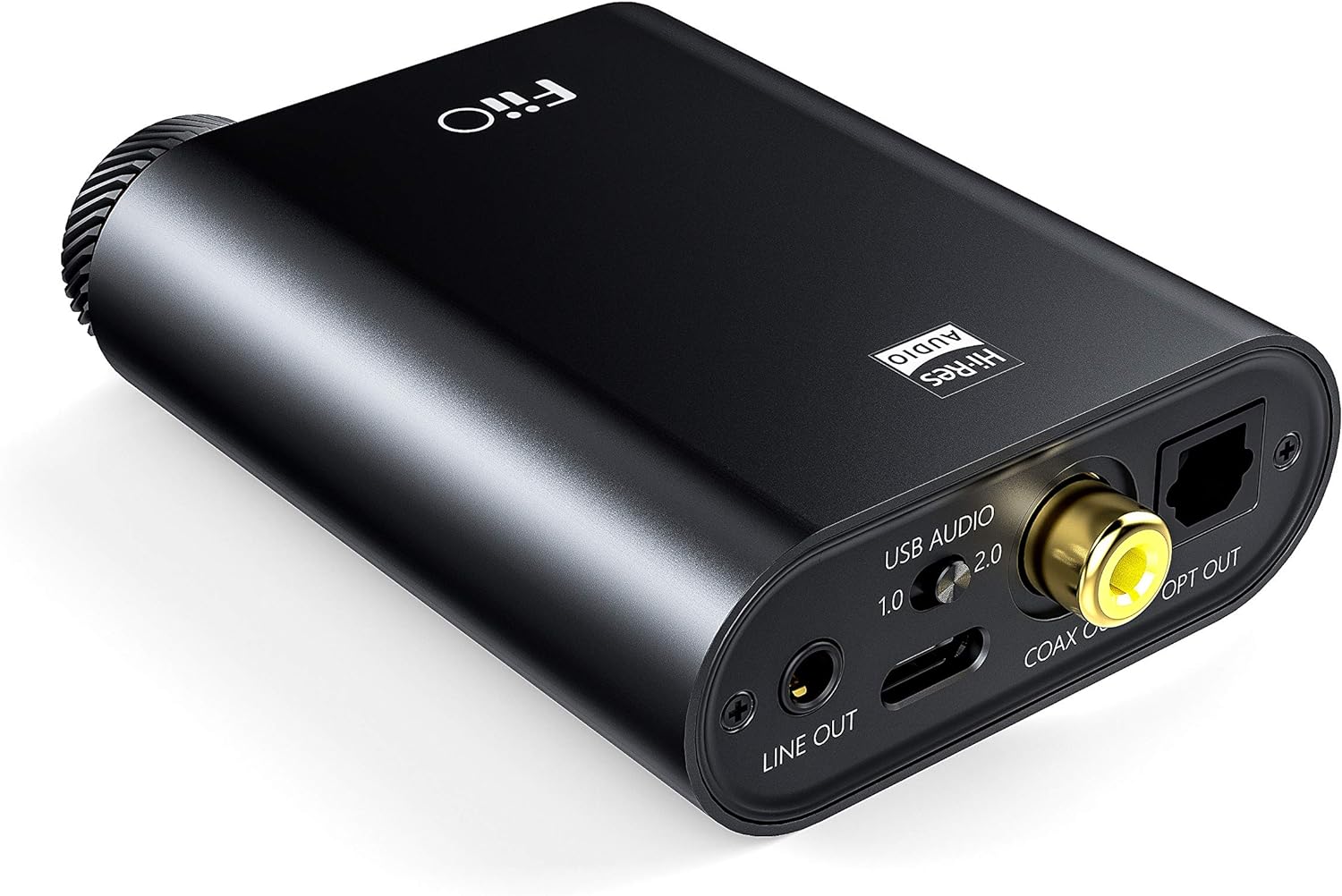
Figure 5: Close-up of the FiiO K3 front panel showing volume knob, bass switch, and gain switch.
3.4 RGB Indicator
The RGB indicator light located near the volume knob displays the current sampየሚጫወተው የድምጽ መጠን፡
- ሰማያዊ፥ 44.1kHz ወይም 48kHz sampየሊንግ ተመን።
- ቢጫ: Sampling rate greater than 48kHz.
- አረንጓዴ፥ DSD audio.
- ቀይ፥ ምልክት የለም።
4. ጥገና
Proper maintenance ensures the longevity and optimal performance of your FiiO K3.
- ማጽዳት፡ Use a soft, dry cloth to wipe the device. Avoid using harsh chemicals or abrasive materials.
- አያያዝ፡ መሳሪያውን በጥንቃቄ ይያዙት። ከመጣል ወይም ከመጠን በላይ ኃይል ከማጋለጥ ይቆጠቡ።
- አካባቢ፡ Keep the device away from extreme temperatures, direct sunlight, moisture, and dust.
- Anti-slip Tape: Apply the provided anti-slip tape to the bottom of the unit to prevent it from sliding on surfaces.
5. መላ መፈለግ
በእርስዎ FiiO K3 ላይ ችግሮች ካጋጠሙዎት የሚከተሉትን የተለመዱ ችግሮች እና መፍትሄዎች ይመልከቱ፡
5.1 ምንም የድምፅ ውፅዓት የለም
- ግንኙነቶችን ይፈትሹ፡ Ensure all cables (USB, headphones, line out) are securely connected.
- የድምጽ ደረጃ፡ Verify that the volume knob on the K3 is turned up and not at its minimum setting. Also check the volume level on your computer or connected audio device.
- Input/Output Selection: Confirm that your computer's audio output is set to the FiiO K3. If using Line Out, ensure your external ampሊፋየር/ስፒከሮች በትክክለኛው ግብዓት ላይ ተቀናብረዋል።
- የRGB አመልካች፡ If the RGB indicator is red, there is no signal. Check your source device and connections.
5.2 የተዛባ ድምጽ
- የማግኛ ቅንብር፡ If the sound is distorted, try switching the GAIN to "Low" for sensitive headphones.
- የድምጽ ደረጃ፡ Reduce the volume on both the K3 and your source device to prevent clipping.
- የምንጭ ጥራት፡ የድምፅ ምንጩን ያረጋግጡ file is not corrupted or of low quality.
- የኬብል ታማኝነት፡ Check if the cables are damaged or faulty.
5.3 USB 2.0 Driver Issues (Windows)
- የአሽከርካሪ ጭነት; Ensure the correct FiiO USB 2.0 driver is installed from the official FiiO webጣቢያ.
- የዩኤስቢ ወደብ፡ በኮምፒተርዎ ላይ ወደተለየ የዩኤስቢ ወደብ ለማገናኘት ይሞክሩ።
- ዳግም አስነሳ፡ ሾፌሩን ከጫኑ በኋላ ኮምፒተርዎን እንደገና ያስጀምሩ።
6. ዝርዝሮች
| ባህሪ | ዋጋ |
|---|---|
| የምርት ስም | ፊዮ |
| ሞዴል | K3 |
| የዩኤስቢ DAC ድጋፍ | Up to 384kHz/32bit PCM, DSD256 |
| የኃይል አቅርቦት | የዩኤስቢ ዓይነት-ሲ |
| የጆሮ ማዳመጫ ውጤቶች | 3.5ሚሜ ነጠላ-ጫፍ፣ 2.5ሚሜ ሚዛናዊ |
| የመስመር ውፅዓት | 3.5 ሚሜ መስመር ውጭ |
| ዲጂታል ውጤቶች | Coaxial Out, Optical Out |
| የእቃው ክብደት | 82 ግራም |
7. ዋስትና እና ድጋፍ
The FiiO K3 comes with a standard manufacturer's warranty. Please refer to the included Warranty Card for specific terms and conditions. For technical support, driver downloads, firmware updates, and frequently asked questions, please visit the official FiiO webጣቢያ፡
You may also contact FiiO customer service directly through their webለተጨማሪ እርዳታ ጣቢያ.


