
መግቢያ
This manual provides essential information for the safe and efficient operation, maintenance, and troubleshooting of your XPOWER X-35AR Pro Industrial Axial Fan. Please read all instructions carefully before use and retain this manual for future reference.
የደህንነት መረጃ
- Always ensure the fan is placed on a stable, level surface.
- ማራገቢያውን በተበላሸ ገመድ ወይም መሰኪያ አያሰራው.
- በሚሠራበት ጊዜ ልጆችን እና የቤት እንስሳትን ከአድናቂዎች ያርቁ።
- Avoid placing objects through the fan grilles.
- ከማጽዳትዎ በፊት ወይም ማንኛውንም ጥገና ከማድረግዎ በፊት የአየር ማራገቢያውን ከኃይል ማከፋፈያው ይንቀሉ.
- This fan is designed for indoor use in high-temperature environments up to 180°F (82°C). It does not produce heat.
ማዋቀር
Follow these steps to set up your XPOWER X-35AR Pro Axial Fan:
- ማሸግ፡ Carefully remove the fan from its packaging. Inspect for any damage during transit.
- አቀማመጥ፡- Position the fan on a firm, flat surface. Ensure there is adequate clearance around the intake and exhaust grilles for optimal airflow.
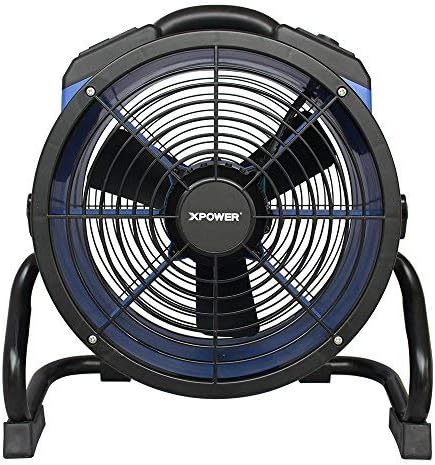
- Rack/Stand Adjustment: The fan includes a rack/stand that allows for 360-degree rotation. Loosen the adjustment knobs on the sides of the stand to tilt the fan to your desired angle. Tighten the knobs securely to lock the position.

የአሠራር መመሪያዎች
To operate your XPOWER X-35AR Pro Axial Fan:
- የኃይል ግንኙነት; የአድናቂውን የኃይል ገመድ ወደ መደበኛ የኤሌክትሪክ ሶኬት ይሰኩ።
- ማብራት/ማጥፋት፡ Locate the power switch or button on the control panel. Press to turn the fan ON. Press again to turn it OFF.
- ተለዋዋጭ የፍጥነት መቆጣጠሪያ; The fan features variable speed control. Use the designated knob or buttons to adjust the airflow intensity from low to high, according to your requirements.
- አብሮገነብ የኃይል ማመንጫዎች; The fan is equipped with built-in power outlets. These allow you to daisy-chain multiple XPOWER fans for extended coverage or to power other compatible devices (e.g., power tools, mobile phone chargers). Ensure the total current draw does not exceed the fan's rated capacity.
- የአየር ፍሰት አቅጣጫ ማስተካከል; Loosen the side knobs on the stand, adjust the fan to the desired angle (up to 360 degrees), and then re-tighten the knobs to secure its position.
ጥገና
Regular maintenance ensures optimal performance and longevity of your fan:
- ማጽዳት፡ Disconnect the fan from the power source before cleaning. Use a soft, damp cloth to wipe down the exterior surfaces. For the grilles and blades, use a vacuum cleaner with a brush attachment or compressed air to remove dust and debris. Do not use harsh chemicals or abrasive cleaners.
- ማከማቻ፡ When not in use, store the fan in a clean, dry place. The fan can be stacked up to 5 units high for efficient storage or transportation. Wrap the 20 ft. power cord around the integrated cord wrap for neat storage.
መላ መፈለግ
| ችግር | ሊሆን የሚችል ምክንያት | መፍትሄ |
|---|---|---|
| ደጋፊ አይበራም። | No power supply; power cord not fully plugged in; circuit breaker tripped. | የኃይል መውጫውን ይፈትሹ; ገመድ ደህንነቱ በተጠበቀ ሁኔታ መጫኑን ያረጋግጡ; የወረዳ የሚላተም ዳግም አስጀምር. |
| የተቀነሰ የአየር ፍሰት. | ግሪልስ ወይም ቢላዎች በአቧራ/ፍርስራሾች ተዘግተዋል። | Unplug fan and clean grilles and blades as per maintenance instructions. |
| በሚሠራበት ጊዜ ያልተለመደ ድምጽ. | Loose components; debris inside the fan. | Unplug fan and inspect for loose parts or foreign objects. If noise persists, contact customer support. |
ዝርዝሮች
| ባህሪ | ዝርዝር |
|---|---|
| የሞዴል ቁጥር | X-35AR Pro |
| የምርት ስም | XPOWER |
| ሞተር | 1/4 HP Sealed Induction Motor |
| የአየር ፍሰት (ከፍተኛ) | 1720 ሴኤፍኤም (ኪዩቢክ ጫማ በደቂቃ) |
| Amperage (Max) | 1.6 Amps |
| የኃይል ምንጭ | ባለገመድ ኤሌክትሪክ |
| ጥራዝtage | 12 ቮልት |
| ዋትtage | 184 ዋት |
| የምርት ልኬቶች (D x W x H) | 9.2" x 18.6" x 19.4" |
| ክብደት | 17.6 ፓውንድ |
| ቁሳቁስ | Polycarbonate Housing, Plastic Blades |
| የገመድ ርዝመት | 20 ጫማ. |
| ልዩ ባህሪያት | Variable Speed, Built-in Power Outlets, 360-degree Rotation, Stackable |
| የቤት ውስጥ / የውጭ አጠቃቀም | የቤት ውስጥ |
ዋስትና እና ድጋፍ
The XPOWER X-35AR Pro Industrial Axial Fan is backed by a የ 1 ዓመት አምራች የተወሰነ ዋስትና. ይህ ዋስትና በመደበኛ አጠቃቀም ላይ የቁሳቁሶች እና የአሠራር ጉድለቶችን ይሸፍናል ።
For warranty claims, technical support, or service inquiries, please contact XPOWER customer support. Refer to the official XPOWER webበጣም ወቅታዊ የእውቂያ መረጃ ለማግኘት ጣቢያ ወይም ምርት ማሸጊያ.