
1. መግቢያ
This manual provides detailed instructions for the Redragon K503 Gaming Keyboard. Please read this guide thoroughly to ensure proper setup, operation, and maintenance of your device. The Redragon K503 is a multimedia gaming keyboard featuring RGB LED backlighting and a comfortable wrist rest, designed for use with Windows and MacOS PC systems.
2. ማዋቀር
2.1 የጥቅል ይዘቶች
- የሬድራጎን K503 የጨዋታ ኪቦርድ
- የዩኤስቢ ገመድ (የተዋሃደ)
2.2 የቁልፍ ሰሌዳውን በማገናኘት ላይ
- በኮምፒተርዎ ላይ የሚገኝ የዩኤስቢ ወደብ ያግኙ።
- የሬድራጎን K503 ኪቦርድ የዩኤስቢ ማገናኛን ወደ ዩኤስቢ ወደብ ይሰኩ።
- Your operating system (Windows or MacOS) should automatically detect and install the necessary drivers. No additional software installation is typically required for basic functionality.
- The keyboard's RGB backlighting will illuminate upon successful connection.
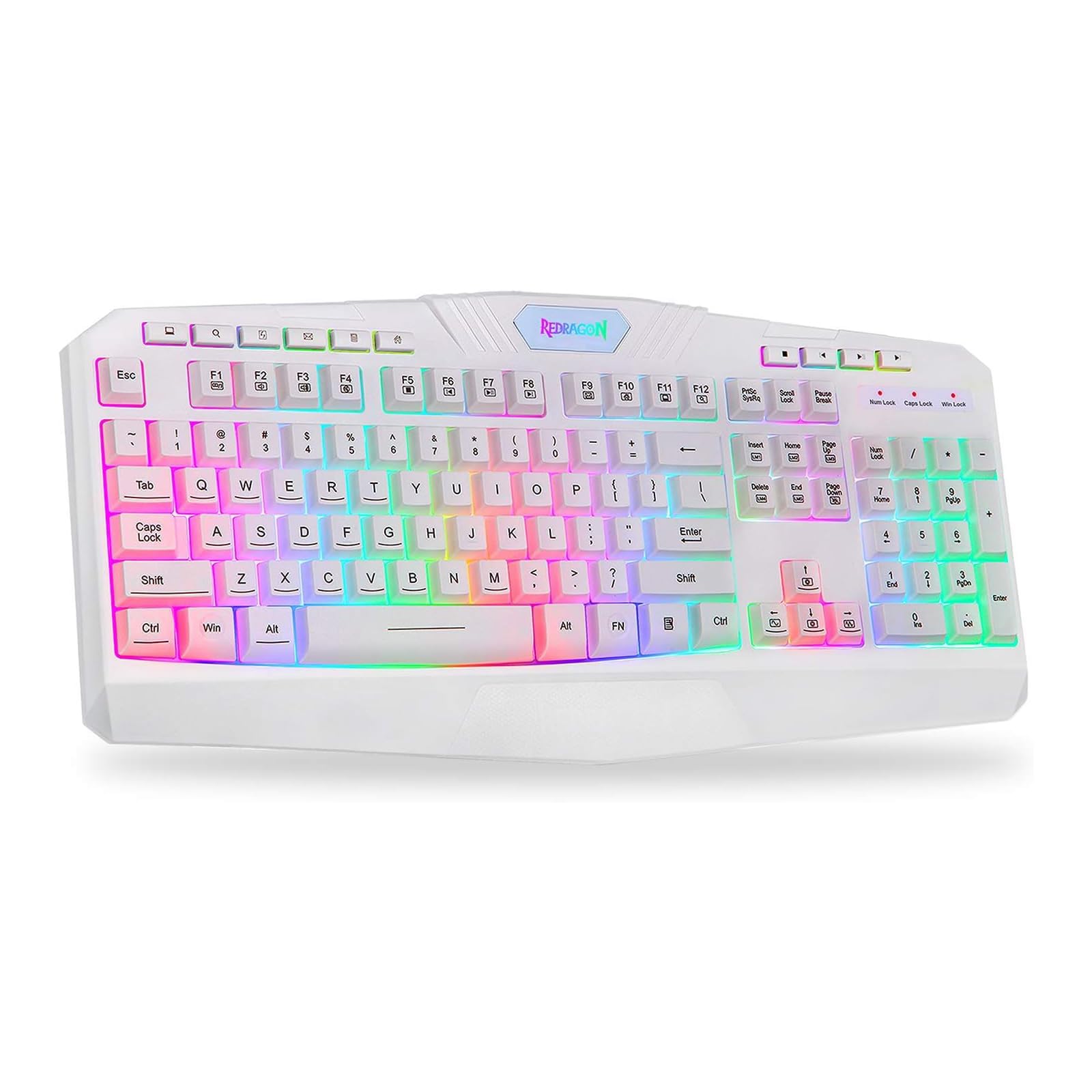
This image shows the Redragon K503 Gaming Keyboard, highlighting its full layout and white finish. The keys feature RGB backlighting, visible around the keycaps.
3. የአሠራር መመሪያዎች
3.1 መሰረታዊ ተግባራት
The Redragon K503 functions as a standard QWERTY keyboard for typing and input. All standard keys operate as labeled.
3.2 የመልቲሚዲያ ቁልፎች
The keyboard includes dedicated multimedia keys for convenient control of media playback and system functions. These keys are typically located above the function keys (F1-F12) or integrated with them via the 'Fn' key. Common functions include:
- የድምጽ መቆጣጠሪያ፡- Increase, decrease, or mute audio.
- የሚዲያ መልሶ ማጫወት Play/pause, stop, previous track, next track.
- Web አሳሽ፡ Launch default web አሳሽ.
- ኢሜይል፡- Launch default email client.
3.3 RGB LED Backlighting
The K503 features customizable RGB LED backlighting. The lighting modes and brightness can be adjusted directly on the keyboard using specific key combinations. Refer to the keycap legends for specific lighting control keys, often involving the 'Fn' key combined with other function keys (e.g., Fn + Scroll Lock, Fn + Home/End, or dedicated lighting keys).
- የመብራት ሁነታዎችን መለወጥ; Press the designated key combination to cycle through various lighting effects (e.g., static, breathing, wave).
- ብሩህነትን ማስተካከል; Use the specified key combination to increase or decrease the backlight intensity.
- ቀለሞችን መለወጥ; Some modes allow for color customization using specific key presses.
4. ጥገና
4.1 የቁልፍ ሰሌዳውን ማጽዳት
ጥሩ አፈፃፀም እና ገጽታ ለመጠበቅ የቁልፍ ሰሌዳዎን አዘውትረው ያጽዱ፦
- ከማጽዳትዎ በፊት የቁልፍ ሰሌዳውን ከኮምፒዩተርዎ ያላቅቁት.
- ለስላሳ፣ ከቆሸሸ ነፃ የሆነ ጨርቅ በትንሹ ተጠቀምampየቁልፍ ክዳኖቹን እና ወለሉን ለማጽዳት በውሃ ወይም በቀላል የጽዳት መፍትሄ ተሸፍኗል።
- በቁልፍ መካከል አቧራ እና ፍርስራሾች, የታመቀ አየር ይጠቀሙ.
- ጠጣር ኬሚካሎችን፣ ሻካራ ማጽጃዎችን ወይም የቁልፍ ሰሌዳውን በፈሳሽ ውስጥ አታጥልቁ።
5. መላ መፈለግ
5.1 የቁልፍ ሰሌዳ ምላሽ አይሰጥም
- የዩኤስቢ ገመድ በሁለቱም በቁልፍ ሰሌዳ እና በኮምፒዩተር ላይ ደህንነቱ በተጠበቀ ሁኔታ መሰካቱን ያረጋግጡ።
- የቁልፍ ሰሌዳውን በኮምፒተርዎ ላይ ወደተለየ የዩኤስቢ ወደብ ለመሰካት ይሞክሩ።
- ችግሩ ከኪቦርድ ወይም ከኮምፒውተሩ የዩኤስቢ ወደብ/ድራይቨሮች ጋር መሆኑን ለማወቅ በሌላ ኮምፒውተር ላይ ኪቦርድን ይሞክሩ።
- ኮምፒተርዎን እንደገና ያስጀምሩ.
5.2 የጀርባ ብርሃን አይሰራም ወይም የተሳሳተ ነው
- Check if the backlighting has been turned off or set to the lowest brightness level using the keyboard's lighting control keys.
- የቁልፍ ሰሌዳው ከኮምፒዩተር ጋር በትክክል መገናኘቱን ያረጋግጡ።
- If a specific key's backlight is not working, it may indicate a hardware issue.
5.3 Specific Keys Not Functioning
- Clean around and under the affected keycap to remove any debris that might be obstructing its movement.
- If the issue persists, it may indicate a hardware malfunction.
6. ዝርዝሮች
| የምርት ስም | ሬድራጎን |
| የሞዴል ቁጥር | K503W-RGB |
| የግንኙነት ቴክኖሎጂ | ዩኤስቢ |
| ተስማሚ መሣሪያዎች | PC (Windows, MacOS) |
| የቁልፍ ሰሌዳ መግለጫ | መልቲሚዲያ |
| ልዩ ባህሪ | Lighting (RGB LED Backlit) |
| ቀለም | ነጭ |
| የምርት ልኬቶች | 17.6"ኤል x 7.9" ዋ x 1.2" ኤች |
| ቁሳቁስ | አሲሪሎንitrile Butadiene Styrene |
| የተካተቱ አካላት | የዩኤስቢ ገመድ |
7. የዋስትና መረጃ
Redragon products are typically covered by a limited manufacturer's warranty. The specific terms and duration of the warranty may vary by region and retailer. Please retain your proof of purchase for warranty claims. For detailed warranty information, refer to the warranty card included with your product or visit the official Redragon webጣቢያ.
8. የደንበኛ ድጋፍ
If you encounter any issues not covered in this manual or require further assistance, please contact Redragon customer support. Contact information can usually be found on the official Redragon website or on the product packaging. When contacting support, please have your product model number (K503) and proof of purchase ready.


