1. ምርት አብቅቷልview
The Yealink T53 is an entry-level IP phone designed for business environments, offering a balance of features and ease of use. It supports 12 VoIP accounts and features a 3.7-inch graphical display for clear visual information. Key functionalities include HD Voice with Yealink Acoustic Shield technology, a USB 2.0 port for various peripherals, and dual-port Gigabit Ethernet with 802.3af Power over Ethernet (PoE) support.
This manual provides instructions for setting up, operating, and maintaining your Yealink T53 IP Phone.
2. የጥቅል ይዘቶች
ጥቅልዎ የሚከተሉትን ንጥሎች መያዙን ያረጋግጡ፡-
- Yealink T53 IP Phone Unit
- የእጅ ስልክ
- የእጅ መያዣ ገመድ
- Ethernet Cable (CAT5E UTP Cable)
- የስልክ ማቆሚያ
- ፈጣን ጅምር መመሪያ (ይህ ሰነድ)
Note: A power adapter is not included and must be purchased separately if PoE is not available.
3. አካላዊ ባህሪያት

ምስል 3.1፡ ፊት ለፊት view of the Yealink T53 IP Phone with its adjustable display showing call information. This image highlights the main display, line keys, and navigation buttons.
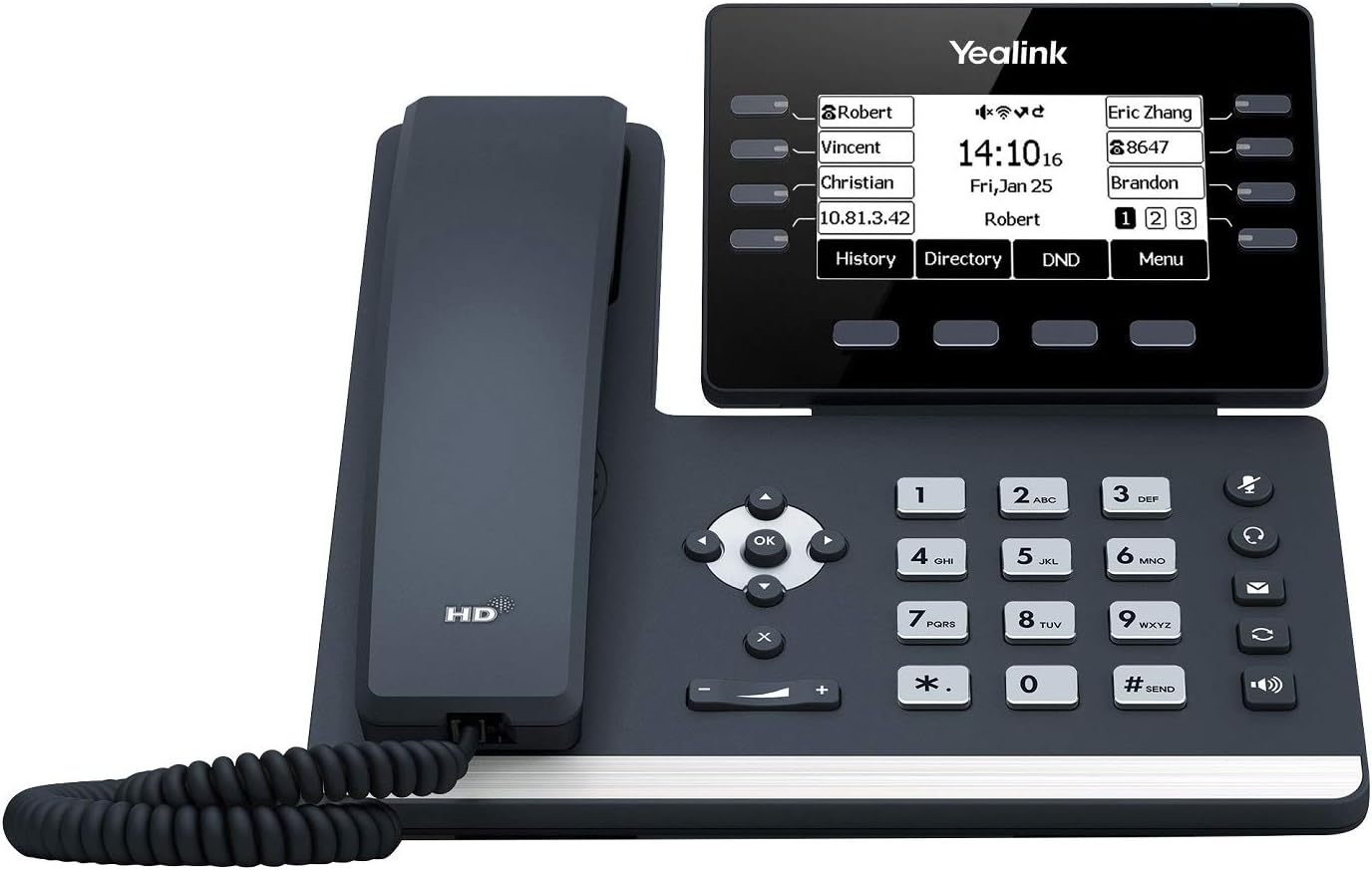
ምስል 3.2፡ ከላይ ወደታች view of the Yealink T53 IP Phone, highlighting the keypad and handset. This perspective shows the layout of the numeric keypad and function keys.
3.1. Phone Components
- Adjustable Graphical Display: 3.7-inch (360x160-pixel) LCD for call information, menus, and status.
- የመስመር ቁልፎች Programmable keys located next to the display for line appearances, speed dials, or feature access.
- የማውጫ ቁልፎች: ለምናሌ አሰሳ ወደ ላይ፣ ወደ ታች፣ ወደ ግራ፣ ወደ ቀኝ እና እሺ አዝራሮች።
- የተግባር ቁልፎች፡- Dedicated keys for features such as Message, Headset, Mute, Redial, Speakerphone, and Volume control.
- የቁጥር ቁልፍ ሰሌዳ፡ ለመደወል መደበኛ 0-9፣ *፣ # ቁልፎች።
- የጆሮ ማዳመጫ Standard telephone handset.
- ዩኤስቢ 2.0 ወደብ Located on the side, supports USB recording, USB headsets, or expansion modules (e.g., Yealink EXP50).
- የኤተርኔት ወደቦች፡ Two Gigabit Ethernet ports (LAN and PC) for network connection and PC pass-through.
- የእጅ ወደብ፡ RJ9 port for connecting the handset.
- የጆሮ ማዳመጫ ወደብ፡ RJ9 port for connecting a wired headset.
- የኃይል ወደብ For connecting an optional power adapter (if PoE is not used).
4. የማዋቀር መመሪያዎች
4.1. ስልኩን መሰብሰብ
- መቆሚያውን ያያይዙ፡ Align the stand with the slots on the back of the phone unit and push until it clicks into place. You can adjust the angle of the display.
- ቀፎውን ያገናኙ፡ Plug one end of the handset cord into the handset port on the phone unit and the other end into the handset.
4.2. ከአውታረ መረብ እና ከኃይል ጋር መገናኘት
The Yealink T53 supports Power over Ethernet (PoE) or an optional power adapter.
- የአውታረ መረብ ግንኙነት፡- Plug one end of the Ethernet cable into the LAN port on the phone and the other end into a network switch or router.
- የፒሲ ግንኙነት (አማራጭ)፦ If you wish to connect a computer through the phone, plug an Ethernet cable from your PC into the PC port on the phone.
- የኃይል አቅርቦት;
- ነጥብ: - If your network switch supports PoE, the phone will power on automatically once connected to the LAN port.
- Power Adapter (Not Included): If PoE is not available, connect a compatible Yealink power adapter (DC 5V/2A) to the power port on the phone and then to an electrical outlet.
4.3. የመጀመሪያ ውቅር
Upon first power-up, the phone will boot and attempt to obtain network settings via DHCP. Your network administrator will provide the necessary account details (SIP server address, username, password) for registration. Configuration can typically be done via the phone's menu or a web-based interface accessible through its IP address.
5. የአሠራር መመሪያዎች
5.1. መሰረታዊ የጥሪ ተግባራት
- ጥሪ ማድረግ፡-
- Pick up the handset, press the Speakerphone key, or press a Line key.
- የቁጥር ቁልፍ ሰሌዳውን በመጠቀም የስልክ ቁጥሩን ያስገቡ።
- የሚለውን ይጫኑ ደውል ለስላሳ ቁልፍ ወይም # ቁልፍ
- ለጥሪ መልስ
- ቀፎውን አንሳ።
- የሚለውን ይጫኑ የድምጽ ማጉያ ቁልፍ
- የሚለውን ይጫኑ መልስ ለስላሳ ቁልፍ.
- ጥሪን በማጠናቀቅ ላይ፡- የስልክ ቀፎውን ይንጠለጠሉ ፣ ይጫኑ የድምጽ ማጉያ ቁልፍ ፣ ወይም ይጫኑ ጥሪን ጨርስ ለስላሳ ቁልፍ.
5.2. የጥሪ አስተዳደር
- ያዝ፡ በንቃት ጥሪ ወቅት ፣ ይጫኑ ያዝ ለስላሳ ቁልፍ። ለመቀጠል፣ ይጫኑ ከቆመበት ቀጥል ለስላሳ ቁልፍ.
- ማስተላለፍ በንቃት ጥሪ ወቅት ፣ ይጫኑ ማስተላለፍ ለስላሳ ቁልፍ፣ አዲሱን ቁጥር ይደውሉ እና ከዚያ ይጫኑ ማስተላለፍ again (for blind transfer) or wait for the other party to answer before pressing ማስተላለፍ (ለተካፈለ ዝውውር)።
- ድምጸ-ከል አድርግ፡ የሚለውን ይጫኑ ድምጸ-ከል አድርግ key to mute your microphone during a call. Press it again to unmute.
- የድምጽ ማስተካከያ; የሚለውን ተጠቀም ድምጽ keys to adjust the handset, headset, or speakerphone volume during a call, or the ringer volume when idle.
5.3. USB Port Functions
The USB 2.0 port on the Yealink T53 offers enhanced functionality:
- የጥሪ ቀረጻ፡ Insert a USB flash drive to record calls.
- USB Headset: Connect a compatible USB headset for hands-free communication.
- የማስፋፊያ ሞጁሎች፡ Connect up to three Yealink EXP50 expansion modules for additional programmable keys.
- ገመድ አልባ ግንኙነት: Use with Yealink Bluetooth USB Dongle BT40 or Wi-Fi USB Dongle WF40/WF50 for wireless headset or network connectivity (dongles sold separately).
6. ጥገና
6.1. ስልኩን ማጽዳት
Use a soft, dry cloth to clean the phone's surface. Avoid using abrasive cleaners or solvents, as these can damage the finish and electronic components.
6.2. የጽኑ ዝማኔዎች
Regular firmware updates are recommended to ensure optimal performance and access to new features. Consult your network administrator or Yealink support for information on available updates and the update procedure.
7. መላ መፈለግ
This section addresses common issues you might encounter with your Yealink T53 IP Phone.
- ስልኩ አይበራም፦
- Ensure the Ethernet cable is securely connected to the LAN port and the network switch provides PoE.
- If using a power adapter, ensure it is correctly connected to the phone and a working power outlet.
- የመደወያ ድምጽ የለም፡
- Check network connectivity. The phone's display should show network status.
- Verify that the SIP account is registered. The display should indicate registration status.
- Ensure the handset cord is properly connected.
- ደካማ የጥሪ ጥራት፡
- የአውታረ መረብ ግንኙነትዎን ለመረጋጋት እና የመተላለፊያ ይዘት ያረጋግጡ።
- ማይክሮፎኑ እና ድምጽ ማጉያው እንዳይደናቀፉ ያረጋግጡ።
- የድምጽ ደረጃዎችን ያስተካክሉ.
- የማሳያ ጉዳዮች፡-
- If the display is blank, refer to "Phone Does Not Power On."
- If the display is frozen, try restarting the phone by disconnecting and reconnecting the power/Ethernet cable.
For further assistance, contact your system administrator or Yealink technical support.
8. ዝርዝሮች
| ባህሪ | ዝርዝር መግለጫ |
|---|---|
| የሞዴል ቁጥር | T53 |
| ማሳያ | 3.7" 360x160-pixel graphical LCD, adjustable |
| የቪኦአይፒ መለያዎች | 12 የ SIP መለያዎች |
| የኤተርኔት ወደቦች | ባለሁለት-ወደብ ጊጋቢት ኢተርኔት |
| የ PoE ድጋፍ | 802.3af የኤተርኔት ላይ ኃይል |
| የዩኤስቢ ወደብ | 1 x USB 2.0 (for call recording, USB headset, EXP50 expansion modules) |
| HD ድምጽ | Yes, with Yealink Acoustic Shield technology |
| ልኬቶች (L x W x H) | 8.29 x 8.35 x 6.87 ኢንች (21.06 x 21.21 x 17.45 ሴሜ) |
| የእቃው ክብደት | 2.55 ፓውንድ (1.16 ኪ.ግ) |
| ቀለም | ጥቁር |
| የመጀመሪያ ቀን ይገኛል። | የካቲት 6 ቀን 2019 ዓ.ም |
9. ዋስትና እና ድጋፍ
For warranty information and technical support, please refer to the official Yealink website or contact your authorized Yealink reseller. Yealink is committed to providing support for its products to ensure optimal user experience.
You can visit the official Yealink store for more information: Yealink Store