
1. መግቢያ
The OWON B41T+ is a high-precision 4 1/2 digit (21999 counts) True RMS digital multimeter designed for accurate electrical measurements. It features Bluetooth connectivity, allowing seamless integration with Android (4.3+) and iOS (7.0+) smartphones and tablets. This device supports various measurement functions including voltage, current, resistance, capacitance, frequency, duty cycle, and temperature. Advanced features include standalone data logging, graphical display of measurements on connected smart devices, and Japanese voice output for readings.
2. የደህንነት መረጃ
Please read and understand all safety instructions before operating the OWON B41T+ Digital Multimeter. Failure to follow these instructions may result in electric shock, fire, or damage to the device.
- የሙከራ መስመሮችን ወደ ወረዳ ከማገናኘትዎ በፊት ሁልጊዜ መልቲሜትር በትክክለኛው የተግባር ሁነታ ላይ መሆኑን ያረጋግጡ።
- ለማንኛውም የመለኪያ ክልል ከከፍተኛው የግቤት ገደቦች አይበልጡ።
- ከእያንዳንዱ አጠቃቀምዎ በፊት የፈተና ሊዶችን ጉዳት ይፈትሹ። የተበላሹ ሊዶችን ወዲያውኑ ይተኩ።
- መልቲሜትርን እርጥብ በሆኑ አካባቢዎች ወይም በኤሌክትሪክ አውሎ ነፋሶች ወቅት ከመጠቀም ይቆጠቡ።
- ተቃውሞን፣ አቅምን ወይም ቀጣይነትን ከመለካትዎ በፊት ሁልጊዜ በሙከራ ላይ ካለው ወረዳ ጋር ያለውን ኃይል ያላቅቁ።
- ከቮል ጋር ሲሰሩ ጥንቃቄ ያድርጉtagእነዚህ ከ30V AC RMS፣ 42V ጫፍ ወይም 60V DC በላይ ይሆናሉ፣ ምክንያቱም እነዚህ የአደጋ ስጋት ይፈጥራሉ።
3. ምርት አብቅቷልview እና አካላት
The OWON B41T+ Digital Multimeter is designed for ease of use and durability. Below are the main components and included accessories.
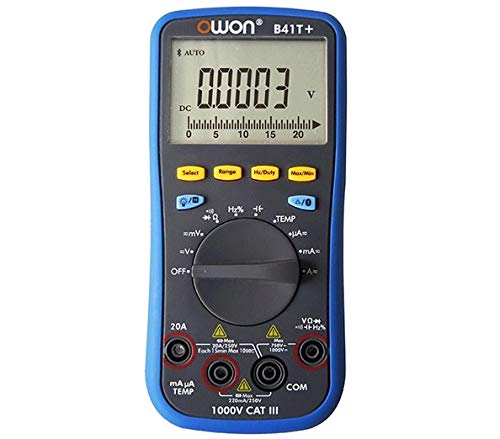
ምስል 3.1፡ የፊት እና ጎን view of the OWON B41T+ Digital Multimeter, showing the display, function dial, and input jacks.
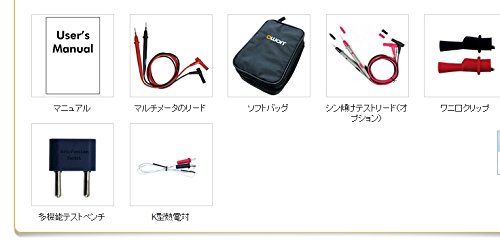
ምስል 3.2፡ Included accessories: User's Manual, Multimeter test leads, Soft bag, K-type thermocouple (temperature probe), and a multi-function test bench adapter.
4. ማዋቀር
4.1 የባትሪ ጭነት
The OWON B41T+ is powered by batteries. To install or replace batteries:
- መልቲሜትሩ መጥፋቱን ያረጋግጡ።
- በመሳሪያው ጀርባ ላይ የባትሪውን ክፍል ሽፋን ያግኙ.
- የባትሪውን ክፍል ለመክፈት ዊንዳይቨር ይጠቀሙ።
- Insert the required batteries, observing correct polarity.
- የባትሪውን ክፍል ሽፋን ደህንነቱ በተጠበቀ ሁኔታ ይዝጉ።
4.2 የመተግበሪያ ጭነት እና የብሉቱዝ ማጣመር
To utilize the smart device connectivity features, download the OWON multimeter application from your device's app store (compatible with Android 4.3+ and iOS 7.0+).
- Download and install the official OWON multimeter app on your smartphone or tablet.
- Turn on the OWON B41T+ multimeter.
- በብሉቱዝ መሣሪያዎ ላይ ብሉቱዝን ያንቁ።
- Open the OWON app and follow the on-screen instructions to search for and pair with your B41T+ device. The Bluetooth icon on the multimeter display will indicate a successful connection.
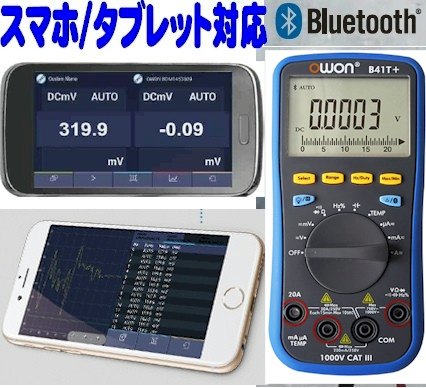
ምስል 4.1፡ The OWON B41T+ multimeter displaying a measurement, with a smartphone screen showing the corresponding app interface.
5. የአሠራር መመሪያዎች
The OWON B41T+ offers a wide range of measurement functions. Use the central rotary dial to select the desired measurement mode.
5.1 መሰረታዊ መለኪያዎች
መሰረታዊ መለኪያ ለማከናወን፡
- Select the appropriate function (e.g., V for voltage, A for current, Ω for resistance) using the rotary dial.
- Connect the test leads to the correct input jacks on the multimeter (e.g., COM and VΩmA for voltage/resistance, COM and 20A or mAμA for current).
- በፈተና ስር ያሉትን የፍተሻ አቅጣጫዎች ወደ ወረዳው ወይም አካል ያገናኙ.
- Read the measurement value on the multimeter's display.
5.2 Advanced Features with Bluetooth Connectivity
When connected to a smartphone or tablet via Bluetooth, the OWON B41T+ provides enhanced functionality:
- የውሂብ ምዝግብ ማስታወሻ; Record measurement data over time directly to your smart device.
- ግራፊክ ማሳያ፡ View real-time measurement trends and historical data in graphical format.
- Voice Output: The device can announce measurement readings in Japanese, allowing for hands-free operation.
- የውሂብ አስተዳደር፡- Save, store, print, and email measurement data (CSV format) directly from the app.
- ባለብዙ መሣሪያ ግንኙነት; Connect two OWON B41T+ units simultaneously to your smart device to monitor two different parameters (e.g., voltage and current, or voltage and resistance) on a dual-screen display.
- የርቀት ክወና Utilize remote desktop applications like TeamViewer to control the connected smartphone/tablet from anywhere, enabling remote monitoring and operation of the multimeter.

ምስል 5.1፡ Illustration of advanced features including simultaneous measurement with two multimeters, data logging, graphical display, and voice output.
6. ዝርዝሮች
The following table details the technical specifications of the OWON B41T+ Digital Multimeter.

ምስል 6.1፡ Detailed specifications including measurement ranges, resolution, and accuracy.
| መለኪያ | ክልል | ጥራት | ትክክለኛነት |
|---|---|---|---|
| ዲሲ ጥራዝtagሠ (ቪ) | 220mV፣ 2.2V፣ 22V፣ 220V፣ 1000V | 0.01mV, 0.1mV, 1mV, 10mV, 0.1V | ±(0.05%+10dig) to ±(0.8%+25dig) |
| ኤሲ ጥራዝtagሠ (ቪ) | 220mV፣ 2.2V፣ 22V፣ 220V፣ 750V | 0.01mV, 0.1mV, 1mV, 10mV, 0.1V | ±(1.0%+25ዲግ) |
| ዲሲ ወቅታዊ (ሀ) | 220μA, 2200μA, 22mA, 220mA, 20A | 0.01μA, 0.1μA, 1μA, 10μA, 1mA | ±(0.8%+10dig) to ±(2.0%+25dig) |
| ኤሲ ወቅታዊ (ኤ) | 220μA, 2200μA, 22mA, 220mA, 20A | 0.01μA, 0.1μA, 1μA, 10μA, 1mA | ±(1.5%+25dig) to ±(2.5%+35dig) |
| መቋቋም (Ω) | 220Ω, 2.2kΩ, 22kΩ, 220kΩ, 2.2MΩ, 22MΩ, 220MΩ | 0.01Ω, 0.1Ω, 1Ω, 10Ω, 100Ω, 1kΩ, 10kΩ | ±(0.4%+5dig) to ±(5%+10dig) |
| አቅም (ኤፍ) | 2.2nF, 22nF, 220nF, 2.2μF, 22μF, 220μF, 2.2mF, 22mF | 1pF, 10pF, 100pF, 1nF, 10nF, 100nF, 1μF, 10μF | ±(2.5%+15ዲግ) |
| ድግግሞሽ (Hz) | 220Hz, 2.2kHz, 22kHz, 220kHz, 2.2MHz, 22MHz | 0.01Hz, 0.1Hz, 1Hz, 10Hz, 100Hz, 1kHz | ±(0.1%+4ዲግ) |
| የግዴታ ዑደት | 0.1% - 99.9% (>1kHz) | 0.1% | ±(1.2%+3ዲግ) |
| የሙቀት መጠን (°C/°F) | -50°C እስከ 400°C፣ -58°F እስከ 752°F | 0.1°ሴ፣ 0.1°F | ±(2.5%+3dig) to ±(1.2%+8dig) |
| ከፍተኛ ቆጠራ | 21999 | ||
| ማሳያ ኤስampሊንግ | 3 ጊዜ / ሰከንድ | ||
| ራስ-ሰር ክልል | አዎ | ||
| የውሂብ ሎገር | 10 hours, 10,000 points | ||
| እውነተኛ RMS | አዎ | ||
| የጀርባ ብርሃን | አዎ | ||
| የዳዮ ሙከራ | አዎ | ||
| ቀጣይነት ፈተና | አዎ | ||
| ከመጠን በላይ መከላከያ | CAT III 1000V, CAT IV 600V | ||
| የኃይል ምንጭ | 3V (1.5V x 2) AA Alkaline Batteries | ||
| ብሉቱዝ | አንድሮይድ 4.3+፣ iOS 7.0+ | ||
| መጠኖች | 85 ሚሜ x 185 ሚሜ x 30 ሚሜ | ||
| ክብደት | በግምት. 320 ግ | ||
7. ጥገና
Proper maintenance ensures the longevity and accuracy of your OWON B41T+ Digital Multimeter.
- ማጽዳት፡ መሳሪያውን በደረቅ እና ለስላሳ ጨርቅ ይጥረጉ. ገላጭ ማጽጃዎችን ወይም ፈሳሾችን አይጠቀሙ.
- የባትሪ መተካት፡ Replace batteries promptly when the low battery indicator appears on the display. Refer to Section 4.1 for battery installation instructions.
- ማከማቻ፡ መልቲሜትርን ከፀሐይ ብርሃን እና ከፍተኛ የሙቀት መጠን ራቅ ባለ ቀዝቃዛና ደረቅ ቦታ ያስቀምጡ። ለረጅም ጊዜ ከተከማቹ፣ እንዳይፈስ ለመከላከል ባትሪዎቹን ያስወግዱ።
- የሙከራ ደረጃዎች Regularly inspect test leads for any signs of wear, cuts, or damage. Replace them if necessary to ensure safe and accurate measurements.
8. መላ መፈለግ
If you encounter issues with your OWON B41T+ Digital Multimeter, refer to the following common problems and solutions:
| ችግር | ሊሆን የሚችል ምክንያት | መፍትሄ |
|---|---|---|
| መሣሪያው አይበራም። | የሞቱ ወይም በስህተት የተጫኑ ባትሪዎች። | ባትሪዎችን ይተኩ, ትክክለኛውን ፖሊነት ያረጋግጡ. |
| ምንም ንባብ ወይም 'OL' (Overload) አይታይም። | የተሳሳተ ተግባር ተመርጧል፣ ክፍት ዑደት ወይም መለኪያው ክልሉን አልፏል። | Select the correct function. Check for proper circuit connection. Switch to a higher range if available. |
| የብሉቱዝ ግንኙነት አልተሳካም። | Bluetooth not enabled, app not running, or device out of range. | Ensure Bluetooth is on for both devices. Restart the app. Move devices closer. Check app compatibility with OS version. |
| ትክክል ያልሆኑ ንባቦች። | Damaged test leads, environmental interference, or incorrect measurement technique. | Inspect and replace test leads if damaged. Ensure proper connection. Avoid strong electromagnetic fields. |
9. ዋስትና እና ድጋፍ
For warranty information and technical support, please refer to the documentation included with your purchase or visit the official OWON website. If you require further assistance, contact OWON customer service through their designated support channels.