
1. መግቢያ
This manual provides detailed instructions for the installation, operation, and maintenance of your Everycom EC801B 80mm Thermal Printer. Please read this manual thoroughly before using the printer to ensure proper function and longevity of the device. The EC801B is a high-speed thermal receipt printer equipped with an auto-cutter and versatile connectivity options including USB and LAN.
2. የደህንነት መረጃ
- DO NOT DISASSEMBLE THE PRINTER PERSONALLY. For any service-related queries, please contact Everycom support.
- The printer should be installed on a flat and solid surface to avoid vibration or impact damage.
- Ensure the power supply matches the printer's requirements to prevent electrical damage.
- Keep the printer away from water, dust, and direct sunlight.
3. የጥቅል ይዘቶች
እባክህ ከዚህ በታች የተዘረዘሩት ሁሉም እቃዎች በጥቅልህ ውስጥ መካተታቸውን አረጋግጥ፡
- 1 x Everycom EC801B Thermal Receipt Printer
- 1 x የኃይል አስማሚ
- 1 x የዩኤስቢ የውሂብ ገመድ
- 1 x Paper Roll (Sampለ)
- 1 x የተጠቃሚ መመሪያ
- 1 x የአሽከርካሪ ሲዲ

Image: Contents of the Everycom EC801B printer package, including the printer unit, power adapter, USB cable, sample paper roll, user manual, and driver CD.
4. ምርት አብቅቷልview
Familiarize yourself with the various parts of your Everycom EC801B thermal printer.
4.1 የፊት እና የላይኛው View

ምስል፡ ፊት ለፊት view of the Everycom EC801B thermal printer, showing the paper output slot and control panel.

ምስል: ከፍተኛ view of the Everycom EC801B thermal printer, highlighting the control panel with POWER, ERROR, PAPER indicators, and the FEED button.
4.2 የቁጥጥር ፓነል
- የኃይል አመልካች፡- Illuminates when the printer is powered on.
- ስህተት አመልካች፡- Flashes or illuminates to indicate an error (e.g., paper out, cover open).
- PAPER Indicator: Illuminates when paper is present, flashes when paper is low.
- የምግብ አዝራር፡- Press to advance paper. Hold to print a self-test page.
4.3 Rear Panel (Connectivity Ports)

ምስል: የኋላ view of the Everycom EC801B thermal printer, showing the power port, cash drawer port, Ethernet (LAN) port, and USB port.
- የኃይል ወደብ፡ ከኃይል አስማሚ ጋር ይገናኛል.
- CASH Drawer Port: Connects to a compatible cash drawer.
- LAN (ኢተርኔት) ወደብ፡ Connects to a network for network printing.
- የዩኤስቢ ወደብ፡ Connects to a computer via USB cable.
5. ማዋቀር
5.1 አካላዊ አቀማመጥ
Place the printer on a stable, flat surface. Ensure there is adequate space around the printer for ventilation and easy access to ports and paper loading.
5.2 ማገናኛ ገመዶች
- የኃይል ግንኙነት; Connect the power adapter to the printer's POWER port and then plug the adapter into a power outlet.
- የውሂብ ግንኙነት (አንዱን ይምረጡ)፦
- ዩኤስቢ፡ Connect the USB data cable from the printer's USB port to an available USB port on your computer.
- ላንኛ የኤተርኔት ገመድን ከአታሚው የላን ወደብ ወደ አውታረ መረብ ራውተርዎ ወይም ማብሪያ/ማጥፊያዎ ያገናኙ።
- Cash Drawer (Optional): If using a cash drawer, connect its cable to the printer's CASH Drawer port.
5.3 የመጫኛ ወረቀት
- Open the printer cover by pushing the cover open lever (if present) or lifting the top cover.
- Insert the 80mm thermal paper roll into the compartment, ensuring the paper feeds from the bottom and the leading edge extends out of the printer.
- Close the printer cover firmly until it clicks into place. Ensure there is no slack in the paper.

ምስል: ከፍተኛ view of the Everycom EC801B printer with the cover open, revealing the paper roll compartment.
5.4 የአሽከርካሪዎች መጫኛ
For the printer to communicate with your computer, drivers must be installed.
- የተሰጠውን የአሽከርካሪ ሲዲ ወደ ኮምፒውተርዎ የሲዲ-ሮም ድራይቭ ያስገቡ።
- Follow the on-screen instructions to install the printer drivers. If your computer does not have a CD drive, drivers can typically be downloaded from the Everycom official webጣቢያ.
- After installation, configure the printer settings through your operating system's printer management tools.
6. የአሠራር መመሪያዎች
6.1 ማብራት / ማጥፋት
To power on the printer, ensure the power adapter is connected and press the power switch located on the side or rear of the printer. The POWER indicator light will illuminate. To power off, press the power switch again.
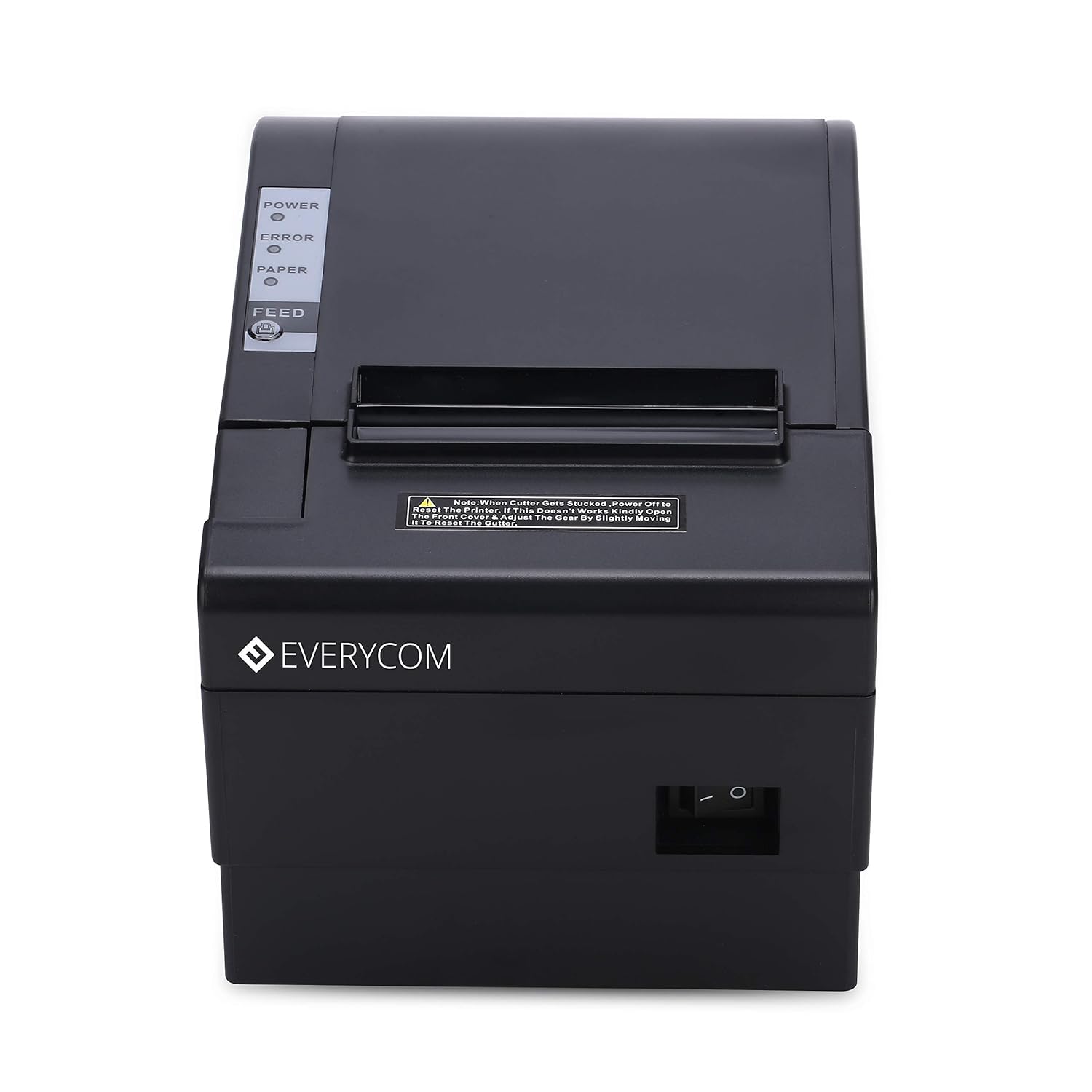
ምስል፡ ፊት ለፊት view of the Everycom EC801B printer, showing the location of the power switch on the side.
6.2 Printing a Self-Test Page
A self-test page can confirm basic printer functionality and print quality without requiring a computer connection.
- Ensure the printer is powered off and paper is loaded.
- ተጭነው ይያዙት። መመገብ አዝራር።
- በመያዝ ላይ ሳለ መመገብ button, turn on the printer.
- ይልቀቁት መመገብ button once the printer starts printing. A self-test page will print, showing printer information and a sample print.

Image: Everycom EC801B printer actively printing a self-test receipt with a QR code and text.
6.3 መሰረታዊ የህትመት ስራ
Once drivers are installed and the printer is connected, you can print from any application that supports printing. Select the Everycom EC801B from your list of available printers and initiate the print command.
6.4 የራስ-ሰር መቁረጫ ተግባር
The EC801B features an automatic cutter that will cut the receipt paper after each print job, or as configured in your printer settings/software.
7. ጥገና
7.1 ማተሚያውን ማጽዳት
አዘውትሮ ማጽዳት የህትመት ጥራትን ለመጠበቅ እና የአታሚውን ዕድሜ ያራዝመዋል።
- የህትመት ራስ፡ የጥጥ መጥረጊያን በትንሹ ተጠቀም መampened with isopropyl alcohol to gently wipe the thermal print head. Allow it to dry completely before use.
- የወረቀት መንገድ፡ Use a soft, dry cloth to remove any paper dust or debris from the paper path.
- ውጫዊ፡ ውጫዊውን ለስላሳ, መamp ጨርቅ. ኃይለኛ ኬሚካሎችን ወይም ሻካራ ማጽጃዎችን አይጠቀሙ.
7.2 የወረቀት ጥቅል መተካት
When the PAPER indicator flashes or printing becomes faint, it's time to replace the paper roll. Follow the steps in Section 5.3 to load a new 80mm thermal paper roll.
8. መላ መፈለግ
If you encounter issues with your printer, refer to the following common problems and solutions:
| ችግር | ሊሆን የሚችል ምክንያት | መፍትሄ |
|---|---|---|
| አታሚ አይበራም። | No power, faulty adapter | Check power cable connection, ensure outlet is working, try another adapter if available. |
| No printing / Blank output | Paper loaded incorrectly, no paper, print head issue, driver issue | Reload paper correctly (thermal side facing print head), replace paper roll, clean print head, reinstall drivers. |
| ERROR indicator on/flashing | Paper out, cover open, print head overheat | Check paper, close cover firmly, allow printer to cool down. |
| ደካማ የህትመት ጥራት | Dirty print head, low quality paper, old paper roll | Clean print head, use high-quality thermal paper, replace old paper. |
| አታሚ በኮምፒዩተር አልታወቀም። | Driver not installed, incorrect cable, port issue | Install/reinstall drivers, check USB/LAN cable connection, try a different port. |
If the problem persists after attempting these solutions, please contact Everycom customer support.
9. ዝርዝሮች
Key technical specifications for the Everycom EC801B Thermal Printer:
| ባህሪ | ዝርዝር |
|---|---|
| ሞዴል | EC801B |
| የህትመት ቴክኖሎጂ | የሙቀት መስመር ማተም |
| የህትመት ፍጥነት | 220 ሚሜ / ሰከንድ |
| የወረቀት ስፋት | 80 ሚሜ |
| ግንኙነት | USB, LAN (Ethernet) |
| አውቶማቲክ መቁረጫ | አዎ |
| የአታሚ ውፅዓት | ሞኖክሮም |
| ልኬቶች (LxWxH) | 18.6 x 14.5 x 13.3 ሴ.ሜ |
| የእቃው ክብደት | 1.2 ኪ.ግ |
| አምራች | Everycom Electronics (Made in India) |
10. ዋስትና እና ድጋፍ
The Everycom EC801B Thermal Printer comes with a የ1-ዓመት ዋስትና ከተገዛበት ቀን ጀምሮ. ይህ ዋስትና በመደበኛ አጠቃቀም ሁኔታዎች ውስጥ የማምረቻ ጉድለቶችን እና ጉድለቶችን ይሸፍናል ።
For technical assistance, troubleshooting, or warranty claims, please contact Everycom Customer Support:
- ከክፍያ ነጻ ቁጥር፡- 1800 121 4480
- Customer Support Working Hours: Monday - Saturday, 10:00 AM - 6:30 PM (Except on Public Holidays)

Image: Everycom customer service contact details, including the toll-free number and working hours.