
1. መግቢያ
The MOXA MGate MB3660-16-2DC is a high-performance 16-port Modbus gateway designed for converting between Modbus TCP and Modbus RTU/ASCII protocols. This device facilitates seamless communication between Modbus TCP hosts and Modbus RTU/ASCII serial devices. It features dual DC power inputs for enhanced reliability and redundancy, making it suitable for critical industrial automation applications.
This manual provides essential information for the proper installation, configuration, operation, and maintenance of your MGate MB3660-16-2DC gateway.
2. የደህንነት መረጃ
Please read and understand all safety instructions before operating the device. Failure to do so may result in injury or damage to the equipment.
- የኃይል አቅርቦቱን ጥራዝ ያረጋግጡtage matches the device's requirements (dual DC input).
- ማንኛውንም የመጫኛ ወይም የጥገና ሂደቶችን ከማከናወንዎ በፊት የኃይል አቅርቦቱን ያላቅቁ።
- ከመጠን በላይ ሙቀትን ለመከላከል መሳሪያውን በደንብ አየር በሚገኝበት ቦታ ላይ ይጫኑት.
- መሳሪያውን ለእርጥበት፣ ለከፍተኛ ሙቀት ወይም ለቆሻሻ አካባቢዎች ከማጋለጥ ይቆጠቡ።
- የመጫንና የጥገና ሥራ ማከናወን ያለባቸው ብቃት ያላቸው ባለሙያዎች ብቻ ናቸው።
3. የጥቅል ይዘቶች
ጥቅልዎ የሚከተሉትን ንጥሎች መያዙን ያረጋግጡ፡-
- MOXA MGate MB3660-16-2DC Modbus Gateway
- ፈጣን የመጫኛ መመሪያ
- የዋስትና ካርድ
- ለኃይል ግብዓት ተርሚናል እገዳ
- DIN-rail mounting kit (if applicable)
ከእነዚህ እቃዎች ውስጥ አንዳቸውም ቢጎድሉ ወይም ቢበላሹ፣ እባክዎን ወዲያውኑ የሽያጭ ወኪልዎን ያነጋግሩ።
4. የሃርድዌር መግለጫ
The MGate MB3660-16-2DC features multiple ports and indicators for easy setup and monitoring.
4.1 የፊት ፓነል
The front panel typically includes LED indicators for power, network activity, and serial port status.
- PWR1/PWR2 LED፡ Indicates status of primary/secondary DC power input.
- የተሳሳተ LED: Indicates system errors or warnings.
- LAN1/LAN2 LEDs: Indicate Ethernet link and activity.
- Serial Port LEDs (1-16): Indicate data transmission/reception on each serial port.
4.2 Rear/Side Panels
These panels house the connection ports:
- የኃይል ግቤት፡ Dual DC power input terminal blocks for redundant power.
- የኤተርኔት ወደቦች፡ RJ45 ports for Modbus TCP network connection.
- ተከታታይ ወደቦች 16 DB9 or terminal block connectors for Modbus RTU/ASCII devices.
- ዳግም አስጀምር አዝራር፡- የፋብሪካ ነባሪ ቅንብሮችን ወደነበረበት ለመመለስ።
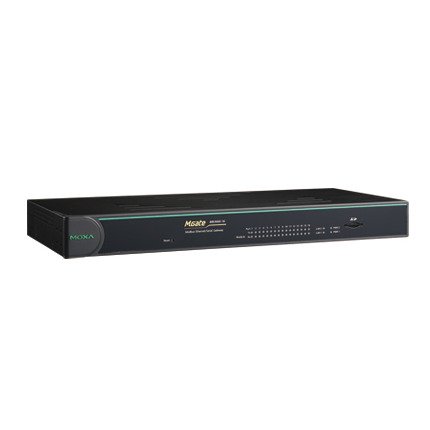
ምስል 1: የፊት view of the MOXA MGate MB3660-16-2DC Modbus Gateway, showing LED indicators and general form factor.
5. ማዋቀር
5.1 መጫን
The MGate MB3660-16-2DC can be mounted on a DIN-rail or wall-mounted using the provided kit.
- ዲአይኤን-ባቡር መጫኛ; Attach the DIN-rail clip to the back of the device and snap it onto a standard DIN-rail.
- የግድግዳ መጫኛ; Secure the wall-mount plates to the device, then use screws to fix the device to a wall or panel.
5.2 የኃይል ግንኙነት
Connect two independent DC power sources to the dual power input terminal blocks for redundancy. Ensure correct polarity.
- Connect the positive (+) wire to the V+ terminal.
- Connect the negative (-) wire to the V- terminal.
- Connect the ground wire to the ⊗ terminal.
5.3 የአውታረ መረብ ግንኙነት
Connect the Ethernet ports to your Modbus TCP network using standard RJ45 Ethernet cables.
5.4 Serial Device Connection
Connect your Modbus RTU/ASCII serial devices to the 16 serial ports. Configure the serial port settings (baud rate, data bits, parity, stop bits, mode) via the device's web console or utility to match your serial devices.
5.5 የመጀመሪያ ውቅር
የመሳሪያውን ይድረሱበት web-based management interface by connecting a computer to the same network segment and entering the default IP address (refer to the Quick Installation Guide for the default IP). Configure network settings, Modbus mapping, and serial port parameters as required for your application.
6. የመግቢያ መንገዱን መስራት
Once configured, the MGate MB3660-16-2DC operates as a transparent Modbus gateway, converting requests between Modbus TCP masters and Modbus RTU/ASCII slaves.
6.1 Modbus Communication Flow
- Modbus TCP master sends a request to the gateway's IP address and configured TCP port.
- The gateway translates the Modbus TCP request into a Modbus RTU/ASCII request.
- The gateway sends the serial request to the designated Modbus RTU/ASCII slave device via the appropriate serial port.
- The slave device responds to the gateway.
- The gateway translates the serial response back to Modbus TCP and forwards it to the Modbus TCP master.
6.2 የክትትል ሁኔታ
Regularly check the LED indicators on the front panel to monitor the device's operational status:
- PWR1/PWR2፡ Should be solid green when power is supplied.
- ስህተት Should be off during normal operation. A red light indicates an error.
- LAN LEDs Solid green for link, blinking for activity.
- Serial Port LEDs: Blink when data is being transmitted or received on that port.
7. ጥገና
To ensure optimal performance and longevity of your MGate MB3660-16-2DC, follow these maintenance guidelines:
- ማጽዳት፡ Periodically clean the device's exterior with a soft, dry cloth. Do not use liquid or aerosol cleaners.
- የጽኑዌር ዝማኔዎች ፦ Check the MOXA website for the latest firmware versions. Apply updates as recommended to enhance features and security.
- የአካባቢ ቁጥጥር; የስራ አካባቢው በተወሰነ የሙቀት መጠን እና እርጥበት ክልሎች ውስጥ መቆየቱን ያረጋግጡ።
- የኬብል ምርመራ; Regularly inspect all connected cables for damage or loose connections.
8. መላ መፈለግ
ይህ ክፍል ሊያጋጥሙህ ለሚችሉ የተለመዱ ጉዳዮች መፍትሄዎችን ይሰጣል።
| ችግር | ሊሆን የሚችል ምክንያት | መፍትሄ |
|---|---|---|
| Device not powering on (PWR LEDs off) | No power supply; faulty power adapter; incorrect wiring. | Check power connections and source; verify power adapter functionality. |
| No network connectivity (LAN LEDs off) | Faulty Ethernet cable; incorrect network settings; switch/router issue. | Check Ethernet cable; verify IP settings; test with another network port. |
| ተከታታይ የግንኙነት ውድቀት | Incorrect serial port settings (baud rate, parity); wrong wiring; slave device issue. | Verify serial port settings match slave device; check serial cable wiring; test slave device independently. |
| FAULT LED is red | System error; hardware malfunction. | Consult the product manual for specific FAULT codes or contact technical support. Try power cycling the device. |
8.1 የፋብሪካ ዳግም ማስጀመር
If issues persist, you may need to perform a factory reset. Locate the reset button (usually a small pinhole) and press it for 5-10 seconds while the device is powered on. This will restore all settings to their default values.
9. ዝርዝሮች
| ባህሪ | ዝርዝር መግለጫ |
|---|---|
| ሞዴል | MGate MB3660-16-2DC |
| ተከታታይ ወደቦች | 16 (RS-232/422/485, software selectable) |
| የኤተርኔት ወደቦች | 2 x 10/100BaseT(X) auto-sensing RJ45 (typically for redundancy) |
| ፕሮቶኮሎች ይደገፋሉ | Modbus TCP, Modbus RTU, Modbus ASCII |
| የኃይል ግቤት | Dual DC Power Input (e.g., 12-48 VDC, specific range may vary by model revision) |
| ድግግሞሽ | Dual power inputs |
| የአሠራር ሙቀት | Typically -40 to 75°C (Industrial Grade) |
| የማከማቻ ሙቀት | Typically -40 to 85°C |
| እርጥበት | ከ 5 እስከ 95% RH (የማይከማች) |
| መጠኖች (ወ x D x H) | Specific dimensions vary, refer to product datasheet for exact measurements. |
| ክብደት | በግምት 22 ፓውንድ (10 ኪ.ግ) |
| አምራች | ሞክሳ |
10. ዋስትና እና ድጋፍ
10.1 የምርት ዋስትና
MOXA products typically come with a standard manufacturer's warranty. Please refer to the warranty card included in your package or visit the official MOXA website for detailed warranty terms and conditions specific to the MGate MB3660-16-2DC.
10.2 የቴክኒክ ድጋፍ
For technical assistance, troubleshooting, or further inquiries, please contact MOXA's technical support team. Support resources, including FAQs, drivers, and documentation, are available on the official MOXA webጣቢያ.
- ሞክሳ Webጣቢያ፡ www.moxa.com
- የድጋፍ አድራሻ፡ Refer to the 'Support' section on the MOXA webለክልላዊ የእውቂያ መረጃ ጣቢያ.