
1. ምርት አብቅቷልview
The AUTENS Wireless Doorbell system provides a convenient and reliable solution for home, office, or classroom use. It features a waterproof push button transmitter and a plug-in receiver, offering a long operating range and a variety of customizable settings. This manual will guide you through the installation, operation, and maintenance of your doorbell.

Image 1.1: The AUTENS Wireless Doorbell kit, showing the plug-in receiver and the wireless push button.

Image 1.2: Diagram illustrating the doorbell's operating range of up to 1000 feet in open space, demonstrating signal penetration through walls within a typical home environment.
2. የመጫኛ መመሪያ
2.1 ክፍሎች
- 1 x ተሰኪ ተቀባይ
- 1 x Wireless Push Button Transmitter
- 1 x 12V 23A Alkaline Battery (pre-installed in push button)
- Mounting Hardware (Screws, Anchors, Double-sided Tape)
2.2 ደረጃ በደረጃ መጫን
The push button transmitter can be mounted using either the provided double-sided tape or screws and anchors. The receiver simply plugs into a standard electrical outlet.
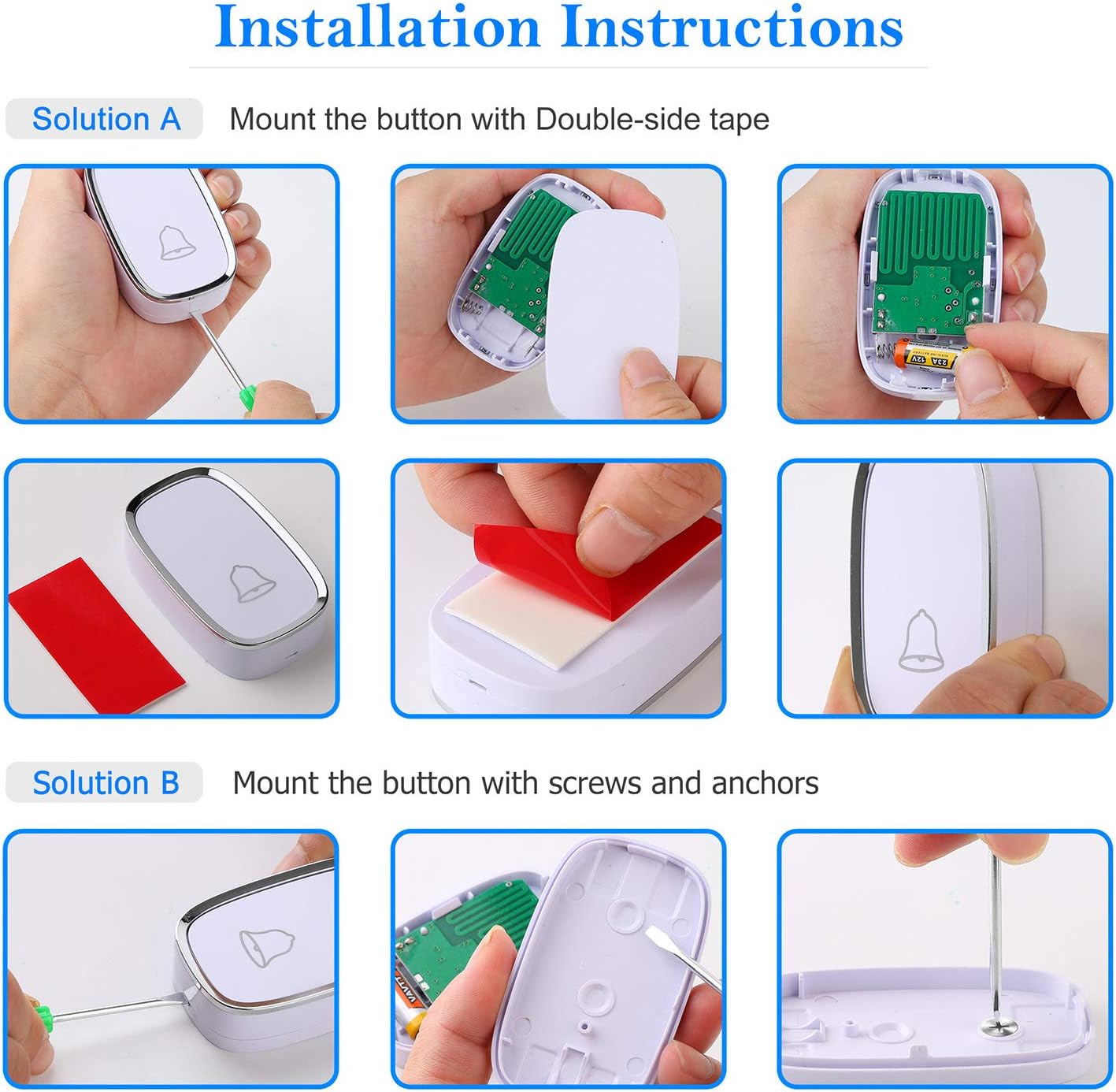
Image 2.1: Visual guide for installing the push button using either double-sided tape or screws and anchors.
Method A: Double-sided Tape Installation
- Prepare the Push Button: Open the back cover of the push button transmitter. Ensure the 12V 23A battery is correctly installed.
- Apply Tape: Peel off one side of the protective film from the double-sided tape and firmly attach it to the back of the push button.
- ቦታ ይምረጡ፡- Select a clean, flat surface near your entry door or gate. Ensure the surface is dry and free of dust or grease.
- Mount Button: Peel off the other side of the protective film from the tape. Press the push button firmly onto the chosen surface for at least 30 seconds to ensure strong adhesion.

ምስል 2.2፡ መቀራረብ view of the push button being installed using double-sided adhesive tape.
Method B: Screw and Anchor Installation
- Prepare the Push Button: Open the back cover of the push button transmitter. Ensure the 12V 23A battery is correctly installed.
- የማርክ ቁፋሮ ጉድጓዶች፡ Hold the back plate of the push button against the desired mounting surface. Use a pencil to mark the positions for the two screw holes.
- ጉድጓዶች ቁፋሮ; Drill two small holes at the marked positions. Insert the plastic anchors into the drilled holes.
- ደህንነቱ የተጠበቀ የኋላ ሳህን; Align the back plate with the anchors and secure it using the provided screws.
- Attach Push Button: Snap the push button onto the secured back plate.

Image 2.3: Detailed steps for installing the push button using screws and wall anchors for a more permanent fixture.
2.3 ተቀባይ ማዋቀር
Simply plug the receiver into any standard electrical outlet within range of the push button. For optimal performance, choose an outlet that is centrally located or closer to the push button, avoiding large metal objects or thick walls that may interfere with the signal.
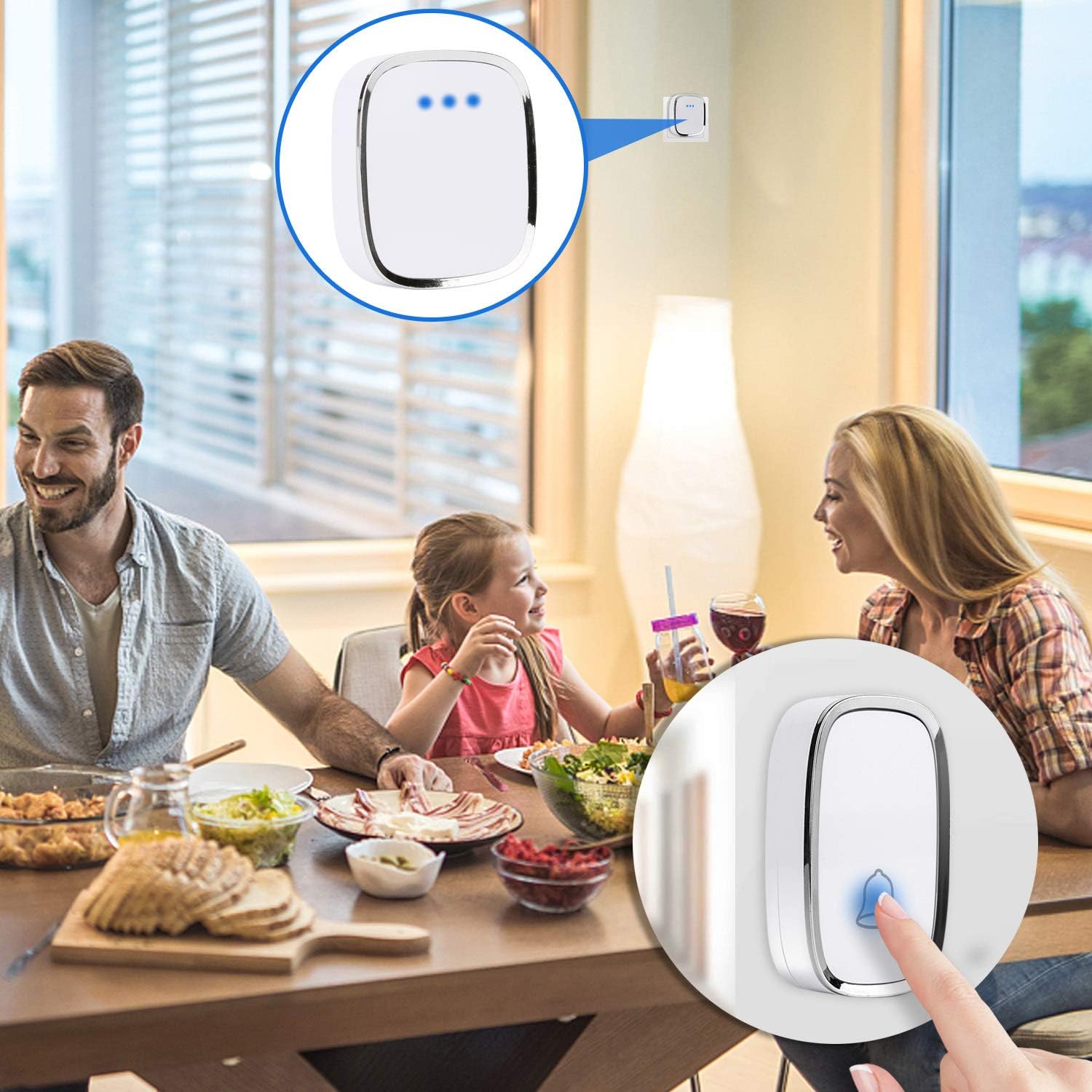
Image 2.4: The doorbell receiver plugged into a wall outlet, indicating its readiness for use in a home setting.
3. ኦፕሬሽን
Your AUTENS Wireless Doorbell offers various customization options for melodies and volume levels.

ምስል 3.1፡ የኋላ view of the receiver showing the Ringtone Button and Volume Button, along with an illustration of the 36 melodies and 4 volume levels (0dB to 80dB).
3.1 Adjusting Melodies
The receiver comes with 36 selectable melodies. To change the melody:
- Press the "Ringtone Button" on the side of the receiver to cycle through the available melodies.
- Stop pressing when you hear your desired melody. The receiver will remember this selection.
3.2 የድምፅ ደረጃዎችን ማስተካከል
The receiver has 4 adjustable volume levels, ranging from 25 dB to 80 dB.
- Press the "Volume Button" on the side of the receiver to cycle through the volume levels.
- Select the volume level that best suits your environment.
3.3 Silent Mode and LED Indicator
A silent mode is available for times when you prefer not to be disturbed. Even in silent mode, the LED indicator on both the push button and receiver will flash when the button is pressed, providing a visual alert. This feature is particularly useful for individuals with hearing impairments.
3.4 Pairing Additional Units (Expandable System)
The AUTENS doorbell system is expandable, allowing you to pair additional receivers or push buttons. Follow these steps to pair new units:
- መቀበያውን ይሰኩ፦ Plug the receiver you wish to pair into an electrical outlet.
- የማጣመሪያ ሁነታን ያስገቡ ፦ Press and hold the "Volume Button" on the receiver. Do not release it.
- Press Transmitter: While still holding the Volume Button on the receiver, press the push button transmitter you want to pair. You should hear a chime from the receiver, indicating successful pairing.
- የመልቀቂያ ቁልፍ፡- Release the Volume Button on the receiver.
- Repeat for Multiple Transmitters/Receivers: If pairing multiple transmitters to one receiver, repeat steps 2-4 for each additional transmitter. If pairing multiple receivers, repeat steps 1-4 for each additional receiver.
4. እንክብካቤ እና ጥገና
Proper care ensures the longevity and optimal performance of your doorbell system.
- ማጽዳት፡ Wipe the receiver and push button with a soft, dry cloth. Do not use abrasive cleaners or solvents.
- የግፊት አዝራር ባትሪ መተካት; The push button uses a 12V 23A alkaline battery, which typically lasts about 1 year. If the LED indicator on the push button does not light up or the signal range decreases significantly, it may be time to replace the battery. To replace, open the back cover of the push button, remove the old battery, and insert a new 12V 23A battery, observing polarity.
- የውሃ መከላከያ ደረጃ The remote transmitter button is rated IP44 dustproof and waterproof, suitable for outdoor use. However, avoid submerging it in water or exposing it to extreme pressure washing.
- የአሠራር ሙቀት; The unit is functional between -30°C to 70°C (-22°F to 158°F).
Image 4.1: Illustration highlighting the IP44 waterproof rating of the push button and its working temperature range of -30°C to 70°C.
5. መላ መፈለግ
If you encounter issues with your doorbell, refer to the table below for common problems and solutions.
| ችግር | ሊሆን የሚችል ምክንያት | መፍትሄ |
|---|---|---|
| Receiver does not ring. | ተቀባዩ አልተሰካም ወይም ኃይል የለውምtage. Push button battery low or dead. Units not paired. | Ensure receiver is securely plugged into a working outlet. Replace 12V 23A battery in push button. Re-pair the push button and receiver as per Section 3.4. |
| Short operating range or intermittent signal. | Obstructions (thick walls, metal objects). Interference from other wireless devices. Low push button battery. | Relocate receiver or push button to minimize obstructions. Ensure receiver is not near large metal appliances. Replace push button battery. |
| Melody or volume settings reset. | Power interruption to receiver. | Re-select your desired melody and volume settings. The receiver should retain settings after minor power fluctuations. |
| የግፊት ቁልፍ LED አይበራም። | የግፊት አዝራር ባትሪ ሞቷል ወይም በትክክል አልተጫነም። | Replace the 12V 23A battery, ensuring correct polarity. |
6. ቴክኒካዊ ዝርዝሮች
| ባህሪ | ዝርዝር መግለጫ |
|---|---|
| የሞዴል ቁጥር | SVS09-14-15 |
| የክወና ክልል | እስከ 1000 ጫማ (300 ሜትር) ክፍት ቦታ ላይ |
| ዜማዎች | 36 ሊመረጡ የሚችሉ ቃጭሎች |
| የድምጽ ደረጃዎች | 4 ደረጃዎች (ከ25 dB እስከ 80 dB) |
| የድምፅ ደረጃ | 100 ዲባቢ (ከፍተኛ) |
| የግፊት አዝራር ባትሪ | 1 x 12V 23A Alkaline Battery (included) |
| Average Battery Life (Push Button) | በግምት 1 ዓመት |
| የውሃ መከላከያ ደረጃ (የግፊት አዝራር) | IP44 |
| የአሠራር ሙቀት | -30°ሴ እስከ 70°ሴ (-22°F እስከ 158°ፋ) |
| ቁሳቁስ | ፕላስቲክ |
| ቀለም | ነጭ |
| የእቃው ክብደት | 100 ግ |
| የፓርሴል ልኬቶች | 11.94 x 9.14 x 7.37 ሴሜ (4.7 x 3.6 x 2.9 ኢንች) |

Image 6.1: Diagram showing the dimensions of both the receiver and the push button in inches.
7. ዋስትና እና ድጋፍ
7.1 የመመለሻ ፖሊሲ
ይህ ምርት በመደበኛ የችርቻሮ ውሎች መሠረት ተመላሽ ገንዘብ ወይም ምትክ ለማድረግ የ30-ቀን የመመለሻ ፖሊሲ ተገዢ ነው።
7.2 የደንበኛ ድጋፍ
For further assistance, technical support, or inquiries regarding your AUTENS Wireless Doorbell, please contact the manufacturer directly or visit the official AUTENS store page: