
1. መግቢያ
Thank you for choosing the Firecore FIR411R Red Laser Level. This professional-grade, self-leveling laser tool is designed for precise measurement and alignment tasks in construction and renovation. It projects 5 lines (4 vertical, 1 horizontal) and a plumb point, offering versatility for various applications. Please read this manual thoroughly before operation to ensure safe and efficient use.
የደህንነት መረጃ
- የጨረር ጨረር; This product is a Class 2 laser product with an output power of ≤ 1 mW. Do not stare directly into the laser beam. Avoid direct eye exposure.
- Do not disassemble the device. Repairs should only be performed by authorized service personnel.
- መሣሪያውን ልጆች በማይደርሱበት ቦታ ያስቀምጡት.
- የተወሰኑ ባትሪዎችን እና ቻርጀሮችን ብቻ ይጠቀሙ።
በሣጥኑ ውስጥ ያለው
The Firecore FIR411R package includes:
- FIR411R Laser Level
- FD20 Laser Detector
- ኪት ሳጥን
- ሌዘር መነጽር
- ትሪፖድ አያያዥ
- የ AC ኃይል መሙያ
- የተጠቃሚ መመሪያ

Image 1.1: Contents of the Firecore FIR411R Laser Level kit, including the laser unit, detector, glasses, charger, and case.
2. የምርት ባህሪዎች
- 5-Line Projection: Projects 4 vertical lines, 1 horizontal line, and 1 plumb point for comprehensive leveling and alignment.
- የራስ-ደረጃ ተግባር፡ Automatically levels within its range, ensuring accuracy.
- ከፍተኛ ትክክለኛነት; ± 0.2 mm/m precision for reliable measurements.
- የተራዘመ ክልል፡ Up to 50m working range with the included Firecore FD20 laser detector.
- ዳግም ሊሞላ የሚችል የሊቲየም ባትሪ፡ High-capacity battery provides up to 5 hours of continuous operation.
- 360° Rotating Fine Adjustment Base: Two micro-rotating knobs allow precise 360° adjustment during operation.
- ባለብዙ ተግባር ሁነታዎች; Vertical and horizontal lines can be operated separately or together.
- ዘላቂ ግንባታ; Made from ABS plastic and rubber for robust use.

ምስል 2.1፡ ፊት view of the Firecore FIR411R Laser Level, highlighting its 360-degree rotation capability.
3. ማዋቀር
3.1 ባትሪ መጫን እና መሙላት
- በመሳሪያው ላይ የባትሪውን ክፍል ያግኙ.
- የቀረበውን የሊቲየም ባትሪ ያስገቡ ፣ ይህም ትክክለኛውን ፖላሪቲ ያረጋግጡ።
- To charge, connect the AC charger to the device and plug it into a power outlet. The power indicator will show charging status.
- A full charge supports approximately 5 hours of continuous operation with all lasers active.
- ጠቃሚ፡- Do not overcharge or over-discharge the battery to prolong its lifespan. Recharge promptly when the power indicator starts flashing.
3.2 መሳሪያውን መጫን
The FIR411R can be placed on a stable surface or mounted:
- የሶስትዮሽ መጫኛ; Use the 5/8 inch female interface on the base to attach the laser level to a compatible tripod.
- የሚሽከረከር መሠረት፡ The integrated rotating base allows for stable placement and fine angular adjustments.
3.3 የመጀመሪያ ኃይል-በ
Slide the main power switch to the 'ON' position. The device will initiate its self-leveling sequence. Once leveled, the laser lines will activate.
4. የአሠራር መመሪያዎች
4.1 ራስን የማስተካከል ሁነታ
When powered on, the FIR411R automatically enters self-leveling mode. If the device is outside its leveling range, the laser lines may flash or an audible alarm may sound. Adjust the device's position until it self-levels and the lines become stable.
4.2 Switching Laser Lines
Use the dedicated vertical and horizontal buttons on the control panel to activate or deactivate specific laser lines. You can display cross-lines, vertical lines, horizontal lines, or combinations as needed for your task.
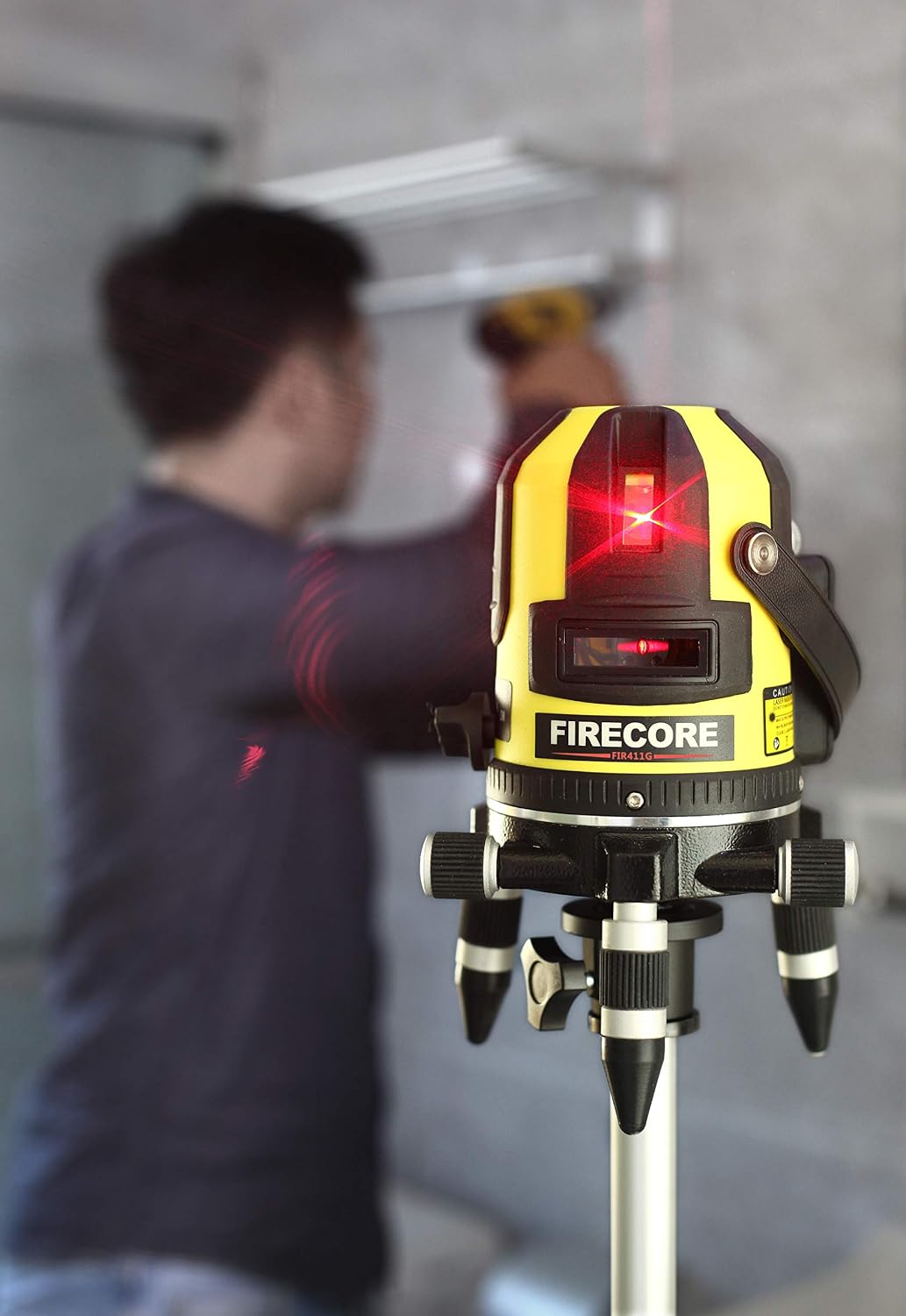
Image 4.1: The Firecore FIR411R Laser Level in operation, projecting clear red laser lines for alignment.
4.3 Using the 360° Rotating Base
The base of the laser level features two micro-rotating knobs. These allow for precise, incremental 360-degree rotation of the laser unit without moving the entire setup, which is ideal for fine adjustments and aligning lines to specific points.
4.4 Using the FD20 Laser Detector
For outdoor use or in bright conditions where laser lines are difficult to see, use the Firecore FD20 laser detector. Turn on the detector and move it along the desired surface. The detector will indicate the position of the laser line with visual and/or audible signals, extending the working range up to 50 meters.

Image 4.2: The Firecore FIR411R Laser Level mounted on a measuring pole, demonstrating its use in a construction setting.
5. ጥገና
5.1 ጽዳት
- Regularly clean the laser windows and housing with a soft, damp ጨርቅ.
- Do not use abrasive cleaners or solvents, as they may damage the plastic parts or optical components.
- ከማከማቸትዎ በፊት መሳሪያው ደረቅ መሆኑን ያረጋግጡ።
5.2 ማከማቻ
- Store the laser level in its original kit box in a cool, dry place, away from direct sunlight and extreme temperatures.
- ለረጅም ጊዜ ከተከማቸ፣ እንዳይፈስ ለመከላከል ባትሪውን ያውጡት።
5.3 የባትሪ እንክብካቤ
- Charge the lithium battery regularly, even if not in use, to maintain its health.
- በተደጋጋሚ ባትሪውን ሙሉ በሙሉ ከመሙላት ይቆጠቡ።
6. መላ መፈለግ
- Laser lines are flashing or alarm sounds: The device is out of its self-leveling range. Adjust its position on a more level surface.
- Laser not turning on: Check if the battery is charged and correctly inserted. Ensure the power switch is fully in the 'ON' position.
- Laser lines are dim or invisible outdoors: Use the FD20 laser detector for improved visibility and extended range. Ensure laser glasses are worn for better visibility of the red beam.
- ትክክል ያልሆኑ መለኪያዎች; Ensure the device is properly self-leveled. Check for any obstructions or damage to the laser windows.
If problems persist, contact Firecore customer support for assistance.
7. ዝርዝሮች
| ባህሪ | ዝርዝር መግለጫ |
|---|---|
| የምርት ስም | Firecore |
| የሞዴል ቁጥር | FIR411R |
| ቁሳቁስ | ኤቢኤስ ፕላስቲክ፣ ጎማ |
| ቀለም | Fir411r Red Line Laser (Yellow/Black Housing) |
| የክወና ሁነታ | Automatic (Self-Leveling) |
| ሌዘር ክፍል | Class 2, ≤ 1 mW |
| ትክክለኛነት | ± 0.2 ሚሜ / ሜትር |
| የስራ ክልል | Up to 50m with FD20 Laser Detector |
| የባትሪ ዓይነት | ዳግም ሊሞላ የሚችል የሊቲየም ባትሪ (1750 ሚአሰ) |
| ቀጣይነት ያለው ክዋኔ | Approx. 5 hours (all lasers active) |
| Tripod ተራራ | 5/8 inch Female Interface |
| ዩፒሲ | 787414950106 |
| ASIN | B07PV9P951 |
8. ዋስትና እና ድጋፍ
Firecore products are manufactured to high-quality standards. For warranty information, please refer to the warranty card included with your product or visit the official Firecore website. If you encounter any issues or require technical assistance, please contact Firecore customer support through their official channels.


