
EBYTE RS232
E90-DTU-433L30 Wireless Transceiver
የተጠቃሚ መመሪያ
1. ምርት አብቅቷልview
The E90-DTU-433L30 is a high-performance wireless data transceiver designed for reliable long-range communication. Operating within the 410-441MHz frequency range with a power output of 30dBm, it can achieve communication distances up to 8.0km. This device integrates digital data processing, modulation, demodulation, and error correction (FEC) to provide a transparent RS232/RS485 interface, distinguishing it from traditional analog FM transceivers.

ምስል 1: የፊት view of the E90-DTU-433L30 Wireless Transceiver, showing RS232, RS485, GND, VCC ports, PWR, TXD, RXD indicators, M0, M1 pins, DC-IN, and antenna connector.
2. ቁልፍ ባህሪያት
- Advanced LoRa Modulation: Utilizes military-grade LoRa modulation technology for enhanced communication distance and stability.
- ከፍተኛ የኃይል ውፅዓት; Transmission power up to 1W, with multi-level adjustable settings, meeting European industrial standards.
- Wide Interface Support: Provides transparent RS232 and RS485 interfaces for versatile connectivity.
- ጠንካራ ንድፍ; All-aluminum alloy shell for compact size, easy installation, good heat dissipation, and excellent electromagnetic compatibility.
- የተሻሻለ አስተማማኝነት፡- Features power reverse connection protection, over-connection protection, and antenna surge protection.
- ተለዋዋጭ የኃይል አቅርቦት; Supports 10-28V power supply, compatible with various power devices or line pressure modes.
- Precise Frequency Stability: Incorporates temperature compensators for frequency stability better than ±1.5PPM.
- ሊዋቀሩ የሚችሉ መለኪያዎች፡ All parameters such as power, frequency, air speed, and address ID can be set via programming software.
- ዝቅተኛ የኃይል ፍጆታ; Standby current is only 21mA (even lower in power-saving and sleep modes).
- Built-in Watchdog: Ensures automatic module restart in case of exceptions, maintaining continuous operation with previous settings.
3. ሃርድዌር አልቋልview
The E90-DTU-433L30 features clearly labeled interfaces and indicators for easy setup and monitoring.

ምስል 2: ዝርዝር view of the transceiver's hardware components, including Antenna Interface, Dip Switch, Power Interface, Function Indicators (PWR, TXD, RXD), RS485 terminals, and RS232 port.
- የአንቴና በይነገጽ፡ SMA-K connector for external antenna connection.
- Dip Switch (M0, M1): Used to set the module's operating mode (e.g., normal, wake-up, power-saving, configuration).
- Power Interface (DC-IN): Input for 10-28V DC power supply.
- የተግባር አመልካቾች፡-
- PWR የኃይል አመልካች.
- TXD፡ Transmit data indicator.
- RXD፡ Receive data indicator.
- RS485 በይነገጽ፡ Screw terminals for RS485_A, RS485_B, GND, and VCC connections.
- RS232 በይነገጽ፡ DB9 serial port for RS232 communication.
4. Setup and Basic Function
The E90-DTU-433L30 facilitates transparent data transmission between devices using RS232 or RS485 interfaces.
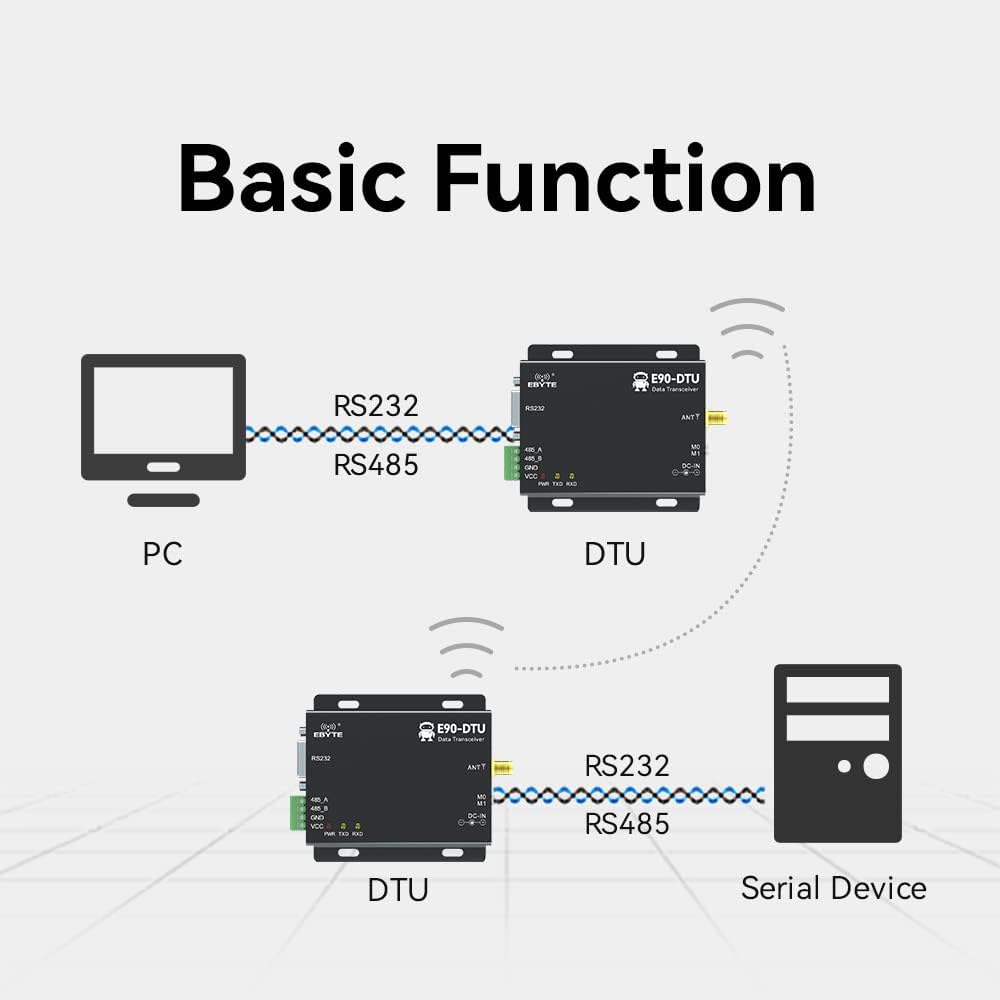
Figure 3: Diagram illustrating typical connections: a PC connected to one DTU via RS232/RS485, and another DTU connected to a serial device via RS232/RS485, communicating wirelessly.
4.1. የመጀመሪያ ደረጃ ማዋቀር
- አንቴናን ያገናኙ፡ Securely attach the 433MHz antenna to the SMA-K connector.
- የኃይል ግንኙነት; Connect a 10-28V DC power supply to the DC-IN port. Ensure correct polarity.
- የውሂብ በይነገጽ ግንኙነት፡-
- For RS232: Connect your device (e.g., PC) to the DB9 RS232 port using a serial cable.
- For RS485: Connect your device to the RS485_A and RS485_B terminals. Ensure proper A/B wiring.
- Mode Configuration: Set the M0 and M1 dip switches according to your desired operating mode (e.g., transparent transmission, configuration mode). Refer to the detailed technical manual for specific mode settings.
4.2. የሶፍትዌር ማዋቀር
The E90-DTU-433L30 supports software configuration for various parameters, including frequency, air speed, and address ID.

ምስል 4: ዘፀample interface of the Function Configuration Software, available for download from the official webጣቢያ.
It is recommended to download and use the official configuration software to customize the module's settings to match your application requirements. This software allows for precise control over the transceiver's operational parameters.
5. ኦፕሬሽን
Once properly configured and connected, the E90-DTU-433L30 operates as a transparent data link. Data sent to its RS232 or RS485 port will be wirelessly transmitted to a paired E90-DTU module, and vice-versa.
- የውሂብ ማስተላለፍ; When data is received on the serial input (RS232/RS485), the module automatically modulates and transmits it wirelessly. The TXD indicator will flash.
- የውሂብ አቀባበል፡ Upon receiving wireless data, the module demodulates it and outputs it through the serial interface. The RXD indicator will flash.
- ሁነታ አስተዳደር፡ Ensure both transmitting and receiving modules are set to compatible operating modes (e.g., transparent transmission mode) for seamless communication.
6. ቴክኒካዊ ዝርዝሮች
| ዝርዝር መግለጫ | ዋጋ |
|---|---|
| ASIN | B07R51G2CD |
| የንጥል ሞዴል ቁጥር | RS232 |
| የምርት ስም | EBYTE |
| ጠቅላላ የኤተርኔት ወደቦች | 2 |
| የወደብ ብዛት | 2 |
| ከፍተኛው የላይፍ ዥረት የውሂብ ዝውውር መጠን | 433 ሜኸ |
| ሞደም አይነት | ዲጂታል |
| አምራች | EBYTE |
| የመጀመሪያ ቀን ይገኛል። | ሴፕቴምበር 27፣ 2021 |

Figure 5: Physical dimensions of the E90-DTU-433L30 module, approximately 82mm in length and 62mm in width.
7. የተለመዱ መተግበሪያዎች
The E90-DTU-433L30 is suitable for a wide range of applications requiring reliable wireless data transmission.

ምስል 6: ዘፀamples of application environments: Smart home, Agricultural application, Intelligent warehouse, Industrial applications, Device management, and general Wireless data transmission.
- ስማርት ቤት ሲስተምስ
- Agricultural Monitoring and Control
- Intelligent Warehouse Management
- የኢንዱስትሪ አውቶሜሽን እና ቁጥጥር
- የርቀት መሣሪያ አስተዳደር
- General Wireless Data Transmission
8. ጥገና
To ensure the longevity and optimal performance of your E90-DTU-433L30 transceiver, follow these maintenance guidelines:
- ንጽህናን ይጠብቁ; Regularly clean the exterior of the module with a soft, dry cloth. Avoid using harsh chemicals or abrasive materials.
- የአካባቢ ሁኔታዎች; ሞጁሉን በተወሰነው የሙቀት መጠን እና የእርጥበት ክልል ውስጥ ያሂዱ። ለከፍተኛ ሙቀት፣ ለቀጥታ የፀሐይ ብርሃን ወይም ለከፍተኛ እርጥበት መጋለጥን ያስወግዱ።
- አስተማማኝ ግንኙነቶች; Periodically check all cable connections (power, serial, antenna) to ensure they are secure and free from damage.
- የጽኑዌር ዝማኔዎች ፦ የአምራቹን ያረጋግጡ website for any available firmware updates that may improve performance or address issues.
- ትክክለኛ አያያዝ; Handle the module with care to prevent physical damage. Avoid dropping or subjecting it to strong vibrations.
9. መላ መፈለግ
If you encounter issues with your E90-DTU-433L30, consider the following troubleshooting steps:
- ኃይል የለም፡
- የኃይል አቅርቦቱን ጥራዝ ያረጋግጡtage በ10-28V የዲሲ ክልል ውስጥ ነው።
- Check power cable connections and ensure they are secure and correctly polarized.
- Confirm the power outlet or source is functional.
- ግንኙነት የለም፡
- Ensure both transmitting and receiving modules are powered on and their PWR indicators are lit.
- Check serial cable connections (RS232/RS485) for proper wiring and secure fit.
- Verify that the M0 and M1 dip switch settings on both modules are identical and configured for the desired operating mode (e.g., transparent transmission).
- Confirm that the frequency, air speed, and address ID settings are consistent across all communicating modules using the configuration software.
- Check antenna connections and ensure antennas are properly installed and not obstructed.
- Reduce the distance between modules or remove obstacles if communication range is an issue.
- የማያቋርጥ ግንኙነት፦
- በሞጁሎቹ አቅራቢያ የኤሌክትሮማግኔቲክ ጣልቃገብነት (EMI) ምንጮችን ያረጋግጡ።
- የኃይል አቅርቦቱ የተረጋጋ እና ከመለዋወጥ የጸዳ መሆኑን ያረጋግጡ።
- Verify antenna integrity and placement.
- Module Not Responding to Software:
- Ensure the module is in configuration mode (check M0/M1 settings).
- Verify the correct COM port is selected in the software.
- Check the serial cable and drivers on your computer.
10. ድጋፍ እና መርጃዎች
For detailed technical documentation, software downloads, and further support, please refer to the official EBYTE resources:
- Technical Manual Support: http://www.ebyte.com/en/product-view-news.aspx?id=418
- አምራች፡ EBYTE
- ኦፊሴላዊ Webጣቢያ፡ Visit the EBYTE official website for the latest product information, drivers, and software.
11. የዋስትና መረጃ
Specific warranty terms and conditions for the E90-DTU-433L30 Wireless Transceiver are typically provided at the point of purchase or can be found on the official EBYTE website. Please retain your proof of purchase for any warranty claims. For detailed warranty policy, please consult the manufacturer's official documentation or contact EBYTE customer support directly.
ተዛማጅ ሰነዶችRS232


Ask a question about this manual
Ask about setup, troubleshooting, compatibility, parts, safety, or missing instructions. Manuals+ will review the question and use this page’s manual context to help answer it.