መግቢያ
This manual provides detailed instructions for the setup, operation, and maintenance of your Sunbuck TAV-339BT Wireless Karaoke Bluetooth Power Amplifier System. This 2-channel stereo amplifier is designed for home audio and karaoke applications, featuring Bluetooth connectivity, USB/SD card playback, FM radio, and dual microphone inputs. Please read this manual thoroughly before using the product to ensure proper operation and to prevent damage.

ምስል 1: የፊት view of the Sunbuck TAV-339BT amplifier. This image displays the main unit with its various controls and inputs on the front panel, including the power switch, microphone inputs, volume knobs, and digital display.
የደህንነት መረጃ
- የኃይል ምንጭ፡- ያገናኙት። amplifier only to the specified power supply (AC 110V or DC 12V 5A). Ensure the voltage matches the requirements before plugging in.
- የአየር ማናፈሻ; የአየር ማናፈሻ ክፍተቶችን አያግዱ. ከመጠን በላይ ሙቀትን ለመከላከል በክፍሉ ዙሪያ በቂ የአየር ዝውውርን ያረጋግጡ.
- ውሃ እና እርጥበት; መሳሪያውን ለዝናብ፣ ለእርጥበት ወይም ለሚንጠባጠብ/ለሚረጭ ፈሳሽ አያጋልጡት። እንደ የአበባ ማስቀመጫዎች ባሉ ፈሳሾች የተሞሉ ነገሮችን በመሳሪያው ላይ አያስቀምጡ።
- የሙቀት ምንጮች; ክፍሉን ከሙቀት ምንጮች ለምሳሌ ራዲያተሮች፣ ሙቀት መመዝገቢያዎች፣ ምድጃዎች ወይም ሌሎች መሳሪያዎችን (ያጠቃልላል) ያርቁ ampማሞቂያዎች) ሙቀትን ያመነጫሉ.
- ማጽዳት፡ ከማጽዳትዎ በፊት መሳሪያውን ከኃይል መውጫው ያላቅቁ። ለማጽዳት ደረቅ ጨርቅ ይጠቀሙ።
- አገልግሎት መስጠት፡ ይህንን ምርት እራስዎ ለማገልገል አይሞክሩ። ሁሉንም አገልግሎት ወደ ብቃት ላለው የአገልግሎት ሠራተኛ ያማክሩ።
- ልጆች፡- መሳሪያውን እና መለዋወጫዎቹን ከልጆች እጅ ያርቁ።
የጥቅል ይዘቶች
እባክዎን ጥቅሉን ለሚከተሉት ነገሮች ያረጋግጡ፡
- 1 x Sunbuck TAV-339BT Ampማንሻ (110 ቪ)
- 1 x የርቀት መቆጣጠሪያ
- 1 x የተጠቃሚ መመሪያ
የምርት ባህሪያት
- Compact and powerful 2-channel stereo ampየማጣሪያ ስርዓት.
- Integrated Bluetooth for wireless audio streaming from compatible devices (smartphones, tablets, PCs).
- Supports USB flash drive and SD memory card playback.
- አብሮ የተሰራ የኤፍኤም ሬዲዮ ማስተካከያ።
- Dual 1/4-inch microphone input jacks for karaoke functions.
- RCA (L/R) audio input for external devices.
- Front panel controls for master volume, bass, treble, microphone volume, echo, and microphone bass/treble.
- Traditional VU meter display.
- ለምቹ አሠራር የርቀት መቆጣጠሪያን ያካትታል።
የፊት ፓነል አልቋልview
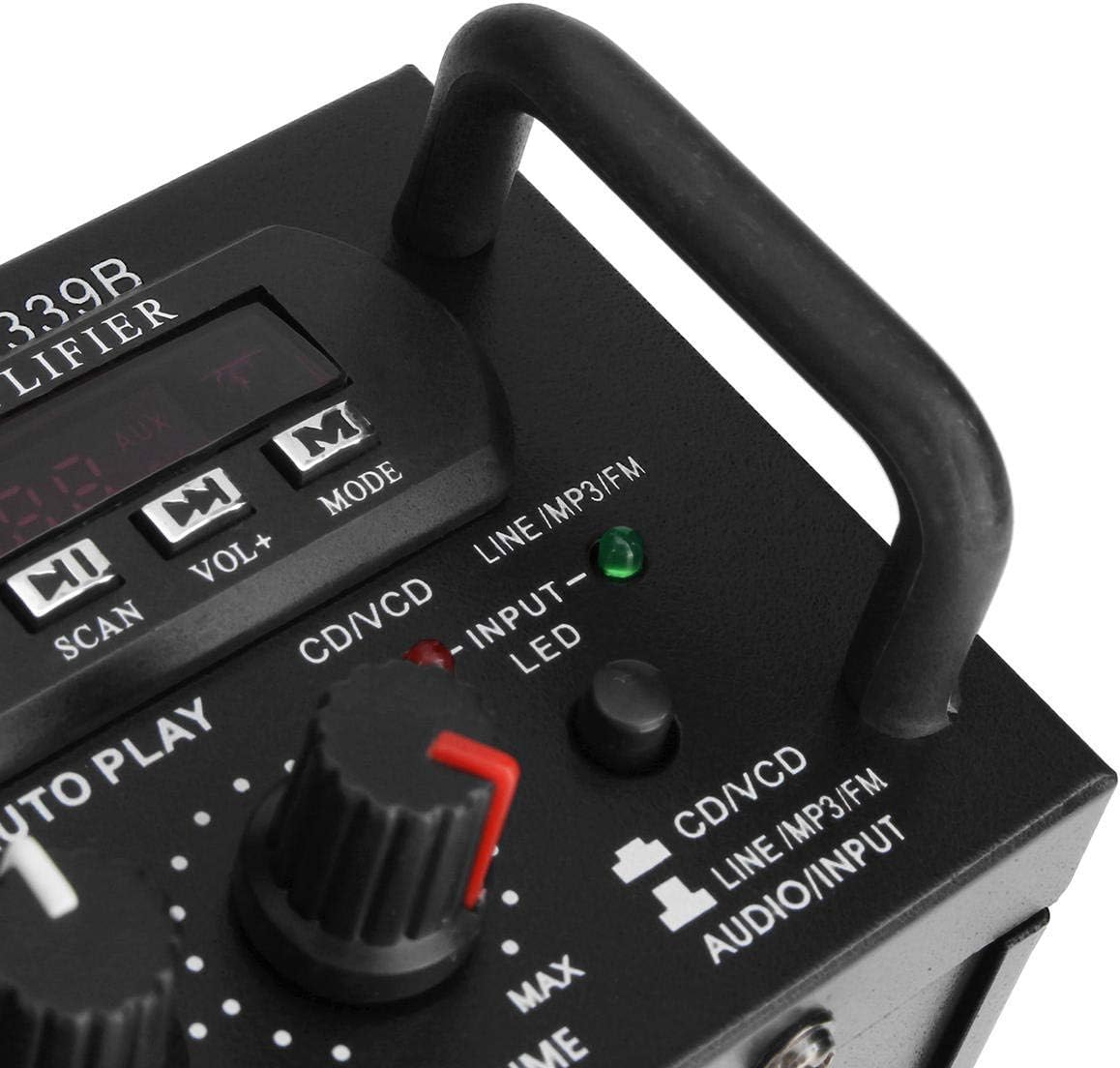
ምስል 2: ዝርዝር view የእርሱ amplifier's front panel, highlighting the various knobs, buttons, and input ports.
- የኃይል መቀየሪያ; ይለውጠዋል ampማብሪያ / ማጥፊያ አብራ ወይም አጥፋ።
- ECHO Control: የማይክሮፎኖችን የኢኮ ተፅዕኖ ያስተካክላል።
- MIC1/MIC2 Input: ማይክሮፎኖችን ለማገናኘት 1/4 ኢንች መሰኪያዎች።
- M.BASS/M.TREBLE: Adjusts bass and treble for microphone input.
- ማይክሮፎን/ድምጽ፡ Adjusts the volume level for microphones.
- VU METER ፦ Displays audio output level.
- USB/SD Card Slot: For connecting USB flash drives or SD memory cards.
- ዲጂታል ማሳያ: የአሁኑን ሁነታ፣ የትራክ ቁጥር ወይም የኤፍኤም ፍሪኩዌንሲ ያሳያል።
- Control Buttons (SCAN, VOL-, VOL+, MODE): For navigating USB/SD/FM functions.
- ባስ/ትሬብል፡ Adjusts the main audio bass and treble levels.
- ድምጽ ለሁሉም የድምጽ ምንጮች ዋና የድምጽ መቆጣጠሪያ።
- INPUT መራጭ፡- Cycles through input sources (CD/VCD, LINE, MP3/FM, Bluetooth).
- INPUT LED Indicators: Lights up to show the currently selected input source.
የኋላ ፓነል አልቋልview

ምስል 3: የኋላ view የእርሱ amplifier, showing the various input and output terminals for connecting speakers and audio sources.
- INPUT (CD/VCD, LINE): RCA (L/R) audio input jacks for connecting external audio sources like CD/DVD players, TVs, or other line-level devices.
- የድምጽ ማጉያ ስርዓት፡- Spring clip terminals for connecting passive speakers. Ensure correct polarity (+ to + and - to -).
- POWER DC 12V INPUT: DC power input for 12V power supply (e.g., car battery, not included).
- AC 110V 60Hz: AC power input for standard household power.
- ኤፍኤም አንቴና Connector for the included FM antenna.
የርቀት መቆጣጠሪያ አብቅቷልview
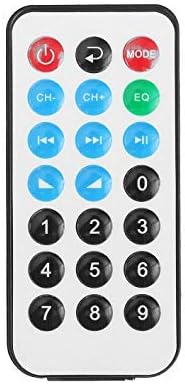
ምስል 4፡ የርቀት መቆጣጠሪያ አዝራሮች አቀማመጥ።
The remote control allows for convenient operation of the amplifier's functions from a distance. It typically includes buttons for power, mode selection, volume adjustment, track navigation (for USB/SD), and FM radio controls.
ለርቀት መቆጣጠሪያ የባትሪ ጭነት

Figure 5: Step-by-step guide for installing the CR2025 lithium battery into the remote control.
The remote control requires a CR2025 lithium battery (3V). To install or replace the battery:
- የባትሪውን ክፍል ከርቀት መቆጣጠሪያው ጀርባ ያግኙት።
- Push the small tab to release the battery tray.
- የባትሪ ትሪውን ያንሸራትቱ።
- የCR2025 ባትሪውን በአዎንታዊው (+) ጎን ወደላይ አስገባ።
- Slide the battery tray back into the remote until it clicks into place.
ማዋቀር
1. የድምጽ ማጉያ ግንኙነት
Connect your passive speakers to the "SPEAKER SYSTEM" terminals on the rear panel. Ensure that the positive (+) terminal of the amplifier connects to the positive (+) terminal of the speaker, and the negative (-) terminal of the amplifier connects to the negative (-) terminal of the speaker. Incorrect polarity can affect sound quality.
2. የድምጽ ግቤት ግንኙነት
- RCA Inputs (CD/VCD, LINE): Use RCA cables to connect external audio sources (e.g., CD player, DVD player, TV audio output) to the corresponding "INPUT" jacks on the rear panel.
- ዩኤስቢ/ኤስዲ ካርድ፡ Insert a USB flash drive or SD memory card into the respective slot on the front panel.
- ብሉቱዝ፡ No physical connection is needed for Bluetooth. Refer to the "Operating Instructions" section for pairing.
3. የማይክሮፎን ግንኙነት
Connect up to two 1/4-inch microphones to the "MIC1" and "MIC2" input jacks on the front panel for karaoke use.
4. FM አንቴና ግንኙነት
Connect the included FM antenna to the FM antenna terminal on the rear panel for improved radio reception.
5. የኃይል ግንኙነት
Connect the power cord to the AC 110V 60Hz input on the rear panel and then plug it into a standard wall outlet. Alternatively, for DC operation, connect a 12V DC power source (not included) to the "POWER DC 12V INPUT" terminals.
የአሠራር መመሪያዎች
1. ማብራት / ማጥፋት
Press the "POWER" switch on the front panel to turn the amplifier on or off. The digital display will illuminate when the unit is powered on.
2. የምንጭ ምርጫ
Press the "INPUT" button on the front panel or the "MODE" button on the remote control to cycle through available input sources: CD/VCD, LINE, MP3/FM, and Bluetooth. The corresponding LED indicator on the front panel will light up.
3. የብሉቱዝ ኦፕሬሽን
- Select "Bluetooth" as the input source using the "INPUT" or "MODE" button. The digital display will show "BLUE" or a similar indicator.
- Enable Bluetooth on your mobile device (smartphone, tablet, PC).
- ፈልግ available Bluetooth devices and select "TAV-339BT" or "Sunbuck" from the list.
- አንዴ ከተጣመረ በኋላ፣ ድምጽን ከመሳሪያዎ ወደ ገመድ አልባ መልቀቅ ይችላሉ ampማብሰያ
4. የዩኤስቢ/ኤስዲ ካርድ መልሶ ማጫወት
- የMP3 ኦዲዮ የያዘ የዩኤስቢ ፍላሽ አንጻፊ ወይም የኤስዲ ካርድ ያስገቡ fileበፊት ፓነል ላይ ባለው ማስገቢያ ውስጥ ይገባል።
- Select "MP3/FM" as the input source. The ampሊፋየር በራስ-ሰር ኦዲዮን ያገኛል እና መጫወት ይጀምራል files.
- Use the "SCAN", "VOL-", "VOL+" buttons on the front panel or the corresponding buttons on the remote control to navigate tracks (play/pause, next/previous).
5. የኤፍኤም ሬዲዮ ኦፕሬሽን
- የኤፍኤም አንቴናው መገናኘቱን ያረጋግጡ።
- Select "MP3/FM" as the input source.
- Press the "SCAN" button to automatically scan and store available FM radio stations.
- Use the "VOL-" and "VOL+" buttons (or remote control) to manually tune or select stored stations.
6. የካራኦኬ ተግባር
- Connect microphones to the "MIC1" and "MIC2" jacks.
- Adjust the "MIC/VOL" knob to control the microphone volume.
- Use the "ECHO" knob to add an echo effect to the vocals.
- Adjust "M.BASS" and "M.TREBLE" to fine-tune the microphone's tone.
7. የድምጽ እና የቃና ቁጥጥር
- ድምጽ Use the large "VOLUME" knob on the front panel to adjust the overall output volume.
- ባስ/ትሬብል፡ Use the "BASS" and "TREBLE" knobs to adjust the low and high frequencies of the main audio output.
ጥገና
- ማጽዳት፡ Disconnect the power before cleaning. Use a soft, dry cloth to wipe the exterior of the unit. Do not use liquid cleaners or aerosol cleaners.
- የአየር ማናፈሻ; Ensure that the ventilation openings are clear of dust and debris to maintain proper cooling.
- ማከማቻ፡ ክፍሉን ረዘም ላለ ጊዜ ካስቀመጠው ከኃይል አቅርቦቱ ያላቅቁት እና በቀዝቃዛና ደረቅ ቦታ ያስቀምጡት.
መላ መፈለግ
| ችግር | ሊሆን የሚችል ምክንያት | መፍትሄ |
|---|---|---|
| ኃይል የለም | የኃይል ገመድ አልተገናኘም፤ የኃይል ማብሪያ / ማጥፊያ ጠፍቷል፤ ከውጪው ኃይል የለም። | Ensure power cord is securely connected. Turn the POWER switch on. Check the power outlet with another device. |
| ምንም የድምፅ ውፅዓት የለም። | Incorrect input source selected; Speaker wires loose or incorrectly connected; Volume too low; Mute activated (if applicable). | Select the correct input source. Check speaker connections and polarity. Increase the VOLUME. Ensure no mute function is active. |
| ብሉቱዝ አይገናኝም። | Amplifier not in Bluetooth mode; Device too far; Device already connected to another amplifier; Bluetooth on device is off. | Select Bluetooth input on the amplifier. Move device closer. Disconnect from other devices. Enable Bluetooth on your device. |
| ዩኤስቢ/ኤስዲ ካርድ አይጫወትም። | Incorrect input source; Files not in supported format (MP3); USB/SD card corrupted or empty. | Select MP3/FM input. Ensure files are MP3 format. Try another USB/SD card. |
| የርቀት መቆጣጠሪያ አይሰራም | Battery depleted or incorrectly installed; Obstruction between remote and ampሊፋየር፤ የርቀት ዳሳሽ ታግዷል። | Replace battery (CR2025) and ensure correct polarity. Remove any obstructions. Ensure the remote sensor on the amplifier is clear. |
ዝርዝሮች
| ባህሪ | ዝርዝር |
|---|---|
| ሞዴል | TAV-339BT |
| ደረጃ የተሰጠው ኢምፔዳንስ | ከ 4 እስከ 8 Ohms |
| የ RMS የኃይል ውፅዓት | 200W + 200W (Recommended for speaker boxes with speakers less than 8") |
| ፒክ የሙዚቃ ኃይል ውፅዓት (PMPO) | 300W + 300W (Total 600W) |
| የኃይል አቅርቦት | AC: 110V 60Hz or DC: 12V 5A |
| ቻናሎች | 2 ቻናሎች |
| የድምጽ ግቤት | Multi-channel signal input (RCA L/R), USB, SD, Bluetooth |
| የማይክሮፎን ግቤት | Dual 1/4-inch Jack |
| የግንኙነት ቴክኖሎጂ | ብሉቱዝ፣ ዩኤስቢ፣ አርሲኤ |
| የገመድ አልባ አይነት | Bluetooth, Infrared (for remote) |
| የምርት ልኬቶች (L x W x H) | 25.4 x 20.32 x 7.01 ሴሜ (10 x 8 x 2.76 ኢንች) |
| የምርት ክብደት | 2.72 ኪግ (6 ፓውንድ) |
| ተስማሚ መሣሪያዎች | Headphones, Laptops, Smartphones |
ዋስትና እና ድጋፍ
ለዋስትና መረጃ ወይም ቴክኒካል ድጋፍ፣ እባክዎ በግዢ ወቅት የቀረበውን ሰነድ ይመልከቱ ወይም ቸርቻሪዎን ያነጋግሩ። ለዋስትና ጥያቄዎች የግዢ ማረጋገጫዎን ያስቀምጡ።