
1. መግቢያ እና በላይview
Thank you for choosing the DOKIO 110W Portable Foldable Solar Panel Kit. This manual provides essential information for the safe and efficient operation of your solar panel kit. Designed for portability and versatility, this kit is ideal for charging 12V batteries and power stations during RV camping, emergency use, or any off-grid adventure.

Figure 1: DOKIO 110W Portable Foldable Solar Panel Kit
2. የጥቅል ይዘቶች
Your DOKIO 110W Portable Foldable Solar Panel Kit includes everything you need for quick setup:
- 100W Foldable Solar Panel (110W variant)
- Standalone PWM Controller (10A)
- SAE to XT60 Cable (9.8ft / 3m)
- XT60 to Alligator Clip Cable
- 4 DC Adapters (3.5×1.35mm / 5.5×2.1mm / 5.5×2.5mm / 8.0mm)
- የማጠራቀሚያ ቦርሳ
- መመሪያ መመሪያ

Figure 2: Included accessories with the DOKIO Solar Panel Kit.
3. የምርት ባህሪዎች
- የታመቀ እና ቀላል ክብደት ያለው ንድፍ; Folds down to 18.9×26×0.5 inches and weighs just 5.3lb, making it highly portable for travel and storage.
- Long Reach Cable: A 9.85ft (3m) extension cable allows flexible positioning of the panel in direct sunlight while keeping the controller or power station shaded.
- Standalone PWM Controller: Provides protection against reverse polarity, overcharge, overload, and short-circuit for 12V systems. It is detachable for easy replacement or upgrade.
- ሁለት የዩኤስቢ ወደቦች: When connected to a 12V battery, the dual USB ports deliver steady power for phones, lights, and small devices. They can also provide emergency charging in direct sunlight without a battery.
- Efficient Monocrystalline Cells with ETFE: Built with premium mono cells for stronger conversion efficiency and faster charging, even in weak sunlight. The panel surface is weather-resistant.
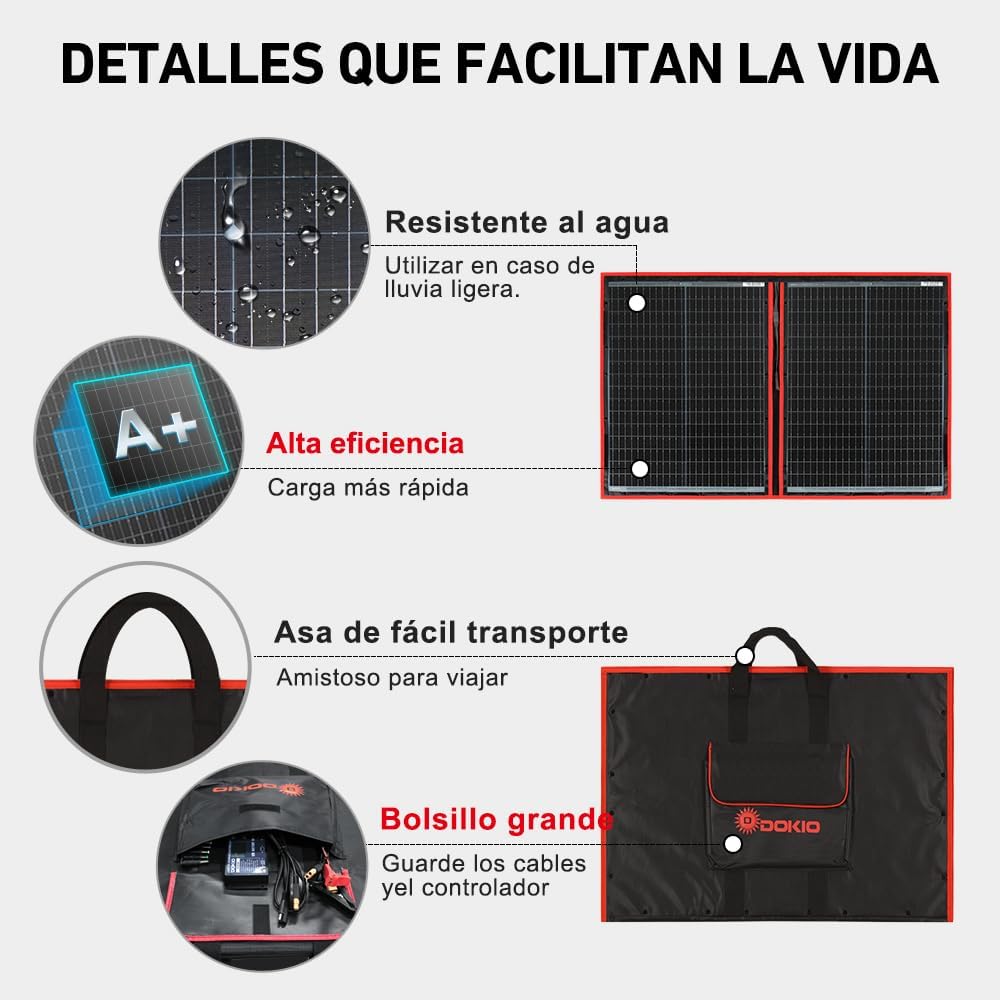
Figure 3: Key features of the DOKIO Solar Panel Kit.
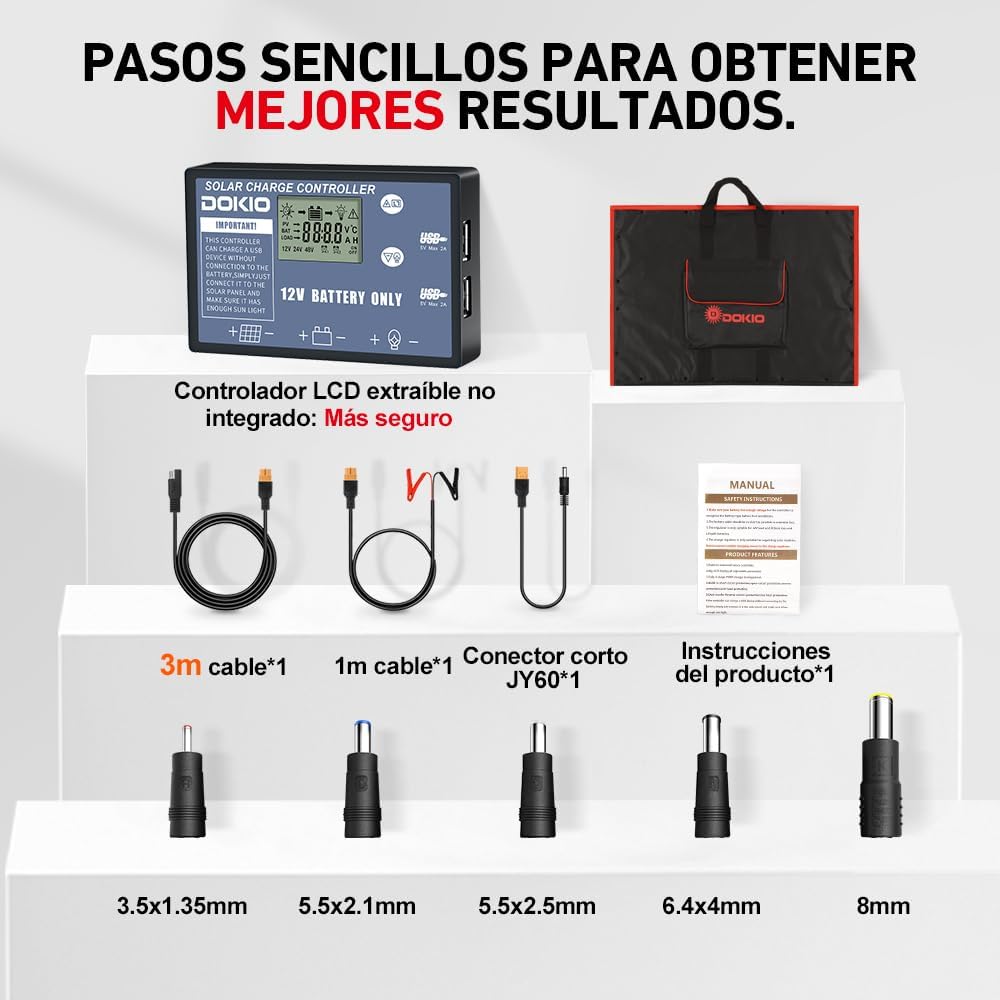
Figure 4: A+ Monocrystalline cells with ETFE for enhanced performance and durability.
4. ማዋቀር እና ግንኙነት
Follow these steps to set up and connect your DOKIO solar panel kit:
4.1 አጠቃላይ ማዋቀር
- Unfold the solar panel completely and place it in direct sunlight.
- Angle the panel perpendicularly to the sun for optimal energy capture, ideally around noon.
- Ensure the panel surface is clean and free of shadows from trees, buildings, or other obstructions.

Figure 5: The long cable allows flexible placement of the panel in the sun while keeping the power station shaded.
4.2 Connecting to a 12V Battery
This method is suitable for charging 12V lead-acid, AGM, GEL, or Lithium batteries.
- Connect the alligator clips to your 12V battery terminals, ensuring correct polarity (red to positive, black to negative).
- Connect the XT60 end of the alligator clip cable to the standalone PWM controller.
- Connect the SAE cable from the solar panel to the controller.

Figure 6: Connection diagram for 12V battery and power station.
4.3 ከኃይል ማመንጫ ጣቢያ ጋር መገናኘት
Use the appropriate DC adapter for your power station's input port.
- Open the solar panel.
- Connect the appropriate DC adapter to the solar panel's output cable.
- Connect the adapter to your power station's solar input port.
ጠቃሚ ማስታወሻ፡-
Some power stations have input limits (e.g., 60W max). The solar panel cannot exceed this cap. Verify your device's input rating to ensure compatibility and optimal performance.
Video 1: Demonstrates how to connect the DOKIO solar panel to a power station or battery.
5. Operating Instructions (Controller Usage)
The standalone PWM controller provides essential information and settings for your charging system. It is designed for 12V battery systems only.
5.1 Display Icons and Operation
The LCD screen displays various parameters. Use the menu buttons to navigate through the information.
- Solar Panel Parameter (PV): ጥራዝ ያሳያልtagኢ እና ከፀሐይ ፓነል የሚመጣ የአሁኑ።
- Battery Parameter (BAT): የባትሪ ጥራዝ ያሳያልtage, charge status, and type.
- Load Parameter (LOAD): Indicates the current drawn by connected loads.
- የምናሌ አዝራሮች፡- Used to cycle through display modes and adjust settings.
Video 2: Detailed guide on how to use the DOKIO solar charge controller, explaining icons and operation.
5.2 የባትሪ አይነት መምረጥ
It is crucial to select the correct battery type on the controller for proper charging and battery longevity.
- Connect the battery to the controller first.
- Press and hold the menu button for 3 seconds to enter the battery type selection menu.
- Cycle through the options (b1: AGM/GEL/Lead-acid, b2: FLD, b3: Lithium, b4: Lifepo4) using the menu button.
- Once your battery type is displayed, press and hold the menu button for 3 seconds to confirm and save the setting.
6. የአፈጻጸም ማመቻቸት
To maximize the power output of your solar panel, consider the following:
- Angle to the Sun: Position the panel to receive direct sunlight at a 90-degree angle. Adjust throughout the day for best results.
- ንጽህናን ይጠብቁ; Regularly wipe dust and debris from the panel surface with a damp ጨርቅ.
- ጥላን ማስወገድ; Even partial shading can significantly reduce power output. Ensure no objects cast shadows on the panel.
- Check Input Limits: Be aware of the maximum solar input wattage your power station can accept. The panel will not exceed this limit.

Figure 7: Simple steps to optimize solar panel performance.
Video 3: Explains common reasons for low power output and how to address them.
7. ዝርዝሮች
| ባህሪ | ዋጋ |
|---|---|
| የምርት ስም | ዶኪዮ |
| ቁሳቁስ | ሞኖኮስትስታን ሲሊከን |
| የምርት መጠኖች (ተከፍተዋል) | 26"ሊ x 18.9"ወ x 0.47"ቁ (በግምት 96 x 66 x 1.2 ሴሜ) |
| የእቃው ክብደት | 5.3 ፓውንድ (2.4 ኪ.ግ) |
| ቅልጥፍና | ከፍተኛ ቅልጥፍና |
| ከፍተኛው ጥራዝtage | 18 ቮልት |
| ከፍተኛው ኃይል | 110 ዋት |
| ተቆጣጣሪ | 10A PWM መቆጣጠሪያ |
| የኬብል ርዝመት | 9.8 ጫማ (3ሜ) |
| ዩፒሲ | 682559946499 |
8. ጥገና
Proper maintenance ensures the longevity and optimal performance of your solar panel kit:
- ማጽዳት፡ Keep the solar panel surface clean from dust, dirt, and debris. Use a soft, damp cloth to wipe it down regularly.
- ማከማቻ፡ When not in use, store the solar panel indoors in a cool, dry place. Avoid leaving the fabric case in heavy rain or harsh sun for extended periods.
- አያያዝ፡ Avoid tight folds or sharp bends, as these can stress the film and cells, potentially reducing power output. Handle gently.
- የኬብል ምርመራ; Periodically check all cables and connectors for any signs of wear, damage, or corrosion.
9. መላ መፈለግ
አንዳንድ የተለመዱ ጉዳዮች እና መፍትሄዎቻቸው እዚህ አሉ
9.1 ዝቅተኛ የኃይል ውፅዓት
If your panel is not producing the expected 100W:
- የአካባቢ ሁኔታዎች: Real-world conditions (outside lab settings) typically yield 60-80W. Clouds, dust, and incorrect tilt angle can significantly drop output.
- Device Input Limits: Some power stations limit solar input (e.g., 40-60W). The panel will not exceed this limit. This is normal system design, not a defect. Verify your device's input rating.
- አካላዊ ጉዳት; Hard bends or weight can crack cells and reduce power.
- መፍትሄዎች፡- Wipe the panel clean, aim it 90° to the sun at midday, and use a power station that accepts higher solar input. If still low, contact support.
9.2 Light Scratches on Panel Surface
Minor scuffs or scratches from transit are normal for new products and do not affect performance. The product is guaranteed brand new from the factory. If you are not satisfied, provide a photo to customer support for assistance.
9.3 Fabric Surface Cracking
Prolonged UV exposure and long sun exposure can age fabrics. Heat and moisture swings, tight folds, and sharp bends can stress the film and cells.
- መከላከል፡- Store indoors in a cool, dry place. Avoid heavy loads or knots on the fabric. Fold gently.
- ተጽዕኖ፡ Good habits contribute to a longer panel life.
9.4 Missing Parts or Compatibility Concerns
If you have missing parts, received a damaged item, or are unsure about power station compatibility, please contact DOKIO customer support directly.
10. ዋስትና እና ድጋፍ
Your DOKIO 110W Portable Foldable Solar Panel Kit comes with a የ 1 ዓመት ዋስትና.
For any questions about your order or products, including compatibility, missing parts, or damage, please contact DOKIO Solar US directly through Amazon. Most issues can be resolved quickly without a return.
- On the product page, click "Sold by DOKIO Solar US".
- Choose "Ask a question", then select "An item for sale."
- Tap "Something else" → "Product details." You'll see a message box — just send a note!
DOKIO Solar US usually replies within 24 hours.