1. መግቢያ
ስለገዙ እናመሰግናለንasing the NewRixing NR-4014 Portable Wireless Bluetooth Stereo Speaker. This device is a versatile sound system designed for portability and high-quality audio. It features Bluetooth connectivity, FM radio, and supports playback from TF cards, U-disks, and AUX input. The integrated microphone allows for hands-free calling, and its ergonomic design with a silicone handle ensures easy transport.
2. የምርት ባህሪዎች
- የላቀ የብሉቱዝ ግንኙነት፦ Easily connects to Bluetooth-enabled devices within a 10-meter range.
- ባለከፍተኛ ጥራት ኦዲዮ፡ Equipped with a 10W loudspeaker for clear and powerful sound.
- በርካታ የመልሶ ማጫወት ሁነታዎች፡- Supports FM radio, TF card, U-disk, and AUX input.
- ከእጅ ነጻ ጥሪ፡ አብሮ የተሰራ ማይክሮፎን ለምቹ የጥሪ አስተዳደር።
- ተንቀሳቃሽ ንድፍ; Features a silicone handle for easy carrying.
- ረጅም የባትሪ ህይወት; Integrated 1500mAh rechargeable battery provides up to 6 hours of music playback.
3. የጥቅል ይዘቶች
እባክዎን ጥቅሉን ለሚከተሉት ነገሮች ያረጋግጡ፡
- 1 x NewRixing NR-4014 Speaker
- 1 x የዩኤስቢ ባትሪ መሙያ ገመድ
- 1 x AUX ኦዲዮ ገመድ
- 1 x የተጠቃሚ መመሪያ
4. ምርት አብቅቷልview

ምስል 1፡ ፊት ለፊት view of the NewRixing NR-4014 speaker, showcasing its grille and control panel.
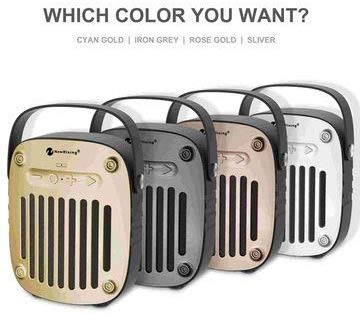
ምስል 2፡ ጎን view of the NewRixing NR-4014 speaker, highlighting its portable handle and compact design.
The speaker features a control panel, input ports (AUX, TF card, U-disk, USB charging), and a power button. Specific button functions are detailed in the Operating Instructions section.
5. ማዋቀር
5.1 የመጀመሪያ ደረጃ መሙላት
Before first use, fully charge the speaker. Connect the provided USB charging cable to the speaker's charging port and the other end to a 5V USB power adapter (not included) or a computer USB port. The charging indicator will illuminate during charging and turn off once fully charged. A full charge takes approximately 3 hours.
5.2 ማብራት / ማጥፋት
- ለማብራት፡- Press and hold the Power button until you hear an audible indication.
- ለማጥፋት፡- ድምጽ ማጉያው እስኪጠፋ ድረስ የኃይል አዝራሩን እንደገና ተጭነው ይያዙት።
6. የአሠራር መመሪያዎች
6.1 የብሉቱዝ ማጣመር
- Ensure the speaker is powered on and in Bluetooth mode (indicated by a flashing LED, if present).
- በተንቀሳቃሽ መሣሪያዎ (ስማርትፎን ፣ ታብሌቱ ፣ ወዘተ) ላይ ብሉቱዝን ያንቁ እና የሚገኙ መሳሪያዎችን ይፈልጉ።
- Select "NR-4014" from the list of found devices.
- Once paired, the speaker will provide an audible confirmation, and the LED indicator will stop flashing.
- አሁን በድምጽ ማጉያው በኩል ከመሳሪያዎ ላይ ድምጽ ማጫወት ይችላሉ።
6.2 ኤፍኤም ሬዲዮ ሁነታ
- ወደ ኤፍኤም ሬዲዮ ሁነታ ለመቀየር የሞድ አዝራሩን (ካለ) ይጫኑ።
- የሚገኙ የኤፍኤም ጣቢያዎችን በራስ-ሰር ለመቃኘት እና ለማስቀመጥ የPlay/Pause አዝራሩን ይጫኑ።
- በተቀመጡ ጣቢያዎች መካከል ለማሰስ የቀደመ/ቀጣይ ትራክ አዝራሮችን ይጠቀሙ።
6.3 TF Card / U-Disk Playback
- Insert a TF card or U-disk (up to 32GB) with MP3 audio fileወደ አግባብ ያለው ማስገቢያ s.
- The speaker will automatically detect the storage device and begin playback.
- መልሶ ማጫወትን ለመቆጣጠር የPlay/Pause፣ Previous/Next ትራክ አዝራሮችን ይጠቀሙ።
6.4 AUX የግቤት ሁነታ
- Connect one end of the provided AUX cable to the speaker's AUX input port.
- Connect the other end to the audio output jack of your external audio device (e.g., MP3 player, laptop).
- The speaker will automatically switch to AUX mode or require a press of the Mode button.
- Audio playback is controlled via your external device.
6.5 ከእጅ-ነጻ ጥሪ
- When connected to a smartphone via Bluetooth, incoming calls will be routed to the speaker.
- Press the Play/Pause button (or Call button, if present) to answer an incoming call.
- ጥሪውን ለመጨረስ የ Play/Pause አዝራሩን እንደገና ይጫኑ።
6.6 የድምጽ መቆጣጠሪያ
Volume is typically controlled by long-pressing the Previous/Next track buttons or directly from the connected device.
7. ጥገና
- ድምጽ ማጉያውን ከውሃ፣ እርጥበት እና ከፍተኛ የሙቀት መጠን ያርቁ።
- ድምጽ ማጉያውን ለስላሳ እና ደረቅ ጨርቅ ያጽዱ. ገላጭ ማጽጃዎችን ወይም ፈሳሾችን አይጠቀሙ.
- ድምጽ ማጉያውን ከመጣል ወይም ለጠንካራ ተጽእኖ ከማድረግ ተቆጠብ።
- ለረጅም ጊዜ ጥቅም ላይ በማይውሉበት ጊዜ፣ ድምጽ ማጉያውን ቀዝቃዛና ደረቅ ቦታ ላይ ያስቀምጡትና የባትሪውን ጤና ለመጠበቅ በየጊዜው ቻርጅ ያድርጉት።
8. መላ መፈለግ
| ችግር | ሊሆን የሚችል ምክንያት | መፍትሄ |
|---|---|---|
| ተናጋሪው አይበራም። | ዝቅተኛ ባትሪ. | ድምጽ ማጉያውን ቢያንስ ለ 3 ሰዓታት ይሙሉ። |
| በብሉቱዝ በኩል ማጣመር አይቻልም። | Bluetooth not enabled on device; speaker too far; speaker not in pairing mode. | Ensure Bluetooth is on, speaker is in pairing mode, and within 10 meters. Try restarting both devices. |
| ከተናጋሪው ምንም ድምፅ የለም። | Volume too low; incorrect mode selected; cable not connected properly (AUX). | Increase volume on both speaker and connected device. Verify correct mode (BT, FM, AUX, TF/U-disk). Check cable connections. |
| የኤፍኤም ሬዲዮ አቀባበል ደካማ ነው። | ደካማ ምልክት; የአካባቢ ጣልቃገብነት. | Move the speaker to a location with better signal. Try rescanning stations. |
9. ዝርዝሮች
| የሞዴል ቁጥር | NR-4014 |
| የገመድ አልባ ስሪት | 4.2 + ኢዲአር |
| Wireless Streaming Range | እስከ 10 ሜትር |
| የውጤት ኃይል | 2 * 5 ዋ (ጠቅላላ 10 ዋ) |
| የድግግሞሽ ምላሽ | 100MHz - 18KHz |
| የጩኸት ሬሾ ምልክት | ≥80 ዲቢቢ |
| የሬዲዮ ድግግሞሽ | 87-108 ሜኸ |
| የኃይል ግቤት | ዲሲ 5 ቪ |
| ባትሪ | Built-in 1500mAh 3.7V rechargeable lithium battery |
| የኃይል መሙያ ጊዜ | በግምት 3 ሰዓታት |
| የጨዋታ ጊዜ | እስከ 6 ሰዓታት (በከፍተኛው የድምፅ መጠን) |
| ተናጋሪው ሾፌር | 4Ω 5 ዋ፣ 52 ሚሜ |
| እክል | 4 ኦኤም |
| የመቆጣጠሪያ ዘዴ | ንካ |
| የውሃ መቋቋም | Yes (as per specifications) |
| የምርት ልኬቶች (L x W x H) | 17.8 x 15.3 x 5.7 ሴ.ሜ |
| የምርት ክብደት | 720 ግ |
| የሚደገፍ ማከማቻ | TF Card, U-Disk (up to 32GB) |
10. ዋስትና እና ድጋፍ
This product is covered by a standard manufacturer's warranty. For specific warranty terms and conditions, please refer to the documentation provided at the time of purchase or contact your retailer. For technical support or service inquiries, please contact the vendor or retailer from whom you purchased the product.
ለዋስትና ጥያቄዎች እባክዎ የግዢ ማረጋገጫዎን ያቆዩ።


