
ROCCAT ROC-12-940-BN
Roccat Vulcan 122 Mechanical Gaming Keyboard User Manual
ሞዴል: ROC-12-940-BN
1. መግቢያ
The Roccat Vulcan 122 is a high-performance mechanical gaming keyboard designed for precision and durability. It features Roccat's unique Titan switches, advanced AIMO RGB lighting, and a robust aluminum construction. This manual provides detailed instructions for setting up, operating, maintaining, and troubleshooting your keyboard.

Image: The Roccat Vulcan 122 keyboard shown with a Roccat mouse and headset, demonstrating its vivid, dynamic lighting synergy with AIMO.
ቁልፍ ባህሪዎች
- Unique design with lowered keycaps and reduced reaction time.
- RGB lighting with configurable LED effects and adjustable AIMO effects.
- High-quality and resistant design with robust materials and an anodized aluminum surface.
- Advanced anti-ghosting with N-Key Rollover (NKRO).
- Programmable macro keys and ROCCAT Easy-Shift[+].
2. ማዋቀር
2.1 የቁልፍ ሰሌዳውን በማገናኘት ላይ
To connect your Roccat Vulcan 122 keyboard:
- የቁልፍ ሰሌዳውን እና መለዋወጫዎቹን ይክፈቱ።
- የዩኤስቢ ማገናኛውን ከቁልፍ ሰሌዳው ወደ ኮምፒውተርዎ ወደሚገኝ የዩኤስቢ ወደብ ይሰኩ።
- The operating system will automatically detect and install the necessary drivers.
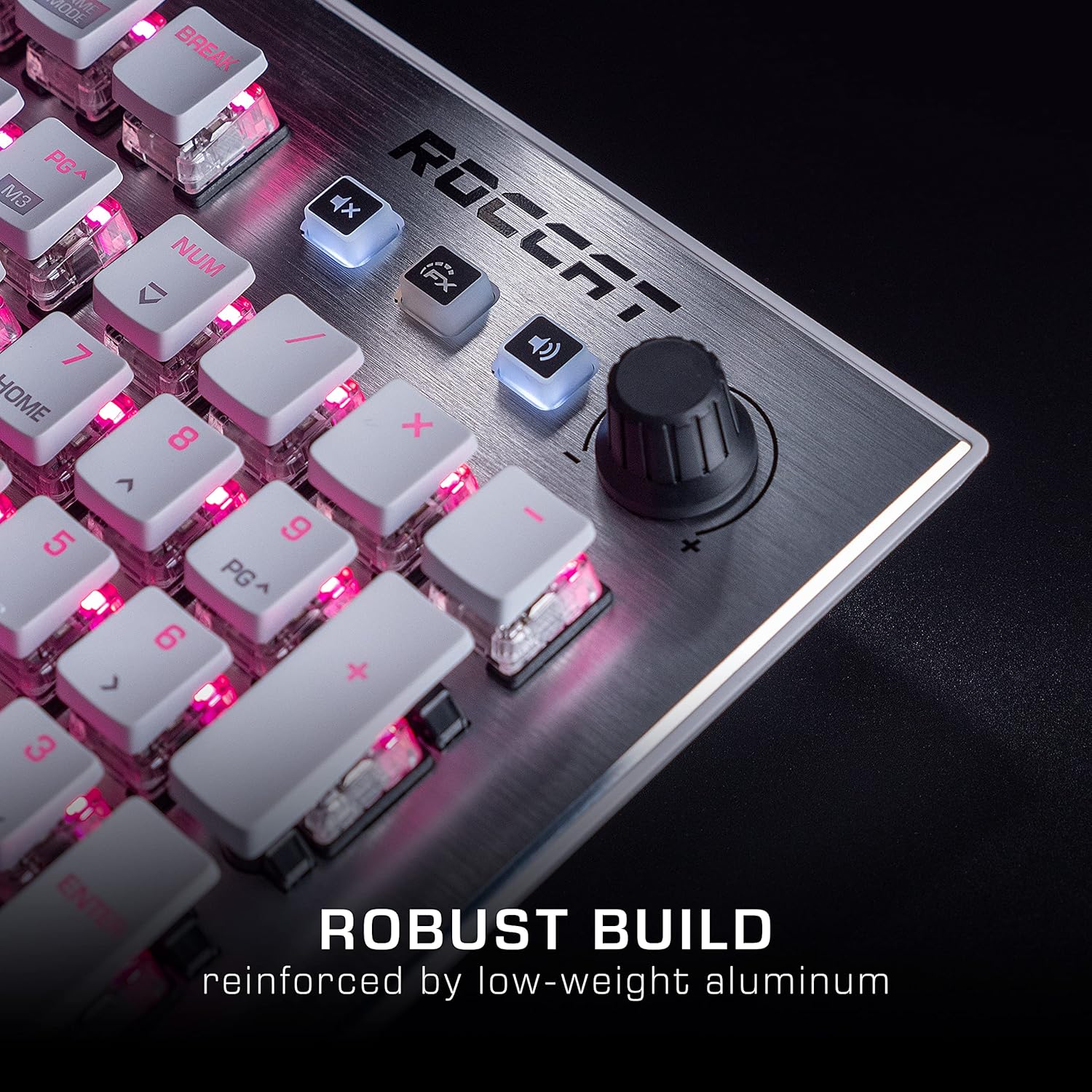
Image: The Roccat Vulcan 122 keyboard shown with its detachable wrist rest, ready for connection.
2.2 የሶፍትዌር ጭነት (ROCCAT Swarm)
For full functionality and customization, install the ROCCAT Swarm software:
- ኦፊሴላዊውን ROCCAT ይጎብኙ webጣቢያ (www.roccat.com) እና ወደ የድጋፍ ክፍል ይሂዱ.
- የቅርብ ጊዜውን የROCCAT Swarm ሶፍትዌር ለስርዓተ ክወናዎ ያውርዱ።
- ጫኚውን ያሂዱ እና በስክሪኑ ላይ ያሉትን መመሪያዎች ይከተሉ።
- After installation, launch ROCCAT Swarm to configure your keyboard settings, lighting, and macros.
3. የቁልፍ ሰሌዳውን መስራት
3.1 መደበኛ የቁልፍ ተግባራት
The Vulcan 122 functions as a standard QWERTY keyboard. All alphanumeric keys, function keys (F1-F12), navigation keys, and the numeric keypad operate as expected.
3.2 የሚዲያ መቆጣጠሪያዎች
The keyboard features dedicated media controls for convenient audio management.
- የድምፅ ቁልፍ; Located in the upper right corner, rotate to adjust system volume.
- ድምጸ-ከል ያድርጉ- ድምጹን ድምጸ-ከል ለማድረግ/ለማንሳት ይጫኑ።
- FX አዝራር፡- Cycles through lighting effects or other programmable functions.

ምስል፡ መቀራረብ view of the mixer-style media controls on the Roccat Vulcan 122, including the volume knob and dedicated function keys.
3.3 RGB Lighting Customization (AIMO)
The Vulcan 122 features advanced RGB lighting with Roccat's AIMO intelligent lighting system. Use the ROCCAT Swarm software to:
- Select from various pre-set lighting effects.
- Customize individual key illumination.
- Adjust brightness and speed of effects.
- Synchronize lighting with other AIMO-compatible devices.
3.4 Programmable Macro Keys and Easy-Shift[+]
The keyboard includes programmable macro keys and the Easy-Shift[+] function, allowing you to assign secondary functions to keys.
- Use the ROCCAT Swarm software to record and assign macros to designated keys.
- Easy-Shift[+] allows you to double the number of assignable functions by holding down the Easy-Shift[+] key (usually Caps Lock by default, configurable in Swarm) and pressing another key.
3.5 Anti-Ghosting with NKRO
The Vulcan 122 features advanced anti-ghosting technology with N-Key Rollover (NKRO), ensuring that every key press is registered accurately, even when multiple keys are pressed simultaneously.

Image: A hand demonstrating typing on the Roccat Vulcan 122 keyboard, emphasizing the ergonomic design of the keys for comfortable use.
4. ጥገና
4.1 የቁልፍ ሰሌዳውን ማጽዳት
To ensure the longevity and optimal performance of your Vulcan 122 keyboard, regular cleaning is recommended.
- ከማጽዳትዎ በፊት የቁልፍ ሰሌዳውን ከኮምፒዩተርዎ ያላቅቁት.
- ለስላሳ፣ ከቆሸሸ ነፃ የሆነ ጨርቅ በትንሹ ተጠቀምampened with water or a mild cleaning solution to wipe the keycaps and surface. Avoid harsh chemicals.
- For dust and debris between keys, use compressed air. The raised keycap design makes cleaning easier.
- እንደገና ከማገናኘትዎ በፊት የቁልፍ ሰሌዳው ሙሉ በሙሉ ደረቅ መሆኑን ያረጋግጡ።

Image: A close-up of the Roccat Vulcan 122 keyboard keys, illustrating their design which facilitates easy cleaning and resistance to dust and liquids.
5. መላ መፈለግ
If you encounter issues with your Roccat Vulcan 122 keyboard, refer to the following common problems and solutions:
- የቁልፍ ሰሌዳ ምላሽ አይሰጥም፡-
- የዩኤስቢ ገመድ ከቁልፍ ሰሌዳው እና ከኮምፒዩተር ጋር ደህንነቱ በተጠበቀ ሁኔታ መገናኘቱን ያረጋግጡ።
- የቁልፍ ሰሌዳውን ወደ ሌላ የዩኤስቢ ወደብ ለመሰካት ይሞክሩ።
- ኮምፒተርዎን እንደገና ያስጀምሩ.
- Check if the keyboard is disabled in your operating system's device manager.
- የ RGB መብራት አይሰራም ወይም ትክክል አይደለም፡-
- Ensure the ROCCAT Swarm software is installed and up to date.
- በSwarm ሶፍትዌር ውስጥ የመብራት ቅንብሮችን ያረጋግጡ።
- Perform a firmware update for the keyboard via Swarm.
- ቁልፎች አይመዘገቡም ወይም አይሳኩም፦
- በጥገና ክፍል ውስጥ እንደተገለጸው የተጎዱትን ቁልፎች ያጽዱ።
- የቁልፍ ሰሌዳው firmware ወቅታዊ መሆኑን ያረጋግጡ።
- ስርዓት-ተኮር ችግሮችን ለማስወገድ የቁልፍ ሰሌዳውን በሌላ ኮምፒውተር ላይ ይሞክሩት።
- ROCCAT Swarm software not detecting keyboard:
- የቁልፍ ሰሌዳው በትክክል መገናኘቱን ያረጋግጡ።
- Restart the Swarm software and your computer.
- የROCCAT Swarm ሶፍትዌርን እንደገና ይጫኑ።
- የሚጋጩ ሶፍትዌሮችን ወይም ሾፌሮችን ያረጋግጡ።
6. ዝርዝሮች
| ባህሪ | ዝርዝር |
|---|---|
| የምርት ስም | ሮኮሳት |
| የሞዴል ስም | ቮልካን 122 |
| የሞዴል ቁጥር | ROC-12-940-BN |
| የቁልፍ ሰሌዳ መግለጫ | መካኒካል |
| የመቀየሪያ አይነት | የሚዳሰስ |
| ቁሳቁስ | አሉሚኒየም |
| ልዩ ባህሪያት | የኋላ መብራት |
| ተስማሚ መሣሪያዎች | Laptop (PC) |
| የስርዓተ ክወና ድጋፍ | ዊንዶውስ 10 ፣ ዊንዶውስ 7 ፣ ዊንዶውስ 8 |
| የምርት ልኬቶች | 46.2 x 23.5 x 3.2 ሴ.ሜ |
| የእቃው ክብደት | 1.15 ኪ.ግ |

ምስል፡ የፈነዳ view diagram illustrating the components of a Roccat Titan Tactile mechanical switch, highlighting its design for swift and precise response.
7. ዋስትና እና ድጋፍ
7.1 የዋስትና መረጃ
Your Roccat Vulcan 122 keyboard is covered by a manufacturer's warranty. The specific terms and duration of the warranty may vary by region and retailer. Please retain your proof of purchase for warranty claims. For detailed warranty information, refer to the warranty card included with your product or visit the official ROCCAT webጣቢያ.
7.2 የቴክኒክ ድጋፍ
For technical assistance, driver updates, or further inquiries, please visit the official ROCCAT support page:
የተደጋጋሚ ጥያቄዎች፣ የመላ ፍለጋ መመሪያዎችን እና የደንበኞች አገልግሎት የእውቂያ መረጃዎችን በድረገጻቸው ላይ ማግኘት ይችላሉ። webጣቢያ.
ተዛማጅ ሰነዶችROC-12-940-BN


Ask a question about this manual
Ask about setup, troubleshooting, compatibility, parts, safety, or missing instructions. Manuals+ will review the question and use this page’s manual context to help answer it.