
መግቢያ
This manual provides essential information for the safe and efficient operation of your Domo DO157A Tower Fan. Please read these instructions carefully before use and retain them for future reference.
The Domo DO157A is a versatile appliance combining the functions of an air cooler, fan, and humidifier, designed to enhance your indoor comfort.

ምስል፡ ፊት ለፊት view of the Domo DO157A Tower Fan.
የደህንነት መረጃ
የእሳት፣ የኤሌክትሪክ ንዝረት እና የግል ጉዳት አደጋን ለመቀነስ የኤሌክትሪክ ዕቃዎችን ሲጠቀሙ ሁል ጊዜ መሰረታዊ የደህንነት ጥንቃቄዎችን ይጠብቁ።
- ጥራዝ ያረጋግጡtage በመሣሪያው ላይ የተመለከተው ከአከባቢዎ ዋና ቮልት ጋር ይዛመዳልtagሠ ከመገናኘቱ በፊት.
- መሳሪያውን፣ መሰኪያውን ወይም ገመዱን በውሃ ወይም ሌሎች ፈሳሾች ውስጥ አታስጠምቁት።
- Unplug from the outlet when not in use, before cleaning, or before moving the appliance.
- መሳሪያውን ህጻናት በማይደርሱበት ቦታ ያስቀምጡት.
- በተበላሸ ገመድ ወይም መሰኪያ፣ ወይም መሳሪያው ከተበላሸ በኋላ ወይም በማንኛውም መልኩ ከተበላሸ በኋላ ማንኛውንም መሳሪያ አይጠቀሙ።
- Refer to the official safety document for detailed safety guidelines: የደህንነት መረጃ (ፒዲኤፍ).
የምርት ክፍሎች
Familiarize yourself with the main parts of your Domo DO157A Tower Fan:
- Main Unit (Tower Fan)
- 7-ሊተር የውሃ ማጠራቀሚያ
- Washable Filter System (Honeycomb Cooling Membrane)
- የርቀት መቆጣጠሪያ
- Coolpack (for enhanced cooling)
- የቁጥጥር ፓነል ከ LED ማሳያ ጋር
ምስል፡ View of the tower fan with the filter system removed, showing the honeycomb cooling membrane.
ማዋቀር
- ማሸግ፡ Carefully remove the appliance from its packaging. Retain packaging for storage or disposal.
- አቀማመጥ፡- Place the tower fan on a firm, level surface. Ensure there is adequate space around the unit for proper airflow.
- የውሃ ማጠራቀሚያ መሙላት;
- የውኃ ማጠራቀሚያውን ከታችኛው ክፍል ከኋላ በኩል ይጎትቱ.
- Fill the 7-liter water tank with clean, cold water. For enhanced cooling, place the included Coolpack (after freezing) into the water tank.
- Ensure the water level does not exceed the maximum fill line.
- የውሃ ማጠራቀሚያውን ወደ ቦታው እስኪገባ ድረስ ወደ ክፍሉ መልሰው ያንሸራትቱት።
- የኃይል ግንኙነት; የኃይል ገመዱን ተስማሚ በሆነ የኤሌክትሪክ ሶኬት (230V) ውስጥ ይሰኩት።
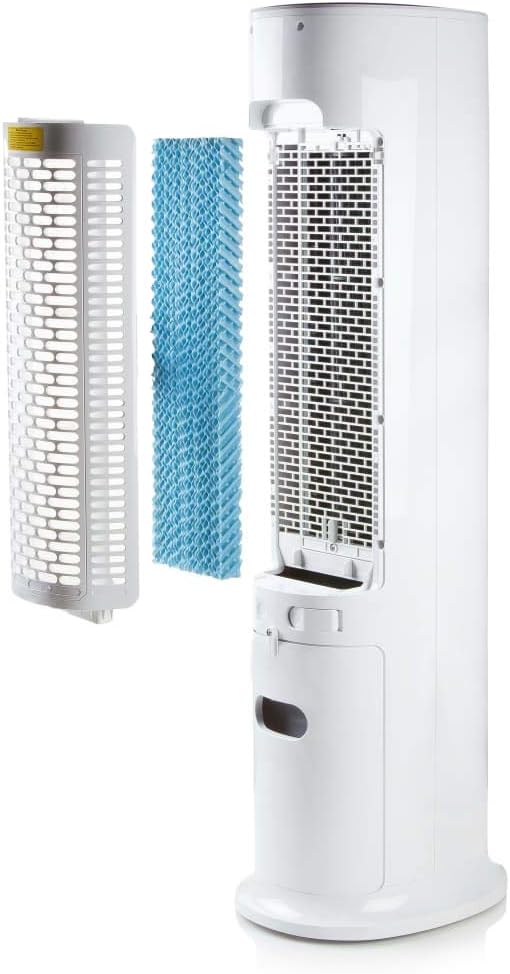
Image: Demonstrating the process of filling the water tank of the tower fan.
የአሠራር መመሪያዎች
The Domo DO157A can be operated using the control panel on top of the unit or the included remote control.
የመቆጣጠሪያ ፓነል እና የርቀት መቆጣጠሪያ ተግባራት

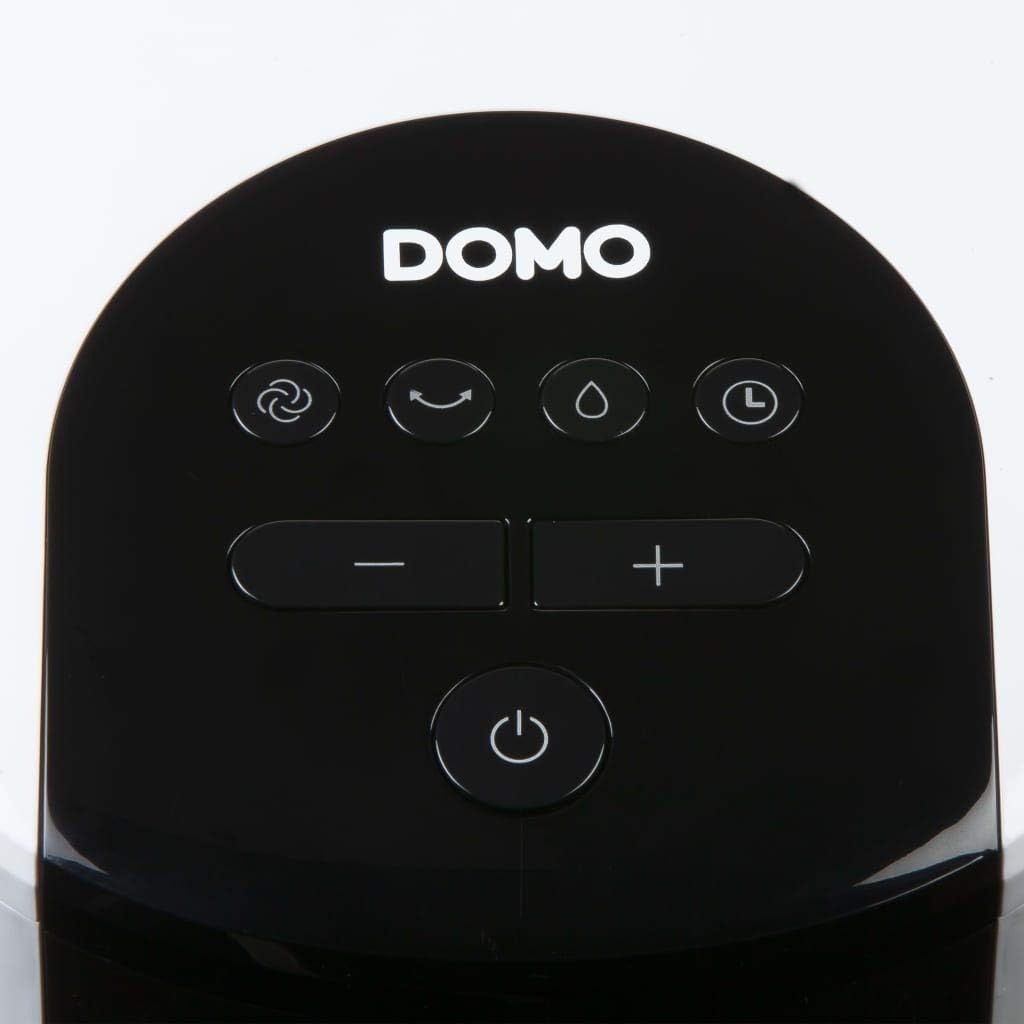
ምስል፡ መቀራረብ view of the control panel on the top of the tower fan.
- ማብሪያ ማጥፊያ (⏻): ክፍሉን ያበራል ወይም ያጠፋል።
- ሁነታ አዝራር (☺): Cycles through 3 ventilation modes:
- መደበኛ፡ በተመረጠው ፍጥነት የማያቋርጥ የአየር ፍሰት.
- ተፈጥሯዊ: ከተለያዩ የደጋፊዎች ፍጥነት ጋር የተፈጥሮ ንፋስን ያስመስላል።
- እንቅልፍ፡ Reduces fan speed and noise for quiet operation during sleep.
- Speed Buttons (- / +): የአየር ማራገቢያ ፍጥነት (4 ደረጃዎች) ያስተካክላል.
- Cooling/Humidifier Button (💧): Activates or deactivates the air cooling and humidifying function. This function requires water in the tank.
- የሰዓት ቆጣሪ ቁልፍ (⏱): Sets the operating timer for up to 10 hours. Each press adds 1 hour.
- የመወዛወዝ ቁልፍ (↻): Activates or deactivates the oscillation function, allowing the fan to rotate and distribute air over a wider area.
የመነሻ ክዋኔ
- Press the Power button to turn on the unit. The default mode is usually Normal.
- Use the Speed buttons to select your desired fan speed (1-4).
- To activate cooling/humidifying, press the Cooling/Humidifier button. Ensure the water tank is filled.
- Select a ventilation mode (Normal, Natural, Sleep) using the Mode button.
- Press the Oscillation button for wider air distribution.
- Set the timer if desired using the Timer button.

Image: The tower fan operating in a living room, illustrating the airflow direction.
ጥገና
መደበኛ ጥገና ጥሩ አፈጻጸምን ያረጋግጣል እና የመሳሪያዎን ዕድሜ ያራዝመዋል።
ውጫዊውን ማጽዳት
- ከማጽዳትዎ በፊት ሁልጊዜ ክፍሉን ይንቀሉ.
- ውጫዊ ገጽታዎችን ለስላሳ, መamp ጨርቅ. ገላጭ ማጽጃዎችን ወይም ፈሳሾችን አይጠቀሙ.
- ምንም ውሃ ወደ ውስጣዊ አካላት ውስጥ እንደማይገባ ያረጋግጡ.
የውሃ ማጠራቀሚያውን ማጽዳት
- የውሃ ማጠራቀሚያውን ከክፍሉ ያስወግዱ.
- የቀረውን ውሃ ባዶ ያድርጉት።
- Clean the tank with mild soap and water. Rinse thoroughly.
- እንደገና ከማስገባትዎ በፊት ታንኩ ሙሉ በሙሉ እንዲደርቅ ይፍቀዱለት።
- Clean the water tank regularly, especially if using the humidifying function frequently, to prevent mold or mildew buildup.
የማጣሪያ ስርዓቱን ማጽዳት
- The high-quality filter system is washable.
- Carefully remove the filter (honeycomb cooling membrane) from the unit as shown in the "Product Components" section.
- አቧራ እና ቆሻሻን ለማስወገድ ማጣሪያውን በሚፈስ ውሃ ስር ያጠቡ።
- ወደ ክፍሉ እንደገና ከማስገባትዎ በፊት ማጣሪያው ሙሉ በሙሉ እንዲደርቅ ይፍቀዱለት።
- Regular cleaning of the filter is recommended, especially for allergy sufferers, to maintain hygiene and efficiency.
መላ መፈለግ
If you encounter issues with your Domo DO157A, refer to the following common problems and solutions:
| ችግር | ሊሆን የሚችል ምክንያት | መፍትሄ |
|---|---|---|
| ክፍል አይበራም። | የኃይል አቅርቦት የለም። | የኤሌትሪክ ገመዱ ደህንነቱ በተጠበቀ ሁኔታ በሚሰራ ሶኬት ውስጥ መጫኑን ያረጋግጡ። |
| ምንም የማቀዝቀዝ ውጤት የለም. | የውሃ ማጠራቀሚያ ባዶ ነው ወይም የማቀዝቀዝ ተግባር አልነቃም. | Fill the water tank. Press the Cooling/Humidifier button to activate the function. Ensure Coolpack is frozen and placed in the tank if desired. |
| ደካማ የአየር ፍሰት. | Fan speed is too low; air filter is dirty. | Increase the fan speed. Clean the air filter as per maintenance instructions. |
| ደስ የማይል ሽታ. | Stagnant water in the tank or dirty filter. | Empty and clean the water tank. Clean the filter. Use fresh water. |
ዝርዝሮች
| ባህሪ | ዝርዝር |
|---|---|
| የምርት ስም | ዶሞ |
| የሞዴል ስም / ቁጥር | DO157A |
| ዓይነት | Tower Fan, Air Cooler, Humidifier |
| ቁሳቁስ | ፕላስቲክ |
| የመጫኛ አይነት | ራሱን ችሎ የቆመ |
| ቀለም | ነጭ |
| የአየር ፍሰት አቅም | 294.29 Cubic Feet per Minute (500 m³/h) |
| የመቆጣጠሪያ ዓይነት | Remote Control, On-unit Control Panel |
| የውሃ ማጠራቀሚያ አቅም | 7 ሊትር |
| የሚመከር የወለል አካባቢ | 25 ካሬ ሜትር |
| የምርት ክብደት | 11.2 ኪ |
| ዋትtage | 65 ዋ |
| የድምጽ ደረጃ | 40 ዲሴብል |
| የፍጥነት ብዛት | 4 |
| ጥራዝtage | 230 ቮልት |
| ልኬቶች (D x W x H) | 34 ሴሜ x 26 ሴሜ x 106.5 ሴ.ሜ |
| ሰዓት ቆጣሪ | እስከ 10 ሰዓታት ድረስ |
| የአየር ማናፈሻ ሁነታዎች | መደበኛ, ተፈጥሯዊ, እንቅልፍ |
| ልዩ ባህሪያት | Sleep mode, Washable filter system, Oscillation, Coolpack included |
ዋስትና እና ድጋፍ
For warranty information, please refer to the documentation provided with your purchase or contact Domo customer support. Keep your proof of purchase for warranty claims.
If you require further assistance or have questions not covered in this manual, please contact Domo customer service through their official webጣቢያ ወይም ከምርትዎ ጋር የቀረቡት የእውቂያ ዝርዝሮች።