
1. ምርት አብቅቷልview
The Alecto WS-1560 is a wireless weather station designed to provide accurate indoor and outdoor environmental data. Featuring a clear color display and a remote outdoor sensor, it offers comprehensive weather information and additional useful functions for your home.
ቁልፍ ባህሪዎች
- የቤት ውስጥ እና የውጪውን የሙቀት መጠን እና እርጥበት ይለካል።
- Long-range wireless outdoor sensor (up to 100 meters).
- 5.7-inch well-lit color display with animated weather forecast icons.
- Temperature and ice alarm functions.
- የማንቂያ ሰዓት ከማሸለብ ተግባር ጋር።
- Memory function for latest and highest readings.
- Moon phase indicator, date, day, and time display.
- Battery-operated main unit and outdoor sensor with backup batteries.

Figure 1.1: Alecto WS-1560 Main Unit and Wireless Outdoor Sensor.
2. የጥቅል ይዘቶች
Ensure all components are present and in good condition upon unpacking:
- Alecto WS-1560 Main Unit (Indoor Display)
- የገመድ አልባ ከቤት ውጭ ዳሳሽ
- የተጠቃሚ መመሪያ
- (Power adapter and batteries may be included depending on package)
Video 2.1: Illustrative video showing typical weather station components and basic setup. (Note: This video is for a related product and may not show the exact Alecto WS-1560 model.)
3. ማዋቀር እና መጫን
3.1. የባትሪ ጭነት
Both the main unit and the outdoor sensor require batteries for operation. Ensure you use the correct type and polarity.
- የውጪ ዳሳሽ፡-
- በገመድ አልባው የውጪ ዳሳሽ ጀርባ ላይ ያለውን የባትሪ ክፍል ይክፈቱ።
- Insert 2x AA batteries (not included) according to the polarity markings (+/-).
- የባትሪውን ክፍል ደህንነቱ በተጠበቀ ሁኔታ ይዝጉ።
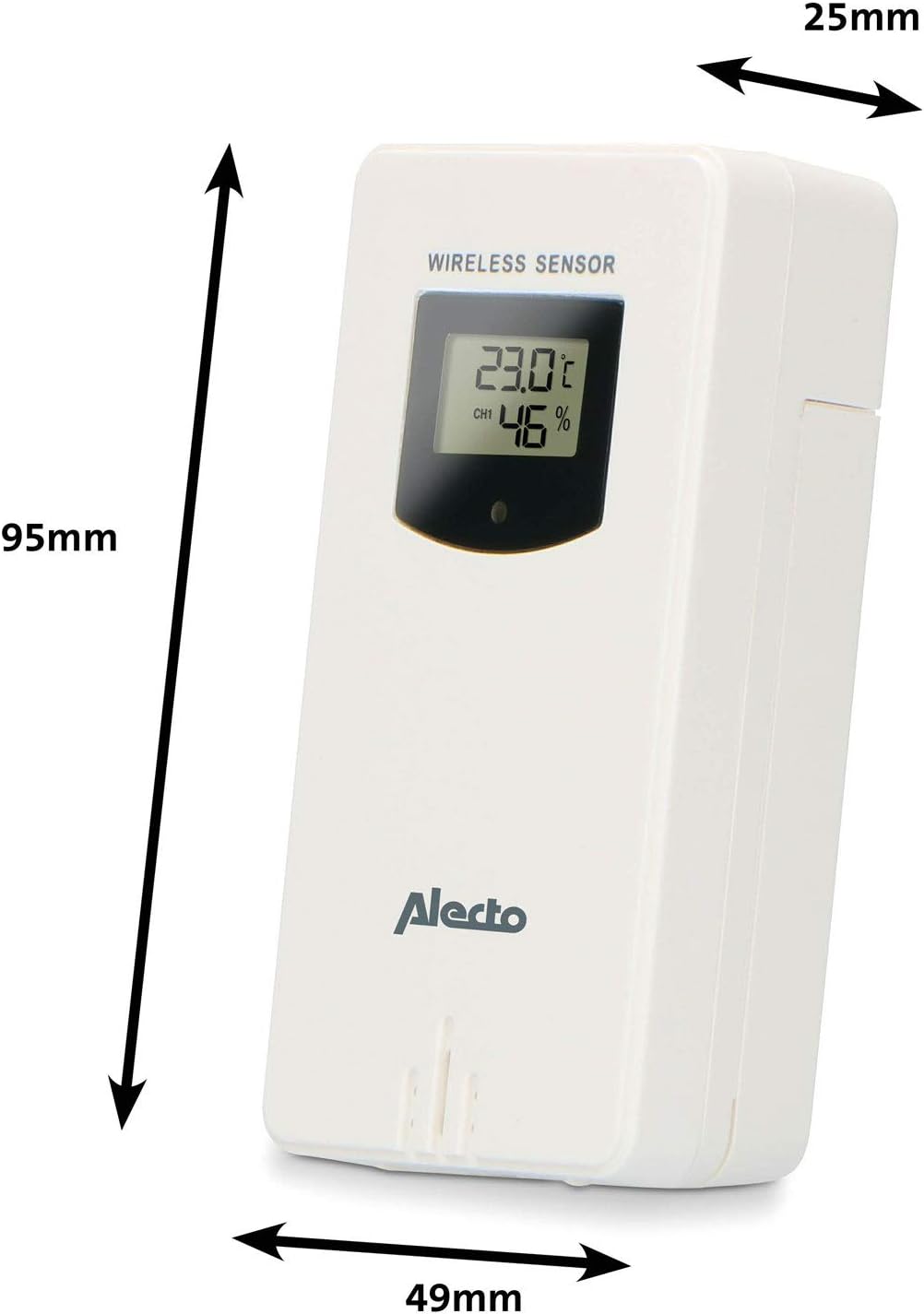
Figure 3.1: Wireless Outdoor Sensor dimensions and battery compartment location.
- ዋና ክፍል፡
- የባትሪውን ክፍል ከዋናው ክፍል ጀርባ ይክፈቱ።
- Insert 2x AA batteries (not included) according to the polarity markings (+/-). These serve as backup batteries.
- የባትሪውን ክፍል ደህንነቱ በተጠበቀ ሁኔታ ይዝጉ።
- Connect the main unit to a power outlet using the provided power adapter (if included).

Figure 3.2: Main Unit dimensions and power input.
3.2. ዳሳሽ አቀማመጥ
For accurate outdoor readings, proper placement of the wireless sensor is crucial:
- Place the sensor in a shaded area, away from direct sunlight, to prevent inaccurate temperature readings.
- በሴንሰሩ ዙሪያ ጥሩ የአየር ዝውውርን ያረጋግጡ።
- Mount the sensor vertically, approximately 1.5 to 2.5 meters (5 to 8 feet) above the ground.
- Avoid placing the sensor near heat sources (e.g., vents, windows) or moisture sources.
- The maximum transmission range is 100 meters (328 feet) in open air. Walls and other obstacles will reduce this range.

ምስል 3.3: ዘፀample of outdoor sensor placement on a wall.
3.3. ሴንሰሩን ከዋናው ክፍል ጋር ማጣመር
The main unit and sensor should automatically pair once both are powered on. If pairing does not occur:
- ሁለቱም መሳሪያዎች አዲስ ባትሪዎች እንዳላቸው እና በክልላቸው ውስጥ መሆናቸውን ያረጋግጡ።
- Press the "TX" button inside the outdoor sensor's battery compartment to manually send a signal.
- On the main unit, you may need to initiate a search for the outdoor sensor (refer to the "Operation" section for specific button functions).
4. ኦፕሬሽን
4.1. የማሳያ አቀማመጥ
The 5.7-inch color display provides a clear overview of all measured data. Key areas include:
- የውጪ ሙቀት እና እርጥበት; Displays current outdoor conditions.
- የቤት ውስጥ ሙቀት እና እርጥበት; Displays current indoor conditions.
- Animated Weather Forecast: Icons predict upcoming weather (sunny, partly cloudy, cloudy, rainy, snowy).
- ሰዓት እና ቀን የአሁኑ ሰዓት፣ ቀን እና ቀን።
- የባሮሜትሪክ ግፊት; የአሁኑ የከባቢ አየር ግፊት.
- የጨረቃ ደረጃ; የአሁኑ የጨረቃ ምዕራፍ ግራፊክ ውክልና።
- Temperature/Ice Alarm Indicators: Alerts for specific temperature thresholds or potential ice conditions.

ምስል 4.1: ዝርዝር view of the main unit's color display.
4.2. የአዝራር ተግባራት
The main unit features several buttons for setting and adjusting functions. Common buttons include:
- SET: Enters setup mode for time, date, and other settings.
- አቅጣጫዎች: Switches between display modes or confirms settings.
- ወደላይ/ታች (ወይም +/-): Adjusts values during setup or cycles through channels.
- ዋስትና የማንቂያ ተግባሩን ያዘጋጃል ወይም ያነቃቃል።
- ኤምኤም፡ Displays maximum/minimum temperature and humidity records. Long press to clear records.
- SNOOZE / LIGHT Activates snooze during an alarm or adjusts backlight brightness.
Video 4.2: Illustrative video demonstrating various features and settings of a weather station. (Note: This video is for a related product and may not show the exact Alecto WS-1560 model.)
4.3. ጊዜ እና ቀን ማዘጋጀት
- Press and hold the "SET" button until the time display starts flashing.
- Use the "UP" or "DOWN" buttons to adjust the hour, then press "SET" to confirm and move to minutes.
- ለደቂቃዎች, ለዓመት, ለወር እና ለቀን መድገም.
- Press "SET" again to exit the setting mode.
4.4. የማንቂያ ቅንብሮች
- Press the "ALARM" button once to view የማስጠንቀቂያ ደወል ጊዜ።
- የማንቂያ ሰዓቱ ብልጭ ድርግም እስኪል ድረስ የ"ALARM" አዝራሩን ተጭነው ይያዙት።
- Use the "UP" or "DOWN" buttons to set the desired alarm hour and minute.
- Press "ALARM" to confirm.
- To activate/deactivate the alarm, press the "ALARM" button briefly when the alarm time is displayed. An alarm icon will appear/disappear.
4.5. ከፍተኛ/ዝቅተኛ መዝገቦች
The weather station automatically records the maximum and minimum temperature and humidity values over a 24-hour period.
- Press the "MEM" button briefly to view the maximum recorded values.
- Press "MEM" again to view the minimum recorded values.
- Press "MEM" a third time to return to current readings.
- To clear the records, press and hold the "MEM" button for a few seconds.
5. ጥገና
- ማጽዳት፡ Wipe the display and unit surfaces with a soft, damp ጨርቅ. ገላጭ ማጽጃዎችን ወይም ፈሳሾችን አይጠቀሙ.
- የባትሪ መተካት፡ Replace batteries in both the main unit and the outdoor sensor when the low battery indicator appears on the display. Always replace all batteries at the same time with new ones of the same type.
- የዳሳሽ እንክብካቤ Periodically check the outdoor sensor for debris or obstructions that might affect its readings. Ensure it remains in a shaded, well-ventilated area.
6. መላ መፈለግ
| ችግር | ሊሆን የሚችል ምክንያት | መፍትሄ |
|---|---|---|
| No outdoor temperature/humidity reading (or "---" displayed) |
|
|
| ትክክለኛ ያልሆነ የሙቀት/የእርጥበት ንባቦች |
|
|
| ማሳያው ደብዛዛ ወይም ባዶ ነው። |
|
|
7. ዝርዝሮች
| የሞዴል ቁጥር | WS-1560 እ.ኤ.አ. |
| የምርት ስም | አሌክቶ |
| የኃይል ምንጭ (ዋና ክፍል) | Power Adapter (if included) + 2x AA batteries (backup) |
| የኃይል ምንጭ (የውጭ ዳሳሽ) | 2 x AA ባትሪዎች |
| የምርት ልኬቶች (ዋና ክፍል) | 5.1 x 16.5 x 12.3 ሴ.ሜ |
| የምርት ክብደት | 440 ግ |
| የገመድ አልባ ዳሳሽ ክልል | እስከ 100 ሜትር (ክፍት አየር) |
| የማሳያ መጠን | 5.7 ኢንች / 14.5 ሴሜ |
| መነሻ | ቻይና |
8. ዋስትና እና ድጋፍ
የዋስትና መረጃ፣ የቴክኒክ ድጋፍ ወይም የአገልግሎት ጥያቄዎች ካሉዎት፣ እባክዎን ከምርትዎ ጋር የተካተተውን የዋስትና ካርድ ይመልከቱ ወይም ኦፊሴላዊውን አሌክቶን ይጎብኙ። webጣቢያ. የግዢ ደረሰኝህን እንደ ግዢ ማረጋገጫ አቆይ።
አሌክቶ Webጣቢያ፡ www.alecto.nl (General Alecto website, specific support page may vary)