
1. መግቢያ
Thank you for choosing the CREATE SILKAIR CONNECT 3-in-1 Mobile Air Conditioner. This versatile appliance is designed to provide cooling, dehumidification, and fan functions for your living space. With its Wi-Fi connectivity, you can conveniently control the unit via a mobile application. Please read this manual thoroughly before operation to ensure safe and efficient use.
ሞዴል፡ 64274_145198
የምርት ስም፡ ፍጠር
2. የደህንነት መረጃ
የእሳት፣ የኤሌክትሪክ ንዝረት እና የአካል ጉዳት አደጋን ለመቀነስ የኤሌክትሪክ ዕቃዎችን ሲጠቀሙ ሁል ጊዜ መሰረታዊ የደህንነት ጥንቃቄዎችን ይከተሉ።
- የኃይል አቅርቦቱ ከቮልዩ ጋር መመሳሰሉን ያረጋግጡtage በደረጃ መለያው ላይ ተገልጿል.
- ክፍሉን በተበላሸ ገመድ ወይም መሰኪያ አያሰራው.
- ክፍሉን ከሙቀት ምንጮች እና በቀጥታ ከፀሐይ ብርሃን ያርቁ።
- የአየር መግቢያዎችን ወይም መውጫዎችን አታግድ.
- ሁልጊዜ ከማጽዳት ወይም ከመጠገንዎ በፊት ክፍሉን ይንቀሉ.
- This appliance uses R290 refrigerant. Do not puncture the refrigerant circuit.
- ልጆችን ይቆጣጠሩ እና ከመሳሪያው ጋር እንደማይጫወቱ ያረጋግጡ.
3. የጥቅል ይዘቶች
Carefully unpack your air conditioner and check that all items are present and in good condition.
- CREATE SILKAIR CONNECT Mobile Air Conditioner Unit
- የጭስ ማውጫ ቱቦ
- Window Sealing Kit (Adjustable window slider, hose adapter)
- የርቀት መቆጣጠሪያ
- የተጠቃሚ መመሪያ

Figure 1: The CREATE SILKAIR CONNECT Mobile Air Conditioner unit shown alongside a smartphone displaying its control application interface.
4. ምርት አብቅቷልview
4.1 የቁጥጥር ፓነል

Figure 2: Close-up of the top-mounted control panel, featuring an LED display and touch-sensitive buttons for various functions such as power, mode selection, fan speed, and timer.
4.2 ክፍሎች እና ልኬቶች
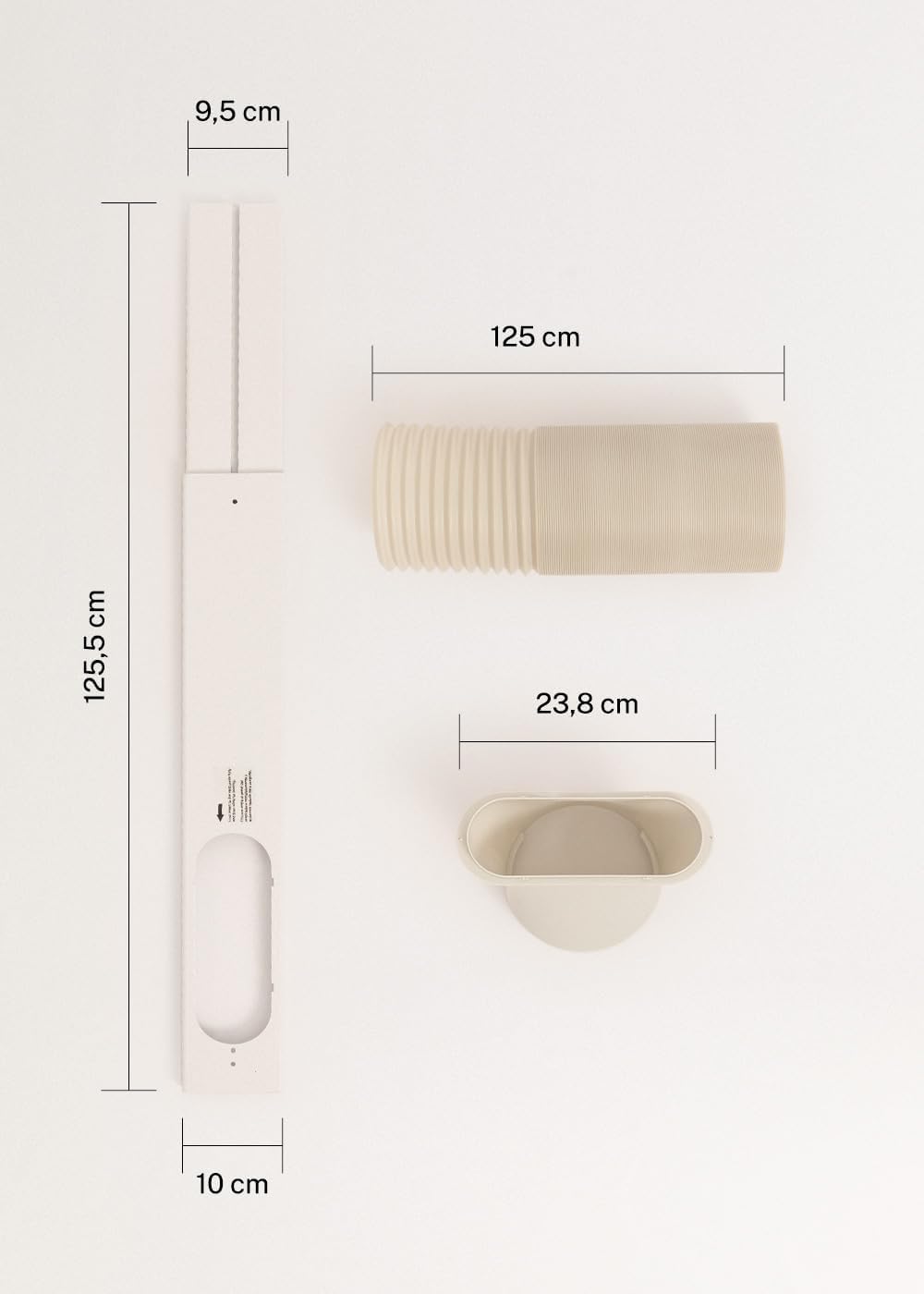
Figure 3: Detailed diagram illustrating the dimensions of the window sealing plate (125.5 cm length, 10 cm width, 9.5 cm adjustable width) and the exhaust hose (125 cm length) with its adapter (23.8 cm diameter).
5. ማዋቀር እና መጫን
ለሞባይል የአየር ማቀዝቀዣዎ ውጤታማ አሠራር ትክክለኛ ጭነት ወሳኝ ነው።
5.1 ክፍሉን አቀማመጥ
- ክፍሉን በጠፍጣፋ እና በተረጋጋ መሬት ላይ ያድርጉት።
- ለትክክለኛው የአየር ፍሰት በንጥሉ ዙሪያ ቢያንስ 30 ሴ.ሜ ቦታ መኖሩን ያረጋግጡ.
- ክፍሉን በመስኮቱ አጠገብ ያስቀምጡት ወይም ለጭስ ማውጫ ቱቦ መክፈቻ.
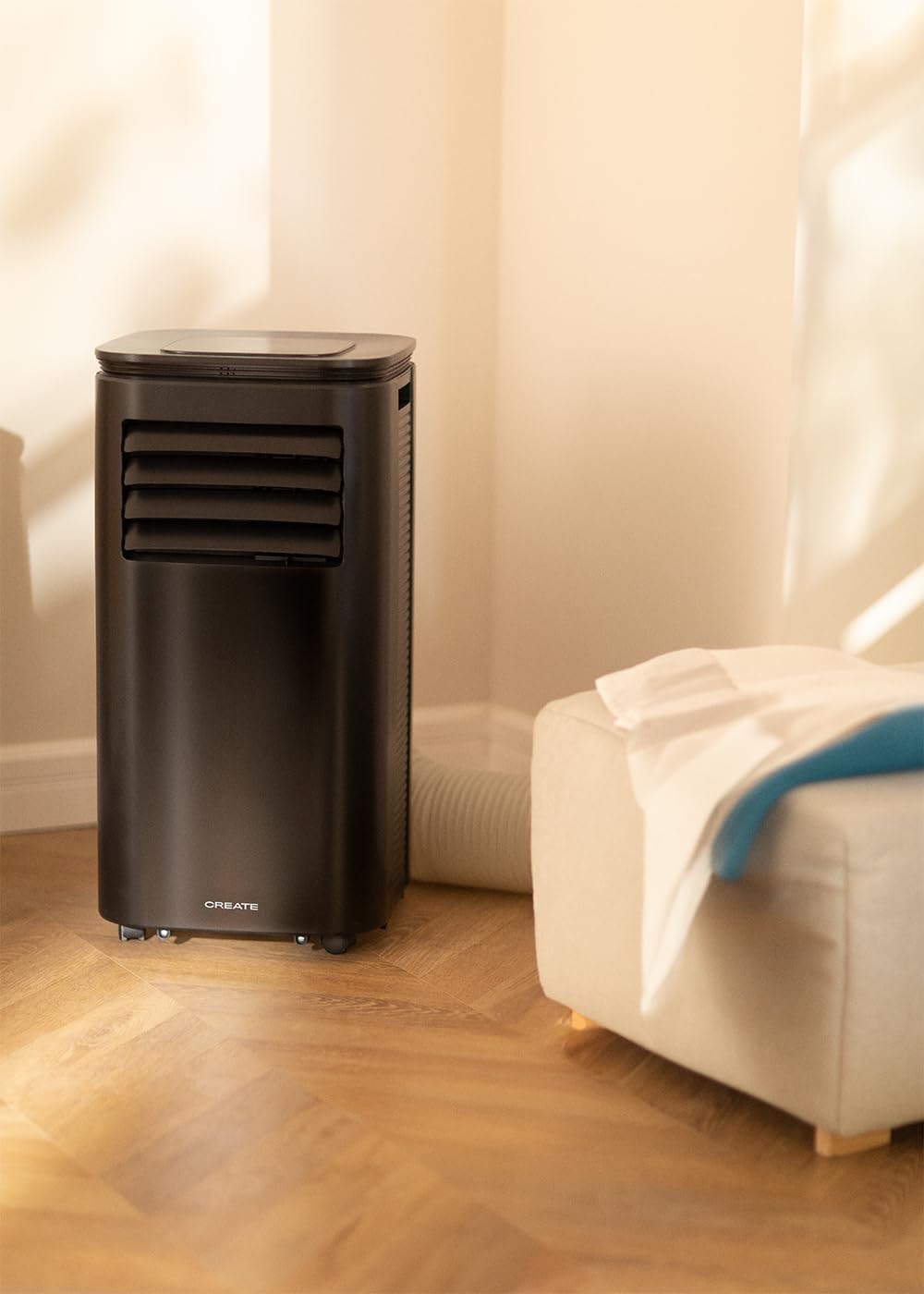
Figure 4: The air conditioner unit positioned in a room, demonstrating the typical setup with the exhaust hose directed towards a window for heat expulsion.
5.2 Installing the Exhaust Hose and Window Kit
- የቱቦ አስማሚውን ከጭስ ማውጫ ቱቦው አንድ ጫፍ ጋር ያያይዙት።
- የጭስ ማውጫ ቱቦውን ሌላኛውን ጫፍ ከመሳሪያው ጀርባ ላይ ካለው የአየር መውጫ ጋር ያገናኙ።
- Install the adjustable window sealing kit in your window opening. Extend it to fit the window frame.
- Insert the hose adapter into the opening of the window sealing kit.

Figure 5: Illustrates the secure connection of the flexible exhaust hose to the designated port at the rear of the air conditioning unit.
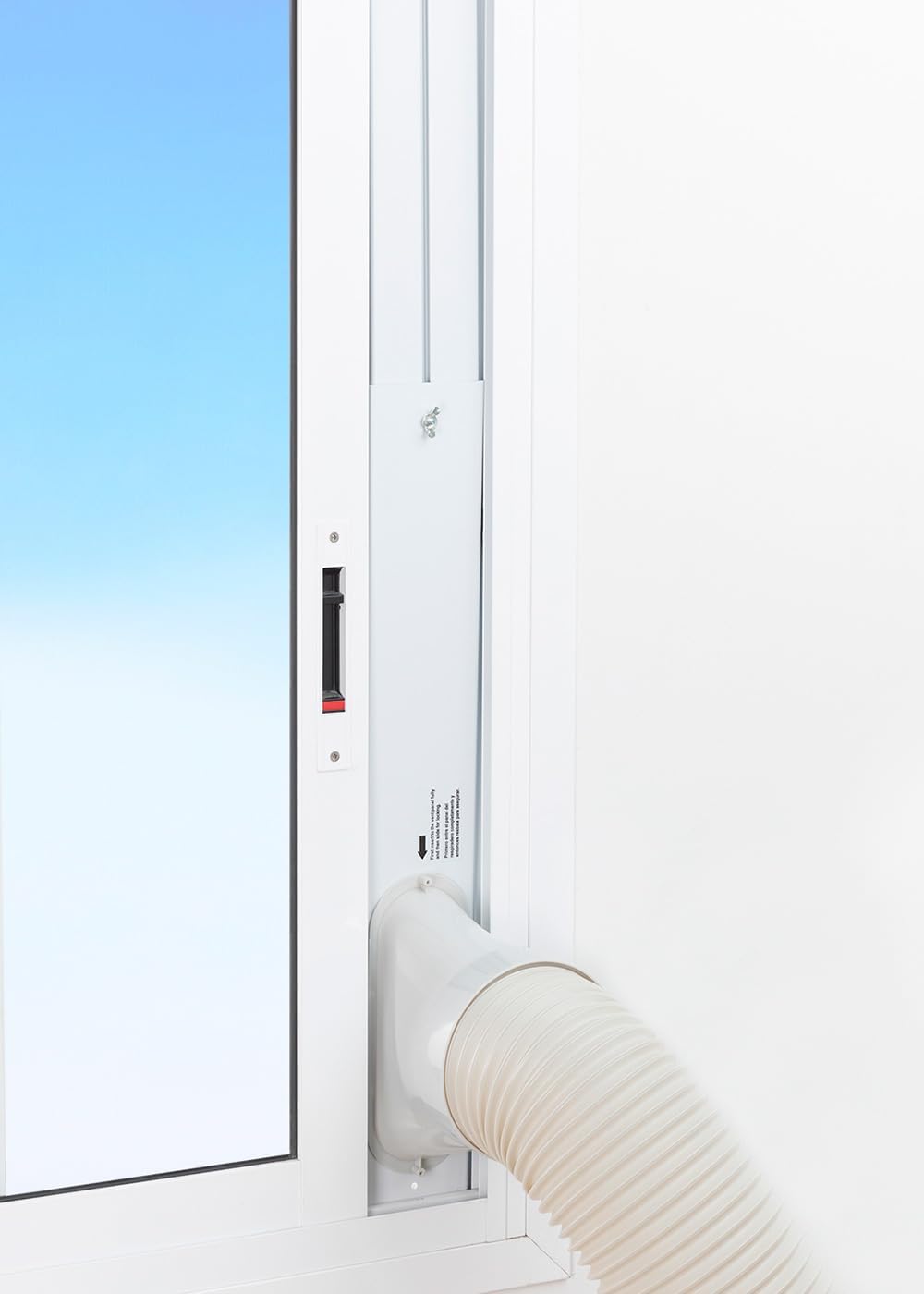
Figure 6: The window sealing kit is shown properly installed in a window frame, with the exhaust hose securely fitted into the kit's opening to vent hot air outside.
6. የአሠራር መመሪያዎች
6.1 የቁጥጥር ፓነልን መጠቀም
The control panel on top of the unit allows direct operation.
- የኃይል ቁልፍ፡- ክፍሉን ለማብራት ወይም ለማጥፋት ይጫኑ።
- ሁነታ አዝራር፡- በማቀዝቀዝ፣ ማራገቢያ እና እርጥበት ማድረቂያ ሁነታዎች ዑደሙ።
- የደጋፊ ፍጥነት አዝራር፡- Adjust fan speed (Low, High).
- የሙቀት አዝራሮች (+/-): Adjust desired temperature in Cooling mode.
- የሰዓት ቆጣሪ አዝራር፡- የራስ-ሰር ማብራት ወይም ራስ-ሰር ማጥፋት ሰዓት ቆጣሪን (እስከ 24 ሰዓታት) ያዘጋጁ።
- የእንቅልፍ ሁነታ አዝራር; Activates a quieter operation mode for nighttime use.
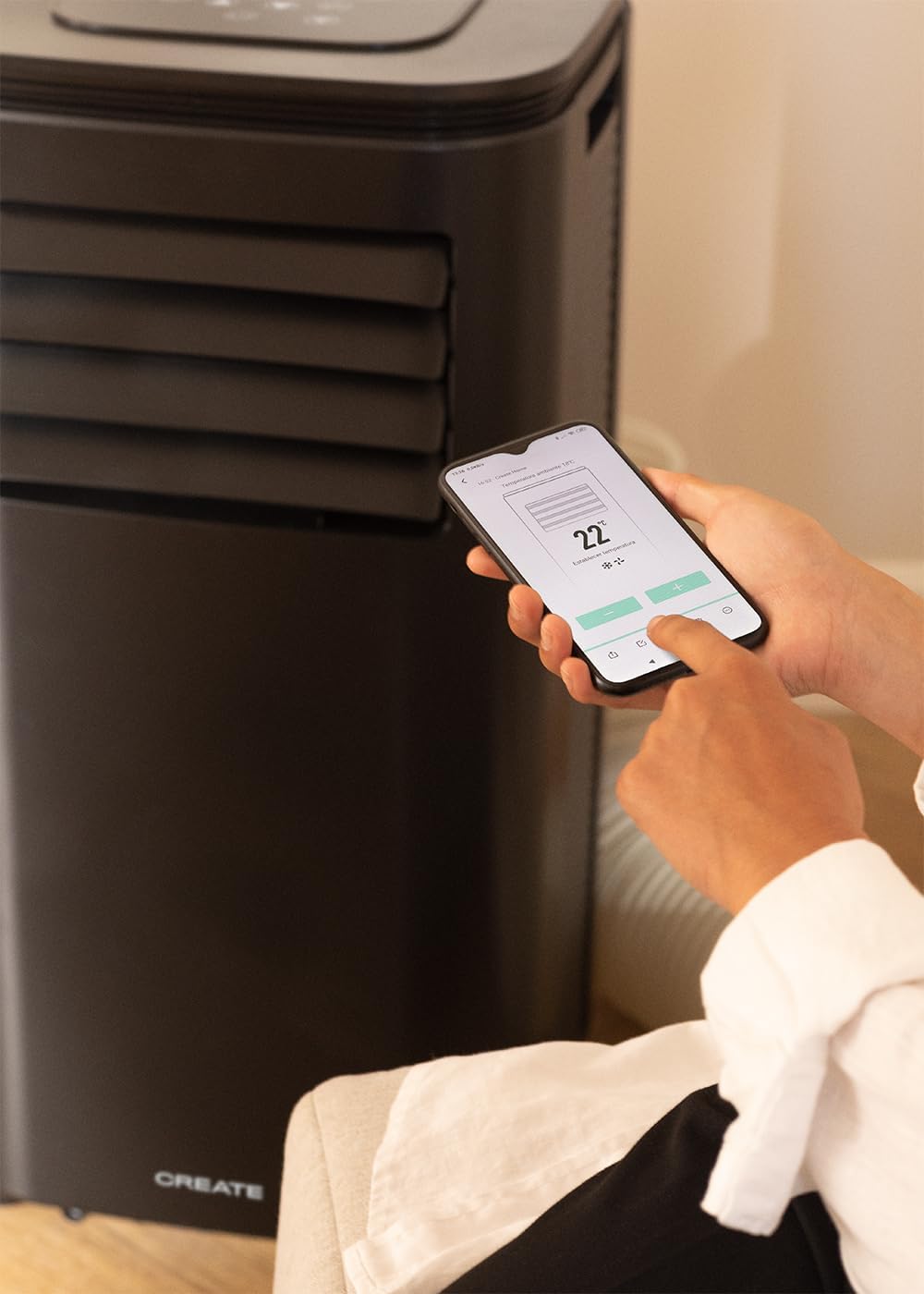
Figure 7: A user's hand interacting with the touch-sensitive control panel located on the top surface of the air conditioner, demonstrating direct manual operation.
6.2 የርቀት መቆጣጠሪያውን በመጠቀም
The remote control provides convenient operation from a distance.

Figure 8: A hand holding the dedicated remote control for the air conditioner, illustrating its use for convenient operation from a distance.
6.3 ዋይ ፋይ እና የመተግበሪያ ቁጥጥር
Download the CREATE Home app from your smartphone's app store. Follow the in-app instructions to connect your air conditioner to your home Wi-Fi network. Once connected, you can control all functions of the unit from your smartphone, including mode selection, temperature adjustment, fan speed, and timer settings.
Figure 9: A user interacting with the mobile application on a smartphone to remotely control the air conditioner, showcasing the Wi-Fi connectivity feature.
7. ጥገና
መደበኛ ጥገና የመሳሪያዎን ምርጥ አፈፃፀም ያረጋግጣል እና የአገልግሎት ዘመኑን ያራዝማል።
7.1 የአየር ማጣሪያን ማጽዳት
የአየር ማጣሪያው እንደ አጠቃቀሙ እና የአየር ጥራት በየሁለት ሳምንቱ ወይም ከዚያ በላይ በተደጋጋሚ ማጽዳት አለበት.
- ክፍሉን ያጥፉት እና ከኃይል ማሰራጫው ያላቅቁት.
- Locate the air filter panel on the back of the unit.
- ማጣሪያውን በቀስታ ያስወግዱት.
- Clean the filter with warm, soapy water or a vacuum cleaner. Rinse thoroughly and allow it to air dry completely before reinserting.

Figure 10: Demonstrates the process of removing the air filter from the rear of the air conditioner unit for cleaning or replacement.
7.2 የውሃ ማፍሰስ
In Dehumidifier mode or high humidity conditions, the internal water tank may fill up. The unit will stop operating when the tank is full. Drain the water from the drainage port at the bottom rear of the unit.
8. መላ መፈለግ
| ችግር | ሊሆን የሚችል ምክንያት | መፍትሄ |
|---|---|---|
| ክፍል አይበራም። | No power; Power cord not plugged in; Water tank full. | የኃይል መውጫውን ይፈትሹ፤ የኃይል ገመዱን ይሰኩ፤ የውሃ ማጠራቀሚያውን ያፈሱ። |
| ክፍሉ ውጤታማ በሆነ መንገድ አይቀዘቅዝም። | የአየር ማጣሪያው ቆሻሻ ነው፤ የጭስ ማውጫ ቱቦው በአግባቡ አልተጫነም፤ ክፍሉ በጣም ትልቅ ነው፤ በሮች/መስኮቶች ክፍት ናቸው። | Clean air filter; Ensure hose is sealed; Use in recommended room size (14-25 m²); Close doors/windows. |
| ከፍተኛ ድምጽ | ክፍሉ ጠፍጣፋ መሬት ላይ አይደለም፤ የአየር ማራገቢያ መሰናክል። | Place on flat surface; Check for obstructions. |
| የWi-Fi ግንኙነት ችግሮች | የተሳሳተ የ Wi-Fi ይለፍ ቃል; ራውተር በጣም ሩቅ; የመተግበሪያ ጉዳዮች | የይለፍ ቃል ያረጋግጡ፤ አሃዱን ወደ ራውተር ቅርብ ያድርጉት፤ መተግበሪያ/አሃድ እንደገና ያስጀምሩ። |
9. ዝርዝሮች
| ባህሪ | ዝርዝር መግለጫ |
|---|---|
| የሞዴል ቁጥር | 64274_145198 |
| የማቀዝቀዝ አቅም | 9000 BTU / 2270 Watt |
| የመጥፋት ችሎታ | 24 ሊትር/ቀን |
| የአየር ፍሰት | በሰአት እስከ 350 ሜ³ |
| የሚመከር የክፍል መጠን | 14-25 ካሬ ሜትር |
| የድምጽ ደረጃ | 65 ዲቢቢ |
| ማቀዝቀዣ | R290 (ECO-friendly) |
| ጥራዝtage | 240 ቮልት |
| ዋትtage | 2600 ዋት |
| ልኬቶች (L x W x H) | 35.5 x 36.5 x 71.3 ሴ.ሜ |
| ቁሳቁስ | ኤቢኤስ |
| የኢነርጂ ውጤታማነት ክፍል | A |

Figure 11: The energy efficiency label for the CREATE SILKAIR CONNECT, indicating an A-class energy rating, 2.6 kW cooling capacity, and a noise level of 65 dB. More details can be found at eprel.ec.europa.eu/qr/1580267.
10. ዋስትና እና ድጋፍ
ለዋስትና መረጃ እና የቴክኒክ ድጋፍ፣ እባክዎን ከምርትዎ ጋር የተካተተውን የዋስትና ካርድ ይመልከቱ ወይም ኦፊሴላዊውን CREATE ይጎብኙ webጣቢያ. የግዢ ደረሰኝህን እንደ ግዢ ማረጋገጫ አቆይ።
አምራች፡ ፍጠር
ያነጋግሩ፡ Refer to CREATE's official support channels.