
1. መግቢያ
ስለገዙ እናመሰግናለንasing the Monitor Audio Bronze W10 6G Series Subwoofer. This manual provides essential information for the safe and optimal operation of your new subwoofer. Please read these instructions thoroughly before installation and use, and retain them for future reference.
2. የደህንነት መረጃ
የኤሌክትሪክ ንዝረትን፣ እሳትን ወይም በመሳሪያው ላይ ጉዳት እንዳይደርስ ለመከላከል የሚከተሉትን የደህንነት ጥንቃቄዎች ሁልጊዜ ይከተሉ፡
- ክፍሉን ለዝናብ ወይም ለእርጥበት አያጋልጡት።
- ሐ አይክፈቱasinሰ. ሁሉንም አገልግሎቶች ብቁ ለሆኑ ባለሙያዎች ያመልክቱ።
- ትክክለኛውን አየር ማናፈሻ ማረጋገጥ. የአየር ማናፈሻ ክፍተቶችን አያግዱ.
- Disconnect the power cord from the wall outlet if the unit will be unused for a long period.
- Use only the power cord supplied or specified by the manufacturer.
- ክፍሉን በሙቀት ምንጮች አጠገብ ወይም በቀጥታ የፀሐይ ብርሃን ውስጥ ከማስቀመጥ ይቆጠቡ.
3. የጥቅል ይዘቶች
ሁሉም እቃዎች በማሸጊያው ውስጥ መኖራቸውን ያረጋግጡ፡-
- Monitor Audio Bronze W10 6G Series Subwoofer
- የኃይል ገመድ
- የተጠቃሚ መመሪያ (ይህ ሰነድ)
4. ምርት አብቅቷልview
4.1 ቁልፍ ባህሪያት
- Long-throw 10" driver featuring 'dished' C-CAM cone for powerful bass.
- 10" flat panel Auxiliary Bass Radiator (ABR) positioned underneath the unit for enhanced low-frequency extension.
- ክፍል ዲ amplifier with high current Switch Mode Power Supply (SMPSU) for efficient power delivery.
- Amplifier Output: 220 Watts RMS.
- Power Consumption: Maximum 300 W, Standby <0.5 W (ErP compliance).
4.2 Subwoofer Components
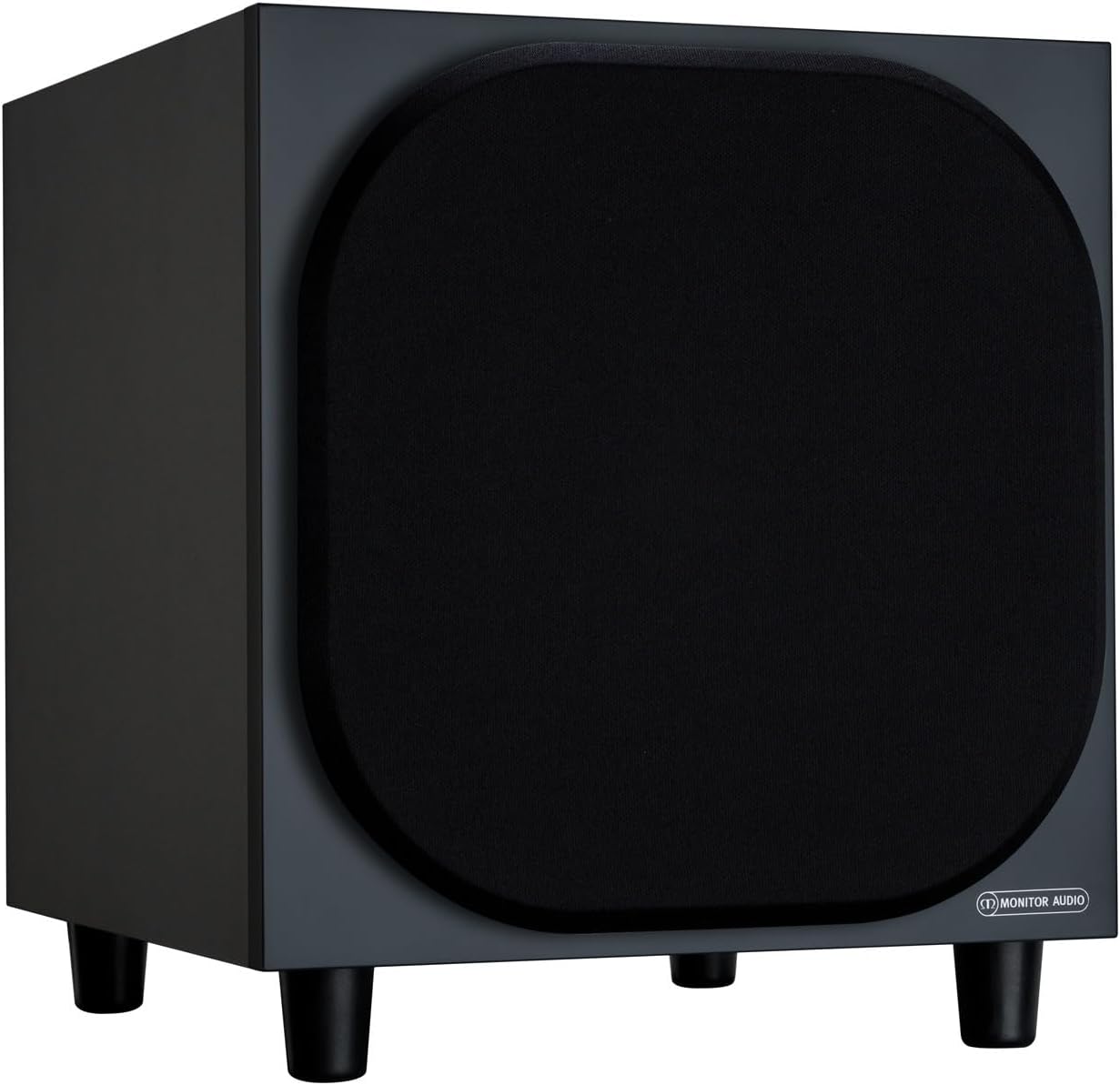
ምስል 4.2.1: የፊት View of the Monitor Audio Bronze W10 Subwoofer. This image displays the front of the subwoofer with its protective grille, showcasing the compact and elegant design.

ምስል 4.2.2: ማዕዘን View of the Monitor Audio Bronze W10 Subwoofer. This image provides an angled perspective, highlighting the overall form factor and the four sturdy feet.

Figure 4.2.3: Rear Panel of the Monitor Audio Bronze W10 Subwoofer. This image details the rear panel, showing all input/output connections, control knobs for frequency, volume, and phase, and the power switch.
5. ማዋቀር
5.1 አቀማመጥ
Optimal placement of the subwoofer is crucial for sound quality. Experiment with different positions in your listening room. Generally, placing the subwoofer in a corner can enhance bass output, while placing it along a wall can provide a more balanced response. Avoid placing it directly against a wall if possible, as this can lead to boomy bass.
5.2 ግንኙነቶች
- የድምጽ ግቤት፡- ንዑስ wooferን ከእርስዎ AV ተቀባይ ጋር ያገናኙ ወይም amplifier's LFE (Low-Frequency Effects) or Subwoofer output using an RCA cable. The Bronze W10 features both LFE and stereo RCA inputs.
- የኃይል ግንኙነት; Ensure the subwoofer's power switch is in the 'Off' position. Connect the supplied power cord to the subwoofer's AC inlet and then to a suitable wall outlet. The unit supports AC 110-120V or 220-240V, selectable via a switch on the rear panel.
- 12 ቮ ቀስቅሴ (አማራጭ) If your AV receiver or amplifier has a 12V trigger output, connect it to the subwoofer's 12V Trigger input. This allows the subwoofer to power on/off automatically with your main system.
5.3 የመጀመሪያ ኃይል-አፕ
After making all connections, switch the subwoofer's power to 'On'. The power indicator light should illuminate. If using the 12V trigger, ensure your main system is powered on.
6. የአሠራር መመሪያዎች
6.1 መቆጣጠሪያዎች
The rear panel of the Bronze W10 features several controls for fine-tuning its performance:
- መጠን፡- Adjusts the overall output level of the subwoofer. Start with a low setting and gradually increase until it blends seamlessly with your main speakers.
- Frequency (Crossover): Sets the upper frequency limit for the subwoofer. This should typically be set to match the low-frequency extension of your main speakers. Common settings range from 80Hz to 120Hz.
- ደረጃ፡ Allows you to adjust the phase of the subwoofer's output relative to your main speakers (0° or 180°). This helps ensure that the subwoofer's sound waves are in sync with the main speakers, preventing cancellation or reinforcement at the crossover point. Experiment with both settings to find the one that produces the most coherent bass.
- ሁነታ፡ Selects the power mode (On, Auto, 12V Trigger). 'Auto' mode will put the subwoofer into standby when no audio signal is detected and power it on when a signal is present.
- የባስ ሁነታ፡ (Refer to Figure 4.2.3) This switch allows selection between different bass characteristics, such as 'Music' or 'Movie' modes, or a 'Bass Boost' setting, to optimize performance for various content.
6.2 Wireless Connectivity (Bluetooth)
The Bronze W10 features Bluetooth connectivity for wireless control or audio input (check specific model features for audio input capability). Refer to your source device's manual for pairing instructions. The Bluetooth range is approximately 10 meters.
7. ጥገና
7.1 ጽዳት
To clean the subwoofer, use a soft, dry, lint-free cloth. Do not use abrasive cleaners, waxes, or solvents, as these can damage the finish. For stubborn marks, a slightly damp ጨርቅ መጠቀም ይቻላል, ከዚያም ደረቅ ጨርቅ ይከተላል.
7.2 እንክብካቤ
- Avoid exposing the subwoofer to extreme temperatures or humidity.
- ከባድ ዕቃዎችን በክፍሉ አናት ላይ አታስቀምጥ.
- ከመጠን በላይ ሙቀትን ለመከላከል በክፍሉ ዙሪያ በቂ የአየር ዝውውርን ያረጋግጡ.
8. መላ መፈለግ
| ችግር | ሊሆን የሚችል ምክንያት | መፍትሄ |
|---|---|---|
| ድምጽ የለም |
|
|
| የተዛባ ድምጽ |
|
|
| የሚያናድድ ድምፅ |
|
|
9. ዝርዝሮች
| ባህሪ | ዝርዝር |
|---|---|
| የሞዴል ስም | SB6GW10B |
| የድምጽ ማጉያ አይነት | Subwoofer |
| Subwoofer ዲያሜትር | 10 ኢንች |
| Amplifier Output (RMS) | 220 ዋት |
| የድምጽ ማጉያው ከፍተኛ የውጤት ኃይል (ጫፍ) | 600 ዋት |
| Frequency Response (Lower Limit) | 25 Hz |
| የኃይል ፍጆታ (ከፍተኛ) | 300 ዋ |
| የኃይል ፍጆታ (ተጠባባቂ) | <0.5 W (ErP compliance) |
| የግንኙነት ቴክኖሎጂ | Auxiliary, RCA, Wireless (Bluetooth) |
| ገመድ አልባ የመገናኛ ቴክኖሎጂ | ብሉቱዝ |
| የብሉቱዝ ክልል | 10 ሜትር |
| የመቆጣጠሪያ ዘዴ | Manual Knobs, Remote (if applicable) |
| የምርት ልኬቶች (D x W x H) | 14.33" ዲ x 12.64" ዋ x 14.33" ኤች |
| የእቃው ክብደት | 34.7 ፓውንድ (15.74 ኪ.ግ) |
| የመጫኛ አይነት | የጠረጴዛ ተራራ |
| ቀለም | ጥቁር |
10. የዋስትና መረጃ
Monitor Audio products are designed and manufactured to the highest quality standards. This product is covered by a Limited Warranty. For specific warranty terms and conditions, please refer to the warranty card included with your product or visit the official Monitor Audio webጣቢያ. ለዋስትና ጥያቄዎች እባክዎ የግዢ ማረጋገጫዎን ያቆዩ።
11. ድጋፍ
For further assistance, technical support, or service inquiries, please contact your authorized Monitor Audio dealer or visit the official Monitor Audio webጣቢያ፡
Webጣቢያ፡ www.monitoraudio.com
Address: Monitor Audio Ltd, 24 Brook Road, Rayleigh, Essex, SS6 7XJ, United Kingdom