
Bmax X15
Bmax X15 Laptop User Manual
ሞዴል: X15
መግቢያ
This manual provides comprehensive instructions for the setup, operation, and maintenance of your Bmax X15 laptop. Please read this manual carefully before using your device to ensure proper functionality and longevity.
ምርት አልቋልview
ፊት ለፊት View

The Bmax X15 features a vibrant 15.6-inch Full HD display, providing clear and crisp visuals for all your computing needs.
የቁልፍ ሰሌዳ እና የመዳሰሻ ሰሌዳ

Equipped with a full-sized keyboard including a numeric keypad and a large 4.7-inch multi-touch touchpad for comfortable and efficient input.
የጎን ፕሮfile እና ወደቦች

The slim design incorporates essential ports including two USB 3.0 ports, a Micro HDMI output, a DC power input, and a headphone jack for versatile connectivity.
የኋላ View

The Bmax X15 features a durable metal back cover, enhancing both its aesthetic appeal and structural integrity.
ማዋቀር
የመጀመሪያ ኃይል-በ
- ባትሪውን መሙላት; Before first use, connect the included power adapter to the laptop's DC port and a power outlet. Allow the battery to charge fully. The charging indicator light will typically change color or turn off when fully charged.
- አብራ፡ Open the laptop lid and press the power button, usually located on the top right of the keyboard area.
- የዊንዶውስ ማዋቀር; Follow the on-screen prompts to complete the Windows 10 Pro setup. This includes selecting your language, region, connecting to a Wi-Fi network, and creating a user account.
ተያያዥ መሳሪያዎች
- የዩኤስቢ መሣሪያዎች፡- Connect USB mice, keyboards, or external drives to the USB 3.0 ports on the sides of the laptop.
- ውጫዊ ማሳያ Use a Micro HDMI cable to connect the laptop to an external monitor or TV. Ensure the external display is set to the correct input source.
- የድምጽ መሳሪያዎች፡- Plug headphones or external speakers into the 3.5mm audio jack.
- ማይክሮ-ኤስዲ ካርድ፡ Insert a Micro-SD card into the designated slot for additional storage.
የአሠራር መመሪያዎች
የቁልፍ ሰሌዳ እና የመዳሰሻ ሰሌዳ አጠቃቀም
The Bmax X15 features a responsive keyboard and a large touchpad. The touchpad supports multi-touch gestures for enhanced navigation. Refer to Windows settings for customizing touchpad gestures.
የማሳያ ቅንብሮች
The 15.6-inch Full HD IPS display offers excellent clarity. You can adjust display settings such as brightness, resolution, and scaling through Windows Display Settings.
የማከማቻ ማስፋፊያ
Expandable M.2 SSD Slot
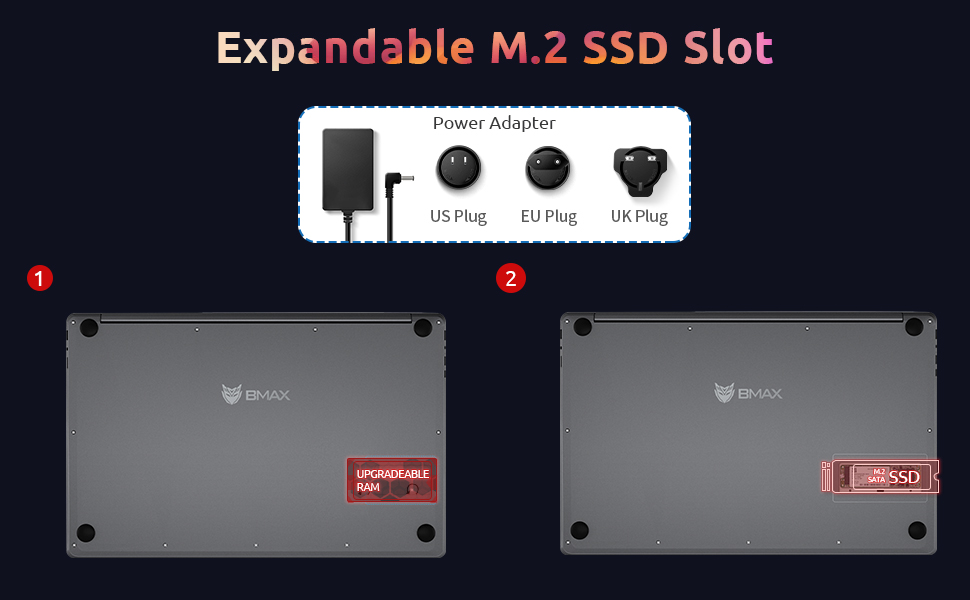
The Bmax X15 comes with a 256GB SSD and supports further storage expansion via an M.2 SATA SSD slot. This allows for significant upgrades to your storage capacity.
ጥገና
ማጽዳት
- ስክሪን፡ ለስላሳ፣ ከቆሸሸ ነፃ የሆነ ጨርቅ በትንሹ ተጠቀምampበውሃ ወይም በስክሪን ማጽጃ የታሸገ። ፈሳሽ በቀጥታ በስክሪኑ ላይ አይረጩ።
- የቁልፍ ሰሌዳ እና ቻሲስ; ለስላሳ እና ደረቅ ጨርቅ ይጠቀሙ. ለግትር ቆሻሻ, ትንሽ መamp ጨርቅ መጠቀም ይቻላል፣ ይህም ፈሳሽ ወደ ቀዳዳዎቹ እንዳይገባ ያረጋግጣል።
- ወደቦች፡ አቧራውን ወደቦች ለማፅዳት የታመቀ አየር ይጠቀሙ።
የባትሪ እንክብካቤ
- በተደጋጋሚ ባትሪውን ሙሉ በሙሉ ከመሙላት ይቆጠቡ።
- ላፕቶፑን ለረጅም ጊዜ ጥቅም ላይ ካልዋለ ቀዝቃዛና ደረቅ ቦታ ላይ ያስቀምጡት፤ ባትሪው እስከ 50% ድረስ ቻርጅ ተደርጎለታል።
- Use only the original Bmax power adapter.
የሶፍትዌር ዝማኔዎች
የስርዓት መረጋጋትን፣ ደህንነትን እና ጥሩ አፈጻጸምን ለማረጋገጥ የዊንዶውስ ዝመናዎችን በመደበኛነት ይፈትሹ እና ይጫኑ። ወደሚከተለው ይሂዱ መቼቶች > አዘምን እና ደህንነት > የዊንዶውስ ዝመና.
መላ መፈለግ
| ችግር | ሊሆን የሚችል ምክንያት | መፍትሄ |
|---|---|---|
| ላፕቶፕ አይበራም። | ዝቅተኛ ባትሪ፤ የኃይል አስማሚ ችግር፤ የሃርድዌር ችግር። | Ensure power adapter is securely connected and outlet is working. Allow battery to charge for at least 30 minutes before attempting to power on again. |
| ማሳያ ባዶ ወይም ብልጭ ድርግም የሚል ነው። | Incorrect display settings; Driver issue; Hardware fault. | ተጫን Fn + F1 (or relevant display toggle key) to cycle through display modes. Update graphics drivers. Restart the laptop. |
| የWi-Fi ግንኙነት ችግሮች። | Wi-Fi adapter off; Router issue; Driver issue. | Ensure Wi-Fi is enabled in Windows settings. Restart your router. Update network drivers. |
| ዘገምተኛ አፈጻጸም. | Too many programs running; Low storage space; Malware. | Close unnecessary applications. Free up disk space. Run a virus scan. Consider upgrading SSD or RAM if consistently slow. |
ዝርዝሮች
| ባህሪ | ዝርዝር |
|---|---|
| ሞዴል | Bmax X15 |
| ፕሮሰሰር | Intel Celeron N4120 Quad Core (up to 2.6 GHz) |
| ራም | 8 ጊባ DDR4 |
| ማከማቻ | 256 GB SSD (Expandable via M.2 SATA SSD slot) |
| ማሳያ | 15.6-inch Full HD (1920x1080) IPS |
| ግራፊክስ | ኢንቴል ዩኤችዲ ግራፊክስ 600 (የተዋሃደ) |
| ስርዓተ ክወና | Windows 10 Pro (Supports Linux OS) |
| የገመድ አልባ ግንኙነት | 802.11ac Wi-Fi፣ ብሉቱዝ |
| ወደቦች | 2x USB 3.0, 1x Micro HDMI, 1x DC Power, 1x 3.5mm Headphone Jack, 1x Micro-SD Card Reader |
| Webካም | 0.3 ሜፒ |
| የባትሪ ህይወት | እስከ 5 ሰዓታት (መደበኛ አጠቃቀም) |
| ልኬቶች (LxWxH) | 14.8 x 9.6 x 0.8 ኢንች |
| ክብደት | 4.4 ፓውንድ |
ዋስትና እና ድጋፍ
Bmax offers a worry-free 30-day return policy and a 12-month warranty for the X15 laptop. For technical support or warranty claims, please refer to the contact information provided with your product packaging or visit the official Bmax support webጣቢያ.
Customer service is available 7 days a week, 24 hours a day.
ለበለጠ መረጃ፣ ን መጎብኘት ይችላሉ። Bmax Store on Amazon.