
1. መግቢያ
The Tramex Concrete Moisture Encounter CMEX5 is a versatile digital multi-moisture meter designed for accurate and non-destructive measurement of moisture content and relative humidity in various building materials. It is suitable for professionals in flooring, water damage restoration, inspection, surveying, and indoor air quality industries. The device features Bluetooth connectivity for seamless integration with the Tramex Meters App on iOS and Android devices, enabling advanced data logging, moisture mapping, and reporting capabilities.

ምስል 1: የፊት view of the Tramex CMEX5, showing the digital display and control buttons.

Figure 2: Visual representation of the key benefits of the Tramex CMEX5, including instant non-destructive tests, accurate results, ASTM F2659 compliance, and app connectivity.
2. የደህንነት መረጃ
Please read and understand all safety instructions before operating the Tramex CMEX5. Failure to follow these instructions may result in injury or damage to the device.
- መሳሪያውን ደረቅ ያድርጉት. ለእርጥበት ወይም ለከፍተኛ ሙቀት አያጋልጡት.
- መሣሪያውን ለመክፈት ወይም ለመለወጥ አይሞክሩ. ሁሉንም አገልግሎቶች ብቁ ለሆኑ ባለሙያዎች ያመልክቱ።
- Use only specified batteries (2 AA batteries). Ensure correct polarity when installing.
- ልጆች በማይደርሱበት ቦታ ያስቀምጡ.
- መሳሪያውን ከመጣል ወይም ለጠንካራ ተጽእኖዎች ከማድረግ ተቆጠብ።
- When using external probes, ensure they are securely connected to prevent inaccurate readings or damage.
3. አካላት
The Tramex CMEX5 includes the following main components:
- ዋና ክፍል፡ The handheld meter with a digital display and control buttons.
- Built-in Ambient Sensor: Located at the top of the device, measures ambient relative humidity, temperature, dew point, and humidity ratio.
- Non-Destructive Electrodes: Located on the base of the unit for non-invasive moisture measurements.
- External Probe Port: For connecting optional external probes such as the Concrete Moisture Probe or Pin Probe.
- የባትሪ ክፍል፡ በክፍሉ ጀርባ ላይ ይገኛል.

ምስል 3: ጎን view of the Tramex CMEX5, highlighting its ergonomic design.

ምስል 4፡ ተመለስ view of the Tramex CMEX5, showing the battery compartment and non-destructive electrodes.
4. ማዋቀር
4.1. የባትሪ ጭነት
- Locate the battery compartment cover on the back of the CMEX5 unit.
- ክፍሉን ለመክፈት ሽፋኑን ያንሸራትቱ ወይም ይንቀሉት.
- Insert 2 AA batteries, ensuring correct polarity as indicated inside the compartment.
- የባትሪውን ክፍል ደህንነቱ በተጠበቀ ሁኔታ ይተኩ.
4.2. ማብራት / ማጥፋት
የኃይል ቁልፉን ተጭነው ይያዙ (ⓘ) መሣሪያውን ለማብራት ወይም ለማጥፋት በፊት ፓነል ላይ ይገኛል።
4.3. የመተግበሪያ ጭነት (አማራጭ)
For enhanced functionality, download the "Tramex Meters App" from your device's app store (iOS or Android). The app allows for Bluetooth connectivity, data logging, moisture mapping, and report generation.
Video 1: This video demonstrates the features and usage of the Tramex Meters App, including connecting to 5-series moisture meters like the CMEX5, viewing readings, and utilizing advanced features such as thermal condition charts and psychometric charts.
5. የአሠራር መመሪያዎች
The Tramex CMEX5 offers multiple measurement modes:
5.1. Non-Destructive Moisture Measurement (Concrete & General Building Materials)
- መሣሪያው መብራቱን ያረጋግጡ።
- Place the base of the CMEX5 firmly onto the surface of the material to be tested. The non-destructive electrodes on the base will make contact.
- Read the moisture content percentage directly from the digital display. The device measures to a depth of approximately 3/4 inch (20 mm).
- For concrete, the display shows Concrete %MC. The meter has Anhydrite & Gypsum scales.

Figure 5: Step-by-step illustration of how to use the Tramex CMEX5 for non-destructive moisture assessment, including placing the device on concrete and syncing with the Tramex Meters App.

Figure 6: A hand holding the Tramex CMEX5, demonstrating the ease of use and visibility of the digital display during operation.
5.2. Ambient Relative Humidity and Temperature Measurement
The built-in hygrometer continuously measures ambient conditions:
- አንጻራዊ እርጥበት (RH%)
- Temperature (T°F/°C)
- Dew Point (DP°F/°C)
- Humidity Ratio (HR G/lb)
These readings are displayed on the main screen alongside moisture content measurements.
5.3. External Probe Measurements (Optional)
The CMEX5 supports optional external probes for specialized measurements:
- Concrete Moisture Probe: Measures in-situ moisture content up to 100 mm (4 inches) deep. Connect the probe to the external port and follow the probe's specific instructions for use.
- Pin Meter Probe: መቶኛ ይለካልtage moisture content of wood, drywall, and other building materials. Connect the pin probe to the external port and insert the pins into the material. The CMEX5 can be calibrated for over 500 different wood species via the app.
- Hygro-i2 RH Probe: For in-situ relative humidity testing in concrete slabs (ASTM F2170 compliant). Connect the probe to the external port.
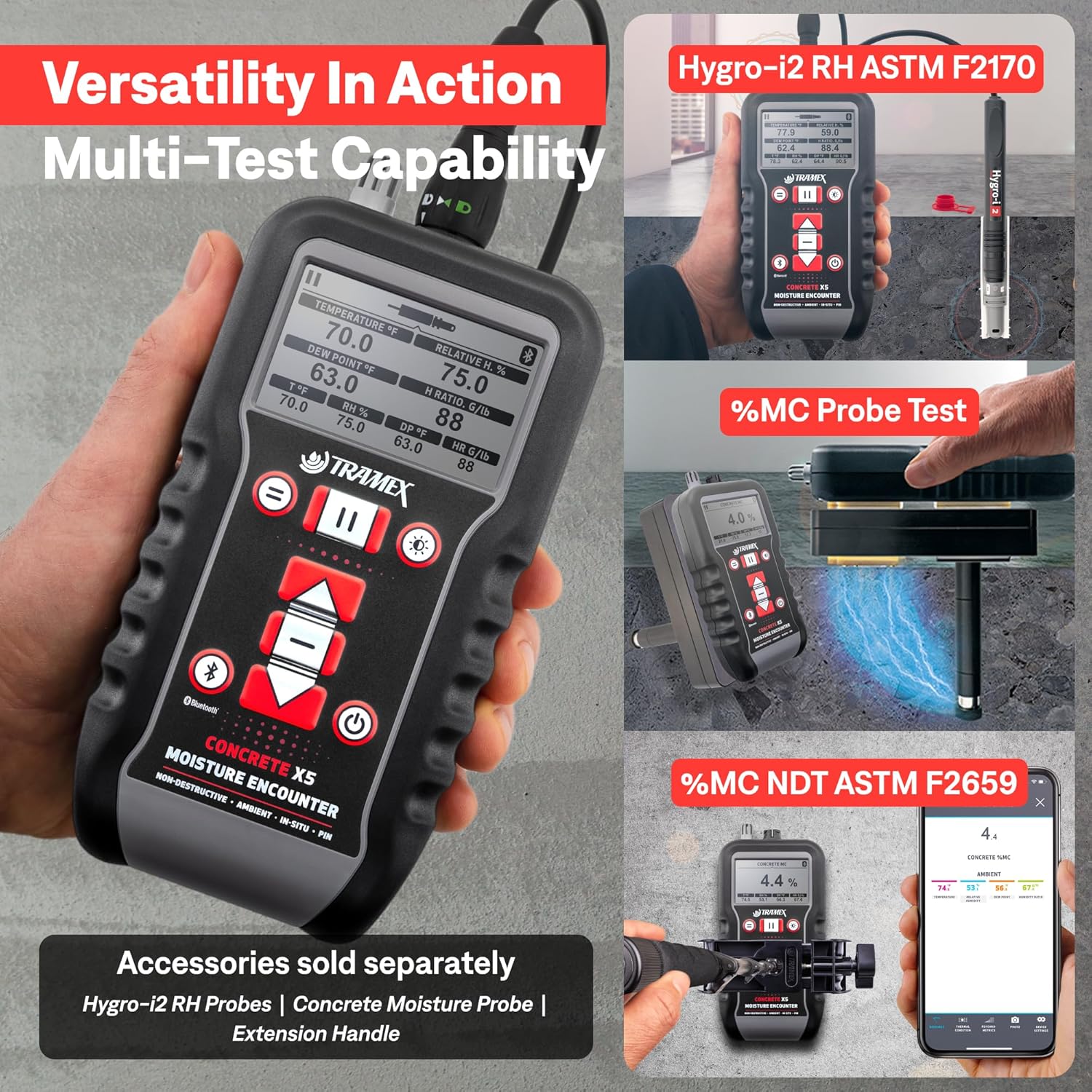
Figure 7: Depiction of the CMEX5's multi-test capability, showing its use with Hygro-i2 RH probes, concrete moisture probes, and an extension handle for various applications.
5.4. App Integration and Data Management
Connect the CMEX5 to the Tramex Meters App via Bluetooth for advanced features:
- Real-time Readings: View all measurements on your smartphone or tablet.
- የውሂብ ምዝግብ ማስታወሻ; Log readings over time for continuous monitoring.
- Moisture Mapping: Create visual maps of moisture levels.
- ትውልድን ሪፖርት አድርግ፡ Generate geo-tagged and time-stamped reports with photos.
- Wood Species Selection: For pin probe measurements, select from over 500 wood species for accurate readings.

Figure 8: Screenshot illustrating the Tramex Meters App interface, showing psychometric readings and options for thermal condition, psychometrics, photo capture, and logging status.
6. ጥገና
6.1. ማጽዳት
Wipe the device with a soft, dry cloth. Do not use abrasive cleaners or solvents. Ensure the non-destructive electrodes on the base are clean and free of debris for accurate readings.
6.2. ማከማቻ
Store the CMEX5 in a cool, dry place away from direct sunlight and extreme temperatures. If storing for extended periods, remove the batteries to prevent leakage.
6.3. የባትሪ መተካት
የባትሪው ዝቅተኛ መጠን ያለው አመልካች በማሳያው ላይ ሲታይ ባትሪዎቹን ይተኩ። የባትሪውን የመጫኛ መመሪያዎች ለማግኘት ክፍል 4.1ን ይመልከቱ።
7. መላ መፈለግ
| ችግር | ሊሆን የሚችል ምክንያት | መፍትሄ |
|---|---|---|
| መሣሪያው አይበራም። | የሞቱ ወይም በስህተት የተጫኑ ባትሪዎች። | የባትሪውን ፖላራይት ይፈትሹ ወይም በአዲስ የ AA ባትሪዎች ይተኩ። |
| ትክክል ያልሆኑ ንባቦች። | Dirty electrodes; improper contact with surface; external interference. | Clean electrodes; ensure firm, flat contact; move away from strong electromagnetic fields. |
| የብሉቱዝ ግንኙነት ችግሮች። | Bluetooth off on device/phone; out of range; app not updated. | Ensure Bluetooth is enabled on both devices; move closer to the meter; update Tramex Meters App. |
| External probe not recognized. | Probe not securely connected; damaged probe. | Ensure probe is fully inserted and locked; inspect probe for damage. |
8. ዝርዝሮች
| ባህሪ | ዝርዝር |
|---|---|
| የምርት ልኬቶች | 7 x 3.5 x 1.5 ኢንች |
| የንጥል ሞዴል ቁጥር | CMEX5 |
| ባትሪዎች | 2 AA ባትሪዎች ያስፈልጋሉ (ተካቷል) |
| የእቃው ክብደት | 12.59 አውንስ (357 ግራም) |
| አምራች | Tramex |
| ቀለም | ጥቁር ፣ ቀይ ፣ ነጭ |
| የመጫኛ አይነት | Surface ተራራ |
| Measurement Depth (Non-destructive) | Up to 3/4 inch (20 mm) into the slab |
| ግንኙነት | Bluetooth for iOS & Android App |
| ተገዢነት | ASTM F2659 (Non-destructive concrete test) |
9. ዋስትና እና ድጋፍ
For detailed warranty information, product registration, and technical support, please visit the official Tramex webጣቢያ ወይም የደንበኞች አገልግሎት ክፍልን ያነጋግሩ። ለዋስትና ጥያቄዎች የግዢ ደረሰኝዎን እንደ ግዢ ማረጋገጫ ያቆዩት።
Official Tramex Webጣቢያ፡ www.tramexmeters.com
For additional resources, including the User Guide (PDF), please refer to the product page where you purchased the device.