
መግቢያ
This manual provides essential information for the safe and efficient operation of your QFX SBX-213 12-inch Portable Bluetooth Speaker. Please read it thoroughly before using the product and retain it for future reference.
የደህንነት መመሪያዎች
ደህንነቱ የተጠበቀ አሰራርን ለማረጋገጥ እና ጉዳት እንዳይደርስ ለመከላከል የሚከተሉትን የደህንነት ጥንቃቄዎች ይከተሉ።
- ክፍሉን ለዝናብ፣ ለእርጥበት ወይም ለከፍተኛ ሙቀት አያጋልጡት።
- ተናጋሪውን አትክፈት ሐasinሰ. ሁሉንም አገልግሎቶች ብቁ ለሆኑ ባለሙያዎች ያመልክቱ።
- ድምጽ ማጉያውን ከሙቀት ምንጮች፣ ከቀጥታ የፀሐይ ብርሃን እና ከተከፈተ እሳት ያርቁ።
- Use only the specified power adapter and charging cable provided with the unit.
- ከመጠን በላይ ሙቀትን ለመከላከል በድምጽ ማጉያው ዙሪያ በቂ የአየር ዝውውርን ያረጋግጡ።
- በድምጽ ማጉያው ላይ ከባድ ነገሮችን ከማስቀመጥ ተቆጠብ።
የጥቅል ይዘቶች
ማሸጊያውን ሲከፍቱ፣ እባክዎን ከዚህ በታች የተዘረዘሩት ሁሉም እቃዎች መኖራቸውን እና በጥሩ ሁኔታ ላይ መሆናቸውን ያረጋግጡ፡-
- QFX SBX-213 Portable Bluetooth Speaker
- የኃይል ገመድ
- የርቀት መቆጣጠሪያ
- የተጠቃሚ መመሪያ (ይህ ሰነድ)
ምርት አልቋልview
The QFX SBX-213 is a 12-inch portable speaker designed for versatile audio playback. It features Bluetooth connectivity for wireless streaming, an FM radio tuner, and a USB input for playing audio files ከ ፍላሽ አንፃፊ.
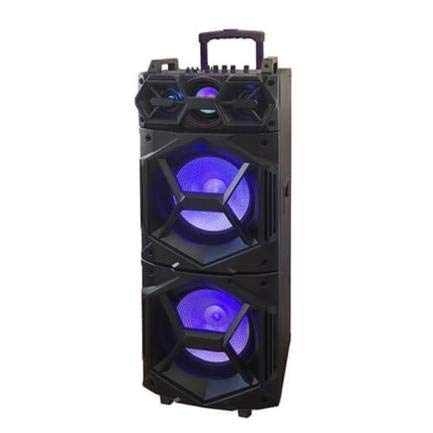
ምስል፡ ፊት ለፊት view of the QFX SBX-213 Portable Bluetooth Speaker, showcasing its 12-inch driver and robust design. The speaker features a black finish and a protective grille over the main driver.
The speaker's control panel and ports typically include:
- የኃይል ማብሪያ / ማጥፊያ
- Mode Button (to switch between Bluetooth, FM, USB inputs)
- Volume Control Knobs or Buttons
- Play/Pause, Previous/Next Track Buttons
- የሚዲያ መልሶ ማጫወት የዩኤስቢ ወደብ
- Charging Port for power cable connection
- LED Indicator Lights for power, charging, and Bluetooth status
ማዋቀር
- ድምጽ ማጉያውን መሙላት; Before first use, connect the provided power cable to the speaker's charging port and plug it into a standard electrical outlet. Allow the speaker to fully charge. The charging indicator light will typically change color or turn off when charging is complete.
- አቀማመጥ፡- Place the speaker on a stable, flat surface. For optimal sound dispersion, avoid placing it in enclosed spaces or directly against walls.
የአሠራር መመሪያዎች
1. ማብራት / ማጥፋት
To power on the speaker, locate the power switch, usually on the back or side panel, and slide it to the "ON" position. To power off, slide the switch to the "OFF" position.
2. የብሉቱዝ ማጣመር
- ድምጽ ማጉያውን ያብሩ። በተለምዶ በራስ-ሰር ወደ ብሉቱዝ የማጣመሪያ ሁነታ ይገባል፣ ይህም በሚያብረቀርቅ የ LED መብራት እና በሚሰማ ጥያቄ ይጠቁማል።
- በተንቀሳቃሽ መሣሪያዎ ላይ ብሉቱዝን ያንቁ (ስማርትፎን ፣ ታብሌት ፣ ወዘተ)።
- ፈልግ available Bluetooth devices. You should see "QFX SBX-213" or a similar name in the list.
- Select the speaker to pair. Once connected, you will hear a confirmation sound, and the LED indicator will stop flashing.
- አሁን በድምጽ ማጉያው በኩል ከመሳሪያዎ ላይ ድምጽ ማጫወት ይችላሉ።
3. የኤፍኤም ሬዲዮ ኦፕሬሽን
- Press the "MODE" button on the speaker or remote control until "FM" mode is selected.
- Press the "Play/Pause" button to initiate an automatic scan for FM stations. The speaker will save all found stations.
- Use the "Previous/Next Track" buttons to navigate between saved FM stations.
4. የዩኤስቢ መልሶ ማጫወት
- MP3 ኦዲዮ የያዘ የዩኤስቢ ፍላሽ አንፃፊ አስገባ fileበድምጽ ማጉያው ላይ ወደ ዩኤስቢ ወደብ.
- Press the "MODE" button until "USB" mode is selected. The speaker will automatically begin playing audio files ከዩኤስቢ አንጻፊ.
- መልሶ ማጫወትን ለመቆጣጠር "Play/Pause" እና "Previous/Next Track" አዝራሮችን ይጠቀሙ።
5. የድምጽ መቆጣጠሪያ
Adjust the master volume using the dedicated volume knob or buttons on the speaker. You can also control the volume from your connected Bluetooth device or the remote control.
ጥገና
- ማጽዳት፡ Use a soft, dry cloth to clean the speaker's exterior. Do not use abrasive cleaners, waxes, or solvents, as these may damage the finish.
- ማከማቻ፡ ረዘም ላለ ጊዜ ጥቅም ላይ በማይውልበት ጊዜ ድምጽ ማጉያውን በቀጥታ ከፀሀይ ብርሀን እና ከከፍተኛ ሙቀት ርቆ በቀዝቃዛና ደረቅ ቦታ ያከማቹ።
- የባትሪ እንክብካቤ To prolong battery life, avoid fully discharging the battery frequently. Charge the speaker regularly, even if not in use for long periods, to maintain battery health.
መላ መፈለግ
If you encounter any issues with your QFX SBX-213 speaker, please refer to the following table for common problems and solutions:
| ችግር | ሊሆን የሚችል ምክንያት | መፍትሄ |
|---|---|---|
| ኃይል የለም | Battery discharged; Power cable not connected securely | Charge the speaker fully; Ensure power cable is securely connected to both the speaker and the power outlet. |
| ምንም የብሉቱዝ ግንኙነት የለም። | Bluetooth not enabled on device; Speaker not in pairing mode; Device too far from speaker | Enable Bluetooth on your device; Put the speaker into Bluetooth pairing mode; Move your device closer to the speaker (within 10 meters). |
| ምንም የድምፅ ውፅዓት የለም። | Volume too low; Incorrect mode selected; Device or speaker is muted | Increase the volume on both the speaker and your connected device; Press the MODE button to select the correct input (Bluetooth, USB, FM); Check if the speaker or device is muted. |
| የኤፍኤም ሬዲዮ የማይንቀሳቀስ ወይም ደካማ አቀባበል | ደካማ ምልክት; ጣልቃ ገብነት | Relocate the speaker to an area with better reception; Perform an auto-scan for stations again; Avoid placing near other electronic devices that may cause interference. |
ዝርዝሮች
- የምርት ስም፡ QFX
- ሞዴል፡ SBX-213
- የድምጽ ማጉያ መጠን፡ 12 ኢንች
- የግንኙነት ቴክኖሎጂ; ዩኤስቢ፣ ብሉቱዝ
- ልዩ ባህሪያት፡ Lightweight, Portable, FM Radio
- የመጫኛ አይነት፡ Floor, Table Mount
- የመቆጣጠሪያ ዓይነት: የርቀት መቆጣጠሪያ
- የኃይል ምንጭ፡- የኤሌክትሪክ ገመድ
- ልኬቶች (H x W x D): በግምት 113 x 42 x 42 ሴ.ሜ
- ክብደት፡ በግምት 4 ኪ.ግ
- ዩፒሲ፡ 606540036341
- ASIN: B08GL3SHQP
ዋስትና እና ድጋፍ
QFX products are designed for reliability and performance. For detailed warranty information or technical support, please refer to the warranty card included with your purchase or visit the official QFX webጣቢያ. ለማንኛውም የዋስትና ጥያቄዎች የግዢ ማረጋገጫዎን ያስቀምጡ።
For further assistance, please contact QFX customer service through their official channels.