
1. ምርት አብቅቷልview
The SanDisk Extreme Portable SSD is a high-capacity, durable external solid-state drive designed for fast data transfer and reliable storage. It features NVMe solid-state performance, robust protection against water, dust, and drops, and includes essential connectivity options.
በሣጥኑ ውስጥ ያለው ነገር፡-
- 1 x SanDisk Extreme Portable SSD
- 1 x ዩኤስቢ-ሲ ወደ ዩኤስቢ-ሲ ገመድ
- 1 x ዩኤስቢ-ሲ ወደ ዩኤስቢ-ኤ አስማሚ
- ፈጣን ጅምር መመሪያ (በዚህ ዲጂታል መመሪያ ውስጥ አልተካተተም)
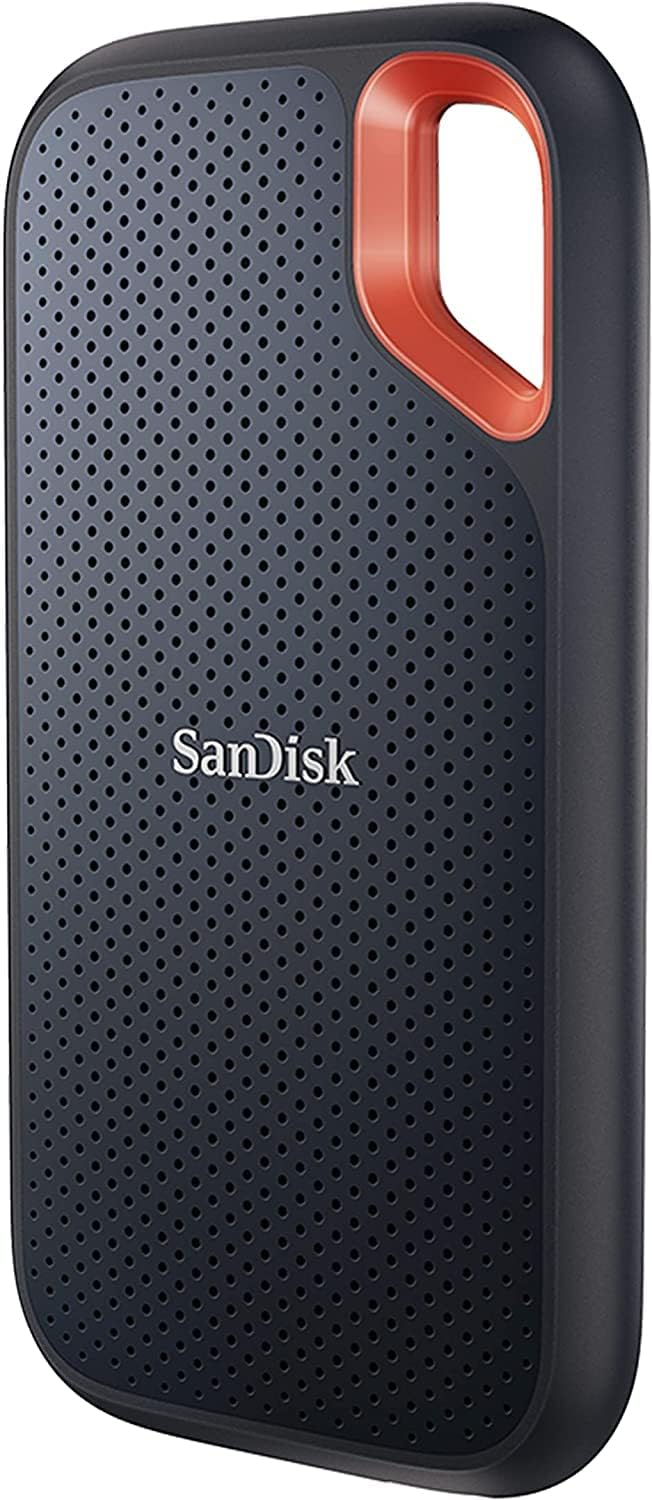
Figure 1: SanDisk Extreme Portable SSD (SDSSDE61-500G-G25)
2. ማዋቀር እና ግንኙነት
የእርስዎን SanDisk Extreme Portable SSD ለማዋቀር እነዚህን ደረጃዎች ይከተሉ፡
- SSD ያገናኙ፡ Use the included USB-C to USB-C cable to connect the SSD directly to a compatible USB-C port on your computer or device. If your device only has USB-A ports, attach the USB-C to USB-A adapter to the USB-C cable before connecting.
- አብራ፡ The SSD draws power directly from the USB connection and does not require an external power source.
- Initialization (First Use): For optimal performance and compatibility, it is recommended to initialize and format the drive according to your operating system's guidelines. Most operating systems will prompt you to do this upon first connection. Refer to your operating system's documentation for specific instructions on disk management and formatting.

Figure 2: Included USB-C cable and USB-A adapter for universal compatibility.
3. SSD ን ማስኬድ
የውሂብ ማስተላለፍ;
Once connected and initialized, your SanDisk Extreme Portable SSD will appear as an external drive on your computer. You can drag and drop files to and from the drive, or use your operating system's copy/paste functions. The drive supports up to 1050MB/s read and 1000MB/s write speeds, depending on your host device and interface.

Figure 3: The SSD offers high-speed NVMe performance for efficient data handling.
የደህንነት ባህሪያት:
The SanDisk Extreme Portable SSD includes password protection with 256-bit AES hardware encryption. This feature requires software download for macOS (v10.9+) and is supported by Windows 8, Windows 10, and later versions. Visit the official SanDisk webለሶፍትዌር ማውረዶች እና መመሪያዎች ጣቢያ።

Figure 4: Secure your data with 256-bit AES hardware encryption.
የሳንዲስክ ማህደረ ትውስታ ዞን መተግበሪያ
ለቀላል የ SanDisk Memory Zone መተግበሪያን ይጠቀሙ file management and automatic space freeing. This app helps organize and back up content from your mobile device to the SSD.

Figure 5: Manage files with the SanDisk Memory Zone app.
4. ዘላቂነት እና ጥገና
The SanDisk Extreme Portable SSD is built for durability:
- የመጣል ጥበቃ Engineered to withstand drops of up to three meters.
- የውሃ እና አቧራ መቋቋም; Features an IP65 rating, meaning it is protected against dust ingress and low-pressure water jets from any direction. Ensure the USB port cover is securely closed for maximum protection. The device must be clean and dry before use after exposure to water.
- የሙቀት መጠን: Designed to operate in a wide range of temperatures. Refer to specifications for exact operating and storage temperature ranges.

Figure 6: The SSD offers IP65 water and dust resistance.

Figure 7: The carabiner loop allows for secure attachment to bags or gear.
5. መላ መፈለግ
በ SanDisk Extreme Portable SSDዎ ላይ ችግሮች ካጋጠሙዎት የሚከተሉትን ያስቡበት፡
- አልተገኘም፦ Ensure the USB cable is securely connected to both the SSD and your device. Try a different USB port or cable. Verify that your operating system's disk management utility recognizes the drive.
- ቀርፋፋ አፈጻጸም፡ Ensure you are using a USB 3.2 Gen 2 compatible port and cable for optimal speeds. Older USB ports (e.g., USB 2.0) will result in significantly slower transfer rates. Close any unnecessary applications running in the background.
- የቅርጸት ችግሮች፡ If the drive is not formatting correctly, try using a different formatting tool or checking for driver updates for your USB controller.
- የውሂብ መጥፋት While the SSD is durable, always maintain regular backups of critical data to prevent loss from unforeseen circumstances.
6. ዝርዝሮች
| ባህሪ | ዝርዝር |
|---|---|
| የሞዴል ቁጥር | SDSSDE61-500G-G25 |
| የዲጂታል ማከማቻ አቅም | 500 ጊባ |
| የሃርድ ድራይቭ በይነገጽ | ዩኤስቢ 3.2 Gen 2 (USB-C) |
| ፍጥነት አንብብ | እስከ 1050MB/s |
| ፍጥነት ይፃፉ | እስከ 1000MB/s |
| ጥበቃን ጣል | እስከ 3 ሜትር |
| የውሃ እና አቧራ መቋቋም | IP65-ደረጃ የተሰጠው |
| ልኬቶች (LxWxH) | 0.38 x 2.07 x 3.97 ኢንች |
| የእቃው ክብደት | 1.76 አውንስ |
| ተስማሚ መሣሪያዎች | Desktop, Laptop, Tablet (Mac compatible) |

Figure 8: Physical dimensions of the SanDisk Extreme Portable SSD.
7. Extended Storage Use (PS5 Exampለ)
The SanDisk Extreme Portable SSD can be used as extended storage for compatible gaming consoles, such as the PlayStation 5. This allows you to store and play PS4 games directly from the SSD, or store PS5 games and transfer them to the console's internal storage when ready to play.
8. ዋስትና እና ድጋፍ
For warranty information, product registration, software downloads, and technical support, please visit the official SanDisk webጣቢያ. ለዋስትና ጥያቄዎች የግዢ ማረጋገጫዎን ያስቀምጡ።
Official SanDisk Webጣቢያ፡ www.sandisk.com