
መግቢያ
The FlinQ Smart WLAN Doorbell with Camera and Intercom provides enhanced home security and convenience. Featuring Full HD video, two-way audio, motion detection, and night vision, it allows you to monitor your doorstep and communicate with visitors from anywhere using your smartphone. This manual provides detailed instructions for setup, operation, and maintenance of your new smart doorbell system.
የጥቅል ይዘቶች

Image: All components included in the FlinQ Smart WLAN Doorbell package, laid out on a white surface. This includes the doorbell unit, the indoor chime, two rechargeable batteries, a micro USB cable, an assembly kit, a safety wall mount, and the user manual.
እባክህ ከዚህ በታች የተዘረዘሩት ሁሉም እቃዎች በጥቅልህ ውስጥ መኖራቸውን አረጋግጥ፡
- FlinQ Smart Video Doorbell Unit
- Indoor Chime Unit (Receiver)
- 2x ዳግም ሊሞሉ የሚችሉ ባትሪዎች
- የማይክሮ ዩኤስቢ ባትሪ መሙያ ገመድ
- Safety Wall Mount
- Assembly Kit (Screws, Wall Plugs)
- የተጠቃሚ መመሪያ
ምርት አልቋልview

Image: The FlinQ Smart WLAN Doorbell, its plug-in indoor chime, and a smartphone displaying the doorbell's live video feed and control options.
The FlinQ Smart WLAN Doorbell is designed for ease of use and comprehensive security. Key components and features include:
- ሙሉ ኤችዲ ካሜራ፡ Captures clear 1920x1080 video.
- ሰፊ-አንግል View: 155 ዲግሪ viewing angle ensures broad coverage of your doorstep.
- PIR Intelligent Motion Sensor: እንቅስቃሴን ያገኛል እና ማንቂያዎችን ያስነሳል።
- የበር በር ቁልፍ ጩኸቱን ያነቃል እና ማሳወቂያዎችን ይልካል።
- Infrared HD Night Vision: Provides clear video even in low-light conditions.
- ባለሁለት መንገድ ኦዲዮ፡- Allows real-time communication with visitors.
- IP52 የውሃ መከላከያ ደረጃ ከቤት ውጭ ያሉትን ነገሮች ለመቋቋም የተነደፈ።
- ዳግም ሊሞላ የሚችል ባትሪ፡ Powered by 2x 2500 mAh batteries, offering extended standby time.
- የቤት ውስጥ ቺም Plugs into a standard outlet and offers multiple melodies.
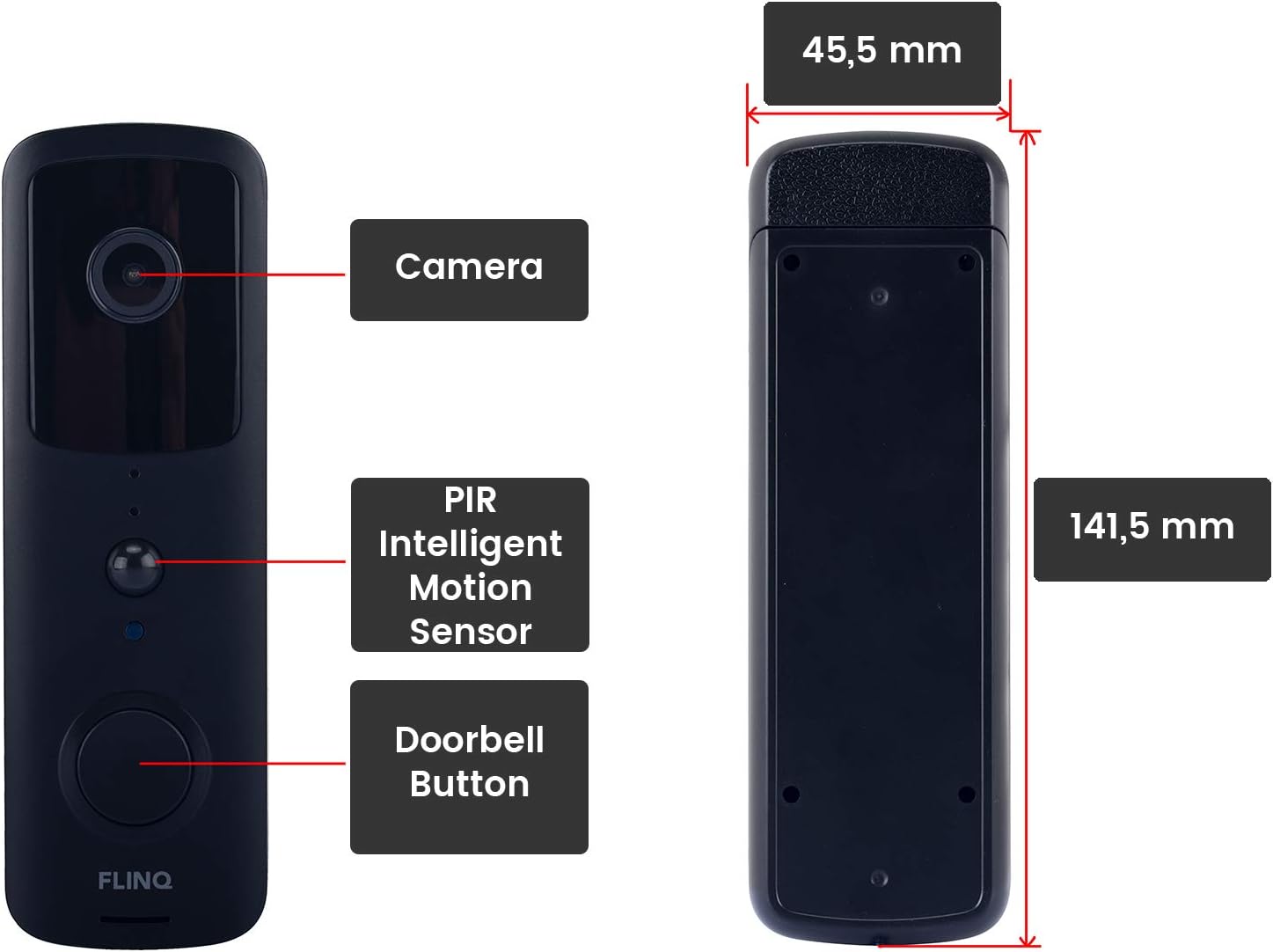
Image: A detailed diagram illustrating the front and side views of the FlinQ Smart WLAN Doorbell, highlighting its camera, PIR intelligent motion sensor, doorbell button, and overall dimensions (141.5 mm height, 45.5 mm width).

Image: A visual representation of the doorbell's 155-degree wide-angle view, showing its broad detection area and real-time HD video capabilities.
የማዋቀር መመሪያ
1. የበር ደወል መሙላት
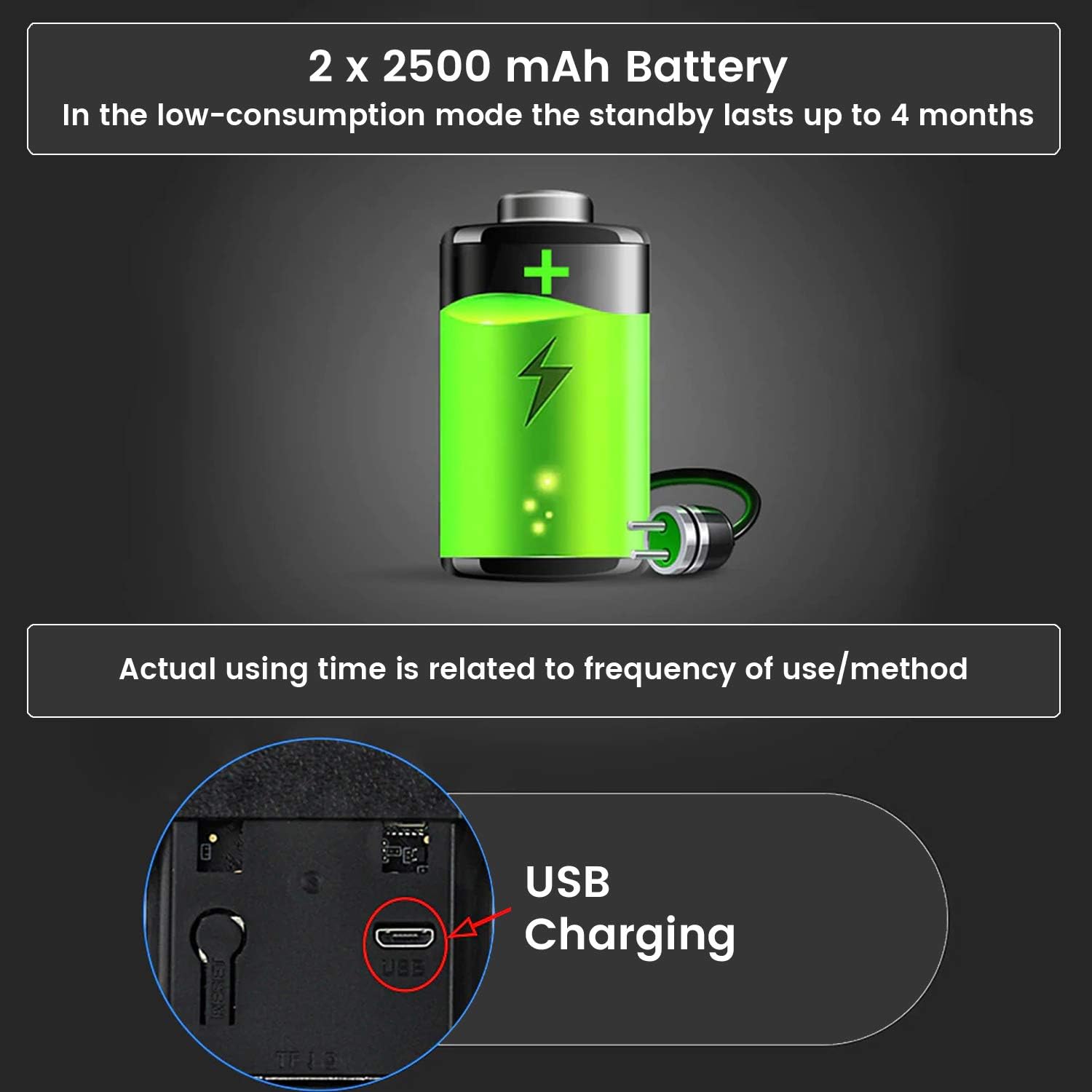
Image: An illustration of the doorbell's battery compartment and the micro USB charging port, indicating the 2x 2500 mAh battery capacity and typical standby time of up to 4 months.
Before initial use, fully charge the doorbell's batteries. Insert the two rechargeable batteries into the doorbell unit. Connect the supplied micro USB cable to the charging port on the doorbell and plug the other end into a standard USB power adapter (not included). The charging indicator light will show the charging status. A full charge can take several hours.
2. የመተግበሪያ ጭነት
The FlinQ Smart Doorbell operates with the TUYA application. Download the "TUYA Smart" app from your smartphone's app store (Google Play Store for Android or Apple App Store for iOS).
- ፈልግ "TUYA Smart" in your app store.
- መተግበሪያውን ያውርዱ እና ይጫኑት።
- መተግበሪያውን ይክፈቱ እና አዲስ መለያ ይመዝገቡ ወይም አስቀድመው ካለዎት ይግቡ።
3. የመሣሪያ ማጣመር
Follow these steps to pair your doorbell with the TUYA Smart app:
- Ensure your smartphone is connected to a 2.4GHz Wi-Fi network. The doorbell does not support 5GHz Wi-Fi.
- Open the TUYA Smart app. Tap the "+" icon in the top right corner to add a device.
- ከመሳሪያዎች ዝርዝር ውስጥ "የቪዲዮ ክትትል" ወይም "ስማርት የበር ደወል" የሚለውን ይምረጡ።
- Follow the on-screen instructions to put the doorbell into pairing mode (usually by pressing and holding the doorbell button or a reset button until an indicator light flashes).
- ሲጠየቁ የእርስዎን የWi-Fi አውታረ መረብ ይለፍ ቃል ያስገቡ።
- The app will generate a QR code. Position your doorbell camera to scan this QR code on your phone screen. Hold it about 15-20 cm away until you hear a confirmation sound from the doorbell.
- Once connected, you can name your doorbell and complete the setup.
To pair the indoor chime: Plug the chime into a power outlet. Press the pairing button on the chime (refer to the chime's specific instructions if available) and then press the doorbell button on the outdoor unit. The chime should ring, indicating successful pairing.
4. አካላዊ ጭነት
Choose a suitable location for your doorbell, ideally near your front door, at a height that allows for optimal viewing. The doorbell is IP52 waterproof, suitable for outdoor installation.
- Mark the drilling points using the provided safety wall mount as a template.
- አስፈላጊ ከሆነ ቀዳዳዎችን ቆፍሩ እና የግድግዳ መሰኪያዎችን ያስገቡ።
- Secure the wall mount to the wall using the screws from the assembly kit.
- Attach the doorbell unit securely to the mounted bracket. Ensure it clicks into place.
የአሠራር መመሪያዎች
1. ባለ ሁለት መንገድ የድምጽ ግንኙነት

Image: A visual representation of the real-time two-way audio feature, showing a person at the door and a smartphone user communicating directly.
When a visitor presses the doorbell button or motion is detected, you will receive a notification on your smartphone. Tap the notification to open the live view in the TUYA Smart app. From here, you can:
- ተናገር፡ Tap the microphone icon to speak to the visitor. Your voice will be projected through the doorbell's speaker.
- ያዳምጡ፡ The doorbell's built-in microphone allows you to hear the visitor.
2. የእንቅስቃሴ ማወቂያ እና ማንቂያዎች
The integrated PIR motion sensor detects movement in front of your doorbell. When motion is detected, the doorbell will:
- Send an instant push notification to your smartphone.
- Begin recording video (if configured).
You can adjust the motion detection sensitivity and set detection zones within the TUYA Smart app settings to minimize false alerts.
3. የምሽት ራዕይ

Image: A visual representation of the doorbell's infrared HD night vision, showing how it provides clear visibility in dark conditions using 6 night vision lights and auto-sensing technology.
The FlinQ Smart Doorbell is equipped with infrared HD night vision. This feature automatically activates in low-light conditions, ensuring clear video recordings and live views even at night.
4. የቪዲዮ ማከማቻ

Image: An illustration detailing the two available video storage methods for the doorbell: 7 days of cloud storage and local storage via a 32GB SD card.
Your video recordings can be stored using two methods:
- የደመና ማከማቻ፡ The TUYA app offers cloud storage options, typically including a period of free storage (e.g., 7 days). Check the app for details on subscription plans for extended cloud storage.
- የማይክሮ ኤስዲ ካርድ ማከማቻ፡ Insert a micro-SD card (up to 32GB, not included) into the designated slot on the doorbell unit for local storage of recordings. This allows you to review footagበቀጥታ ከካርዱ።
5. Indoor Chime Operation
The indoor chime plugs into any standard wall outlet. When the doorbell button is pressed, the chime will ring, providing an audible alert inside your home. The chime unit comes with six different melodies. Refer to the chime's specific instructions (if separate) or the TUYA app settings to change melodies and adjust volume.
ጥገና
1. የባትሪ ኃይል መሙላት
The doorbell's battery life can last up to 4 months under optimal conditions and low usage. However, frequent motion detection events, live view access, and two-way audio usage will reduce battery life. When the battery level is low, you will receive a notification via the TUYA app. Recharge the doorbell using the micro USB cable as described in the Setup section.
Note: Some users report shorter battery life depending on usage frequency and environmental factors. Regular monitoring of battery status via the app is recommended.
2. ማጽዳት
To maintain optimal performance, periodically clean the doorbell unit. Use a soft, damp cloth to wipe the camera lens and the body of the doorbell. Do not use harsh chemicals or abrasive cleaners, as these can damage the device or its waterproof sealing.
መላ መፈለግ
| ችግር | ሊሆን የሚችል ምክንያት | መፍትሄ |
|---|---|---|
| Doorbell not connecting to Wi-Fi / App pairing fails. | Incorrect Wi-Fi band (5GHz), wrong password, weak signal, doorbell not in pairing mode. |
|
| አጭር የባትሪ ህይወት. | Frequent motion detection, high traffic area, frequent live view access, cold weather. |
|
| Motion detection is unreliable or triggers false alarms. | Incorrect sensitivity settings, environmental factors (e.g., swaying trees, passing cars). |
|
| No audio or poor audio quality during two-way communication. | Weak Wi-Fi signal, app permissions, microphone/speaker obstruction. |
|
| የቤት ውስጥ ቃጭል አይጮህም። | Chime unplugged, not paired, out of range. |
|
ዝርዝሮች
| ባህሪ | ዝርዝር |
|---|---|
| የምርት ስም | FLINQ |
| ሞዴል (ASIN) | B08PD3YP2W |
| የቪዲዮ ጥራት | ባለሙሉ ኤችዲ 1920 x 1080 ፒክስል |
| Viewማእዘን | 155 ዲግሪ |
| ግንኙነት | Wireless (WLAN 2.4G), Wired (for power, if applicable, though primarily battery) |
| የኃይል ምንጭ | Battery powered (2x 2500 mAh rechargeable batteries) |
| አማካይ የባትሪ ህይወት | Up to 4 Months (usage dependent) |
| የውሃ መቋቋም ደረጃ | IP52 የውሃ መከላከያ |
| ልዩ ባህሪያት | Motion Sensor, Night Vision, Two-Way Audio, Cloud/SD Card Storage |
| ተስማሚ መሣሪያዎች | Smartphone (via TUYA Smart App) |
| ልኬቶች (የበር ደወል) | Approx. 141.5 mm (H) x 45.5 mm (W) |
| የጥቅል ልኬቶች | 26.3 x 8.7 x 7.7 ሴ.ሜ; 370 ግ |
| መጀመሪያ የሚገኝ ቀን | ታህሳስ 23 ቀን 2020 ዓ.ም |
ዋስትና እና ድጋፍ
For warranty information and technical support, please refer to the official FLINQ webጣቢያ ወይም ምርቱን የገዙበትን ቸርቻሪ ያነጋግሩ። ለዋስትና ጥያቄዎች የግዢ ማረጋገጫዎን ያስቀምጡ።
For app-related issues, please consult the help section within the TUYA Smart app or visit the TUYA Smart support webጣቢያ.