
1. መግቢያ
This manual provides detailed instructions for the operation and maintenance of your Tayogo WB02 Bone Conduction Swimming Headphones. These headphones are designed for various activities, including swimming, diving, running, and cycling, offering an IPX8 waterproof rating, an integrated 8GB MP3 player, and Bluetooth connectivity.

Image 1.1: Tayogo WB02 Bone Conduction Swimming Headphones. The image displays the black headphones with a flexible neckband, designed to sit comfortably around the head, with the bone conduction transducers resting near the ears. Water splashes are visible in the background, indicating its waterproof nature.
2. የምርት ባህሪዎች
- IPX8 የውሃ መከላከያ ደረጃ Designed for underwater use up to 5 meters, suitable for swimming and diving.
- Flexible and Durable Design: Constructed with a titanium alloy frame for 360-degree adjustment and covered with skin-friendly silicone. Includes an adjustable belt and buckle for a secure fit.
- Integrated 8GB MP3 Player: Stores up to 2,000 songs for offline playback, ideal for water activities where Bluetooth connectivity may be limited.
- የብሉቱዝ ግንኙነት; Supports Bluetooth connection up to 10 meters for streaming audio from compatible devices. Automatically switches to answer incoming calls during music playback.
- ኤፍኤም ሬዲዮ ሞድ; Built-in FM tuner allows access to radio channels for news, audiobooks, or music.
- የአጥንት ማስተላለፊያ ቴክኖሎጂ; Transmits sound through the cheekbones to the inner ear, leaving the ear canal open to ambient sounds for increased awareness and safety.

Image 2.1: Diagram illustrating bone conduction technology. Sound waves are shown bypassing the eardrum and transmitting through cranial bones to the inner ear, allowing the ear to remain open to environmental sounds. A person wearing the headphones while swimming is also depicted.

Image 2.2: Collage showing various usage scenarios for the Tayogo WB02 headphones, including use by hearing-impaired individuals, fitness enthusiasts, cyclists, and drivers, highlighting versatility and safety benefits.
3. የጥቅል ይዘቶች
ሁሉም እቃዎች በጥቅልዎ ውስጥ መኖራቸውን ያረጋግጡ፡-
- Tayogo WB02 Bone Conduction Swimming Headphones
- የዩኤስቢ ባትሪ መሙያ / የውሂብ ገመድ
- Adjustable Headband/Buckle
- የመዋኛ የጆሮ ማዳመጫዎች
- የማከማቻ መያዣ
- የተጠቃሚ መመሪያ (ይህ ሰነድ)

Image 3.1: Contents of the Tayogo WB02 package, including the headphones, a black protective case, a USB charging cable, and a pair of earplugs, alongside the user manual.
4. ማዋቀር
4.1. የጆሮ ማዳመጫዎችን መሙላት
Before first use, fully charge the headphones. Connect the provided USB charging cable to the USB interface on the headphones and to a standard USB power source (e.g., computer USB port, wall adapter). The charging indicator light will show the charging status. Ensure the charging port is completely dry before connecting the cable to prevent damage.
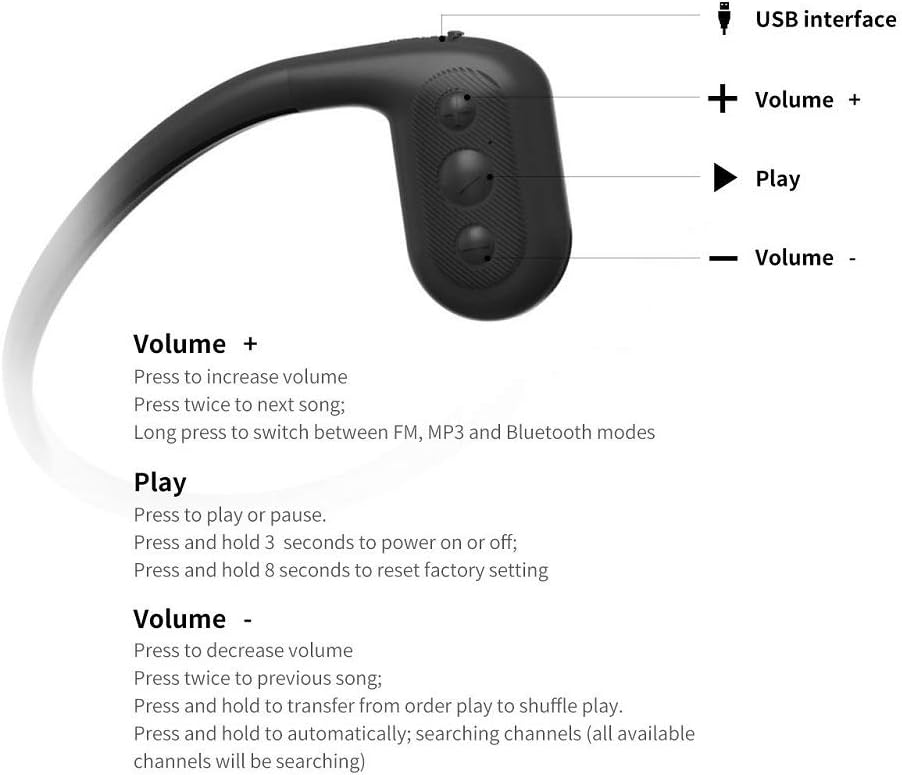
ምስል 4.1፡ መቀራረብ view of the Tayogo WB02 headphones showing the USB interface for charging and data transfer, located on one of the ear pieces.
4.2. Loading Music (MP3 Mode)
The headphones have an 8GB internal storage for MP3 playback. To load music:
- Connect the headphones to your computer using the USB charging/data cable.
- የጆሮ ማዳመጫዎቹ በኮምፒተርዎ ላይ እንደ ተነቃይ ዲስክ ድራይቭ ሆነው ይታያሉ።
- Drag and drop your desired MP3, WMA, WAV, FLAC, or APE audio fileወደ የጆሮ ማዳመጫ ማከማቻ አቃፊው ገባ።
- Safely eject the removable disk from your computer before disconnecting the cable.
You can also use the Tayogo APP to manage your song list, as shown in Image 4.2.

Image 4.2: A person connecting the Tayogo WB02 headphones to a laptop via USB to transfer music files, with a smartphone displaying the Tayogo app interface for song management.
4.3. የጆሮ ማዳመጫዎችን መልበስ
Place the flexible neckband around the back of your head, with the bone conduction transducers resting comfortably on your cheekbones, just in front of your ears. Adjust the headband for a snug and secure fit. For swimming, ensure the headphones are positioned firmly to prevent movement.
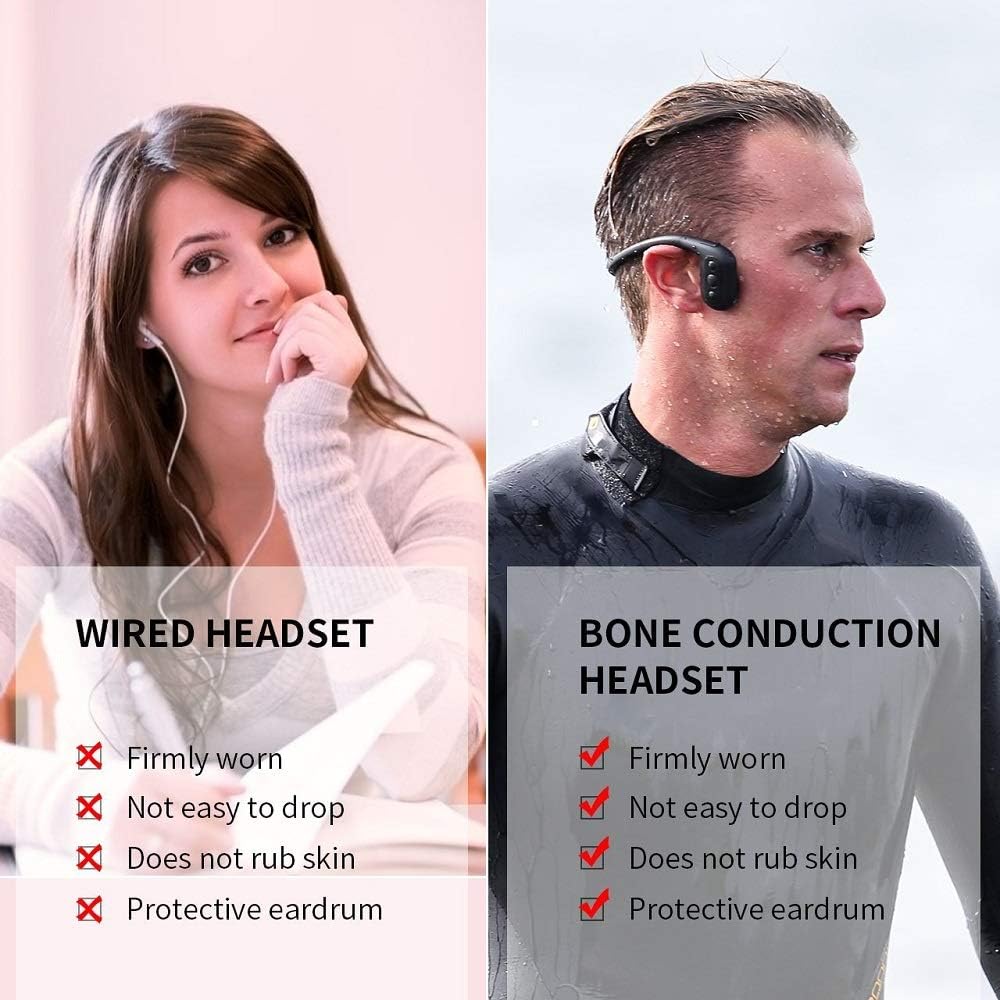
Image 4.3: A side-by-side comparison showing a person wearing traditional wired earbuds versus a person wearing bone conduction headphones. The bone conduction headphones are shown securely fitted around the head, with the transducers positioned correctly.
5. የአሠራር መመሪያዎች
5.1. የአዝራር ተግባራት
The headphones feature three main control buttons: Volume +, Play, and Volume -.
Image 5.1: Detailed diagram of the control buttons on the Tayogo WB02 headphones, indicating the USB interface, Volume +, Play, and Volume - buttons, along with their primary functions.
- ድምጽ + አዝራር
- ተጫን፡ ድምጽን ጨምር።
- Press twice: Next song.
- Long press: Switch between FM, MP3, and Bluetooth modes.
- አጫውት አዝራር፡-
- Press: Play or pause audio.
- Press and hold for 3 seconds: Power on or off.
- ለ 8 ሰከንድ ተጭነው ይያዙ፡ ወደ ፋብሪካ መቼቶች ዳግም ያስጀምሩ።
- የድምጽ መጠን - አዝራር:
- ተጫን፡ ድምጽን ቀንስ።
- Press twice: Previous song.
- Press and hold: Transfer from order play to shuffle play (MP3 mode).
- Press and hold (in FM mode): Automatically search for and save available FM channels.
5.2. የመቀያየር ሁነታዎች
ን በረጅሙ ተጫን ጥራዝ + button to cycle through the available modes: Bluetooth, MP3, and FM Radio.
5.3. የብሉቱዝ ማጣመር
- Ensure the headphones are powered on and in Bluetooth mode (indicated by a specific LED light or voice prompt).
- በመሳሪያዎ (ስማርትፎን፣ ታብሌት፣ ወዘተ) ላይ ብሉቱዝን አንቃ እና የሚገኙ መሳሪያዎችን ፈልግ።
- Select "Tayogo WB02" (or similar name) from the list to pair.
- Once paired, the headphones will connect automatically to your device when in range and in Bluetooth mode.
Note: Bluetooth connectivity may be interrupted or lost when submerged in water due to radio wave limitations. For underwater use, MP3 mode is recommended.
5.4. Using FM Radio
በኤፍኤም ሁነታ፣ ለረጅም ጊዜ ይጫኑ ጥራዝ - button to initiate an automatic scan for FM channels. The headphones will search and save all available stations. Use the Volume + and Volume - buttons (single press) to adjust volume, and double press them to navigate between saved stations.
6. ጥገና
- ማጽዳት፡ After use, especially in chlorinated or saltwater, rinse the headphones with fresh water. Wipe them gently with a soft, dry cloth.
- ማድረቅ፡ It is crucial to ensure the charging port and surrounding areas are completely dry before charging or connecting to a computer. Allow the headphones to air dry thoroughly. Avoid storing them in a wet environment.
- ማከማቻ፡ Store the headphones in their protective case in a cool, dry place away from direct sunlight and extreme temperatures.
- የባትሪ እንክብካቤ የባትሪ ዕድሜን ለማራዘም በተደጋጋሚ ባትሪውን ሙሉ በሙሉ ከመሙላት ይቆጠቡ። ምንም እንኳን ለረጅም ጊዜ ጥቅም ላይ ባይውልም የጆሮ ማዳመጫዎችን በመደበኛነት ቻርጅ ያድርጉ።
7. መላ መፈለግ
| ችግር | ሊሆን የሚችል ምክንያት | መፍትሄ |
|---|---|---|
| የጆሮ ማዳመጫዎች አይበሩም። | ዝቅተኛ ባትሪ. | የጆሮ ማዳመጫዎቹን ሙሉ በሙሉ ይሙሉ። |
| በብሉቱዝ መገናኘት አልተቻለም። | Headphones not in Bluetooth mode; device Bluetooth off; out of range. | Ensure headphones are in Bluetooth mode. Turn on Bluetooth on your device. Move device closer to headphones (within 10 meters). |
| ምንም ድምፅ ወይም ደካማ የድምጽ ጥራት. | Volume too low; incorrect mode; water in transducers (for underwater use). | Adjust volume. Switch to correct mode (MP3/Bluetooth/FM). Ensure transducers are dry and properly positioned on cheekbones. |
| Charging port issues / Device damaged after charging. | Moisture in the charging port. | Always ensure the charging port is completely dry before connecting the USB cable. ፍቀድ ample time for air drying after water exposure. If damage occurs, contact customer support. |
| ሙዚቃ ማስተላለፍ አይቻልም files. | Improper connection; file ቅርጸት አይደገፍም። | Ensure headphones are properly connected to the computer. Verify audio files are in supported formats (MP3, WMA, WAV, FLAC, APE). Safely eject the device after transfer. |
8. ዝርዝሮች
- ሞዴል፡ WB02-20201201 እ.ኤ.አ.
- የውሃ መከላከያ ደረጃ IPX8 (እስከ 5 ሜትር)
- የውስጥ ማከማቻ፡ 8 ጊባ
- ግንኙነት፡ ብሉቱዝ 5.0
- የሚደገፉ የድምጽ ቅርጸቶች፡- APE፣ FLAC፣ MP3፣ WAV፣ WMA
- ልዩ ባህሪያት፡ FM Radio, Bone Conduction Technology
- ባትሪ፡ 1 ሊቲየም አዮን ባትሪ (ተጨምሯል)
- የምርት መጠኖች: 4 x 4 x 1.1 ኢንች
- የእቃው ክብደት፡ 9.6 አውንስ
- አምራች፡ ታዮጎ
9. ዋስትና እና ድጋፍ
Tayogo provides a የ1-ዓመት ዋስትና for this product. If you encounter any issues or defects within the warranty period, please contact Tayogo customer support for assistance.
For further support, troubleshooting, or warranty claims, please visit the official Tayogo website or contact their customer service department. Contact details are typically available on the product packaging or the official brand webጣቢያ.
እባክዎ ለዋስትና ዓላማዎች የግዢ ማረጋገጫዎን ያቆዩ።