1. መግቢያ
Thank you for choosing the Hama 186369 Weather Forecast Center. This device provides comprehensive weather data, including satellite-based forecasts, indoor and outdoor temperature/humidity, and more. This manual will guide you through the setup, operation, and maintenance of your weather station to ensure optimal performance.
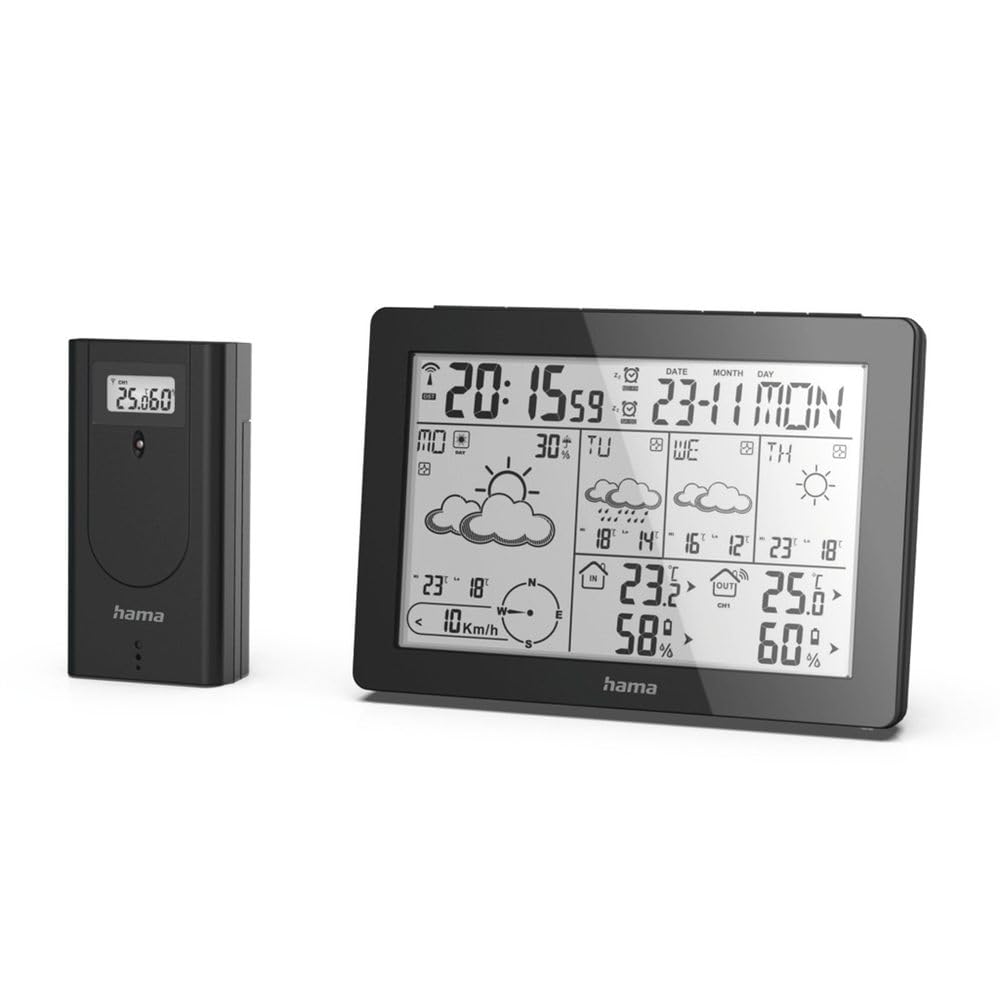
The Hama 186369 Weather Forecast Center main unit, showcasing its digital display with various weather parameters.
2. የጥቅል ይዘቶች
እባኮትን ከዚህ በታች የተዘረዘሩት ሁሉም እቃዎች መኖራቸውን እና በጥሩ ሁኔታ ላይ መሆናቸውን ያረጋግጡ፡-
- Hama 186369 Weather Forecast Center (Base Station)
- የገመድ አልባ ከቤት ውጭ ዳሳሽ
- 4 x AA Batteries (for both units)
- ይህ መመሪያ መመሪያ

The complete set, including the base station and the wireless outdoor sensor.
3. የደህንነት መመሪያዎች
- Do not open the device. Improper repair can lead to considerable hazards for the user.
- Do not expose the product to direct sunlight, extreme temperatures, or high humidity.
- ይህንን ምርት ልክ እንደ ሁሉም የኤሌክትሪክ ምርቶች, ህጻናት በማይደርሱበት ቦታ ያስቀምጡት.
- ምርቱን ከቆሻሻ, እርጥበት እና ከመጠን በላይ ሙቀት ይጠብቁ.
- ምርቱን ለታለመለት ዓላማ ብቻ ይጠቀሙ.
- የኤሌክትሮኒክስ ምርቶች ያልተፈቀዱ ቦታዎች ላይ ምርቱን አይጠቀሙ.
- When inserting batteries, note the correct polarity (+ and - markings) and insert the batteries accordingly. Otherwise, the batteries could leak or explode.
- Replace all batteries of a set at the same time. Do not mix old and new batteries or batteries of different types.
4. ማዋቀር
4.1 ባትሪዎችን ማስገባት
The Hama 186369 Weather Forecast Center and its outdoor sensor require AA batteries for operation.
- Open the battery compartment cover on the back of both the base station and the outdoor sensor.
- Insert the AA batteries, ensuring correct polarity (+ and -). The base station requires 2x AA batteries, and the outdoor sensor requires 2x AA batteries.
- የባትሪውን ክፍል በጥንቃቄ ይዝጉ።
Inserting batteries into the base station. Ensure correct polarity.

The wireless outdoor sensor, which also requires batteries.
4.2 Initial Operation and Signal Reception
After inserting the batteries, the base station will automatically search for the DCF-77 signal and connect to the outdoor sensor.
- Place the base station and the outdoor sensor close to each other during initial setup.
- The DCF-77 radio signal for time and date synchronization will be automatically received. This process may take several minutes.
- The outdoor sensor will transmit temperature and humidity data to the base station. Ensure they are within range (up to 30 meters in open areas).

አልቋልview of the weather station's features and components, including the outdoor sensor and base station display.
5. Operating the Weather Forecast Center
5.1 ማሳያview
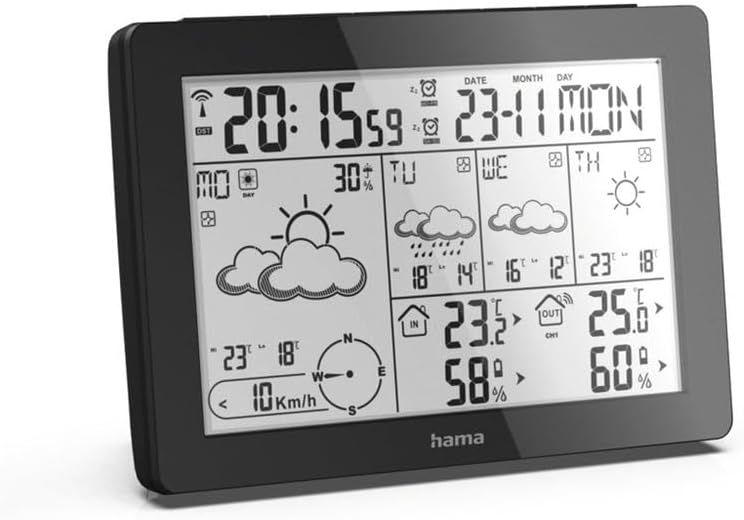
The main display shows various information at a glance:
- ሰዓት እና ቀን፡- Synchronized via DCF-77 signal.
- የቤት ውስጥ ሙቀት እና እርጥበት; Measured by the base station.
- የውጪ ሙቀት እና እርጥበት; Received from the wireless outdoor sensor.
- የአየር ሁኔታ ትንበያ: Satellite-based 4-day forecast for 60 regions/30 regions in Europe, updated daily.
- Rain Probability: Indication of precipitation likelihood.
- የንፋስ ፍጥነት እና አቅጣጫ; Displayed graphically.
- Frost Alarm: Activates when temperatures drop to a critical level.
5.2 የአዝራር ተግባራት
The buttons on the top of the base station allow you to adjust settings and view different information.

ከፍተኛ view of the base station showing the control buttons.
- አቅጣጫዎች: Switches between display modes (e.g., time, alarm setting).
- ቻናል Selects different outdoor sensor channels if multiple sensors are used.
- DAY/NIGHT/SNOOZE+LIGHT: Activates backlight, snooze function for alarm, or switches between day/night display.
- ሙከራ: Initiates a test of the sensor connection.
- ላይ ታች: Adjusts values during settings or navigates through forecast data.
5.3 ሰዓት እና ቀን ማዘጋጀት (በእጅ ማስተካከል)
While the time and date are usually set automatically via the DCF-77 signal, you can manually adjust them if needed.
- ተጭነው ይያዙት። MODE የጊዜ ማሳያው ብልጭ ድርግም እስኪል ድረስ አዝራር።
- የሚለውን ተጠቀም UP እና ታች ሰዓቱን ለማስተካከል ቁልፎች ፣ ከዚያ ተጫን MODE ለማረጋገጥ እና ወደ ደቂቃዎች ይሂዱ.
- ለደቂቃዎች, ለዓመት, ለወር እና ለቀን መድገም.
- ተጫን MODE እንደገና ከማቀናበር ሁነታ ለመውጣት.
5.4 የማንቂያ ደወል ተግባር
የአየር ሁኔታ ጣቢያው የማንቂያ ተግባርን ያካትታል።
- የሚለውን ይጫኑ MODE button repeatedly until the alarm time is displayed.
- ተጭነው ይያዙ MODE የማንቂያ ቅንብር ሁኔታን ለማስገባት ፡፡
- ተጠቀም UP እና ታች የሚፈለገውን የማንቂያ ጊዜ ለማዘጋጀት.
- ተጫን MODE እያንዳንዱን ቅንብር ለማረጋገጥ።
- ማንቂያውን ለማንቃት/ለማጥፋት፣ የሚለውን ይጫኑ UP button when the alarm time is displayed. An alarm icon will appear/disappear.
6. ጥገና
6.1 ጽዳት
- ይህንን ምርት በጥቂቱ ብቻ ያጽዱamp፣ ከጥጥ ነፃ የሆነ ጨርቅ እና ኃይለኛ የጽዳት ወኪሎችን አይጠቀሙ።
- Ensure that no water gets into the device.
6.2 የባትሪ መተካት
When the battery indicator appears on the display, replace all batteries in the respective unit (base station or outdoor sensor).
- Follow the steps in section 4.1 "Inserting Batteries".
- ያገለገሉ ባትሪዎችን በአካባቢያዊ ደንቦች መሰረት ያስወግዱ.
7. መላ መፈለግ
| ችግር | ሊሆን የሚችል ምክንያት | መፍትሄ |
|---|---|---|
| No display / Weak display | Batteries are empty or incorrectly inserted. | ባትሪዎችን ይተኩ, ትክክለኛውን ፖሊነት ያረጋግጡ. |
| ከቤት ውጭ የአየር ሙቀት/የእርጥበት ንባብ የለም። | Outdoor sensor not connected or out of range. |
|
| የተሳሳተ ሰዓት/ቀን | DCF-77 signal not received or interference. |
|
| ትክክለኛ ያልሆነ የአየር ሁኔታ ትንበያ | Incorrect region setting or temporary signal issue. |
|
8. ዝርዝሮች
| ባህሪ | ዝርዝር |
|---|---|
| የሞዴል ቁጥር | 186369 |
| Dimensions (Base Station) | 3 x 15.3 x 10.5 ሴ.ሜ |
| ክብደት | 510 ግ |
| ቁሳቁስ | አክሬሊክስ |
| የኃይል ምንጭ | Battery-powered (4 AA batteries required, included) |
| ግንኙነት | Wireless (for outdoor sensor) |
| ልዩ ባህሪያት | Alarm, Wireless Outdoor Sensor, Frost Alarm, DCF-77 Radio Clock |
| የአየር ሁኔታ ትንበያ | Satellite-based 4-day forecast for 60 regions/30 regions in Europe, daily updated data for 611 locations. |
| የሚመከር አጠቃቀም | Temperature measurement, hobby, private, business. |
9. ዋስትና እና ድጋፍ
Hama GmbH & Co KG ምንም ዓይነት ሀላፊነት አይወስድም እና ተገቢ ባልሆነ ጭነት/መጫኛ ፣ በምርቱ ተገቢ ያልሆነ አጠቃቀም ወይም የአሠራር መመሪያዎችን እና/ወይም የደህንነት ማስታወሻዎችን ባለማክበሩ ምክንያት ለደረሰ ጉዳት ዋስትና አይሰጥም።
For technical support or warranty claims, please contact your retailer or visit the official Hama webለተጨማሪ እርዳታ ጣቢያ.

Hama: Experience and competence since 1923.