
1. መግቢያ
This manual provides detailed instructions for the safe and efficient use of your Hoco HC3 Bounce Sports Wireless Speaker. Please read this manual thoroughly before operating the device and retain it for future reference. The Hoco HC3 is a versatile portable speaker supporting Bluetooth, FM radio, TF card, USB, AUX, and TWS modes.

Figure 1: Hoco HC3 Bounce Sports Wireless Speaker. This image displays the speaker in a vertical orientation, showcasing its black mesh grille, the 'hoco' logo at the bottom right, and a braided carrying strap attached to the top left side. The control buttons are visible on the side panel.
2. የጥቅል ይዘቶች
ከሳጥኑ ሲወጡ ሁሉም እቃዎች መኖራቸውን ያረጋግጡ፡
- Hoco HC3 Bounce Sports Wireless Speaker
- የዩኤስቢ ባትሪ መሙያ ገመድ
- የተጠቃሚ መመሪያ (ይህ ሰነድ)
- AUX Audio Cable (if included with your model)
3. ምርት አብቅቷልview
3.1 የተናጋሪ ክፍሎች

Figure 2: Rear panel of the Hoco HC3 speaker. This image highlights the various input ports and control buttons located on the back of the speaker. Visible elements include the power switch, USB port, TF card slot, AUX input, and LED indicator.
ከተናጋሪው መቆጣጠሪያዎች እና ወደቦች ጋር እራስዎን ይወቁ፡
- የኃይል ቁልፍ፡- Long press to power on/off. Short press to switch modes.
- አጫውት/አፍታ አቁም አዝራር፡- ኦዲዮን ያጫውቱ ወይም ለአፍታ ያቁሙ። ጥሪዎችን ይመልሱ/ያቁሙ።
- የድምጽ መጨመሪያ / ቀጣይ የትራክ አዝራር፡ ለቀጣዩ ትራክ አጭር ጫን፣ ለድምጽ መጨመር ረጅም ጫን።
- የድምጽ ቅነሳ/የቀድሞው የትራክ አዝራር፡- ለቀዳሚው ትራክ አጭር ይጫኑ፣ የድምጽ ቅነሳን ለማግኘት ረጅም ይጫኑ።
- ሁነታ አዝራር (ኤም)፦ Short press to cycle through Bluetooth, FM, TF card, USB, and AUX modes.
- የዩኤስቢ ወደብ፡ ለዩኤስቢ አንጻፊ መልሶ ማጫወት።
- የ TF ካርድ ማስገቢያ ለ TF (ማይክሮ ኤስዲ) ካርድ መልሶ ማጫወት።
- AUX ግቤት፡ ለገመድ የድምጽ ግንኙነት 3.5ሚሜ መሰኪያ።
- የኃይል መሙያ ወደብ; ድምጽ ማጉያውን ለመሙላት የማይክሮ ዩኤስቢ ወደብ።
- የ LED አመልካች፡- Displays charging status and operating mode.
3.2 ቁልፍ ባህሪያት
- ብሉቱዝ V5.0፡ የተረጋጋ እና ቀልጣፋ የገመድ አልባ ግንኙነትን ያቀርባል።
- በርካታ የመልሶ ማጫወት ሁነታዎች፡- Supports Bluetooth, FM radio, TF card, USB drive, and AUX input.
- እውነተኛ ገመድ አልባ ስቴሪዮ (TWS) Allows two HC3 speakers to connect wirelessly for a stereo sound experience.
- ረጅም የባትሪ ህይወት; 2400mAh battery capacity offers up to 5 hours of music playback.
- ባለሁለት ድምጽ ማጉያዎች; Equipped with two 45mm speaker units, each with 5W power output.
- የታመቀ እና ተንቀሳቃሽ፡ Dimensions of 202*60*60mm and weight of 561g for easy transport.
4. ማዋቀር
4.1 ድምጽ ማጉያውን መሙላት
- የቀረበውን የዩኤስቢ ኃይል መሙያ ገመድ ከድምጽ ማጉያው የኃይል መሙያ ወደብ ጋር ያገናኙ።
- የዩኤስቢ ገመዱን ሌላኛውን ጫፍ ከ5 ቮ የዩኤስቢ የኃይል አስማሚ (ያልተካተተ) ወይም ከኮምፒዩተር የዩኤስቢ ወደብ ጋር ያገናኙ።
- The LED indicator will illuminate to show charging status. It typically takes about 3 hours for a full charge.
- Once fully charged, the LED indicator will change or turn off (refer to specific LED behavior in the troubleshooting section if unsure).
ማሳሰቢያ፡- ለተመቻቸ የባትሪ ዕድሜ፣ ለመጀመሪያ ጊዜ ከመጠቀምዎ በፊት ድምጽ ማጉያውን ሙሉ በሙሉ ይሙሉት።
4.2 ማብራት / ማጥፋት
- ለማብራት፡- Long press the Power button until you hear an audible prompt and the LED indicator lights up.
- ለማጥፋት፡- Long press the Power button again until you hear an audible prompt and the LED indicator turns off.
5. የአሠራር መመሪያዎች
5.1 የብሉቱዝ ማጣመር
- Ensure the speaker is powered on and in Bluetooth mode (the LED indicator will typically flash blue, indicating it's ready for pairing). If not, short press the Mode (M) button to switch to Bluetooth mode.
- Enable Bluetooth on your mobile device (smartphone, tablet, computer).
- ፈልግ available Bluetooth devices. You should see "HC3" or "Hoco HC3" in the list.
- Select "HC3" to connect. Once paired, the speaker will emit an audible confirmation, and the LED indicator will stop flashing and remain solid blue.
- አሁን በድምጽ ማጉያው በኩል ከመሳሪያዎ ላይ ድምጽ ማጫወት ይችላሉ።
Note: The speaker will automatically attempt to reconnect to the last paired device when powered on, if that device's Bluetooth is active and within range.
5.2 ኤፍኤም ሬዲዮ ሁነታ
- በተናጋሪው ላይ ኃይል ፡፡
- Short press the Mode (M) button repeatedly until you enter FM radio mode.
- To auto-scan and save available FM stations, short press the Play/Pause button. The speaker will scan and store stations.
- Use the Volume Up / Next Track and Volume Down / Previous Track buttons to navigate between saved stations.
5.3 የTF ካርድ / የዩኤስቢ መልሶ ማጫወት
- በተናጋሪው ላይ ኃይል ፡፡
- Insert a TF (MicroSD) card into the TF card slot or a USB flash drive into the USB port.
- The speaker should automatically switch to TF card or USB mode and begin playing audio files. If not, short press the Mode (M) button to select the correct mode.
- Use the Play/Pause, Volume Up / Next Track, and Volume Down / Previous Track buttons to control playback.
Note: Ensure your TF card or USB drive contains compatible audio files (ለምሳሌ፣ MP3 ቅርጸት)።
5.4 AUX ሁነታ
- በተናጋሪው ላይ ኃይል ፡፡
- Connect one end of a 3.5mm audio cable (if included) to the speaker's AUX input port.
- Connect the other end of the audio cable to the audio output jack of your external device (e.g., MP3 player, computer).
- The speaker should automatically switch to AUX mode. If not, short press the Mode (M) button to select AUX mode.
- ከውጫዊ መሳሪያዎ መልሶ ማጫወትን ይቆጣጠሩ። የድምጽ መጠኑ በድምጽ ማጉያውም ሆነ በውጫዊ መሳሪያው ላይ ሊስተካከል ይችላል።
5.5 TWS (እውነተኛ ገመድ አልባ ስቴሪዮ) ተግባር
The TWS function allows you to pair two Hoco HC3 speakers together for a true stereo sound experience.
- Ensure both HC3 speakers are powered off.
- ሁለቱንም ድምጽ ማጉያዎች በአንድ ጊዜ ያብሩ። ሁለቱም የብሉቱዝ ማጣመሪያ ሁነታ ውስጥ መግባት አለባቸው።
- On አንድ of the speakers (this will become the primary speaker), long press the Mode (M) button or a dedicated TWS button (if present, otherwise try the Play/Pause button for 3-5 seconds) until you hear a pairing tone. The speakers will attempt to connect to each other.
- Once successfully paired, you will hear a confirmation tone, and one speaker's LED will indicate it's the primary (e.g., flashing slowly), while the other's LED will be solid.
- Now, connect your mobile device to the የመጀመሪያ ደረጃ speaker via Bluetooth as described in section 5.1.
- ኦዲዮ አሁን በሁለቱም ድምጽ ማጉያዎች በኩል በስቲሪዮ ውስጥ ይጫወታል።
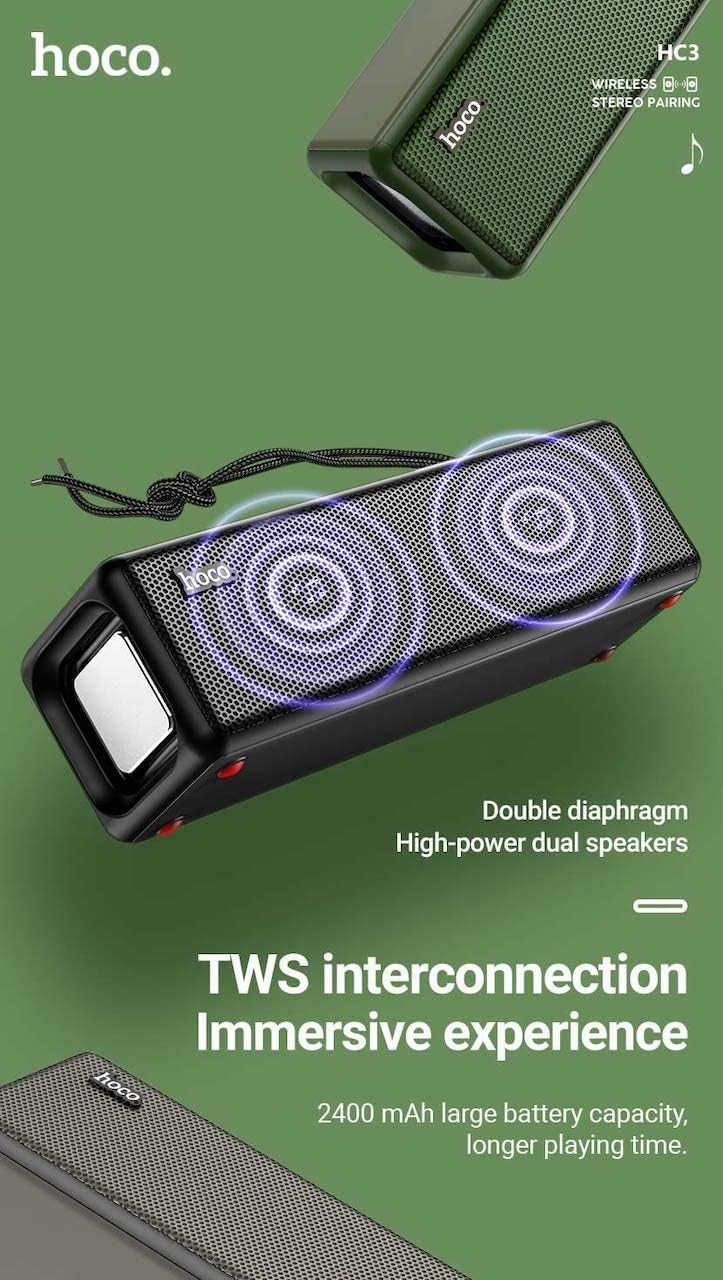
Figure 3: TWS Interconnection. This image illustrates the concept of two Hoco HC3 speakers wirelessly connected to provide a stereo audio experience, highlighting the dual speaker setup and the 2400 mAh battery capacity.
5.6 የጥሪ አያያዝ
በብሉቱዝ ወደ ስማርትፎን ሲገናኙ፡-
- ጥሪ መልስ፡- አጫውት/አፍታ አቁም የሚለውን ቁልፍ ተጫን።
- ጥሪን ጨርስ፡ በጥሪ ጊዜ አጫውት/አፍታ አቁም የሚለውን ቁልፍ ተጫን።
- ጥሪን ውድቅ አድርግ፡ ገቢ ጥሪ ሲደወል አጫውት/አፍታ አቁም የሚለውን በረጅሙ ተጫን።
- የመጨረሻ ቁጥር አጫውት/አፍታ አቁም የሚለውን ቁልፍ ሁለቴ ተጫን።
6. ጥገና
- ማጽዳት፡ Use a soft, dry cloth to clean the speaker's surface. Do not use abrasive cleaners, alcohol, or other chemical solvents.
- ማከማቻ፡ ድምጽ ማጉያውን በቀጥታ ከፀሀይ ብርሀን እና ከከፍተኛ ሙቀት ርቆ በቀዝቃዛና ደረቅ ቦታ ያከማቹ።
- የባትሪ እንክብካቤ To prolong battery life, charge the speaker regularly, even if not in use for extended periods (e.g., once every 3 months). Avoid fully discharging the battery frequently.
- የውሃ መቋቋም; While designed for sports, avoid submerging the speaker in water. Refer to product specifications for any IP rating.
- ተጽዕኖን ያስወግዱ፡ Protect the speaker from drops and strong impacts.
7. መላ መፈለግ
If you encounter issues with your Hoco HC3 speaker, refer to the following table for common problems and solutions:
| ችግር | ሊሆን የሚችል ምክንያት | መፍትሄ |
|---|---|---|
| ተናጋሪው አይበራም። | ዝቅተኛ ባትሪ. | ድምጽ ማጉያውን ቢያንስ ለ 30 ደቂቃዎች ይሙሉ. |
| በብሉቱዝ በኩል ማጣመር አይቻልም። | በመሳሪያው ላይ ብሉቱዝ አልነቃም; ድምጽ ማጉያ በማጣመር ሁነታ ላይ አይደለም; ከመሳሪያው በጣም የራቀ. | Ensure Bluetooth is on, speaker is in pairing mode (flashing blue LED), and devices are within 10 meters. Forget "HC3" on your device and try pairing again. |
| ድምጽ የለም። | በጣም ዝቅተኛ መጠን; የተሳሳተ ሁነታ ተመርጧል; መሣሪያ ኦዲዮ አይጫወትም። | Increase volume on both speaker and connected device. Verify correct mode (Bluetooth, AUX, TF, USB). Ensure audio is playing on the source device. |
| የኤፍኤም ሬዲዮ አቀባበል ደካማ ነው። | ደካማ ምልክት; የአካባቢ ጣልቃገብነት. | Move the speaker to a location with better reception. Re-scan for stations. |
| የTF ካርድ/ዩኤስቢ መልሶ ማጫወት አይሰራም። | Card/drive not inserted correctly; incompatible file ቅርጸት; የተበላሸ files. | Ensure card/drive is fully inserted. Check file formats (MP3 recommended). Try another card/drive. |
| TWS ማጣመር አልተሳካም። | በTWS የማጣመሪያ ሁነታ ላይ ያልሆኑ ድምጽ ማጉያዎች፤ በጣም የተራራቁ። | Ensure both speakers are powered on and in TWS pairing mode. Keep them close during pairing. Refer to section 5.5. |
8. ዝርዝሮች
| ባህሪ | ዝርዝር |
|---|---|
| ሞዴል | HC3 |
| መጠኖች | 202 x 60 x 60 ሚ.ሜ |
| ክብደት | 561 ግ |
| የብሉቱዝ ስሪት | V5.0 (Chip: JLAC6928B) |
| የባትሪ አቅም | 2400mAh |
| የኃይል መሙያ ጊዜ | በግምት 3 ሰዓታት |
| የንግግር/የሙዚቃ ጊዜ | እስከ 5 ሰዓታት ድረስ |
| የድምጽ ማጉያ ክፍል | 45 ሚሜ * 2 |
| የድምፅ ማጉያ የኃይል ማመንጫ | 5 ዋ * 2 |
| የግንኙነት ሁነታዎች | Bluetooth, FM, TF card, USB, AUX, TWS |
| የድምጽ ውፅዓት ሁኔታ | ዙሪያ |
| አምራች | Hoco |
| የትውልድ ሀገር | ቻይና |
9. ዋስትና እና ድጋፍ
Hoco products are manufactured to high quality standards. For information regarding warranty coverage, please refer to the warranty card included with your purchase or contact your local Hoco distributor or retailer. Keep your proof of purchase for any warranty claims.
For technical support or further assistance, please visit the official Hoco website or contact their customer service department. Contact details are typically available on the product packaging or the official webጣቢያ.