
1. መግቢያ
ስለገዙ እናመሰግናለንasing the QFX E-B3 Bluetooth Professional High-Power Speaker. This manual provides essential information for the safe and efficient operation of your speaker. Please read it thoroughly before use and retain it for future reference.
The QFX E-B3 is designed to deliver powerful audio with features including Bluetooth connectivity, FM radio, USB/SD card playback, LED party lights, and a 250W power amplifier. It also supports True Wireless System (TWS) for stereo pairing with another compatible speaker.
2. የደህንነት መረጃ
- የኃይል ምንጭ፡- ድምጽ ማጉያውን በመሳሪያው ላይ እንደተገለጸው ከተጠቀሰው የኃይል አቅርቦት ጋር ብቻ ያገናኙ።
- የአየር ማናፈሻ; በድምጽ ማጉያው ዙሪያ በቂ የአየር ዝውውር መኖሩን ያረጋግጡ። የአየር ማናፈሻ ክፍተቶችን አይዝጉ።
- ውሃ እና እርጥበት; This speaker is not waterproof. Do not expose it to rain, moisture, or any liquids to prevent electric shock or fire.
- ሙቀት፡ ድምጽ ማጉያውን እንደ ራዲያተሮች፣ የሙቀት መመዝገቢያዎች፣ ምድጃዎች ወይም ሌሎች ሙቀትን ከሚያመነጩ መሳሪያዎች ካሉ የሙቀት ምንጮች ያርቁ።
- ማጽዳት፡ Unplug the speaker from the power outlet before cleaning. Use a dry cloth for cleaning. Do not use liquid cleaners or aerosol cleaners.
- አገልግሎት መስጠት፡ ይህንን ምርት እራስዎ ለማገልገል አይሞክሩ። ሁሉንም አገልግሎት ወደ ብቃት ላለው የአገልግሎት ሠራተኛ ያማክሩ።
- አቀማመጥ፡- ድምጽ ማጉያው እንዳይወድቅ ለመከላከል በተረጋጋና ጠፍጣፋ መሬት ላይ ያስቀምጡት።
3. የጥቅል ይዘቶች
ሁሉም እቃዎች በጥቅሉ ውስጥ መኖራቸውን ያረጋግጡ፡-
- QFX E-B3 High-Power Speaker
- ማይክሮፎን
- የርቀት መቆጣጠሪያ
- የ AC ኃይል ገመድ
- የተጠቃሚ መመሪያ (ይህ ሰነድ)
4. ምርት አብቅቷልview
The QFX E-B3 speaker features dual 15-inch woofers and a 1-inch tweeter, protected by a metal grill. It includes integrated handles and wheels for portability.

ምስል 4.1: የፊት view of the QFX E-B3 Speaker.
የኋላ ፓነል መቆጣጠሪያዎች እና ወደቦች
The rear panel houses all input/output connections and control knobs.
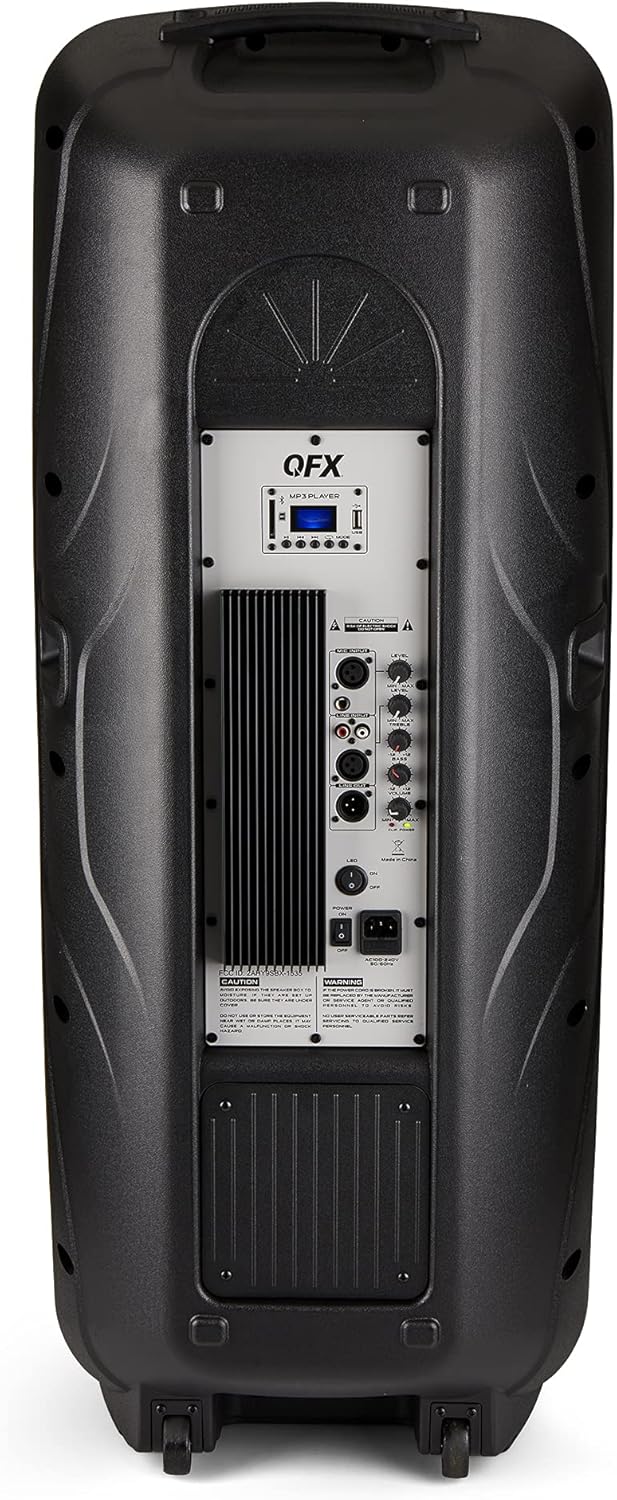
Figure 4.2: Rear panel with controls and ports.
- የኃይል መቀየሪያ ድምጽ ማጉያውን ያበራል/ያጠፋል።
- የኤሲ ግቤት፡- የኤሲ ኤሌክትሪክ ገመድ ያገናኛል።
- USB/SD Card Ports: ኦዲዮ ለማጫወት fileከዩኤስቢ ድራይቮች ወይም ከኤስዲ ካርዶች።
- ማሳያ ማያ: የአሁኑን ሁነታ እና የትራክ መረጃን ያሳያል።
- ሁነታ አዝራር፡- Switches between input modes (Bluetooth, FM, USB, SD, RCA).
- አጫውት/አፍታ አቁም አዝራር፡- Controls playback for USB/SD/Bluetooth.
- ቀዳሚ/ቀጣይ የትራክ አዝራሮች፡- ትራኮችን ወይም የኤፍኤም ጣቢያዎችን ያስሱ።
- ዋና የድምጽ መቆጣጠሪያ፡ አጠቃላይ ድምጹን ያስተካክላል.
- Bass/Treble Control Knobs: Adjusts low and high frequencies.
- የXLR ማይክሮፎን ግቤት፡- Connects a wired microphone.
- የማይክሮፎን ድምጽ/የማስገቢያ ኖቦች፡ Adjusts microphone volume and echo effect.
- የአርሲኤ ግብዓት (ሊትር/አር)፡ Connects external audio devices via RCA cables.
- XLR Line Input/Output: ከሌሎች የድምጽ መሳሪያዎች ጋር ለመገናኘት.
5. ማዋቀር
የመጀመሪያ አቀማመጥ
Place the speaker on a stable, flat surface. For optimal sound, position it in a central location within the listening area. The integrated wheels and handle allow for easy transport.

Figure 5.1: Speaker being moved with handle and wheels.
የኃይል ግንኙነት
- የድምጽ ማጉያው የኃይል ማብሪያ / ማጥፊያው በOFF ቦታ ላይ መሆኑን ያረጋግጡ።
- Connect the AC power cable to the AC input on the rear panel of the speaker.
- የኤሲ ገመዱን ሌላኛውን ጫፍ ወደ መደበኛ የግድግዳ ሶኬት ይሰኩ።
- የኃይል ማብሪያ / ማጥፊያውን ወደ ON ቦታ ያዙሩት። የማሳያ ስክሪኑ ያበራል።
6. የአሠራር መመሪያዎች
የብሉቱዝ ማጣመር
- Turn on the QFX E-B3 speaker.
- የሚለውን ይጫኑ MODE button on the speaker or remote control until "BLUE" appears on the display screen, indicating Bluetooth mode.
- በተንቀሳቃሽ መሣሪያዎ ላይ ብሉቱዝን ያንቁ (ስማርትፎን ፣ ታብሌት ፣ ወዘተ)።
- ፈልግ available Bluetooth devices and select "QFX E-B3" from the list.
- Once paired, the speaker will emit a confirmation sound. You can now play audio from your device through the speaker.
True Wireless System (TWS) Pairing
TWS allows two QFX E-B3 speakers to connect wirelessly for a stereo sound experience. This feature works only in Bluetooth mode.
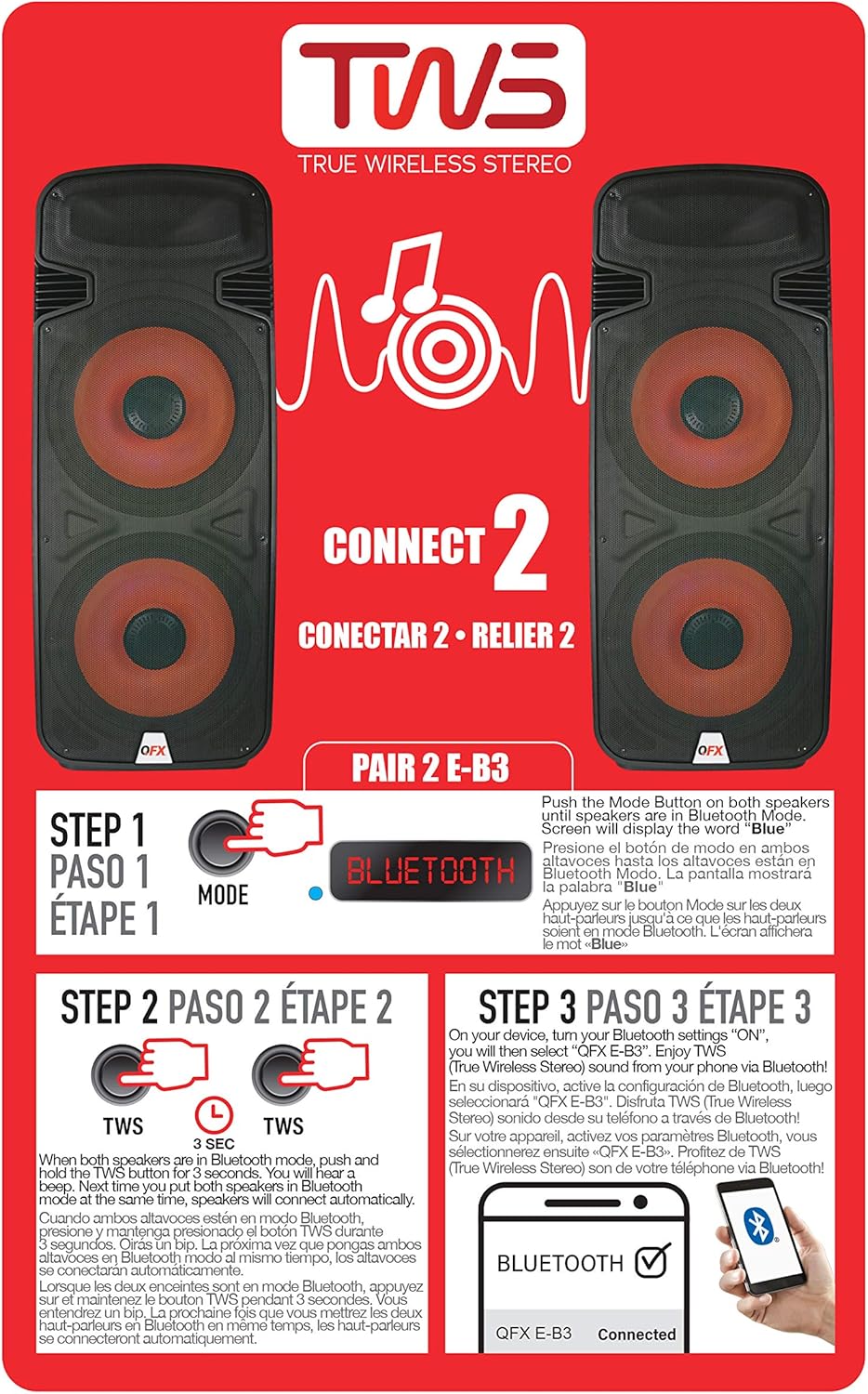
Figure 6.1: TWS Pairing Instructions.
- Ensure both QFX E-B3 speakers are powered on and in Bluetooth mode. The display on both speakers should show "BLUE".
- በአንደኛው ድምጽ ማጉያ ላይ (ይህ የእርስዎ ዋና ድምጽ ማጉያ ይሆናል)፣ ተጭነው ይያዙት እና ይያዙት። TWS button for approximately 3 seconds. The speakers will attempt to connect to each other.
- Once successfully paired, you will hear a confirmation sound, and the display on the primary speaker will show "BLUE" while the secondary speaker will show "BLUE" as well.
- On your Bluetooth-enabled device, search for and select "QFX E-B3". The two speakers will now play audio in stereo.
የኤፍኤም ሬዲዮ ኦፕሬሽን
- የሚለውን ይጫኑ MODE button to switch to FM radio mode. The display will show the FM frequency.
- ተጭነው ይያዙት። ተጫወት/ ለአፍታ አቁም button to initiate an automatic scan for FM stations. The speaker will save all found stations.
- የሚለውን ተጠቀም ቀዳሚ/ቀጣይ ትራክ በተቀመጡት የኤፍኤም ጣቢያዎች ውስጥ ለማሰስ አዝራሮች።
የዩኤስቢ/ኤስዲ ካርድ መልሶ ማጫወት
- የዩኤስቢ ፍላሽ አንጻፊ ወይም የኤስዲ ካርድ ያስገቡ (ተኳሃኝ ኦዲዮ ያለው) files) በኋላ ፓነል ላይ ወደሚመለከተው ወደብ።
- The speaker will automatically switch to USB/SD mode and begin playing the audio fileኤስ. ካልሆነ, ይጫኑ MODE የዩኤስቢ ወይም የኤስዲ ሁነታን ለመምረጥ አዝራር።
- የሚለውን ተጠቀም ተጫወት/ ለአፍታ አቁም እና ቀዳሚ/ቀጣይ ትራክ መልሶ ማጫወትን ለመቆጣጠር አዝራሮች።
የማይክሮፎን ግቤት
- Connect a microphone to the XLR Microphone Input on the rear panel.
- Adjust the Microphone Volume and Echo knobs to achieve the desired sound.
RCA ግብዓት
- Connect an external audio source (e.g., CD player, mixer) to the RCA Input (L/R) ports using appropriate RCA cables.
- የሚለውን ይጫኑ MODE button to select RCA input mode.
- Adjust the master volume on the speaker and the volume on your external audio source.
የ LED ፓርቲ መብራቶች
The speaker features integrated LED party lights that activate automatically when the speaker is powered on. There are no specific controls for the LED lights mentioned; they are designed to enhance the audio experience.
7. ጥገና
ማጽዳት
- Always unplug the speaker before cleaning.
- የተናጋሪውን ውጫዊ ገጽታዎች ለማጽዳት ለስላሳ እና ደረቅ ጨርቅ ይጠቀሙ።
- አጨራረስን ሊጎዱ ስለሚችሉ ብስባሽ ማጽጃዎችን፣ ሰምዎችን ወይም ፈሳሾችን አይጠቀሙ።
- የአየር ማናፈሻ ክፍተቶችን ከአቧራ እና ከቆሻሻ ያፅዱ።
ማከማቻ
When not in use for extended periods, store the speaker in a cool, dry place, away from direct sunlight and extreme temperatures. Cover the speaker to protect it from dust.
8. መላ መፈለግ
If you encounter issues with your QFX E-B3 speaker, refer to the following common problems and solutions:
| ችግር | ሊሆን የሚችል ምክንያት | መፍትሄ |
|---|---|---|
| ኃይል የለም | የኃይል ገመድ አልተገናኘም፤ የኃይል መውጫው ንቁ አይደለም፤ የድምጽ ማጉያው የኃይል ማብሪያ / ማጥፊያ ጠፍቷል። | Ensure AC cable is securely connected to speaker and outlet. Check if outlet is working. Turn speaker power switch ON. |
| ድምጽ የለም። | Volume too low; Incorrect input mode selected; Audio source not playing. | Increase master volume. Press MODE button to select correct input. Ensure audio source is playing and its volume is up. |
| ብሉቱዝ አይገናኝም። | Speaker not in Bluetooth mode; Device Bluetooth off; Speaker already paired to another device; Device too far. | Ensure speaker is in Bluetooth mode ("BLUE" on display). Turn on device Bluetooth. Disconnect from other devices. Move device closer to speaker (within 30 feet). |
| TWS ማጣመር አልተሳካም። | Speakers not in Bluetooth mode; TWS button not held long enough. | Ensure both speakers are in Bluetooth mode. Press and hold the TWS button on one speaker for 3 seconds. |
| የዩኤስቢ/ኤስዲ መልሶ ማጫወት እየሰራ አይደለም | የተሳሳተ ሁነታ፤ ተኳሃኝ ያልሆነ file format; Corrupted USB/SD card. | Press MODE to select USB/SD. Ensure audio files are in a compatible format (e.g., MP3). Try a different USB/SD card. |
9. ዝርዝሮች
| ባህሪ | ዝርዝር መግለጫ |
|---|---|
| የምርት ስም | QFX |
| የሞዴል ቁጥር | ኢ-ቢ3 |
| የድምጽ ማጉያ ከፍተኛ የውጤት ኃይል | 250 ዋት |
| የግንኙነት ቴክኖሎጂ | ዩኤስቢ፣ ብሉቱዝ |
| የድምጽ ውፅዓት ሁኔታ | ስቴሪዮ |
| የመጫኛ አይነት | Plug Mount, Wheel Mount |
| የድምጽ ማጉያ አይነት | Woofer (Dual 15 Inches) |
| የመቆጣጠሪያ አይነት | የርቀት መቆጣጠሪያ |
| ቀለም | Party LED |
| ውሃ የማይገባ ነው። | ውሸት |
| የመቆጣጠሪያ ዘዴ | የርቀት |
| Woofer ዲያሜትር | 15 ኢንች |
| የድምጽ ቻናሎች ብዛት | 2.0 |
| ገመድ አልባ ቴክኖሎጂ | ብሉቱዝ |
| የግንኙነት ፕሮቶኮል | ብሉቱዝ |
| የኃይል ምንጭ | ባለገመድ ኤሌክትሪክ |
| የድምጽ ሾፌር ዓይነት | ተለዋዋጭ ሾፌር |
| የድምጽ ነጂ መጠን | 15 ኢንች |
| የንጥል መጠኖች (D x W x H) | 16.77" ዲ x 13.98" ዋ x 23.74" ኤች |
| የእቃው ክብደት | 13.2 ፓውንድ £ |
| ተስማሚ መሣሪያዎች | ላፕቶፕ፣ MP3 ማጫወቻ፣ ስማርትፎን፣ ታብሌት፣ ቴሌቪዥን |
| ዩፒሲ | 606540039618 |
10. የዋስትና መረጃ
This product is covered by a limited warranty. For specific details regarding warranty coverage and terms, please refer to the warranty information provided at the point of purchase or contact QFX customer support directly. The warranty is typically per contract with the retailer.
11. ድጋፍ
For technical assistance, troubleshooting beyond this manual, or inquiries about your QFX E-B3 speaker, please contact QFX customer support or your retailer. Contact information can usually be found on the manufacturer's webጣቢያ ወይም በግዢ ደረሰኝዎ ላይ።