
ምርት አልቋልview
The Hoco ES41 TWS (True Wireless Stereo) Bluetooth Headset provides a wireless audio experience with clear sound. This manual will guide you through the setup, operation, and maintenance of your ES41 headset.
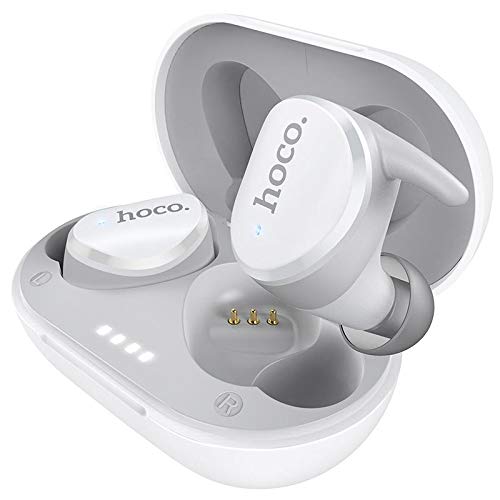
Image: The Hoco ES41 TWS Bluetooth Wireless Headset, showing both earbuds and the charging case in white.
የጥቅል ይዘቶች
እባክዎን ጥቅሉን ለሚከተሉት ነገሮች ያረጋግጡ፡
- Hoco ES41 TWS Wireless Earbuds (Left and Right)
- የገመድ አልባ ባትሪ መሙያ መያዣ
- የዩኤስቢ ኃይል መሙያ ገመድ (ማይክሮ ዩኤስቢ)
- የተጠቃሚ መመሪያ

ምስል፡ ፊትና ጀርባ view of the Hoco ES41 retail packaging, displaying the product and key features.
ማዋቀር
1. የጆሮ ማዳመጫውን እና መያዣውን መሙላት
ለመጀመሪያ ጊዜ ከመጠቀምዎ በፊት የኃይል መሙያ መያዣውን እና የጆሮ ማዳመጫውን ሙሉ በሙሉ ይሙሉ።
- Connect the provided USB charging cable to the charging port on the case and to a USB power source.
- በቻርጅ መሙያ መያዣው ላይ ያሉት የአመላካች መብራቶች የኃይል መሙያ ሁኔታን ለማሳየት ያበራሉ።
- የጆሮ ማዳመጫዎቹን በቻርጅ መሙያ መያዣው ውስጥ ያስቀምጡ። በትክክል መቀመጡን ያረጋግጡ፤ የጆሮ ማዳመጫዎቹ በራስ-ሰር መሙላት ይጀምራሉ።
- Charging time for the headset is approximately 1 hour. The charging case takes approximately 2.5 hours to fully charge.

Image: The Hoco ES41 earbuds placed inside the open charging case, showing the LED indicator lights for battery status.
2. ከብሉቱዝ መሳሪያ ጋር ማጣመር
The ES41 headset uses Bluetooth 5.0 for a stable connection.
- የመጀመሪያ ማጣመር፡
- የኃይል መሙያ መያዣውን ይክፈቱ. የጆሮ ማዳመጫው በራስ-ሰር ይበራል እና የማጣመሪያ ሁነታን ያስገባል።
- በመሳሪያዎ ላይ (ስማርትፎን፣ ታብሌት፣ ወዘተ)፣ ብሉቱዝን አንቃ።
- ፈልግ Bluetooth devices and select "Hoco ES41" from the list.
- አንዴ ከተገናኙ በኋላ የማረጋገጫ ድምጽ ይሰማሉ፣ እና የጆሮ ማዳመጫዎቹ አመልካች መብራቶች ይለወጣሉ።
- ዳግም ግንኙነት፡
- After initial pairing, the earbuds will automatically connect to the last paired device when removed from the charging case and Bluetooth is enabled on the device.
የአሠራር መመሪያዎች
ኃይል አብራ/ አጥፋ
- አብራ፡ Open the charging case, or long-press the touch area on both earbuds for approximately 3 seconds.
- ኃይል ዝጋ: Place the earbuds back into the charging case and close the lid, or long-press the touch area on both earbuds for approximately 5 seconds.
የሙዚቃ መልሶ ማጫወት
- አጫውት/ ለአፍታ አቁም፡ በሁለቱም የጆሮ ማዳመጫዎች ላይ ያለውን የንክኪ ቦታ አንድ ጊዜ መታ ያድርጉ።
- ቀጣይ ትራክ፡ በቀኝ የጆሮ ማዳመጫው ላይ ያለውን የንክኪ ቦታ ሁለቴ መታ ያድርጉ።
- ቀዳሚ ትራክ በግራ የጆሮ ማዳመጫው ላይ ያለውን የንክኪ ቦታ ሁለቴ መታ ያድርጉት።
የጥሪ አስተዳደር
- መልስ/ጥሪ ጨርስ፡ በሁለቱም የጆሮ ማዳመጫዎች ላይ ያለውን የንክኪ ቦታ አንድ ጊዜ መታ ያድርጉ።
- ጥሪን ውድቅ አድርግ፡ Long-press the touch area on either earbud for 2 seconds.
የድምጽ ረዳት
- የድምፅ ረዳት አግብር በሁለቱም የጆሮ ማዳመጫዎች ላይ ያለውን የንክኪ ቦታ ሶስት ጊዜ መታ ያድርጉ።
ጥገና
- ማጽዳት፡ የጆሮ ማዳመጫውን እና የኃይል መሙያ መያዣውን ለማጽዳት ለስላሳ ደረቅ ጨርቅ ይጠቀሙ። ኃይለኛ ኬሚካሎችን ወይም ሻካራ ቁሳቁሶችን አይጠቀሙ.
- ማከማቻ፡ ጥቅም ላይ በማይውልበት ጊዜ የጆሮ ማዳመጫዎቹን ለመጠበቅ እና እንዲከፍሉ ለማድረግ በእነሱ ቻርጅ ውስጥ ያከማቹ። ከፀሀይ ብርሀን እና ከከፍተኛ ሙቀት ርቆ በቀዝቃዛና ደረቅ ቦታ ያከማቹ።
- የውሃ መቋቋም; የጆሮ ማዳመጫዎቹ ውሃ የማያስገቡ ናቸው። ለውሃ፣ ላብ ወይም ለከፍተኛ እርጥበት መጋለጥን ያስወግዱ።
መላ መፈለግ
- የጆሮ ማዳመጫዎች እርስ በእርስ የማይጣመሩ;
Place both earbuds back into the charging case, close the lid, then open it again. This should reset their connection.
- የጆሮ ማዳመጫዎች ከመሳሪያው ጋር የማይገናኙ፦
Ensure Bluetooth is enabled on your device. Forget "Hoco ES41" from your device's Bluetooth settings and attempt to pair again.
- ከአንድ የጆሮ ማዳመጫ ድምጽ የለም
Check if both earbuds are charged. Try placing them back in the case and taking them out again. If the issue persists, try resetting the earbuds (refer to the full manual if available for specific reset instructions).
- የመሙላት ችግሮች፡-
Ensure the charging cable is securely connected and the power source is active. Clean the charging contacts on both the earbuds and the case with a dry cotton swab.
ዝርዝሮች
| ባህሪ | ዝርዝር መግለጫ |
|---|---|
| የሞዴል ስም | ኢኤስ41 |
| የብሉቱዝ ስሪት | 5.0 |
| የብሉቱዝ ቺፕ | JL6936D |
| የኬዝ ባትሪ መሙላት አቅም | 400mAh |
| Single Headset Battery Capacity | 40mAh |
| የንግግር/የሙዚቃ ጊዜ | 5 ሰዓታት |
| የመጠባበቂያ ጊዜ | 200 ሰዓታት |
| የጆሮ ማዳመጫ መሙላት ጊዜ | 1 ሰዓት |
| የጉዳይ መሙላት ጊዜ | 2.5 ሰዓታት |
| ጠቅላላ ክብደት | 37 ግ |
| Single Headset Weight | 4g |
| የመቆጣጠሪያ ዘዴ | ንካ |
| የግንኙነት ቴክኖሎጂ | ገመድ አልባ |
| የጆሮ ማዳመጫዎች ቅጽ ምክንያት | በጆሮ ውስጥ |
| ቁሳቁስ | ፕላስቲክ |
| ተስማሚ መሣሪያዎች | ሞባይል ስልኮች |
ዋስትና እና ድጋፍ
For warranty information and technical support, please refer to the documentation provided with your purchase or contact HOCO customer service. Keep your proof of purchase for warranty claims.