
Sharp OZJONG
SHARP Digital Alarm Clock with AccuSet
Model: OZJONG
መግቢያ
The SHARP Digital Alarm Clock with AccuSet is designed for effortless timekeeping. Featuring automatic time setting, a clear LED display, and user-friendly controls, this clock is ideal for any bedroom. Its AccuSet technology ensures the time is always accurate, eliminating the need for manual adjustments, making it perfect for seniors, children, or anyone seeking a hassle-free alarm clock solution.

ምስል 1: የፊት view of the SHARP Digital Alarm Clock with green LED display.
ቁልፍ ባህሪያት
- AccuSet ራስ-ሰር ጊዜ አዘጋጅ፡- The clock is pre-programmed to automatically set the correct time, removing the need for manual adjustments. Simply select your time zone.
- ፈጣን የቀን ብርሃን ቁጠባ ጊዜ (DST) ማስተካከያ፡- A convenient switch allows for easy adjustment for Daylight Savings Time (+1 hour) or Standard Time (-1 hour).
- ከፍተኛ/ዝቅተኛ ዲመር መቆጣጠሪያ፡- Adjust the brightness of the LED display to your preference, ensuring comfortable viewቀንም ሆነ ማታ።
- የባትሪ ምትኬ A pre-installed CR2032 button cell battery provides backup for time settings during power outages, ensuring continuous accuracy.
- የሰዓት ሰቅ ምርጫ፡- Easily select your local time zone from the options provided at the bottom of the clock.

Figure 2: Diagram illustrating the key features and functionalities of the alarm clock.
የማዋቀር መመሪያ
- ማሸግ፡ Carefully remove the alarm clock from its packaging.
- Battery Installation (Pre-installed): The CR2032 button cell battery for backup is pre-installed in a screw-secured cabinet at the bottom of the clock. This battery is designed to last for several years. No immediate action is required for initial setup.
- የሰዓት ሰቅ ምርጫ፡- Before plugging in the clock, locate the time zone selection switch at the bottom of the unit. Select your correct time zone (e.g., EST, CST, MST, PST). The default time zone is Eastern Standard Time.
- የኃይል ግንኙነት; Plug the clock into an approved electrical source. The AccuSet feature will automatically program the correct time based on your selected time zone.
- Daylight Savings Time (DST) Adjustment: If applicable, slide the DST switch at the bottom of the clock to "ON" to add one hour (+1 hr) for Daylight Savings Time. For Standard Time, slide the switch to "OFF" to subtract one hour (-1 hr).

Figure 3: Top panel controls for setting time, alarm, and adjusting display.
የአሠራር መመሪያዎች
ማንቂያውን በማዘጋጀት ላይ
- የሚለውን ይጫኑ ማንቂያ button once. The alarm time will appear on the display.
- የማንቂያ ሰዓቱ በሚታይበት ጊዜ, ይጫኑ ሰአት የማንቂያ ሰዓቱን ለማስተካከል አዝራር።
- የሚለውን ይጫኑ ደቂቃ የማንቂያ ደቂቃውን ለማስተካከል አዝራር።
- ማንቂያውን ለማንቃት ወይም ለማሰናከል፣ የሚለውን ይጫኑ ማንቂያ በርቷል / አጥፋ button. An alarm indicator light (usually a small LED) will illuminate when the alarm is active.
- To return to the current time display, press the TIME button or wait a few seconds for it to revert automatically.
የማሸለብ ተግባርን በመጠቀም
ማንቂያው ሲሰማ, ትልቁን ይጫኑ አሸልብ button located on the top of the clock. This will temporarily silence the alarm for a set period (typically 9 minutes), allowing for extra rest. The alarm will sound again after the snooze period ends.
Adjusting Display Brightness (Dimmer Control)
The clock features a High/Low dimmer control to adjust the display brightness. Locate the DIMMER HI/LO button on the top panel. Press this button to toggle between high and low brightness settings to suit your environment and preference.

Figure 4: Illustration of the High & Low Display Dimmer Control.
ጥገና
- ማጽዳት፡ To clean the clock, use a soft, dry cloth. Do not use abrasive cleaners or solvents, as they may damage the finish.
- የባትሪ መተካት፡ The CR2032 backup battery is designed for long-term use. If the clock loses time during a power outage after several years, it may be time to replace the battery. This is located in a screw-secured compartment at the bottom of the clock.
- አቀማመጥ፡- Place the clock on a stable, flat surface. Avoid placing it in direct sunlight, near heat sources, or in areas with high humidity.
መላ መፈለግ
| ችግር | ሊሆን የሚችል ምክንያት | መፍትሄ |
|---|---|---|
| Clock does not display time after plugging in. | Not connected to power, or power outlet is not active. | የኃይል ገመዱ ደህንነቱ በተጠበቀ ሁኔታ በሚሰራ የኤሌክትሪክ ሶኬት ውስጥ መያያዙን ያረጋግጡ። |
| ጊዜው ትክክል አይደለም። | Incorrect time zone selected, or DST switch is set incorrectly. | Verify the time zone switch at the bottom of the clock is set to your local zone. Check the DST switch position. |
| ማንቂያ አይሰማም። | Alarm is not activated, or alarm volume is too low (if adjustable). | Ensure the alarm is turned ON using the ALARM ON/OFF button. Check for an alarm indicator light. |
| ማሳያው በጣም ብሩህ ወይም በጣም ደብዛዛ ነው። | የዲመር ቅንብር ማስተካከያ ያስፈልገዋል። | Press the DIMMER HI/LO button to cycle through brightness settings. |
| ሰዓቱ በኃይል ወቅት ጊዜን ያጣልtage. | Backup battery is depleted. | Replace the CR2032 backup battery located in the compartment at the bottom of the clock. |
ዝርዝሮች
| ባህሪ | ዝርዝር |
|---|---|
| የምርት ስም | ስለታም |
| የሞዴል ቁጥር | OZJONG |
| ቀለም | Black - Green Led |
| የማሳያ ዓይነት | ዲጂታል |
| ልዩ ባህሪያት | Alarm, Daylight Saving, Auto Dimmable |
| የምርት ልኬቶች | 5.5" ዋ x 2.6" ኤች |
| የኃይል ምንጭ | ባለገመድ ኤሌክትሪክ፣ በባትሪ የተጎላበተ |
| የመጠባበቂያ ባትሪ | CR2032 (ቀድሞ የተጫነ) |
| ቁሳቁስ | ፕላስቲክ |
| የእቃው ክብደት | 9.9 አውንስ |
| የመጫኛ አይነት | የጠረጴዛ ጫፍ |
| ዩፒሲ | 049353006079 |
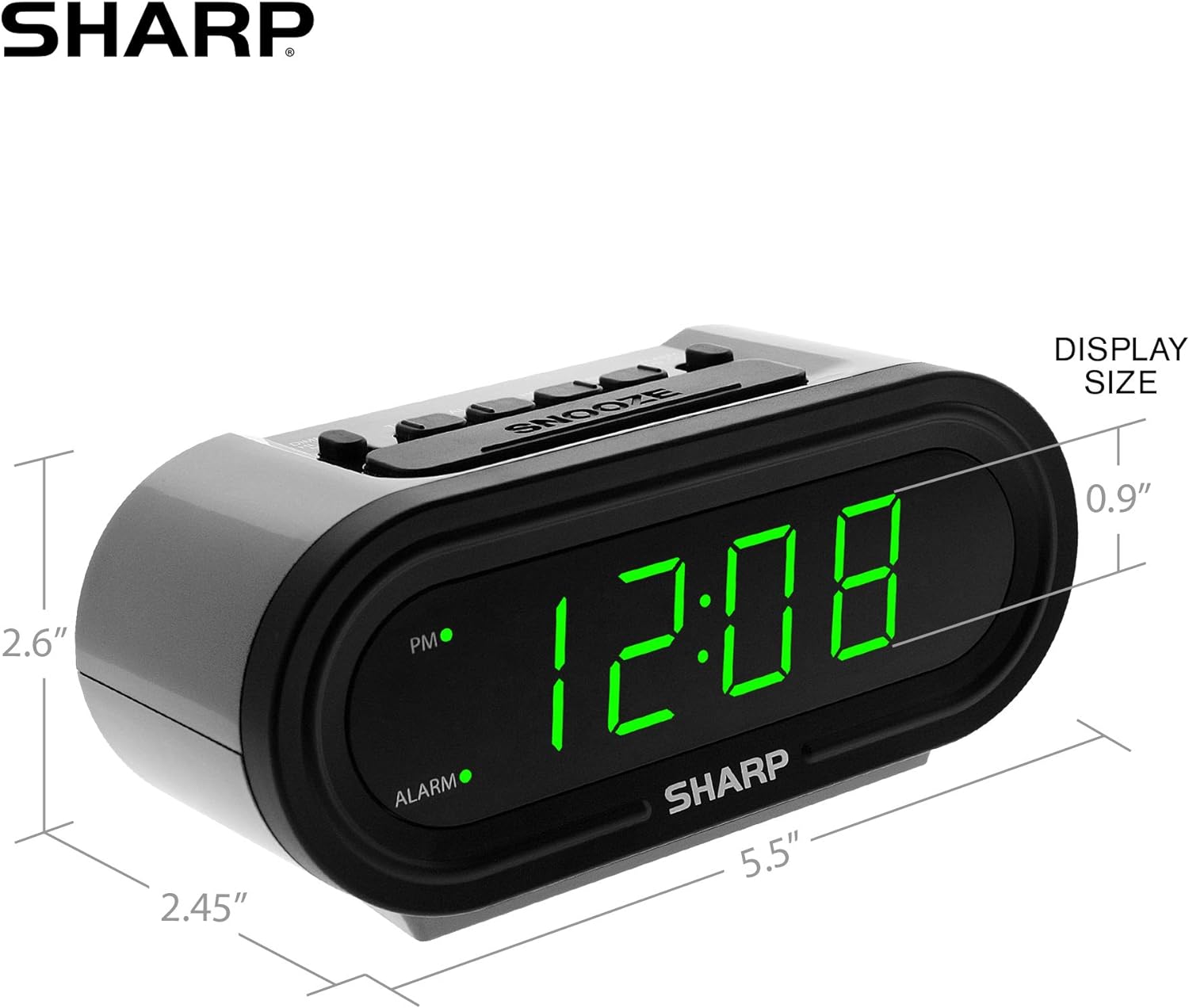
ምስል 5፡ ለቀላል ማጣቀሻ የምርት ልኬቶች።
ዋስትና እና ድጋፍ
For warranty information or technical support, please refer to the contact details provided in your product packaging or visit the official Sharp webጣቢያ. ለዋስትና ጥያቄዎች የግዢ ደረሰኝዎን ያስቀምጡ።
Ask a question about this manual
Ask about setup, troubleshooting, compatibility, parts, safety, or missing instructions. Manuals+ will review the question and use this page’s manual context to help answer it.