
1. መግቢያ
ስለገዙ እናመሰግናለንasing the Trevi CMP 588 DAB Portable Stereo System. This manual provides essential information for the safe and correct operation of your device. Please read it thoroughly before use and retain it for future reference.
The Trevi CMP 588 DAB is a versatile portable stereo system featuring DAB/DAB+ and FM radio with RDS, a CD/MP3 player, USB input, AUX-in, Bluetooth connectivity, and a headphone jack, all designed for an enhanced audio experience.
2. የደህንነት መረጃ
- የኃይል ምንጭ፡- የተገለጸውን የኃይል አስማሚ ወይም ባትሪዎችን ብቻ ይጠቀሙ። ጥራዝ ያረጋግጡtagሠ የዩኒቱን መስፈርቶች ያሟላል።
- ውሃ እና እርጥበት; Do not expose the unit to rain, moisture, or immerse it in water. Avoid placing objects filled with liquids, such as vases, on the unit.
- የአየር ማናፈሻ; በቂ የአየር ዝውውርን ያረጋግጡ. የአየር ማናፈሻ ክፍተቶችን አያግዱ.
- ሙቀት፡ ክፍሉን ከሙቀት ምንጮች ለምሳሌ ራዲያተሮች፣ ሙቀት መመዝገቢያዎች፣ ምድጃዎች ወይም ሌሎች መሳሪያዎችን (ያጠቃልላል) ያርቁ ampማሞቂያዎች) ሙቀትን ያመነጫሉ.
- ማጽዳት፡ ከማጽዳትዎ በፊት ክፍሉን ከግድግዳው መውጫ ያላቅቁት. ለስላሳ እና ደረቅ ጨርቅ ይጠቀሙ. ፈሳሽ ማጽጃዎችን ወይም የአየር ማጽጃዎችን አይጠቀሙ.
- አገልግሎት መስጠት፡ ይህንን ምርት እራስዎ ለማገልገል አይሞክሩ። ሁሉንም አገልግሎት ወደ ብቃት ላለው የአገልግሎት ሠራተኛ ያማክሩ።
- ሲዲ ማጫወቻ፡ ወደ ሌዘር ጨረር በቀጥታ አይመልከቱ።
3. የጥቅል ይዘቶች
ሁሉም እቃዎች መኖራቸውን እና በጥሩ ሁኔታ ላይ መሆናቸውን ያረጋግጡ፡-
- Trevi CMP 588 DAB Portable Stereo System
- የ AC ኃይል ገመድ
- የርቀት መቆጣጠሪያ
- የተጠቃሚ መመሪያ (ይህ ሰነድ)
4. የምርት ባህሪዎች
- DAB/DAB+ and FM Radio with RDS
- High Readability Dot Matrix Display
- CD Player (supports CD-DA, MP3)
- USB Input for MP3 Playback
- AUX-in for external audio devices
- የብሉቱዝ ግንኙነት
- የጆሮ ማዳመጫ ጃክ
- ተንቀሳቃሽ ንድፍ በእጅ መያዣ
- የርቀት መቆጣጠሪያ ተካትቷል።
5. መቆጣጠሪያዎች እና ግንኙነቶች

ምስል 1: የፊት view of the Trevi CMP 588 DAB, showing speakers, display, and main controls.
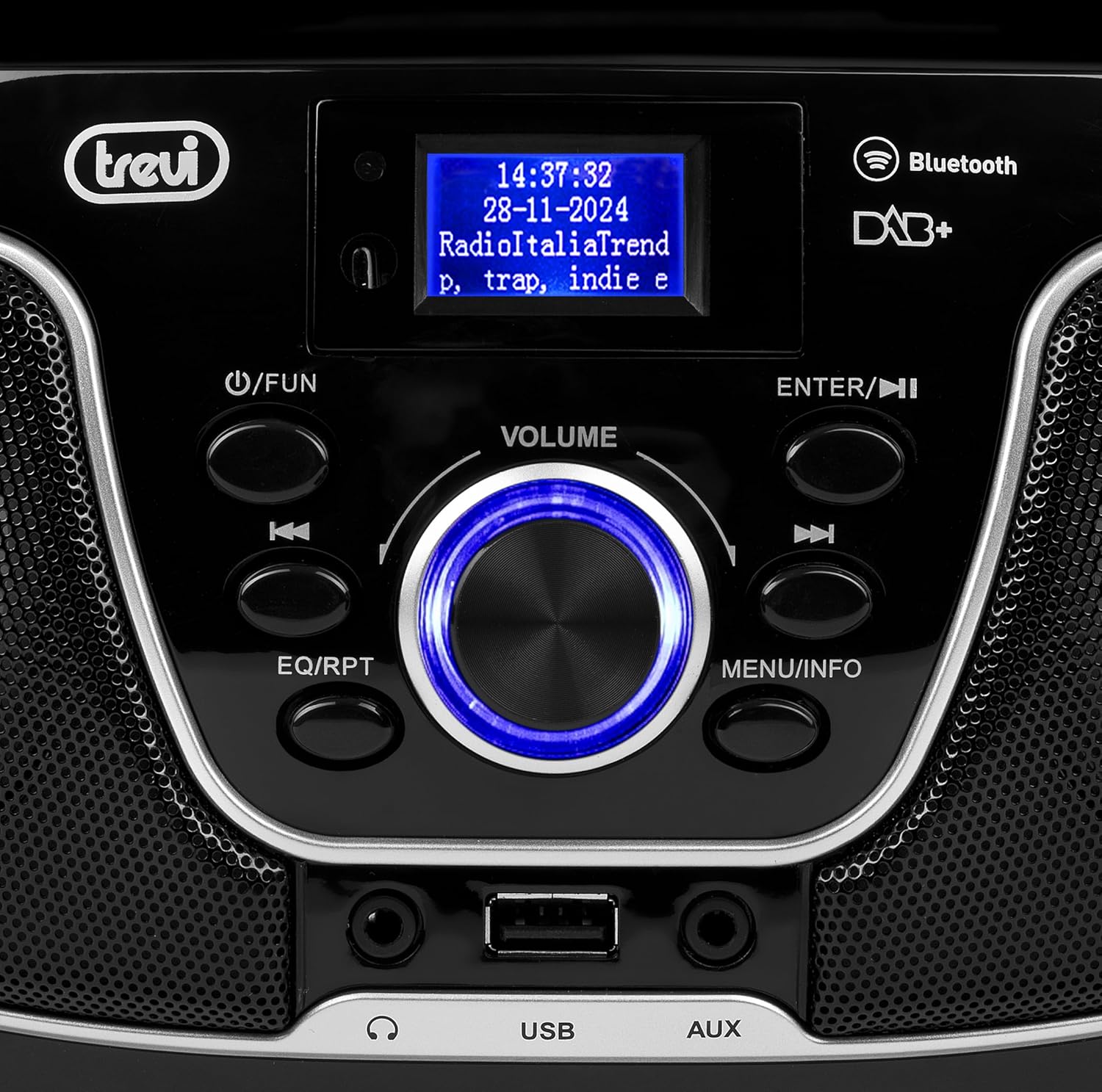
ምስል 2: ዝርዝር view of the control panel, including power, function, volume knob, and navigation buttons.
የፊት ፓነል መቆጣጠሪያዎች;
- POWER / FUN button: Press to turn on/off, press to switch functions (CD/USB/DAB/FM/Bluetooth/AUX).
- የድምፅ ቁልፍ Rotate to adjust volume. Press to confirm selections.
- ENTER / ►►I button: Confirm selection / Skip to next track/station.
- I▼▼ / EQ/RPT button: Skip to previous track/station / Equalizer settings / Repeat mode.
- MENU / INFO button: Access menu / Display information.
- የዩኤስቢ ወደብ፡ ለMP3 መልሶ ማጫወት የዩኤስቢ ማከማቻ መሳሪያዎችን ያገናኙ።
- AUX-in Jack: ውጫዊ የድምጽ መሳሪያዎችን ያገናኙ.
- የጆሮ ማዳመጫ ጃክ ለግል ማዳመጥ የጆሮ ማዳመጫዎችን ያገናኙ።

ምስል 3: የኋላ view of the Trevi CMP 588 DAB, showing the power input and telescopic antenna.
የኋላ ፓነል ግንኙነቶች;
- የኤሲ የኃይል ግቤት የቀረበውን የኤሲ ሃይል ገመድ ያገናኙ።
- ቴሌስኮፒክ አንቴና፡ ለተሻለ የሬዲዮ አቀባበል ማራዘም።

Figure 4: Remote control for the Trevi CMP 588 DAB, showing various function buttons.
የርቀት መቆጣጠሪያ ተግባራት;
- ተጠንቀቅ: ኃይል አብራ / አጥፋ
- FUNC፡ Switch between modes (CD, USB, DAB, FM, Bluetooth, AUX).
- ድምጸ-ከል የድምጽ ድምጸ-ከል አንሳ/አጥፋ።
- RPT የመልሶ ማጫወት ሁነታን ድገም.
- ይቃኙ፡ Auto scan for radio stations.
- F+/CH+, F-/CH-: Navigate folders/channels.
- EQ: አመጣጣኝ ቅንብሮች.
- PLAY/PAUSE (►II): መልሶ ማጫወትን አጫውት/ ለአፍታ አቁም
- PREV/TUN- (▼▼): Previous track/tune down.
- NEXT/TUN+ (►►): Next track/tune up.
- አቁም (■): መልሶ ማጫዎትን አቁም።
- መኑ የመዳረሻ ምናሌ።
- መረጃ፡- የማሳያ መረጃ.
- ፕሮግ Program tracks/stations.
- ቮል+/ቮል-፡ ድምጽን አስተካክል.
6. ማዋቀር
6.1 የኃይል ግንኙነት
- የኤሲ ኃይል Connect the supplied AC power cable to the AC power input on the rear of the unit, then plug the other end into a wall outlet.
- Battery Operation (Optional): For portable use, insert 6 x C-size batteries (not included) into the battery compartment on the bottom of the unit. Ensure correct polarity.
6.2 የመነሻ ኃይል በርቷል
የሚለውን ይጫኑ POWER / FUN በአሃዱ ላይ ያለው አዝራር ወይም ተጠንቀቅ button on the remote control to turn on the system. The display will light up.
6.3 Setting Up the Antenna
For optimal radio reception, fully extend the telescopic antenna located at the rear of the unit. Adjust its position for the best signal.
7. የአሠራር መመሪያዎች
7.1 DAB/DAB+ የሬዲዮ ኦፕሬሽን
- የሚለውን ይጫኑ POWER / FUN button repeatedly until "DAB" mode is selected.
- The unit will automatically scan for available DAB/DAB+ stations on first use. To perform a manual scan, press the MENU button, navigate to "Full Scan" and press አስገባ.
- መቃኘት እንደተጠናቀቀ፣ ይጠቀሙ ▼▼ or ►► buttons to browse through the available stations. Press አስገባ ጣቢያ ለመምረጥ.
- የሚለውን ይጫኑ መረጃ button to cycle through different information displays (e.g., program type, signal strength, time).
7.2 ኤፍኤም ሬዲዮ ኦፕሬሽን
- የሚለውን ይጫኑ POWER / FUN button repeatedly until "FM" mode is selected.
- To auto-scan and store stations, press the ይቃኙ button on the remote. The unit will scan and save strong signals.
- በእጅ ለማስተካከል፣ ተጭነው ይያዙት እና ይያዙት ▼▼ or ►► buttons to search for the next available station. Press briefly to fine-tune the frequency.
- The RDS function will display station information (if available).
7.3 ሲዲ/ኤምፒ3 መልሶ ማጫወት

ምስል 5: ከፍተኛ view of the Trevi CMP 588 DAB with the CD compartment open, ready for disc insertion.
- የሲዲውን ክፍል ክዳን ይክፈቱ.
- Place a CD (CD-DA or MP3 CD) onto the spindle with the label side facing up.
- የሲዲውን ክፍል ሽፋን ይዝጉ.
- የሚለውን ይጫኑ POWER / FUN button repeatedly until "CD" mode is selected.
- The unit will read the disc. Press PLAY/PAUSE (►II) መልሶ ማጫወት ለመጀመር.
- ተጠቀም ▼▼ or ►► to skip tracks. Press and hold to fast forward/rewind.
- ተጫን አቁም (■) መልሶ ማጫወት ለማቆም።
7.4 የዩኤስቢ መልሶ ማጫወት
- MP3 የያዘ የዩኤስቢ ፍላሽ አንፃፊ አስገባ fileወደ ዩኤስቢ ወደብ
- የሚለውን ይጫኑ POWER / FUN "ዩኤስቢ" ሁነታ እስኪመረጥ ድረስ ደጋግመው አዝራሩን ይጫኑ።
- መሣሪያው በራስ-ሰር MP3 ን ያገኛል እና መጫወት ይጀምራል files.
- ተጠቀም ▼▼ or ►► ትራኮችን ለመዝለል.
7.5 የብሉቱዝ ማጣመር እና መልሶ ማጫወት
- የሚለውን ይጫኑ POWER / FUN button repeatedly until "Bluetooth" mode is selected. The display will show "BT" or "PAIRING".
- በተንቀሳቃሽ መሣሪያዎ ላይ ብሉቱዝን ያንቁ (ስማርትፎን ፣ ታብሌት ፣ ወዘተ)።
- ፈልግ available devices and select "TREVI CMP 588 DAB" from the list.
- Once paired, you can play audio from your device through the stereo system.
- Use the controls on your mobile device or the stereo system to manage playback.
7.6 AUX-in Operation
- Connect an external audio device (e.g., MP3 player, smartphone) to the AUX-in jack using a 3.5mm audio cable (not included).
- የሚለውን ይጫኑ POWER / FUN "AUX" ሁነታ እስኪመረጥ ድረስ ደጋግመው አዝራሩን ይጫኑ።
- Play audio from your connected device. The volume can be controlled via both the stereo system and the external device.
8. ጥገና
8.1 ክፍሉን ማጽዳት
የቤቱን ውጫዊ ክፍል ለስላሳና ደረቅ ጨርቅ ይጥረጉ። ሻካራ ማጽጃዎችን፣ ሰሞችን ወይም መሟሟቶችን አይጠቀሙ ምክንያቱም ጨርቁን ሊያበላሹት ይችላሉ። ከማጽዳትዎ በፊት መሳሪያው መሰኪያውን መነቀሉን ያረጋግጡ።
8.2 የሲዲ ሌንስ እንክብካቤ
If the CD player experiences reading errors, the lens may be dirty. Use a commercially available CD lens cleaner to clean the lens. Do not touch the lens with your fingers.
8.3 ማከማቻ
If the unit will not be used for an extended period, remove the batteries (if applicable) and unplug the power cable. Store the unit in a cool, dry place away from direct sunlight and extreme temperatures.
9. መላ መፈለግ
| ችግር | ሊሆን የሚችል ምክንያት | መፍትሄ |
|---|---|---|
| ኃይል የለም | የኃይል ገመድ አልተገናኘም; ባትሪዎች ተሟጠዋል ወይም በስህተት ገብተዋል። | Check power cable connection; Replace batteries or ensure correct polarity. |
| ድምጽ የለም። | በጣም ዝቅተኛ መጠን; ድምጸ-ከል ተግባር ንቁ; የተሳሳተ ምንጭ ተመርጧል። | Increase volume; Deactivate mute; Select correct function (CD, USB, DAB, FM, BT, AUX). |
| ደካማ የሬዲዮ አቀባበል | አንቴናው በትክክል አልተዘረጋም ወይም አልተቀመጠም፤ ደካማ የምልክት ቦታ። | ቴሌስኮፒክ አንቴናውን ሙሉ በሙሉ ዘርጋ እና አስተካክል፤ ክፍሉን ወደ ሌላ ቦታ ለማንቀሳቀስ ሞክር። |
| ሲዲ/ዩኤስቢ እየተጫወተ አይደለም | Disc dirty/scratched; Incorrect file format on USB; USB drive not properly inserted. | Clean or replace disc; Ensure MP3 format for USB; Reinsert USB drive. |
| የብሉቱዝ ማጣመር አልተሳካም። | Device too far; Bluetooth not enabled on source device; Unit not in pairing mode. | Move devices closer; Enable Bluetooth on source device; Ensure unit is in Bluetooth mode and searching. |
10. ዝርዝሮች
- ሞዴል፡ CM 588 DAB
- የኃይል ምንጭ፡- AC 230V ~ 50Hz or 6 x C-size batteries (not included)
- የኃይል ፍጆታ; 15 ዋት
- የድምጽ ማጉያ አይነት፡ Stereo (2 speakers)
- ግንኙነት፡ Bluetooth, USB, AUX-in
- የሚደገፉ የድምጽ ቅርጸቶች፡- CD audio (CD-DA), MP3
- የሬዲዮ ድግግሞሽ DAB/DAB+, FM with RDS
- ልኬቶች (L x W x H)፦ 50 x 50 x 28 ሴሜ (ግምታዊ)
- ክብደት፡ 1.5 ኪሎግራም (በግምት)
- ቀለም፡ ጥቁር
11. ዋስትና እና ድጋፍ
This product is covered by a standard manufacturer's warranty. Please refer to the warranty card included in your package for specific terms and conditions, including the warranty period and coverage details.
For technical support, service, or warranty claims, please contact your retailer or the official Trevi customer service. Contact information can typically be found on the Trevi webጣቢያ ወይም በምርት ማሸጊያው ውስጥ.
Please retain your proof of purchase (receipt) for any warranty-related inquiries.