
1. መግቢያ
ስለገዙ እናመሰግናለንasing the Generic B10 Hi-Fi Stereo Wireless Bluetooth Over-Ear Headphones. This manual provides essential information for the safe and efficient operation of your device. Please read it thoroughly before use and retain it for future reference.
2. ምርት አብቅቷልview
The B10 headphones offer versatile audio playback options, including wireless Bluetooth connectivity, an integrated SD card reader, FM radio, and a wired audio input. They feature an over-ear design for comfort and include a built-in microphone for hands-free calls.
የጥቅል ይዘቶች፡-
- Generic B10 Over-Ear Headphones
- የዩኤስቢ ባትሪ መሙያ ገመድ
- 3.5 ሚሜ የድምጽ ገመድ
- የተጠቃሚ መመሪያ
Headphone Diagram:
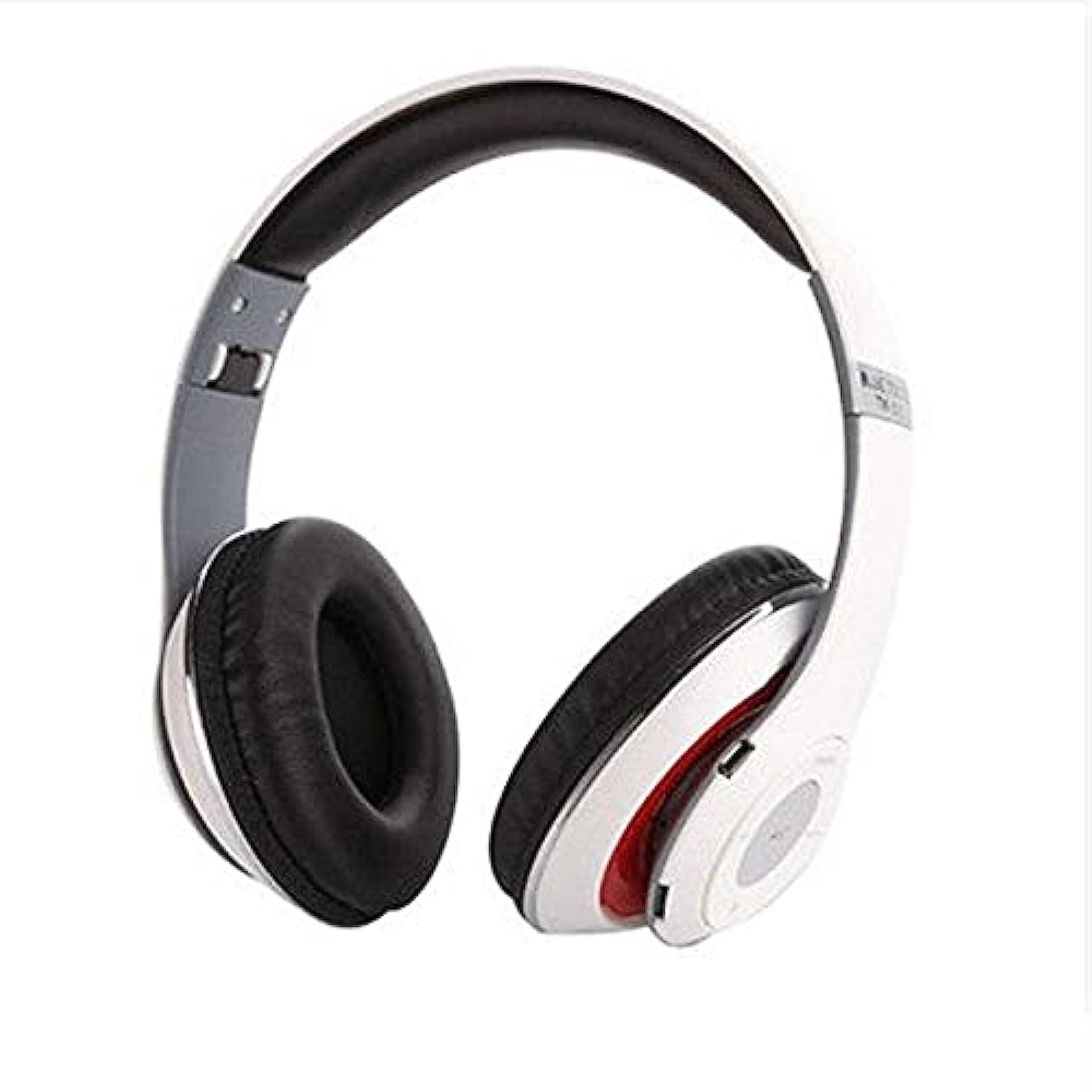
Image: The Generic B10 Over-Ear Headphones, featuring the adjustable headband, cushioned earcups, and visible control buttons on one earcup.
ቁልፍ ባህሪዎች
- የገመድ አልባ የብሉቱዝ ግንኙነት
- Built-in SD Card Reader for MP3 Playback
- Integrated FM Radio Tuner
- Wired Audio Input (3.5mm AUX)
- ከእጅ-ነፃ ጥሪ ጋር አብሮ የተሰራ ማይክሮፎን
- የድምጽ ማግለል
- Over-Ear Design for Comfort
3. ማዋቀር
3.1. የጆሮ ማዳመጫዎችን መሙላት
- የዩኤስቢ ቻርጅ ገመዱን ትንሽ ጫፍ በጆሮ ማዳመጫው ላይ ካለው ቻርጅ ፖርት ጋር ያገናኙ።
- ትልቁን የዩኤስቢ ባትሪ መሙያ ገመድ ከዩኤስቢ ሃይል አስማሚ (ያልተካተተ) ወይም ከኮምፒዩተር ዩኤስቢ ወደብ ጋር ያገናኙ።
- The LED indicator will illuminate, typically red, during charging.
- Once fully charged, the LED indicator will change color or turn off (refer to specific LED behavior in the specifications).
- የኃይል መሙያ ገመድ ያላቅቁ።
ማስታወሻ፡- ለተሻለ የባትሪ ዕድሜ፣ ለመጀመሪያ ጊዜ ከመጠቀምዎ በፊት የጆሮ ማዳመጫዎቹን ሙሉ በሙሉ ይሙሉ።
3.2. ማብራት / ማጥፋት
- ለማብራት፡- Press and hold the Power/Multi-function button for approximately 3-5 seconds until the LED indicator flashes and an audible prompt is heard.
- ለማጥፋት፡- Press and hold the Power/Multi-function button for approximately 3-5 seconds until the LED indicator turns off and an audible prompt is heard.
4. የአሠራር መመሪያዎች
4.1. የብሉቱዝ ማጣመር
- የጆሮ ማዳመጫዎች መጥፋታቸውን ያረጋግጡ።
- Press and hold the Power/Multi-function button for about 5-7 seconds until the LED indicator flashes red and blue alternately, indicating pairing mode.
- በመሣሪያዎ (ብሉቱዝ ፣ ጡባዊ ፣ ኮምፒተር) ላይ ብሉቱዝን ያንቁ።
- ፈልግ available Bluetooth devices. The headphones will appear as "B10" or a similar name.
- Select "B10" to connect. Once paired, the LED indicator will typically flash blue slowly, and an audible confirmation will be heard.
- የይለፍ ቃል ከተጠየቁ "0000" ያስገቡ.
4.2. የኤስዲ ካርድ መልሶ ማጫወት
- Insert a microSD card (TF card) with MP3 audio files into the SD card slot on the headphones. Ensure the card is inserted correctly until it clicks into place.
- The headphones will automatically switch to MP3 mode and begin playing music from the SD card.
- Use the 'Next Track' and 'Previous Track' buttons to navigate songs.
- Press the 'Play/Pause' button to pause or resume playback.
4.3. ኤፍኤም ሬዲዮ ሁነታ
- With the headphones powered on, press the 'Mode' button to switch to FM Radio mode.
- Press the 'Play/Pause' button once to automatically scan and save available FM stations. This process may take a few minutes.
- Use the 'Next Track' and 'Previous Track' buttons to switch between saved FM stations.
4.4. Wired Audio Mode (AUX)
- የ3.5ሚሜ የድምጽ ገመዱን አንድ ጫፍ በጆሮ ማዳመጫው ላይ ካለው የAUX የግቤት ወደብ ጋር ያገናኙ።
- Connect the other end of the 3.5mm audio cable to the audio output jack of your device (e.g., smartphone, computer, MP3 player).
- የጆሮ ማዳመጫዎች በራስ-ሰር ወደ ባለገመድ ሁነታ ይቀየራሉ.
- ማስታወሻ፡- In wired mode, the headphone controls (volume, track, play/pause) may not function. Control playback directly from your connected device.
4.5. የጥሪ ተግባራት
- ጥሪ መልስ፡- የኃይል/ባለብዙ ተግባር አዝራሩን አንድ ጊዜ ይጫኑ።
- ጥሪን ጨርስ፡ Press the Power/Multi-function button once during a call.
- ጥሪን ውድቅ አድርግ፡ የኃይል/ባለብዙ ተግባር አዝራሩን ለ2 ሰከንዶች ያህል ተጭነው ይያዙት።
- የመጨረሻ ቁጥር የኃይል/ባለብዙ ተግባር አዝራሩን ሁለቴ ይጫኑ።
4.6. አጠቃላይ ቁጥጥሮች
| አዝራር | ተግባር |
|---|---|
| Power/Multi-function | Power On/Off, Play/Pause, Answer/End/Reject Call, Redial |
| ድምጽ +/ ቀጣይ ትራክ | Short press: Next Track/Station; Long press: Volume Up |
| ድምጽ - / ቀዳሚ ትራክ | Short press: Previous Track/Station; Long press: Volume Down |
| ሁነታ (ኤም) | Switch between Bluetooth, SD Card, and FM Radio modes |
5. ጥገና
- የጆሮ ማዳመጫዎቹን ለስላሳ እና ደረቅ ጨርቅ ያጽዱ. ገላጭ ማጽጃዎችን ወይም ፈሳሾችን አይጠቀሙ.
- የጆሮ ማዳመጫዎችን ለከፍተኛ ሙቀት፣ እርጥበት ወይም ቀጥተኛ የፀሐይ ብርሃን ከማጋለጥ ይቆጠቡ።
- በማይጠቀሙበት ጊዜ የጆሮ ማዳመጫዎቹን በቀዝቃዛና ደረቅ ቦታ ያከማቹ።
- የጆሮ ማዳመጫውን ለመበተን ወይም ለመቀየር አይሞክሩ ምክንያቱም ይህ ዋስትናውን ስለሚያጠፋ ጉዳት ሊያደርስ ይችላል.
6. መላ መፈለግ
| ችግር | ሊሆን የሚችል መፍትሄ |
|---|---|
| የጆሮ ማዳመጫዎች አይበሩም። | ባትሪው መሙላቱን ያረጋግጡ። የዩኤስቢ ገመዱን በመጠቀም ከኃይል ምንጭ ጋር ያገናኙ። |
| በብሉቱዝ በኩል ማጣመር አይቻልም። | Ensure headphones are in pairing mode (flashing red/blue). Turn off and on Bluetooth on your device. Move closer to the headphones. |
| ከጆሮ ማዳመጫዎች ምንም ድምፅ የለም። | Check volume levels on both headphones and connected device. Ensure headphones are correctly paired or connected via AUX cable. Check if the correct mode (Bluetooth, SD, FM) is selected. |
| SD card music not playing. | Ensure the SD card is inserted correctly and contains compatible MP3 files. Press the 'Mode' button to switch to SD card mode. |
| ኤፍኤም ሬዲዮ አይሰራም። | Ensure you are in FM mode. Perform an auto-scan for stations by pressing the Play/Pause button. Try in a location with better signal. |
7. ዝርዝሮች
| ባህሪ | ዝርዝር |
|---|---|
| የምርት ስም | አጠቃላይ |
| የሞዴል ቁጥር | ብ10 |
| ቀለም | ነጭ |
| የግንኙነት ቴክኖሎጂ | ባለገመድ/ገመድ አልባ (ብሉቱዝ) |
| የጆሮ አቀማመጥ | ከጆሮ በላይ |
| የቅጽ ምክንያት | ከጆሮ በላይ |
| የድምጽ መቆጣጠሪያ | የድምጽ ማግለል |
| ማይክሮፎን | አዎ |
| ባትሪ | እንደገና ሊሞላ የሚችል (ተካትቷል) |
| ተስማሚ መሣሪያዎች | All devices with Bluetooth or 3.5mm audio output |
| ልዩ ባህሪያት | የድምጽ ስረዛ፣ ማይክሮፎን ተካትቷል። |
| የመቆጣጠሪያ ዓይነት | የድምጽ መቆጣጠሪያ |
| የመቆጣጠሪያ ዘዴ | ንካ (አዝራሮች) |
| የውሃ መቋቋም ደረጃ | የውሃ መቋቋም አይደለም |
8. የደህንነት መረጃ
- የመስማት ችግርን ለመከላከል የጆሮ ማዳመጫውን በከፍተኛ ድምጽ ለረጅም ጊዜ አይጠቀሙ።
- በሚነዱበት፣ በሚነዱበት ወይም የአካባቢ ድምጾችን በሚሰሙበት ጊዜ የጆሮ ማዳመጫዎቹን አይጠቀሙ።
- የጆሮ ማዳመጫውን ከውሃ፣ እርጥበት እና ከፍተኛ የሙቀት መጠን ያርቁ።
- Dispose of the battery according to local regulations. Do not expose to fire or extreme heat.
- ልጆች በማይደርሱበት ቦታ ያስቀምጡ.
9. ዋስትና እና ድጋፍ
This product comes with a standard manufacturer's warranty. For warranty claims or technical support, please refer to the contact information provided at your point of purchase. Keep your proof of purchase for warranty validation.