
1. መግቢያ
The Rigol DS2302A is a high-performance digital oscilloscope designed for precise signal analysis and measurement. It features a 300 MHz bandwidth, 2 analog channels, a 2 GSa/s real-time sampling rate, and a deep memory depth of 56 Mpts. This manual provides essential information for setting up, operating, and maintaining your DS2302A oscilloscope.

ምስል 1.1: የፊት view of the Rigol DS2302A Digital Oscilloscope, showing the display, control panel, and input channels.
2. ቁልፍ ባህሪያት
The DS2302A incorporates several advanced features to enhance measurement capabilities and user experience:
- High Bandwidth and Sampየሊንግ ተመን ፦ 300 MHz analog bandwidth and 2 GSa/s real-time sampling rate for capturing fast signals.
- ጥልቅ የማስታወስ ጥልቀት; Up to 56 Mpts memory depth allows for longer waveform captures with high resolution.
- UltraVision Technology: Features like multi-level intensity grading display (up to 256 levels) and real-time ceaseless waveform recording, playback, and analysis functions.
- Advanced Triggering: Supports various trigger types including Edge, Pulse, Runt, Windows, Nth Edge, Slope, Video, Pattern, Delay, Timeout, Duration, Setup/Hold, RS232, I2C, SPI, and CAN.
- ተከታታይ የአውቶቡስ ዲኮዲንግ፦ Built-in decoding functions for common serial protocols such as Parallel, RS232, I2C, SPI, and CAN.
- ትልቅ ማሳያ፡ An 8-inch display provides clear viewing of waveforms and measurement data.
- Built-in 50Ω Adapters: Improves signal integrity for higher speed signals.
ቪዲዮ 2.1፡ አልቋልview of the Rigol DS2000 Series Digital Oscilloscopes, highlighting key features such as large display, high sampling rate, deep memory, and advanced triggering and decoding capabilities.

Figure 2.1: The oscilloscope display demonstrating its wide vertical range (500 µV/div to 10 V/div) and low noise floor, which is beneficial for capturing small signals accurately.

Figure 2.2: Illustration of the UltraVision deep memory feature, allowing for up to 56 Mpts of memory depth on analog channels for extended waveform capture.
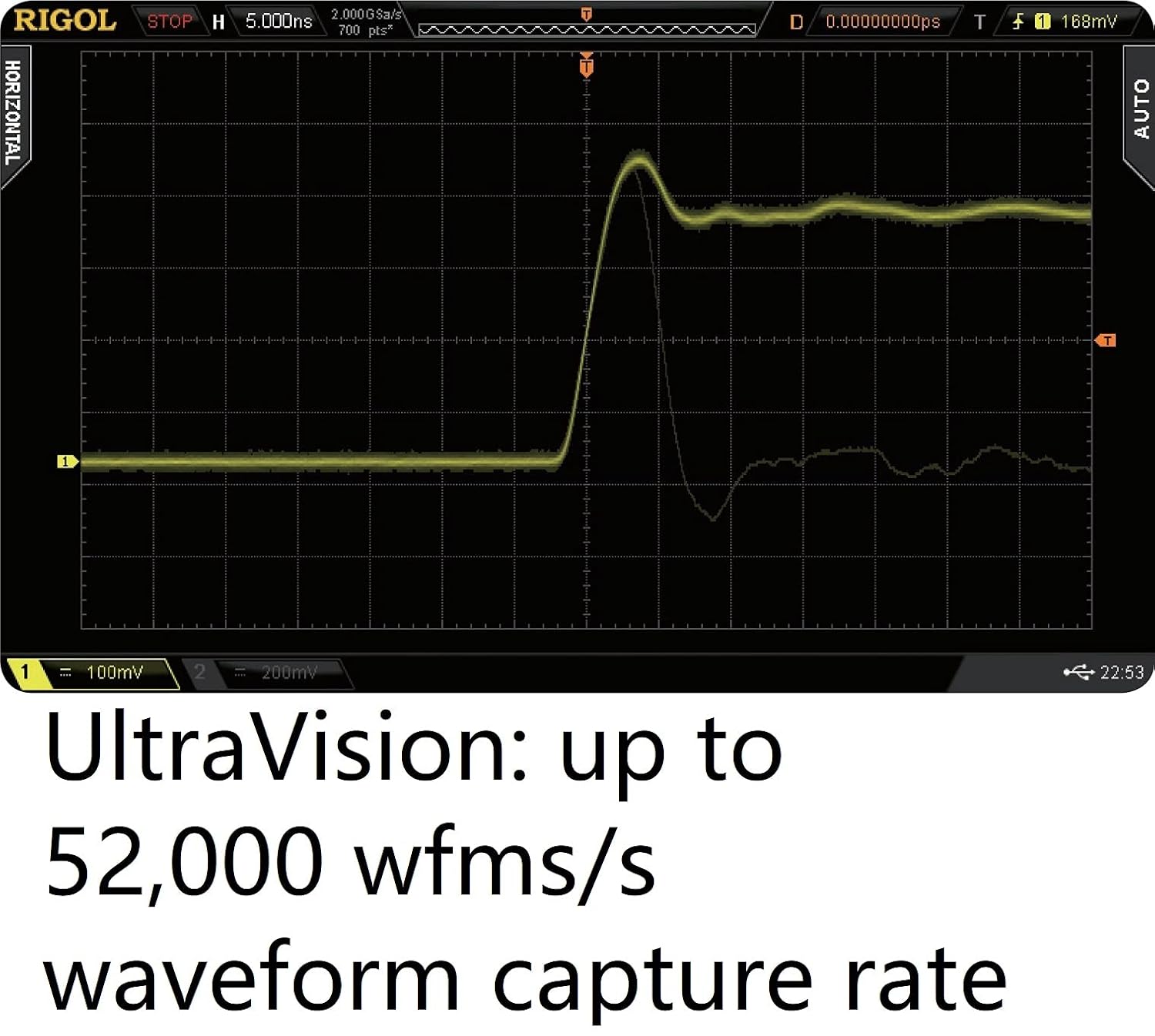
Figure 2.3: The oscilloscope's display showcasing the UltraVision technology's high waveform capture rate of up to 52,000 waveforms per second, enabling the observation of transient events.
3. ማዋቀር
Follow these steps to set up your Rigol DS2302A oscilloscope:
- ማሸግ፡ Carefully remove the oscilloscope and all accessories from its packaging. Inspect for any signs of damage.
- የኃይል ግንኙነት; Connect the provided power cable to the power input on the rear panel of the oscilloscope and then to a suitable AC power outlet.
- የመጀመሪያ ኃይል በርቷል፡ Press the power button on the front panel to turn on the oscilloscope. Allow a few moments for the system to boot up.
- የመርማሪ ግንኙነት፡- Connect the oscilloscope probes to the BNC input connectors (CH1, CH2) on the front panel. Ensure a secure connection.
- መሬት ላይ Always ensure the oscilloscope is properly grounded to prevent electrical shock and ensure accurate measurements.

Figure 3.1: The packaging box for the Rigol DS2302A oscilloscope, indicating proper handling and recycling symbols.
4. የአሠራር መመሪያዎች
This section covers basic operation and common functions of the DS2302A oscilloscope.
4.1. Basic Waveform Display
- አቀባዊ መቆጣጠሪያዎች፡ Use the vertical position and scale knobs for each channel (CH1, CH2) to adjust the vertical position and voltage በሞገድ ቅርጹ ክፍፍል።
- አግድም መቆጣጠሪያዎች፡ Use the horizontal position and scale knobs to adjust the time base and horizontal position of the waveform.
- ራስ -ሰር አዝራር; የሚለውን ይጫኑ አውቶማቲክ button for automatic setup of vertical, horizontal, and trigger systems to display a stable waveform.
4.2. Trigger Functions
The oscilloscope offers various trigger modes to stabilize and capture specific events.
- Edge Trigger: Triggers on the rising or falling edge of a signal.
- Pulse Trigger: Triggers on pulses of specific width or polarity.
- Serial Bus Triggering: Utilize dedicated trigger types for serial protocols like I2C, SPI, and CAN to isolate specific data packets or events.

Figure 4.1: The oscilloscope's trigger menu, illustrating the wide array of trigger functions available, including Runt, Setup/Hold, and Nth Edge, for precise signal capture.
4.3. Serial Bus Decoding
The DS2302A can decode and display data from various serial buses.
- Accessing Decode: ወደ መፍታት menu to select the desired protocol (e.g., RS232, I2C, SPI, CAN).
- ውቅር፡ Configure the bus parameters such as clock source, data lines, and bit rates as required by your specific bus.
- Viewing Decoded Data: The decoded data will be displayed on the screen, often in a tabular or packet-based format, alongside the analog waveforms.

Figure 4.2: The oscilloscope's display demonstrating its serial bus trigger and decoding functions for protocols like RS232, I2C, SPI, and CAN, showing both the analog signal and the decoded data.
4.4. Waveform Recording and Analysis
Utilize the UltraVision features for in-depth waveform analysis.
- መቅዳት፡ Access the recording function to capture long durations of waveform data into the deep memory.
- መልሶ ማጫወት፡ Review recorded waveforms frame by frame or continuously to identify anomalies.
- ትንተና፡- Apply various measurement and analysis tools to the recorded data for detailed characterization.

Figure 4.3: The oscilloscope's display showcasing UltraVision's real-time ceaseless waveform recording, playback, and analysis functions, allowing users to capture and examine transient events.
5. ጥገና
ትክክለኛ ጥገና የኦሲሎስኮፕዎን ረጅም ጊዜ እና ትክክለኛነት ያረጋግጣል።
- ማጽዳት፡ Use a soft, dry cloth to clean the exterior of the instrument. For stubborn dirt, a slightly damp cloth with mild detergent may be used. Avoid abrasive cleaners or solvents.
- የአየር ማናፈሻ; Ensure the ventilation openings on the instrument are clear and unobstructed to prevent overheating.
- ማከማቻ፡ When not in use, store the oscilloscope in a clean, dry environment away from direct sunlight and extreme temperatures.
- የመርማሪ እንክብካቤ፡- Handle oscilloscope probes with care. Avoid bending or stressing the probe tips. Store them properly to prevent damage.
6. መላ መፈለግ
This section addresses common issues you might encounter with your DS2302A oscilloscope.
| ችግር | ሊሆን የሚችል ምክንያት | መፍትሄ |
|---|---|---|
| ከኃይል በኋላ ምንም ማሳያ አይታይም | Power cable not connected; Power switch off; Fuse blown | Check power cable connection; Ensure power switch is ON; Replace fuse (refer to back panel for fuse specifications). |
| የሞገድ ቅርጽ አልታየም | Probe not connected; Input signal too small/large; Incorrect trigger settings | Connect probe securely; Adjust vertical scale (Volts/Div); Press AUTO button or adjust trigger level/mode. |
| ያልተረጋጋ የሞገድ ቅርፅ | Incorrect trigger source/mode/level; Signal noise | Verify trigger settings; Adjust trigger level; Use averaging acquisition mode to reduce noise. |
7. ዝርዝሮች
Detailed technical specifications for the Rigol DS2302A Digital Oscilloscope:
| ባህሪ | ዝርዝር መግለጫ |
|---|---|
| አናሎግ ባንድዊድዝ | 300 ሜኸ |
| የአናሎግ ቻናሎች ብዛት | 2 |
| Max. Real-time Sampደረጃ ይስጡ | 2 GSa/s (single channel), 1 GSa/s (dual channel) |
| ከፍተኛ የማህደረ ትውስታ ጥልቀት | 56 Mpts (single channel), 28 Mpts (dual channel) |
| Max. Waveform Capture Rate | 50,000 wfms/s |
| የምርት ልኬቶች | 14.17 x 7.09 x 5.12 ኢንች |
| የእቃው ክብደት | 8.36 ፓውንድ £ |
| አምራች | RIGOL |
| የንጥል ሞዴል ቁጥር | DS2302A |
8. ዋስትና እና ድጋፍ
For warranty information, technical support, or any further inquiries regarding your Rigol DS2302A Digital Oscilloscope, please contact Rigol directly.
You can also visit the official Rigol North America website for more details and resources: www.rigolna.com


