
1. መግቢያ
Thank you for choosing the MEDION X64060 Party Speaker. This manual provides essential information for the safe and efficient use of your device. Please read it thoroughly before operating the speaker and keep it for future reference.
The MEDION X64060 is a versatile party speaker designed for various entertainment needs, featuring powerful audio output, integrated DJ and karaoke functions, and dynamic light effects.
2. የደህንነት መመሪያዎች
- ከመጠቀምዎ በፊት ሁሉንም መመሪያዎች በጥንቃቄ ያንብቡ.
- ድምጽ ማጉያውን ከውሃ፣ እርጥበት እና ከፍተኛ የሙቀት መጠን ያርቁ።
- የአየር ማናፈሻ ክፍተቶችን አያግዱ ፡፡
- ከመሳሪያው ጋር አብሮ የሚመጣውን የኃይል ገመድ ብቻ ይጠቀሙ።
- መሳሪያውን እራስዎ ለመጠገን አይሞክሩ. ሁሉንም አገልግሎቶች ብቁ ለሆኑ ባለሙያዎች ያመልክቱ።
- Ensure the speaker is placed on a stable, level surface to prevent tipping.
- የመስማት ችግርን ለመከላከል ለከፍተኛ መጠን ደረጃዎች ለረጅም ጊዜ መጋለጥን ያስወግዱ.
3. የጥቅል ይዘቶች
እባክዎን ጥቅሉን ለሚከተሉት ነገሮች ያረጋግጡ፡
- MEDION X64060 Party Speaker
- 1 x ማይክሮፎን
- የኃይል ገመድ
- የተጠቃሚ መመሪያ (ይህ ሰነድ)
4. ምርት አብቅቷልview
Familiarize yourself with the main components and controls of your MEDION X64060 Party Speaker.

Image: Control Panel Overview
This image displays a close-up of the speaker's top control panel, showing various knobs and buttons for audio adjustments, DJ functions, and input selections.

Image: Speaker Dimensions and Connections
This image illustrates the overall dimensions of the speaker (980mm height, 350mm width, 340mm depth) and highlights the available connection ports: 1x USB, 2x Microphone (6.3 mm), 1x Guitar (6.3 mm), 1x Audio Input (3.5 mm), and 1x Audio Input (RCA).
4.1 የፊት ፓነል
- ተናጋሪዎች፡- Two main speakers with integrated LED lighting.
- የብርሃን ተፅእኖዎች; Dynamic LED lights that synchronize with music.
4.2 የላይኛው የቁጥጥር ፓነል
- የኃይል ቁልፍ፡- ድምጽ ማጉያውን ለማብራት/ለማጥፋት።
- የድምጽ መቆጣጠሪያዎች; Main volume, microphone volume (MIC1 VOL, MIC2 VOL), guitar volume (GUITAR VOL), and echo volume (ECHO VOL).
- አመጣጣኝ (ኢ.ሲ.) 5-band equalizer for sound adjustment.
- የግቤት መራጮች፡- Buttons for Bluetooth, USB, AUX.
- DJ Functions: Cross-fader, scratch wheel, drum pads (HI-HAT, SNARE, BASS DRUM, CYMBAL, TOM1, TOM2), and record function.
- የዩኤስቢ ወደብ፡ ለዩኤስቢ መልሶ ማጫወት።
- የማይክሮፎን ግብዓቶች፡- Two 6.3 mm jack inputs.
- ጊታር ግቤት፡- One 6.3 mm jack input.
- AUX ግቤት፡ 3.5 mm jack input.
4.3 የኋላ ፓነል
- የኃይል ግቤት፡ የኃይል ገመዱን ለማገናኘት.
- RCA ኦዲዮ ግቤት፡- Additional audio input.
4.4 የእንቅስቃሴ ባህሪያት
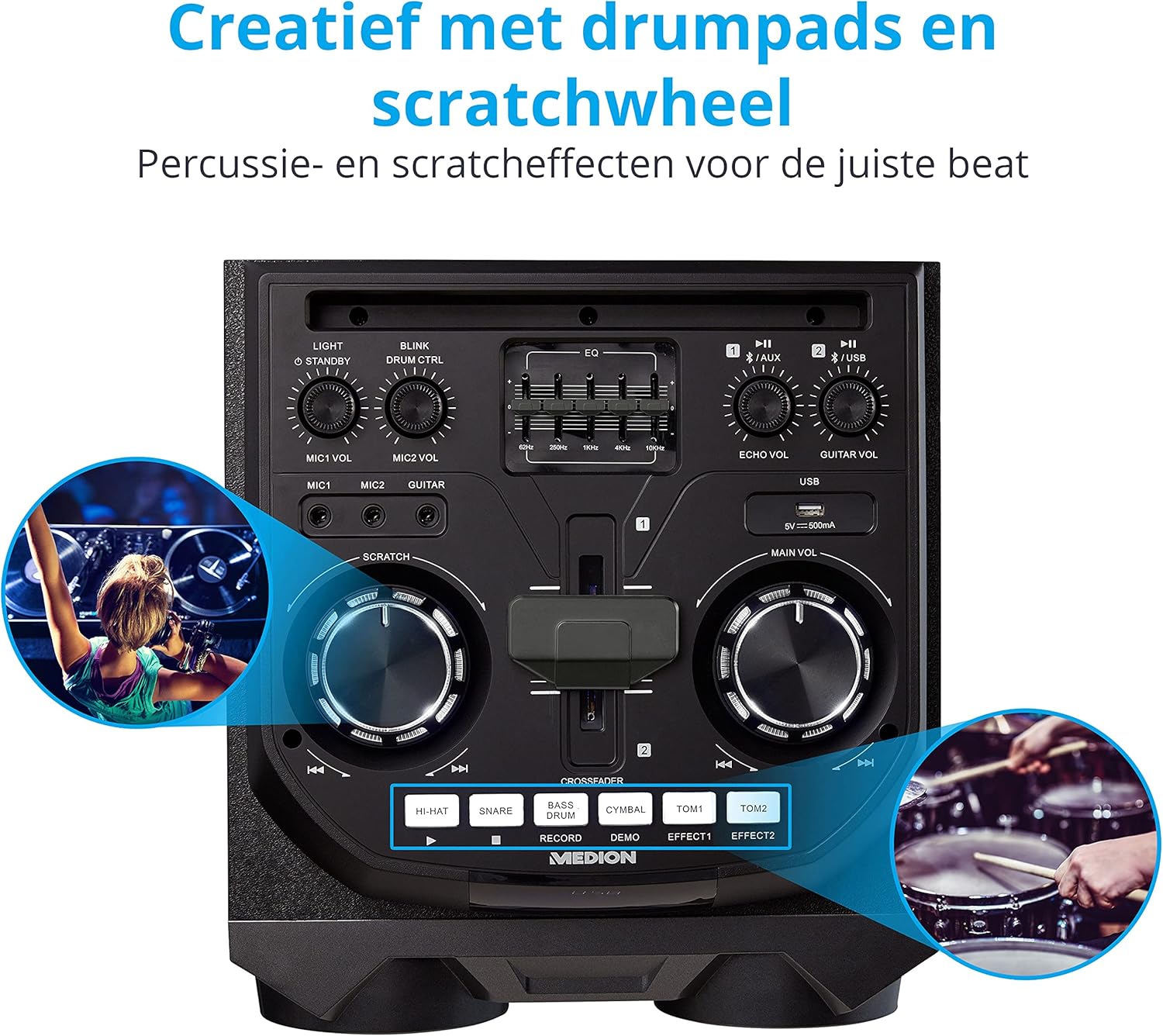
Image: Integrated Wheels for Portability
This image shows the back of the speaker, highlighting the integrated wheels at the bottom, designed for easy transport.
- የተዋሃዱ ጎማዎች; For easy transportation of the speaker.
- መያዣዎች፡ Ergonomic handles for lifting and moving.
5. ማዋቀር
5.1 የመጀመሪያ አቀማመጥ
Place the speaker on a stable, flat surface. Ensure there is adequate ventilation around the unit. Avoid placing it near heat sources or in direct sunlight.
5.2 የኃይል ግንኙነት
- Connect the supplied power cord to the power input on the rear of the speaker.
- የኃይል ገመዱን ሌላኛውን ጫፍ ተስማሚ በሆነ ግድግዳ ላይ ይሰኩት.
- Press the power button on the top control panel to turn on the speaker. The LED lights will illuminate.
5.3 Connecting a Microphone or Guitar
For karaoke or live instrument performance:
- Plug your microphone(s) into the MIC1 or MIC2 6.3 mm jack inputs on the top panel.
- Plug your guitar into the GUITAR 6.3 mm jack input on the top panel.
- Adjust the respective volume knobs (MIC1 VOL, MIC2 VOL, GUITAR VOL) and ECHO VOL to your preference.
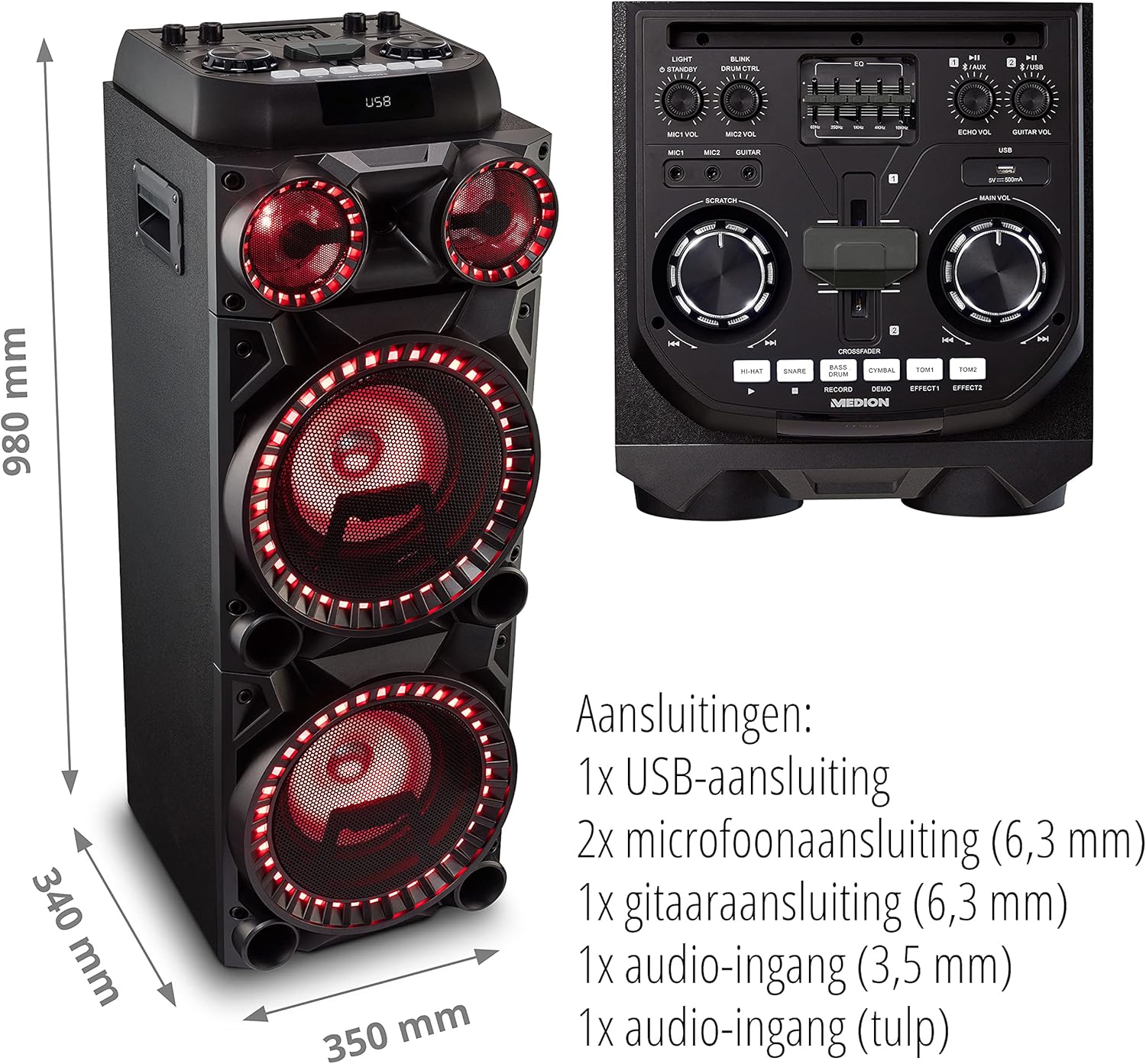
Image: Microphone and Guitar Connection for Karaoke
This image shows individuals enjoying karaoke, demonstrating the use of a microphone connected to the speaker for singing.
6. የአሠራር መመሪያዎች
6.1 የብሉቱዝ ግንኙነት
- የሚለውን ይጫኑ ብሉቱዝ button on the control panel. The Bluetooth indicator will blink.
- ብሉቱዝን በስማርትፎንዎ፣ በጡባዊዎ ወይም በሌላ የድምጽ መሳሪያዎ ላይ ያንቁ።
- ፈልግ "MEDION X64060" in your device's Bluetooth settings and select it to pair.
- Once connected, the Bluetooth indicator will stop blinking and remain solid. You can now play music wirelessly.

Image: Bluetooth Music Playback
This image shows a smartphone displaying a music application, indicating a wireless Bluetooth connection to the speaker for audio streaming.
6.2 የዩኤስቢ መልሶ ማጫወት
- ኦዲዮ የያዘ የዩኤስቢ ፍላሽ አንፃፊ አስገባ files into the USB port on the top panel.
- የሚለውን ይጫኑ ዩኤስቢ የዩኤስቢ ሁነታን ለመምረጥ አዝራር.
- The speaker will automatically detect and begin playing audio files from the USB drive. Use the playback controls (play/pause, skip track) on the control panel.
6.3 AUX ግቤት
- Connect an external audio device (e.g., MP3 player, laptop) to the 3.5 mm AUX input or the RCA audio input on the rear panel using an appropriate audio cable (not included).
- የሚለውን ይጫኑ AUX የ AUX ሁነታን ለመምረጥ አዝራር።
- Play audio from your connected device. The speaker will output the sound.
6.4 DJ Functions
The MEDION X64060 includes various DJ features for creative sound mixing.

Image: DJ Function Controls
ይህ ምስል በዝርዝር ያቀርባል view of the DJ control section, including the cross-fader, scratch wheel, and various drum pads.
- Cross-fader: Use the cross-fader to smoothly transition between different audio sources or effects.
- Scratch Wheel: Manipulate the scratch wheel for classic DJ scratch effects.
- የከበሮ መሸፈኛዎች; የሚለውን ይጫኑ ሃይ-ባርኔጣ, SNARE, ባስ ከበሮ, ሲምባል, ቶም1, እና ቶም2 pads to add drum sound effects to your music.
- የመዝገብ ተግባር፡- የሚለውን ተጠቀም መዝገብ button to record your drum pad sequences.
6.5 የካራኦኬ ተግባር
Connect a microphone as described in section 5.3. Play your chosen karaoke track via Bluetooth, USB, or AUX. Adjust the microphone and echo volumes for the desired effect.
6.6 የብርሃን ተፅእኖዎች
The speaker features dynamic LED light effects that respond to the music. These lights automatically activate when the speaker is on. There may be a dedicated button (e.g., "LIGHT" or "BLINK") to control or cycle through different light modes, refer to the control panel for specific options.

Image: Dynamic Blue Light Effects
This image showcases the speaker with its blue LED lights illuminated, demonstrating the atmospheric light effects.

Image: Dynamic Red Light Effects
This image shows the speaker with its red LED lights illuminated, highlighting another color option for the atmospheric light effects.
7. ጥገና
7.1 ጽዳት
- ከማጽዳትዎ በፊት ድምጽ ማጉያውን ከኃይል መውጫው ሁልጊዜ ያላቅቁ።
- ውጫዊ ገጽታዎችን ለማጽዳት ለስላሳ እና ደረቅ ጨርቅ ይጠቀሙ.
- Do not use liquid cleaners, aerosols, or abrasive materials, as these can damage the finish or internal components.
7.2 ማከማቻ
When not in use for extended periods, store the speaker in a cool, dry place, away from direct sunlight and extreme temperatures. Cover the unit to protect it from dust.
8. መላ መፈለግ
| ችግር | ሊሆን የሚችል ምክንያት | መፍትሄ |
|---|---|---|
| ኃይል የለም | Power cord not connected properly; Power outlet not working. | Ensure the power cord is securely plugged into both the speaker and a working wall outlet. Test the outlet with another device. |
| ድምጽ የለም። | Volume too low; Incorrect input selected; Device not paired (Bluetooth); Cable not connected (AUX/Guitar/Mic). | Increase the main volume and individual input volumes. Select the correct input source (Bluetooth, USB, AUX). Re-pair Bluetooth device. Check all cable connections. |
| የብሉቱዝ ግንኙነት አልተሳካም። | ድምጽ ማጉያ በማጣመር ሁነታ ላይ አይደለም; መሣሪያ በጣም ሩቅ; ጣልቃ ገብነት. | Ensure the speaker is in Bluetooth pairing mode (blinking indicator). Move your device closer to the speaker. Avoid obstacles and other wireless devices. |
| ማይክሮፎን/ጊታር አይሰራም | Volume too low; Cable faulty; Incorrect input. | Increase MIC/GUITAR VOL. Check microphone/guitar cable. Ensure the instrument is properly connected. |
9. ዝርዝሮች
| የምርት ስም | MEDION |
| የሞዴል ቁጥር | X64060 | MD44060 |
| የውጤት ኃይል | 2 x 100 W RMS (2 x 1000 W max. music output power) |
| የግንኙነት ቴክኖሎጂ | Bluetooth 5.0, USB, AUX (3.5mm, RCA) |
| የድምፅ ግብዓቶች | 2 x Microphone (6.3 mm), 1 x Guitar (6.3 mm), 1 x AUX (3.5 mm), 1 x RCA |
| አመጣጣኝ | 5-ባንድ |
| ቀለም | ጥቁር |
| ቁሳቁስ | ፕላስቲክ |
| የምርት ልኬቶች (L x W x H) | 38.8 x 35 x 101 ሴ.ሜ |
| የእቃው ክብደት | 15 ኪ.ግ |
| የመጫኛ አይነት | የወለል ንጣፍ |
| የኃይል ምንጭ | ባለገመድ ኤሌክትሪክ |
| ተስማሚ መሣሪያዎች | ላፕቶፕ, ስማርትፎን |
10. ዋስትና እና ድጋፍ
For warranty information and technical support, please refer to the warranty card included with your product or visit the official MEDION webጣቢያ. ለማንኛውም የዋስትና ጥያቄዎች የግዢ ማረጋገጫዎን ያስቀምጡ።
MEDION Customer Service: For assistance, please contact MEDION customer support through their official channels. Contact details can typically be found on the MEDION webጣቢያ ወይም በምርት ማሸጊያው ውስጥ.


