
Symphony SY-V3080BT
Symphony SY-V3080BT 7.2 Inch Touch Screen Car Multimedia Player User Manual
Model: SY-V3080BT

ምስል፡ ፊት ለፊት view of the Symphony SY-V3080BT car multimedia player, displaying a car on its 7.2-inch touch screen. The unit features control buttons on the left side and a USB port.
1. መግቢያ
This manual provides detailed instructions for the installation, operation, and maintenance of your Symphony SY-V3080BT 7.2 Inch Touch Screen Car Multimedia Player. Please read this manual thoroughly before using the product to ensure proper operation and to prevent damage.
2. የደህንነት መረጃ
- Always operate the device in a safe manner, ensuring it does not distract you from driving.
- ክፍሉን ለመበተን ወይም ለማሻሻል አይሞክሩ። ይህ ጉዳት ሊያስከትል እና ዋስትናውን ሊያሳጣ ይችላል።
- አጭር ወረዳዎችን ለመከላከል ሁሉም የገመድ ግንኙነቶች ደህንነታቸው የተጠበቀ እና በትክክል መከለላቸውን ያረጋግጡ።
- ስለማንኛውም እርምጃ እርግጠኛ ካልሆኑ ለመጫን ባለሙያ ያማክሩ።
- ክፍሉን ከውሃ እና ከመጠን በላይ እርጥበት ያርቁ.
3. የጥቅል ይዘቶች
ሁሉም እቃዎች በጥቅሉ ውስጥ መኖራቸውን ያረጋግጡ፡-
- Symphony SY-V3080BT Car Multimedia Player Unit
- የርቀት መቆጣጠሪያ
- የኃይል እና የድምፅ ማጉያ ሽቦ ማሰሪያ
- ሃርድዌርን መጫን (ቅንፍ፣ ብሎኖች)
- የተጠቃሚ መመሪያ (ይህ ሰነድ)
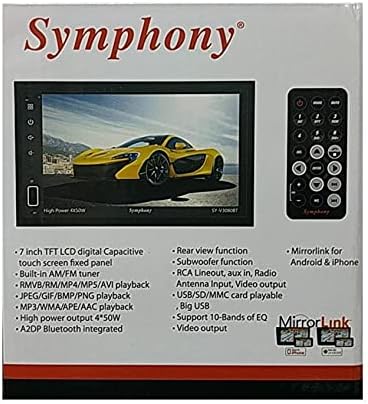
Image: The product packaging for the Symphony SY-V3080BT, highlighting key features such as 7-inch TFT LCD, AM/FM tuner, various playback formats, Bluetooth, and MirrorLink. A remote control is also visible.
4. ማዋቀር እና መጫን
4.1 የወልና ግንኙነቶች
Before installation, ensure the vehicle's battery is disconnected. Connect the wiring harness to the corresponding ports on the back of the unit and to your vehicle's wiring system. Pay close attention to power, ground, speaker, and accessory wire connections.
- ኃይል (ቢጫ) ከቋሚ 12 ቮልት ኃይል ጋር ይገናኙ።
- መለዋወጫ (ቀይ) ከተለዋዋጭ 12 ቮልት ኃይል (ማቀጣጠያ) ጋር ይገናኙ።
- መሬት (ጥቁር) ከጠንካራ የቼሲስ መሬት ነጥብ ጋር ይገናኙ።
- የድምፅ ማጉያ ሽቦዎች; ከተሽከርካሪዎ ድምጽ ማጉያዎች ጋር ይገናኙ፣ ይህም ትክክለኛውን ፖላሪቲ ያረጋግጡ።
- የአንቴና ግቤት፡ የመኪናዎን የሬዲዮ አንቴና ያገናኙ።
- RCA Lineout: ውጫዊውን ለማገናኘት ampአነፍናፊዎች።
- የቪዲዮ ውፅዓት፡- ውጫዊ ማሳያዎችን ለማገናኘት።
- የኋላ View የካሜራ ግቤት፡ ተኳሃኝ የሆነ የኋላ ክፍል ያገናኙ view ካሜራ (የሚመለከተው ከሆነ)።

ምስል: የኋላ view of the Symphony SY-V3080BT car multimedia player, showing various input and output ports for power, speakers, antenna, and auxiliary connections.
4.2 ክፍሉን መጫን
Secure the unit into the vehicle's dashboard using the provided mounting brackets and screws. Ensure the unit is firmly in place and does not obstruct any vehicle controls.
4.3 የመጀመሪያ ኃይል-በ
After all connections are made and the unit is mounted, reconnect the vehicle's battery. Turn on the vehicle's ignition. The unit should power on. Follow any on-screen prompts for initial setup.
5. የአሠራር መመሪያዎች
5.1 መሰረታዊ ቁጥጥሮች
- የኃይል ቁልፍ፡- ክፍሉን ለማብራት/ለማጥፋት ይጫኑ።
- የድምጽ መቆጣጠሪያ፡- Use the on-screen controls or remote to adjust volume.
- የምናሌ/መነሻ አዝራር፡ Returns to the main menu or home screen.
- የንክኪ ማያ ምናሌዎቹን ያስሱ እና ማያ ገጹን በመንካት ተግባራትን ይምረጡ።
5.2 የሚዲያ መልሶ ማጫወት (ዲቪዲ/ዩኤስቢ/ኤስዲ)
- ዲቪዲ መልሶ ማጫወት፡ Insert a DVD disc into the slot. The unit will automatically detect and begin playback.
- የዩኤስቢ መልሶ ማጫዎቻ Insert a USB drive into the USB port. Select the USB source from the main menu to browse and play media files (MP3, MPEG4, RMVB, etc.).
- የ SD ካርድ መልሶ ማጫወት Insert an SD card into the SD card slot. Select the SD source from the main menu to browse and play media files.
5.3 Radio (AM/FM Tuner)
Select the Radio function from the main menu. Use the on-screen controls to scan for stations, save presets, and switch between AM and FM bands.
5.4 የብሉቱዝ ግንኙነት
ተንቀሳቃሽ መሣሪያዎን ለማጣመር፦
- በተንቀሳቃሽ መሣሪያዎ ላይ ብሉቱዝን ያንቁ።
- On the SY-V3080BT, select the Bluetooth function.
- ፈልግ available devices on your mobile phone and select 'SY-V3080BT'.
- ከተጠየቁ የማጣመሪያውን ኮድ ያረጋግጡ።
Once paired, you can make/receive calls and stream audio (A2DP) wirelessly.
5.5 MirrorLink (Android & iPhone)
The MirrorLink feature allows you to mirror your smartphone's screen onto the unit's display. Connect your Android or iPhone device via USB. Follow the on-screen instructions on both the unit and your phone to establish the connection. This enables on-screen control of compatible smartphone applications.
5.6 የኋላ View ተግባር
ከኋላ ከሆነ view ካሜራው ከተገናኘ፣ ተሽከርካሪው በተገላቢጦሽ ማርሽ ውስጥ ሲገባ ማሳያው በራስ-ሰር ወደ ካሜራ ምግብ ይቀየራል።
5.7 የድምጽ ቅንብሮች
Access the audio settings menu to adjust equalizer (EQ) presets or custom settings (supports 10-bands of EQ), balance, fader, and subwoofer output.
6. ጥገና
6.1 ክፍሉን ማጽዳት
Use a soft, dry cloth to clean the unit's screen and exterior. For stubborn marks, slightly dampጨርቁን በውሃ. ገላጭ ማጽጃዎችን ወይም ፈሳሾችን አይጠቀሙ.
6.2 አጠቃላይ እንክብካቤ
Avoid exposing the unit to extreme temperatures, direct sunlight for prolonged periods, or excessive dust. Ensure proper ventilation around the unit.
7. መላ መፈለግ
If you encounter issues with your SY-V3080BT, refer to the following common problems and solutions:
| ችግር | ሊሆን የሚችል ምክንያት | መፍትሄ |
|---|---|---|
| ኃይል የለም | የተሳሳተ ሽቦ፣ የተነፈሰ ፊውዝ፣ የተሽከርካሪ ባትሪ ችግር። | የኃይል እና የመሬት ግንኙነቶችን ይፈትሹ። የተሽከርካሪ ፊውዞችን ይመርምሩ። የተሽከርካሪው ባትሪ መሙላቱን ያረጋግጡ። |
| ድምጽ የለም። | የድምጽ ማጉያ ሽቦዎች ተለያይተዋል፣ የድምጽ መጠኑ በጣም ዝቅተኛ ነው፣ የተሳሳተ የድምጽ ምንጭ። | Verify speaker connections. Increase volume. Select correct audio source. Check audio settings. |
| የንክኪ ማያ ምላሽ የማይሰጥ | System error, temporary glitch. | Restart the unit (turn off and on vehicle ignition). If issue persists, consult support. |
| የብሉቱዝ ግንኙነት አልተሳካም። | መሳሪያው በማጣመር ሁነታ ላይ አይደለም፣ ጣልቃ ገብነት፣ የተሳሳተ የማጣመር ሂደት። | ሁለቱም መሳሪያዎች በማጣመር ሁነታ ላይ መሆናቸውን ያረጋግጡ። ቀዳሚ ማጣመሪያዎችን ሰርዝ እና እንደገና ሞክር። ወደ አሃዱ ተጠጋ። |
| ዲቪዲ/ዩኤስቢ/ኤስዲ እየተጫወተ አይደለም | የማይጣጣም file format, damaged media, incorrect source selected. | Check media for damage. Ensure files are in supported formats (MP3, MPEG4, RMVB, etc.). Select correct source. |
If the problem persists after trying these solutions, please contact Symphony customer support.
8. ዝርዝሮች
- ሞዴል፡ SY-V3080BT
- የስክሪን መጠን፡ 7.2 ኢንች የንክኪ ማያ ገጽ
- ጥራት፡ 1920x1080
- የሚዲያ ዓይነት፡ DVD, MP3, MPEG4, RMVB, USB, SD
- መቃኛ፡ AM/FM መቃኛ
- ግንኙነት፡ AUX, Bluetooth (A2DP), USB, SD Card
- የስማርትፎን ውህደት፡- MirrorLink for Android & iPhone, On-Screen Control
- የኦዲዮ ውፅዓት ሁነታ ፦ ዲጂታል
- የሚደገፍ የድምፅ ቅርጸት; ዶልቢ ዲጂታል፣ DTS
- የኃይል ውፅዓት፡- High Power 4 x 50W
- አመጣጣኝ Support 10-Bands of EQ
- ተጨማሪ ባህሪያት፡ የኋላ view function, RCA Lineout, Video output
- የእቃው ክብደት፡ Approximately 904 g (0.9 Kilograms)
9. ዋስትና እና ድጋፍ
For warranty information, please refer to the warranty card included with your product or contact your retailer. For technical support or service inquiries, please contact Symphony customer service through their official channels.