
1. ምርት አብቅቷልview
The iulock IU-20 Code Door Lock is an electronic door knob designed for keyless entry, offering enhanced security and convenience for various applications including offices, warehouses, bedrooms, and garages. It features a backlit keypad, multiple user code capacity, and robust construction for durability.

Figure 1: The iulock IU-20 Code Door Lock, showing the keypad, keyhole, and included mechanical keys.
2. ቁልፍ ባህሪያት
- Keyless Entry & Ergonomic Design: Program up to 50 user access codes and 1 master code (4 to 15 digits). Easily programmed via the backlit keypad.
- Enhanced Security & Durable: Heavy-duty metal construction and solid lock cylinder. IP65 weatherproof for outdoor use.
- Multi-functions & Smart: Auto-locks after 4 seconds for peace of mind. Features password disguise and silent mode. Passage Mode can be enabled for continuous access. Low battery warning and Type-C USB backup (cable not included) for emergency power.
- Easy Install & Universal Fit: Direct replacement for standard doors. Fits both left and right-handed doors. Adjustable latch for door thickness 1-3/8 Inch to 2-1/2 Inch, with 2-3/8 Inch or 2-3/4 Inch backset. Installs with a screwdriver.
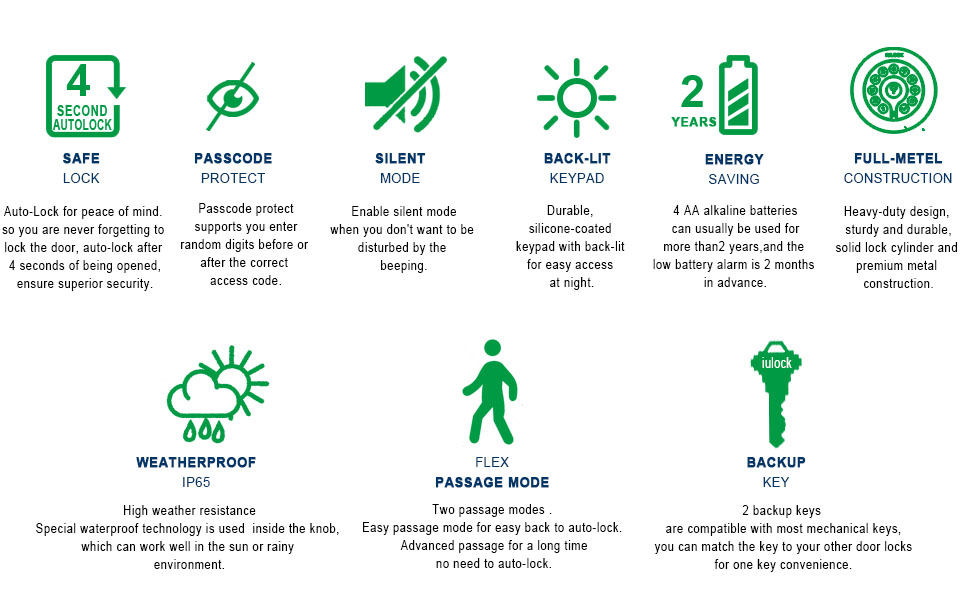
Figure 2: Visual representation of the IU-20's key features, including Passage Mode, Silent Mode, Auto Lock, Code Protect, 50+ Codes, and Easy Install.
3. የጥቅል ይዘቶች
እባክዎ መጫኑን ከመጀመርዎ በፊት ሁሉም አካላት መኖራቸውን ያረጋግጡ፡-
- IU-20 Electronic Door Knob Assembly (Exterior and Interior)
- 2 Traditional Keys (KW type)
- Mounting Hardware (Screws, Latch, Strike Plate)
- የተጠቃሚ መመሪያ (ይህ ሰነድ)

Figure 3: The IU-20 Code Door Lock and its various components, including the main unit, keys, and installation hardware.
4. ዝርዝሮች
| ባህሪ | ዝርዝር መግለጫ |
|---|---|
| የምርት ስም | iulock |
| የሞዴል ቁጥር | አይዩ-20 |
| የመቆለፊያ ዓይነት | የኤሌክትሮኒክ በር ቁልፍ |
| ቁሳቁስ | ብረት |
| ቀለም | ማት ጥቁር |
| ልኬቶች (L x W x H) | 8.07 x 4.53 x 4.53 ኢንች |
| የእቃው ክብደት | 1 ፓውንድ £ |
| ልዩ ባህሪ | ውሃ የማይገባ (IP65) |
| የኮድ አቅም | 1 Master Code, 50 User Codes |
| የኮድ ርዝመት | 4-15 አሃዞች |
| የኃይል ምንጭ | 4 AA ባትሪዎች (አልተካተተም) |
| የመጠባበቂያ ኃይል | Type-C USB (cable not included) |
| የአሠራር ሙቀት | -22°F እስከ +176°F |
| የበር ውፍረት ተኳሃኝነት | 1-3/8 Inch to 2-1/2 Inch |
| የሚስተካከለው መቆለፊያ | 2-3/8 Inch or 2-3/4 Inch |
5. ማዋቀር እና መጫን
The IU-20 Code Door Lock is designed for straightforward installation, typically requiring only a screwdriver. It is compatible with most standard doors and can be installed on both left-handed and right-handed doors.
5.1 Door Preparation and Measurement
Ensure your door meets the compatibility requirements for thickness and backset. The lock fits door thicknesses from 1-3/8 inches to 2-1/2 inches. The adjustable latch supports backsets of 2-3/8 inches or 2-3/4 inches.

Figure 4: Diagram illustrating the dimensions and door compatibility of the IU-20 Code Door Lock, including backset, rosette diameter, front height, door thickness, hole diameter, and knob diameter.
5.2 የመጫኛ ደረጃዎች (አጠቃላይ በላይview)
- መቀርቀሪያውን ጫን፡- Insert the latch into the door edge, ensuring the bevel faces the door frame. Secure with screws.
- የውጪውን ስብስብ ይጫኑ; Feed the cable and spindle through the latch hole. Position the exterior keypad assembly on the door.
- የውስጥ መጫኛ ሰሌዳውን ይጫኑ፡ Align the mounting plate with the exterior assembly and secure it with screws.
- ኬብሎችን ያገናኙ እና የውስጥ መገጣጠሚያ ይጫኑ፡ Connect the cable from the exterior assembly to the interior assembly. Carefully tuck the cable into the designated space. Attach the interior assembly to the mounting plate.
- ባትሪዎችን ይጫኑ Insert 4 AA alkaline batteries (not included) into the battery compartment of the interior assembly.
- የሙከራ ተግባር Test the lock's functionality using the default master code or a mechanical key to ensure proper installation.
For detailed, step-by-step installation instructions, please refer to the comprehensive user guide PDF available for download or included in your product packaging.
6. የአሠራር መመሪያዎች
The IU-20 lock offers various functions for secure and convenient access. All programming is done directly on the keypad using the master code.
6.1 Adding a User Passcode
You can add up to 50 unique user passcodes (4-15 digits in length).
Command: √ 1 √ Master code √ New user code √ New user code √
ለ example, if your Master code is 123456 and you want to add a new user code 6789:
Command: √ 1 √ 123456 √ 6789 √ 6789 √
Video 1: Demonstrates how to add a new user passcode to the IU-20 Code Door Lock.
6.2 Changing Master Passcode & User Passcode
You can change existing master or user passcodes.
Command: √ 2 √ Master code √ Old code √ New code √ New code √
ለ example, if your Master code is 123456, the old user code is 6789, and you want to change it to 4321:
Command: √ 2 √ 123456 √ 6789 √ 4321 √ 4321 √
Video 2: Demonstrates how to change an existing master or user passcode on the IU-20 Code Door Lock.
6.3 የተጠቃሚ ኮድ መሰረዝ
To remove a specific user code:
Command: √ 3 √ Master code √ Unwanted user code √
ለ example, if your Master code is 123456 and you want to delete user code 4321:
Command: √ 3 √ 123456 √ 4321 √
Video 3: Demonstrates how to delete a specific user code from the IU-20 Code Door Lock.
6.4 ሁሉንም የተጠቃሚ ኮዶች መሰረዝ
To delete all user codes (master code remains active):
Command: √ 4 √ Master code √
ለ example, if your Master code is 123456:
Command: √ 4 √ 123456 √
Video 4: Demonstrates how to delete all user codes from the IU-20 Code Door Lock.
6.5 Setting Visitor Mode
Visitor mode allows the door to be opened without requiring a passcode. This is useful for temporary access.
Enable Visitor Mode: √ 5 √ Master code √
ለ example, if your Master code is 123456:
Command: √ 5 √ 123456 √
Disable Visitor Mode: Press any key on the keypad.
Video 5: Demonstrates how to enable and disable Visitor Mode on the IU-20 Code Door Lock.
6.6 Enabling/Disabling Beeper (Silent Mode)
You can enable or disable the beeper sound for keypad presses and lock operations.
Enable Beeper (Normal Mode): √ 6 √ Master code √ 1 √
Disable Beeper (Silent Mode): √ 6 √ Master code √ 0 √
ለ example, to enable the beeper if your Master code is 123456:
Command: √ 6 √ 123456 √ 1 √
To disable the beeper (silent mode) if your Master code is 123456:
Command: √ 6 √ 123456 √ 0 √
Video 6: Demonstrates how to enable and disable the beeper sound for the IU-20 Code Door Lock.
7. ጥገና
Proper maintenance ensures the longevity and optimal performance of your IU-20 Code Door Lock.
- የባትሪ መተካት፡ The lock requires 4 AA alkaline batteries. Replace them when the low battery warning is indicated (usually a specific light pattern or sound). Do not mix old and new batteries or different types of batteries.
- የአስቸኳይ ጊዜ ኃይል In case of complete battery depletion, you can use a Type-C USB cable (not included) to provide temporary power for emergency access. Connect the cable to the Type-C port on the exterior assembly.
- ማጽዳት፡ Clean the keypad and lock body with a soft, dry cloth. Avoid using abrasive cleaners, solvents, or harsh chemicals, as these can damage the finish and electronic components.
- ቅባት፡ The mechanical parts of the lock are designed for long-term use and generally do not require lubrication. If the key mechanism feels stiff, a small amount of graphite lubricant can be applied to the keyhole.

Figure 7: The interior assembly of the IU-20 lock, showing the battery compartment and the Type-C USB backup port for emergency power.
8. መላ መፈለግ
If you encounter issues with your IU-20 Code Door Lock, refer to the following common problems and solutions:
| ችግር | ሊሆን የሚችል ምክንያት | መፍትሄ |
|---|---|---|
| መቆለፊያ ለቁልፍ ሰሌዳ ግቤት ምላሽ አይሰጥም። | Dead batteries; Incorrect code entered; Keypad malfunction. | Replace batteries; Use Type-C USB for emergency power; Re-enter code carefully; Contact customer support if issue persists. |
| መቆለፊያው በራስ-ሰር አይቆልፍም። | Passage Mode is enabled. | Disable Passage Mode by pressing any key on the keypad if Visitor Mode is active, or by entering the master code if Advanced Passage Mode is set. |
| Keypad is not lighting up. | Low batteries; Complete battery depletion. | Replace batteries; Use Type-C USB for emergency power. |
| አዲስ ኮዶችን ፕሮግራም ማድረግ አይቻልም። | Incorrect master code; Incorrect programming sequence. | Ensure you are using the correct master code; Follow the programming steps precisely as outlined in Section 6. |
| Lock is loose on the door. | የመትከያ ብሎኖች ልቅ ናቸው። | Tighten the mounting screws on the interior assembly. |
9. ዋስትና እና ድጋፍ
The iulock IU-20 Code Door Lock comes with a comprehensive warranty to ensure your peace of mind.
9.1 የዋስትና መረጃ
IULOCK extends a Lifetime Limited Mechanical and Finish Warranty እና ሀ One-Year Limited Electronics Warranty to the original consumer user of the Product against defects in material and workmanship. This warranty remains valid as long as the Original User occupies the residential premises upon which the Product was originally installed. Please refer to the full warranty terms and conditions provided with your product or on the iulock webለተሟላ ዝርዝሮች ጣቢያ።
9.2 የደንበኛ ድጋፍ
For any questions, technical assistance, or warranty claims, please contact iulock customer support. Contact information can typically be found on the product packaging or the official iulock website. We are committed to providing lifetime customer support to ensure your satisfaction with the IU-20 Code Door Lock.