
Deenkee DK600
Deenkee Robot Vacuum DK600 User Manual
Model: DK600 | Brand: Deenkee
መግቢያ
Welcome to the Deenkee Robot Vacuum DK600 user manual. This guide provides detailed instructions for setting up, operating, and maintaining your new robot vacuum cleaner. The Deenkee DK600 is designed to simplify your cleaning routine with its powerful suction, intelligent navigation, and multiple cleaning modes.

Figure 1: Deenkee Robot Vacuum DK600. This image shows the top view of the sleek, black robot vacuum with its central control button.
የደህንነት መረጃ
Please read all safety instructions carefully before using the Deenkee DK600. Keep this manual for future reference.
- Ensure the charging dock is placed against a wall on a hard, level surface, free from obstacles.
- ሮቦቱን ከመንገዱ ሊያግዱት የሚችሉ ልቅ ኬብሎችን፣ መጋረጃዎችን እና ሌሎች ነገሮችን ያስቀምጡ።
- The robot vacuum is equipped with anti-drop sensors to prevent falls from stairs. However, always exercise caution.
- ልጆች ወይም የቤት እንስሳት በሮቦቱ ቫክዩም እንዲጫወቱ አይፍቀዱ።
- ትላልቅ ፍርስራሾችን፣ ፈሳሾችን ወይም የሚቃጠሉ ነገሮችን ለመውሰድ የሮቦቱን ቫክዩም አይጠቀሙ።

Figure 2: The robot vacuum demonstrating its anti-collision and anti-drop capabilities. The top panel shows the robot avoiding furniture, while the bottom panel shows it detecting a stair edge.
Video 1: Demonstrates the robot vacuum automatically adjusting its cleaning trajectory when encountering obstacles, ensuring smooth navigation around furniture.
Video 2: Illustrates the anti-drop feature of the DK600 Max Robot Vacuum Cleaner, showing it safely navigating near edges without falling.
የጥቅል ይዘቶች
ሁሉም ክፍሎች በጥቅሉ ውስጥ መገኘታቸውን ያረጋግጡ፡-
- Deenkee Robot Vacuum DK600
- የኃይል መሙያ መትከያ
- የኃይል አስማሚ
- የርቀት መቆጣጠሪያ
- የጎን ብሩሽዎች (2 ጥንድ)
- ከፍተኛ አፈጻጸም ማጣሪያ
- የጽዳት መሳሪያ
- የተጠቃሚ መመሪያ
ምርት አልቋልview
Familiarize yourself with the main components of your Deenkee DK600 robot vacuum.
ከፍተኛ View
- አጽዳ አዝራር፡- ጽዳት ለመጀመር/ለአፍታ ለማቆም ተጫን።
- የቆሻሻ መጣያ መልቀቂያ አዝራር፡ Press to remove the dustbin.
- አመልካች ብርሃን፡- Shows battery status and error codes.
ከታች View
- የጎን ብሩሽዎች; Collect dust and debris from edges and corners.
- ዋና ብሩሽ፡ ጥልቅ ምንጣፎችን እና ጠንካራ ወለሎችን ያጸዳል።
- መንኮራኩሮች; ሮቦቱ በተለያዩ ቦታዎች ላይ እንዲንቀሳቀስ ይፍቀዱለት።
- እውቂያዎችን በመሙላት ላይ፡ Connect with the charging dock for recharging.
- ዳሳሾችን ጣል ጠርዞችን ይወቁ እና መውደቅን ይከላከሉ.
ማዋቀር
1. የመትከያ ቦታን መሙላት
Place the charging dock on a hard, level surface against a wall. Ensure there is at least 3 feet (1 meter) of clear space to the front and 1.5 feet (0.5 meters) to each side of the charging dock to allow the robot to return easily.

Figure 3: The robot vacuum automatically returning to its charging dock. This image illustrates the logical route planning for docking and recharging, highlighting the 2600mAh battery's 100-minute continuous cleaning capability.
2. የመነሻ ኃይል መሙላት
Connect the power adapter to the charging dock and plug it into a wall outlet. Place the robot vacuum on the charging dock, ensuring the charging contacts align. The indicator light will show charging status. Fully charge the robot before first use (approximately 4-5 hours).
Video 3: Demonstrates the automatic recharge function and the use of the remote control for a simpler cleaning experience. The robot vacuum is shown returning to its charging base.
3. የጎን ብሩሽ መትከል
Attach the side brushes to the square posts on the bottom of the robot by pressing them down until they click into place. Ensure they are securely fastened.
4. Dustbin Installation
Ensure the dustbin is properly inserted into the robot vacuum until it clicks into place. A full dustbin can reduce suction power.
የአሠራር መመሪያዎች
1. ማብራት / ማጥፋት
- አብራ፡ Press and hold the "Clean" button on the robot or the power button on the remote control until the indicator light illuminates.
- ኃይል ዝጋ: Press and hold the "Clean" button on the robot or the power button on the remote control until the indicator light turns off.
2. የጽዳት ሁነታዎች
The Deenkee DK600 offers various cleaning modes to suit your needs:
- AUTO Cleaning: The robot automatically cleans in a systematic pattern, adjusting to different floor types.
- SPOT Cleaning: በተወሰነ የቆሸሸ ቦታ ላይ ያተኩራል፣ ክብ ቅርጽ ባለው ንድፍ ያጸዳል።
- EDGE Cleaning: በግድግዳዎች እና የቤት እቃዎች ጠርዝ ላይ ያጸዳል.
- SINGLE ROOM Cleaning: Cleans one room thoroughly before stopping.
- MAX CLEANING: ለጥልቅ ጽዳት የመሳብ ኃይልን ይጨምራል።
- SCHEDULE CLEANING: Set a specific time for the robot to start cleaning automatically.
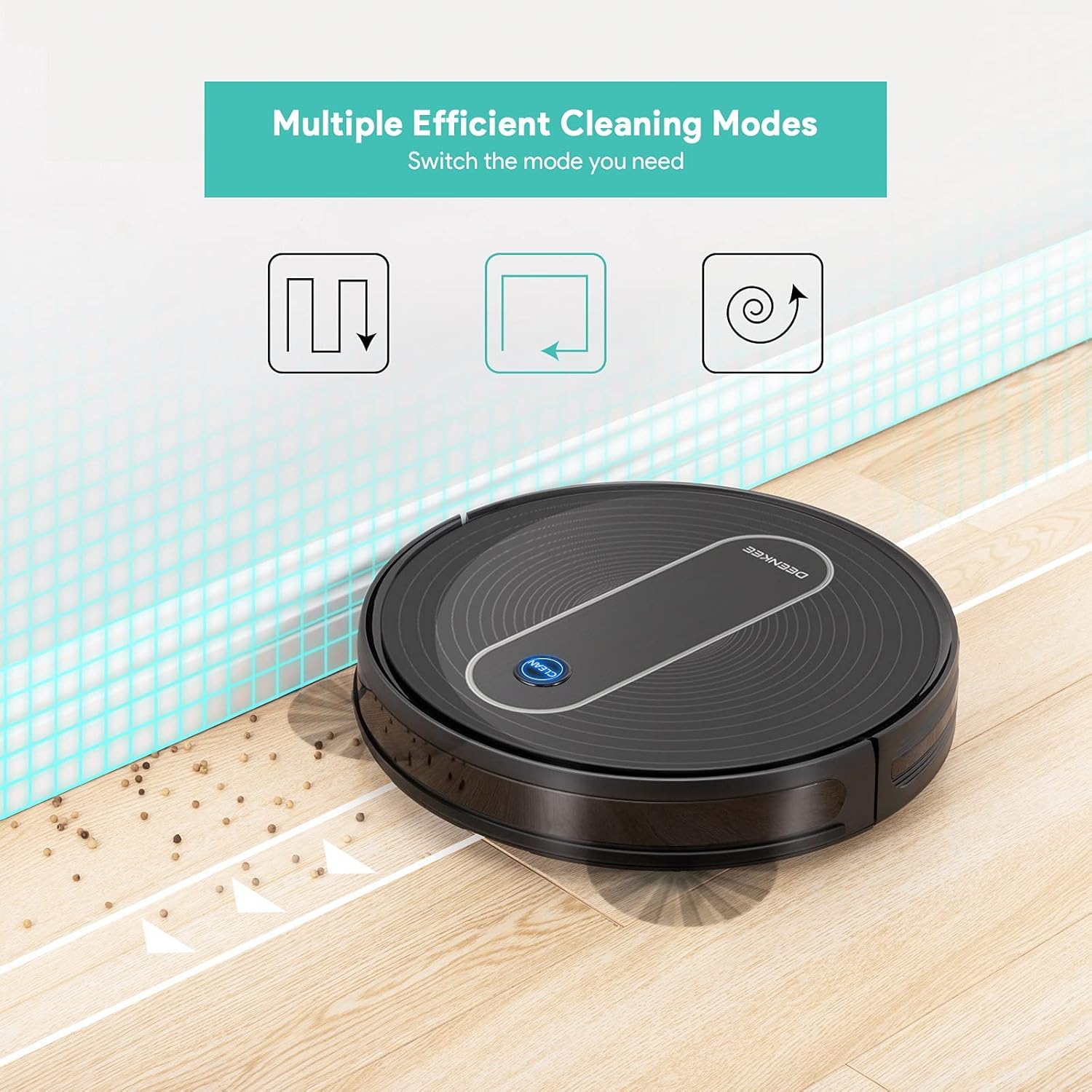
Figure 4: Illustration of the multiple efficient cleaning modes available on the Deenkee robot vacuum, including auto, spot, and edge cleaning patterns.

Figure 5: Demonstrates the 1500Pa super-strong suction of the Deenkee robot vacuum, effectively removing dust, dirt, and pet hair from floors and carpets.

Figure 6: Shows the Deenkee robot vacuum operating quietly with low noise (≤55dB), ensuring it does not disturb your family during cleaning.

Figure 7: Illustrates the robot vacuum's ability to easily cross thresholds up to 0.63 inches, allowing it to transition smoothly between different floor types like hard floor and carpet.
Video 4: Shows the powerful suction of the Deenkee robot vacuum, demonstrating its effectiveness on carpets by picking up small debris.
Video 5: Highlights the ultra-thin body design of the robot vacuum, allowing it to easily pass through and clean under most furniture.
3. የርቀት መቆጣጠሪያውን መጠቀም
The remote control allows you to conveniently manage your robot vacuum. Functions include:
- ማጽዳት ይጀምሩ / ለአፍታ ያቁሙ
- የጽዳት ሁነታዎችን ይምረጡ
- Manual Direction Control
- Send Robot to Charging Dock
- መርሃግብር ያዘጋጁ
4. በራስ-ሰር መሙላት
When the battery level is low, the Deenkee DK600 will automatically return to its charging dock. Ensure the charging dock is accessible and free from obstructions.
ጥገና
Regular maintenance ensures optimal performance and extends the lifespan of your Deenkee DK600.
1. Dustbinን ባዶ ማድረግ
Empty the dustbin after each cleaning cycle. Press the dustbin release button, pull out the dustbin, open its lid, and discard the collected debris.
2. ብሩሾችን ማጽዳት
- ዋና ብሩሽ፡ Remove the main brush cover and lift out the main brush. Use the cleaning tool to remove hair and debris tangled around the brush. Clean the brush bearings.
- የጎን ብሩሽዎች; Periodically check side brushes for wear or damage. Remove any tangled hair or debris. Replace worn brushes as needed.
3. የጽዳት ዳሳሾች
Wipe the drop sensors and charging contacts on the bottom of the robot with a clean, dry cloth to ensure proper function.
4. የባትሪ እንክብካቤ
To maintain battery health, always return the robot to the charging dock after use. If the robot will not be used for an extended period, fully charge it and store it in a cool, dry place, recharging every 3 months.
መላ መፈለግ
| ችግር | ሊሆን የሚችል ምክንያት | መፍትሄ |
|---|---|---|
| ሮቦት አይበራም። | ዝቅተኛ ባትሪ; የኃይል ማብሪያ / ማጥፊያ. | ሮቦቱን ይሙሉት፤ የኃይል ማብሪያ / ማጥፊያው መብራቱን ያረጋግጡ። |
| ሮቦት በተደጋጋሚ ይጣበቃል. | እንቅፋቶች (ኬብሎች፣ ምንጣፎች)፤ የቆሸሹ ዳሳሾች። | Clear obstacles; Clean drop sensors. |
| ደካማ የጽዳት አፈፃፀም. | Full dustbin; Tangled brushes; Clogged filter. | የቆሻሻ መጣያውን ባዶ ያድርጉ፤ ዋና/የጎን ብሩሾችን ያጽዱ፤ ማጣሪያውን ያጽዱ/ይተኩ። |
| ሮቦት ወደ ቻርጅ መሙያ አይመለስም። | የኃይል መሙያ መትከያ ተዘግቷል፤ ሮቦቱ ከመትከያው በጣም ርቆ ነበር። | Clear area around dock; Manually place robot on dock. |
ዝርዝሮች
| ባህሪ | ዝርዝር |
|---|---|
| የምርት ስም | Deenkee |
| ሞዴል | ዲኬ600 |
| የመሳብ ኃይል | 1500 ፓ |
| የባትሪ ህይወት | እስከ 100 ደቂቃዎች ድረስ |
| የሰውነት ቁመት | 2.75 inches (Ultra-thin) |
| የጽዳት ሁነታዎች | AUTO, SPOT, EDGE, SINGLE ROOM, MAX CLEANING, SCHEDULE CLEANING |
| አሰሳ | Intelligent Navigation with Anti-drop Sensor |
| የመቆጣጠሪያ ዘዴ | የርቀት መቆጣጠሪያ |
| የማጣሪያ ዓይነት | ካርቶሪጅ |
| የእቃው ክብደት | 8.93 ፓውንድ |
| የምርት ልኬቶች | 2.75"ኤል x 2.75" ዋ x 2.75" ኤች |
ዋስትና እና ድጋፍ
Deenkee products come with a standard manufacturer's warranty. For detailed warranty information, technical support, or service inquiries, please refer to the official Deenkee webጣቢያ ወይም በቀጥታ የደንበኛ አገልግሎታቸውን ያግኙ። የግዢ ደረሰኝህን እንደ ግዢ ማረጋገጫ አቆይ።
You can visit the official Deenkee store on Amazon for more information: Deenkee Store