1. መግቢያ
This user manual provides detailed instructions for the operation and maintenance of your Sunbuck AS-60BU Home Audio Amplifier Stereo Receiver. This 2-channel amplifier is designed to enhance your home audio experience, offering versatile input options including Bluetooth 5.0, USB, SD card, AUX, CD, Line-in, and microphone inputs. Please read this manual thoroughly before using the product to ensure proper function and safety.

Figure 1: Sunbuck AS-60BU Amplifier and Remote Control
2. የደህንነት መመሪያዎች
- ይህንን መሳሪያ ለዝናብ ወይም እርጥበት አያጋልጡ።
- ሽፋኑን አያንሱት። በውስጡ ለተጠቃሚ አገልግሎት የሚሰጡ ክፍሎች የሉም። አገልግሎቱን ብቁ ለሆኑ ባለሙያዎች ያማክሩ።
- በመሳሪያው ዙሪያ በቂ የአየር ዝውውር እንዲኖር ያድርጉ። የአየር ማናፈሻ ክፍተቶችን አይዝጉ።
- Connect only to a grounded AC power outlet.
- የኤሌክትሪክ ማሰራጫዎችን ወይም የኤክስቴንሽን ገመዶችን ከመጠን በላይ አይጫኑ.
- ክፍሉን በሙቀት ምንጮች አጠገብ ወይም በቀጥታ የፀሐይ ብርሃን ውስጥ ከማስቀመጥ ይቆጠቡ.
- በመብረቅ አውሎ ንፋስ ጊዜ ወይም ለረጅም ጊዜ ጥቅም ላይ በማይውልበት ጊዜ ኃይልን ያላቅቁ።
- ልጆች በማይደርሱበት ቦታ ያስቀምጡ.
3. የጥቅል ይዘቶች
ሁሉም እቃዎች በጥቅልዎ ውስጥ መካተታቸውን ያረጋግጡ፡-
- Sunbuck AS-60BU Amplifier ተቀባይ
- የ AC ኃይል ገመድ
- የተጠቃሚ መመሪያ (ይህ ሰነድ)
- የርቀት መቆጣጠሪያ

ምስል 2፡ በሳጥኑ ውስጥ ያለው ነገር
4. ምርት አብቅቷልview
4.1 የፊት ፓነል

ምስል 3፡ የፊት እና የኋላ ፓነል አቀማመጥ
| ባህሪ | መግለጫ |
|---|---|
| ኃይል (በርቷል/ጠፍቷል) | ለክፍሉ ዋና የኃይል ማብሪያ / ማጥፊያ. |
| AUX ግብዓት | ውጫዊ የድምጽ መሳሪያዎችን ለማገናኘት 3.5 ሚሜ መሰኪያ. |
| የግቤት መራጭ | Rotary knob to select audio input source: LINE, CD, AUX, MEDIA PLAYER. |
| የ BASS መቆጣጠሪያ | ዝቅተኛ-ድግግሞሽ የድምጽ ውፅዓትን ያስተካክላል። |
| ትሬብል መቆጣጠሪያ | ከፍተኛ-ድግግሞሽ የድምጽ ውፅዓትን ያስተካክላል። |
| ኢችኮ ቁጥጥር | Adjusts the echo effect for microphone inputs. |
| M.TONE Control | Adjusts the microphone tone. |
| MIC የድምጽ መቆጣጠሪያ | Adjusts the volume of the microphone inputs. |
| ማስተር ቮልዩም | Main volume control for all audio output. |
| USB/SD/MMC Port | Input for USB flash drives and SD/MMC cards for media playback. |
| MEDIA PLAYER Display & Buttons | Digital display and controls (MODE, Play/Pause, Previous, Next) for USB/SD/Bluetooth playback. |
| MIC 1 / MIC 2 | 6.35 ሚሜ የማይክሮፎን ግቤት መሰኪያዎች። |
4.2 የኋላ ፓነል
| ባህሪ | መግለጫ |
|---|---|
| CD L/R IN | RCA stereo input for CD players. |
| LINE L/R IN | RCA stereo input for general line-level audio sources. |
| ኤፍኤም አንቴና | Connection point for the FM radio antenna. |
| የዲሲ የኃይል ግብዓት | የኃይል ግብዓት ለ ampማብሰያ |
| Speaker Output (L/R) | ተገብሮ ድምጽ ማጉያዎችን ለማገናኘት የሚያገለግሉ የማሰሪያ ልጥፎች (4-16 ohms)። |
5. ማዋቀር
Follow these steps to set up your Sunbuck AS-60BU ampማስታገሻ ፦
- የድምጽ ማጉያ ግንኙነት፡- Connect your passive speakers to the "Speaker Output (L/R)" binding posts on the rear panel. Ensure correct polarity (+ to + and - to -) for optimal sound. This amplifier supports speakers with an impedance range of 4 to 16 ohms.
- የድምጽ ምንጭ ግንኙነት፡-
- For CD players, connect RCA cables from the CD player's output to the "CD L/R IN" on the ampማብሰያ
- For other line-level devices (e.g., tape drive, tuner), connect RCA cables to the "LINE L/R IN".
- For devices with a 3.5mm output (e.g., smartphones, tablets), use a 3.5mm audio cable to connect to the "AUX INPUT" on the front panel.
- For PC connection, use appropriate cables to connect your PC's audio output to either the LINE IN or AUX IN.

ምስል 4: የግንኙነት ንድፍ
- የኤፍኤም አንቴና ግንኙነት; If you plan to use the FM radio function, connect an FM antenna to the "FM Antenna" terminal on the rear panel.
- የኃይል ግንኙነት; ያረጋግጡ amplifier's POWER switch is in the OFF position. Connect the supplied AC power cord to the "DC Power Input" on the rear panel and then to a suitable wall outlet.
6. የአሠራር መመሪያዎች
6.1 ማብራት / ማጥፋት
ለማብራት ampሊፋየር፣ ይጫኑ ኃይል switch to the ON position. The LED display will illuminate. To turn off, press the ኃይል ወደ OFF ቦታ ይቀይሩ.
6.2 የግቤት ምርጫ
አሽከርክር የግቤት መራጭ knob on the front panel to choose your desired audio source (LINE, CD, AUX, MEDIA PLAYER). When selecting MEDIA PLAYER, you can then use the MODE button on the front panel or remote to switch between USB, SD, and Bluetooth modes.
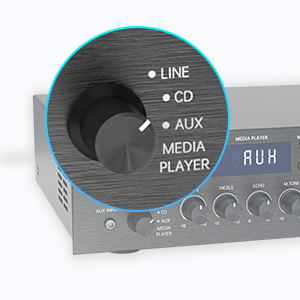
Figure 5: Input Selector
6.3 የብሉቱዝ ግንኙነት
በብሉቱዝ ለመገናኘት፡-
- ያቀናብሩ የግቤት መራጭ to MEDIA PLAYER.
- የሚለውን ይጫኑ MODE button until "BLUETOOTH" or "BT" appears on the display.
- በተንቀሳቃሽ መሳሪያዎ (ስማርትፎን ፣ ታብሌት ፣ ላፕቶፕ) ላይ ብሉቱዝን ያንቁ እና የሚገኙ መሳሪያዎችን ይፈልጉ።
- Select "SUNBUCK" or "AS-60BU" from the list to pair.
- አንዴ ከተጣመረ በኋላ፣ ድምጽን ከመሳሪያዎ ወደ ገመድ አልባ መልቀቅ ይችላሉ ampማብሰያ
The Bluetooth range is approximately 40+ feet, but can be affected by obstacles and interference.

ምስል 6፡ የብሉቱዝ ግንኙነት
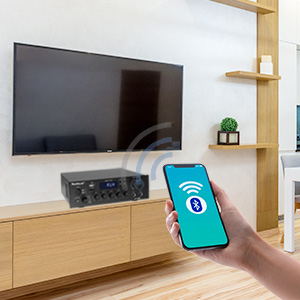
Figure 7: Bluetooth Connection Indicator
6.4 ዩኤስቢ/ኤስዲ ካርድ መልሶ ማጫወት
To play media from a USB drive or SD/MMC card:
- Insert your USB flash drive or SD/MMC card into the corresponding port on the front panel.
- ያቀናብሩ የግቤት መራጭ to MEDIA PLAYER.
- የ amplifier will automatically detect and begin playing supported audio files (MP3, WAV, WMA, APE, FLAC).
- መልሶ ማጫወትን ለመቆጣጠር በፊት ፓነል ወይም በርቀት መቆጣጠሪያ ላይ ያሉትን የPlay/Pause፣ Previous እና Next አዝራሮችን ይጠቀሙ።
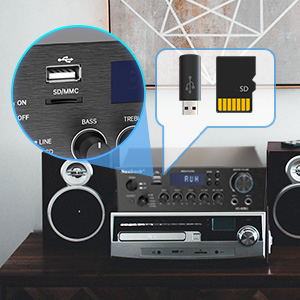
Figure 8: USB/SD Card Slots
6.5 የማይክሮፎን አጠቃቀም
Connect up to two microphones to the MIC 1 and MIC 2 jacks on the front panel. Adjust the MIC ጥራዝ, ኢኮ, እና M.TONE controls to achieve your desired sound for karaoke or public address.

Figure 9: Ideal for Karaoke and Home Entertainment
6.6 ኤፍኤም ሬዲዮ
የኤፍኤም ሬዲዮን ለመጠቀም፡-
- Ensure an FM antenna is connected to the rear panel.
- ያቀናብሩ የግቤት መራጭ to MEDIA PLAYER.
- የሚለውን ይጫኑ MODE "ኤፍኤም" በማሳያው ላይ እስኪታይ ድረስ አዝራር.
- Use the Previous/Next buttons to scan for stations. Note that this model cannot fix and save FM stations.

Figure 10: FM Mode Display
6.7 የድምጽ ማስተካከያዎች
የሚለውን ተጠቀም BASS, ይንቀጠቀጡ, እና ማስተር ቮልዩም knobs on the front panel to fine-tune your audio output. The ማስተር ቮልዩም controls the overall sound level.
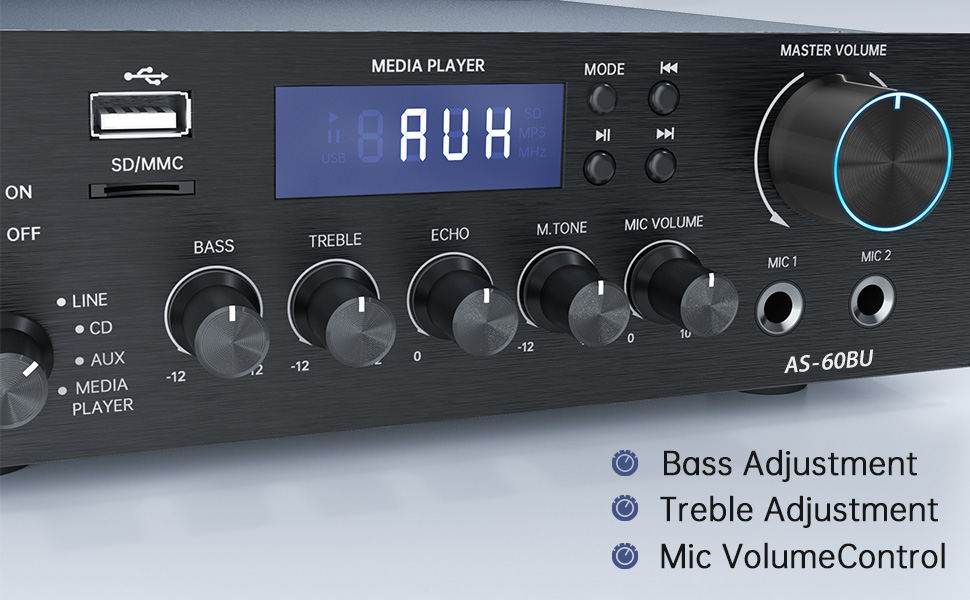
Figure 11: Audio Adjustment Controls
Video 1: Demonstration of Sunbuck AS-60BU amplifier features and sound quality.
7. ጥገና
- ማጽዳት፡ የውጪውን ክፍል ለማጽዳት ለስላሳ እና ደረቅ ጨርቅ ይጠቀሙ ampፈሳሽ ማጽጃዎችን ወይም ኤሮሶሎችን አይጠቀሙ።
- ማከማቻ፡ ለረጅም ጊዜ ጥቅም ላይ በማይውልበት ጊዜ, ያከማቹ ampበቀጥታ ከፀሀይ ብርሀን እና ከከባድ የሙቀት መጠን ርቆ በሚገኝ ቀዝቃዛና ደረቅ ቦታ ላይ ማጣሪያ።
- የአየር ማናፈሻ; ከመጠን በላይ ሙቀትን ለመከላከል የአየር ማናፈሻ ክፍተቶች ከአቧራ እና ከቆሻሻ ንፁህ መሆናቸውን ያረጋግጡ።
8. መላ መፈለግ
| ችግር | ሊሆን የሚችል ምክንያት | መፍትሄ |
|---|---|---|
| ምንም የድምፅ ውፅዓት የለም። | Incorrect input selected, loose speaker connections, low volume. | Verify input selection, check speaker wiring polarity and tightness, increase MASTER VOLUME. |
| Bluetooth connection unstable or short range. | Obstacles between device and amplifier, interference, device too far. | Reduce distance between devices, remove obstacles, avoid other wireless devices. |
| የርቀት መቆጣጠሪያ አይሰራም። | Dead batteries, line of sight blocked. | Replace batteries, ensure clear path to ampየሊፋየር የ IR መቀበያ። |
| Settings not saved after power off. | This is normal behavior for some settings (e.g., input mode). | Re-select desired input mode after powering on. |
| የተዛባ ኦዲዮ። | የግቤት ምልክት በጣም ከፍተኛ፣ የድምጽ ማጉያው የኢምፔዳንስ አለመዛመድ፣ የተበላሹ ኬብሎች። | Reduce source volume, ensure speakers are within 4-16 ohm range, check/replace cables. |
9. ዝርዝሮች
- ሞዴል፡ AS-60BU
- የኃይል ውፅዓት፡- MAX 400W x 2 (RMS 70W x 2)
- ቻናሎች፡ 2-ቻናል
- የድምጽ ማጉያ መጨናነቅ; 4-16 ohms
- የውጤት ጫና፡ 0.1 ኦኤም
- ግብዓቶች፡- 2 x RCA Audio (CD, Line), 2 x Microphone (6.35mm), USB 2.0, SD Card, Bluetooth 5.0, AUX In (3.5mm), FM Radio
- የሚደገፉ የድምጽ ቅርጸቶች (ዩኤስቢ/ኤስዲ): MP3፣ WAV፣ WMA፣ APE፣ FLAC
- የምርት መጠኖች: 8.27 x 7.68 x 2.44 ኢንች
- ክብደት፡ 3.24 ፓውንድ £
- አምራች፡ JS Electronics Limited
- መጀመሪያ የሚገኝ፡- ሴፕቴምበር 9፣ 2021
10. ዋስትና እና ድጋፍ
Sunbuck products are designed for reliability and performance. For warranty information or technical support, please refer to the contact details provided with your purchase documentation or visit the official Sunbuck webጣቢያ. ለዋስትና ጥያቄዎች የግዢ ደረሰኝዎን እንደ ግዢ ማረጋገጫ ያቆዩት።
For further assistance, you may contact the manufacturer, JS Electronics Limited.