
Cabletech URZ0336B
Cabletech URZ0336B DVB-T2 H.265 HEVC Digital Tuner
የተጠቃሚ መመሪያ መመሪያ
1. መግቢያ
This manual provides comprehensive instructions for the installation, operation, and maintenance of your Cabletech URZ0336B DVB-T2 H.265 HEVC Digital Tuner. Please read this manual thoroughly before using the device to ensure proper functionality and to prevent damage.
2. የደህንነት መረጃ
Always observe the following safety precautions to avoid electric shock, fire, or damage to the device:
- መሳሪያውን ለዝናብ ወይም ለእርጥበት አያጋልጡት.
- ሐ አይክፈቱasinሰ. ሁሉንም አገልግሎቶች ብቁ ለሆኑ ባለሙያዎች ያመልክቱ።
- በመሳሪያው ዙሪያ ትክክለኛ የአየር ዝውውርን ያረጋግጡ. የአየር ማናፈሻ ክፍተቶችን አያግዱ.
- ከመሳሪያው ጋር የቀረበውን የኃይል አስማሚ ብቻ ይጠቀሙ።
- መሳሪያውን ከሙቀት ምንጮች እና ከፀሀይ ብርሀን ያርቁ.
- Disconnect the power plug from the wall outlet if the device will not be used for a long period.
3. የጥቅል ይዘቶች
እባክዎን ጥቅሉን ለሚከተሉት ነገሮች ያረጋግጡ፡
- Cabletech URZ0336B DVB-T2 H.265 HEVC Digital Tuner
- የርቀት መቆጣጠሪያ
- የ AAA ባትሪዎች (2x)
- የኃይል አስማሚ
- የተጠቃሚ መመሪያ (ይህ ሰነድ)
4. ምርት አብቅቷልview
Familiarize yourself with the main components and connections of your Cabletech URZ0336B tuner.
4.1. Device and Remote Control
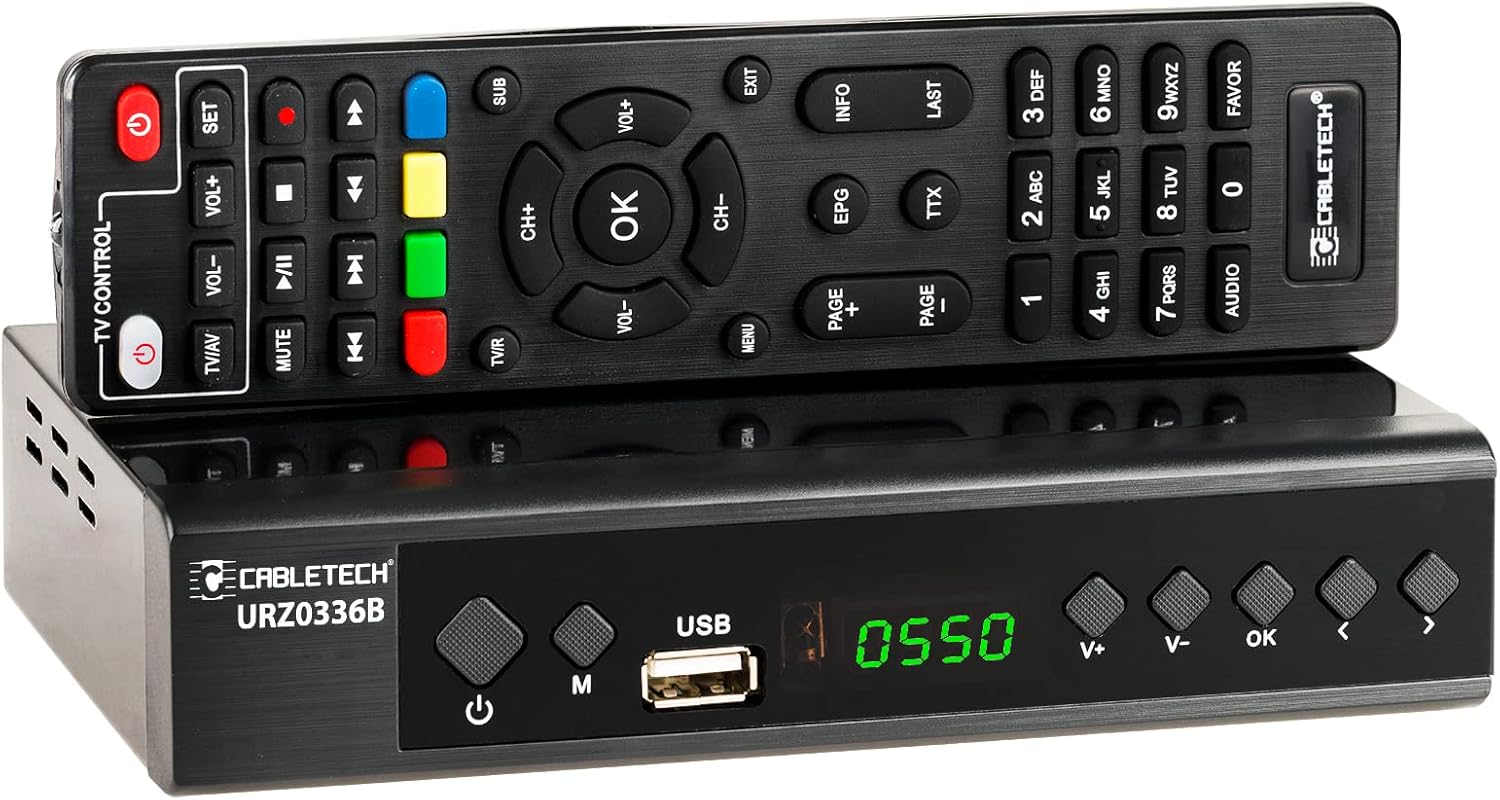
Image: The Cabletech URZ0336B DVB-T2 H.265 HEVC Digital Tuner shown with its accompanying remote control. The tuner is a compact black box, and the remote is also black with various control buttons.
4.2. የፊት ፓነል
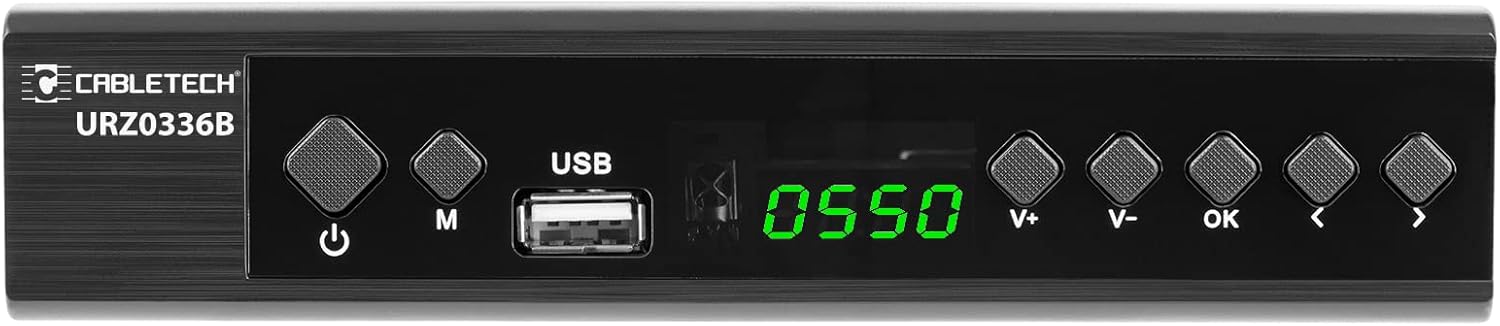
Image: Close-up of the Cabletech URZ0336B front panel, featuring a power button, menu button (M), USB 2.0 port, LED display showing "0550", and navigation/volume buttons (V+, V-, OK, <, >).
- የኃይል ቁልፍ፡- መሣሪያውን ያበራል/ያጠፋል ወይም ወደ መጠባበቂያ ቦታ ያበራል።
- M (ምናሌ) አዝራር፡- ወደ ዋናው ሜኑ ይደርሳል።
- ዩኤስቢ 2.0 ወደብ For software updates, PVR recording, and media playback.
- የ LED ማሳያ የሰርጥ ቁጥር ወይም ጊዜ ያሳያል።
- V+/V- Buttons: የድምፅ መጠንን ያስተካክላል።
- እሺ አዝራር; ምርጫዎችን ያረጋግጣል።
- </> Buttons: Navigates through menus or changes channels.
4.3. የኋላ ፓነል ግንኙነቶች

Image: The rear panel of the Cabletech URZ0336B, showing various input and output ports: ANT IN (IEC socket), COAXIAL, USB, HD OUT (HDMI), SCART, and the power input (110-240V~ 50/60Hz).
- ጉንዳን በ: Connects to your DVB-T/T2 antenna.
- ኮአክሲያል፡ ዲጂታል የድምጽ ውፅዓት.
- ዩኤስቢ፡ Additional USB 2.0 port for external devices.
- ኤችዲ አውት (ኤችዲኤምአይ): ለከፍተኛ ጥራት ቪዲዮ እና ኦዲዮ ከቴሌቪዥንዎ ጋር ይገናኛል።
- ስካርት Connects to older TVs or VCRs.
- የኃይል ግቤት፡ ከኃይል አስማሚ ጋር ይገናኛል.
4.4. የርቀት መቆጣጠሪያ አቀማመጥ

ምስል፡ ዝርዝር view of the Cabletech URZ0336B remote control, showing buttons for power, TV/AV, volume, channel, mute, playback controls, EPG, TTX, INFO, numeric keypad, and special function buttons.
The remote control provides full functionality for operating your tuner. Insert 2x AAA batteries into the battery compartment before first use.
5. ማዋቀር
5.1. Connecting the Tuner
- አንቴናን ያገናኙ፡ Connect your DVB-T/T2 antenna cable to the ጉንዳን ወደ ውስጥ port on the rear panel of the tuner.
- ከቲቪ ጋር ይገናኙ፡
- For HD TVs: Connect an HDMI cable from the HD OUT (HDMI) port on the tuner to an HDMI input on your TV.
- For older TVs: Connect a SCART cable from the SCART port on the tuner to the SCART input on your TV.
- የግንኙነት ኃይል; Connect the power adapter to the tuner's power input and then plug it into a wall outlet.
- ባትሪዎችን አስገባ: Open the battery compartment on the remote control and insert 2x AAA batteries, observing polarity.
5.2. First-Time Installation and Channel Scan
- Turn on your TV and select the correct HDMI or SCART input source that the tuner is connected to.
- Power on the Cabletech URZ0336B tuner using the power button on the front panel or remote control.
- The first-time installation wizard should appear on your TV screen. Follow the on-screen prompts.
- Select your preferred language and country.
- Initiate an ራስ-ሰር ፍለጋ for channels. The tuner will scan for all available DVB-T/T2 channels in your area. This process may take several minutes.
- Once the scan is complete, the tuner will save the found channels and display the first channel.
Note: If you experience poor signal quality, adjust your antenna position or consider using a signal ampማብሰያ
6. የአሠራር መመሪያዎች
6.1. መሰረታዊ ተግባራት
- ማብራት/ማጥፋት፡ የሚለውን ይጫኑ ኃይል በርቀት መቆጣጠሪያው ላይ ያለው አዝራር.
- የሰርጥ ለውጥ፡- የሚለውን ተጠቀም CH + / CH- buttons or the numeric keypad to enter a channel number.
- የድምጽ መቆጣጠሪያ፡- የሚለውን ተጠቀም VOL + / VOL- አዝራሮች.
- ድምጸ-ከል አድርግ፡ የሚለውን ይጫኑ ሙት ኦዲዮውን ለጊዜው ዝም ለማሰኘት አዝራር።
- ምናሌ፡- የሚለውን ይጫኑ MENU ለቅንብሮች እና ባህሪያት ዋናውን ምናሌ ለመድረስ ቁልፉን ይጫኑ።
- እሺ Confirms selections in menus or displays the channel list.
- ውጣ ከአሁኑ ምናሌ ወይም ማያ ገጽ ይወጣል።
6.2. የኤሌክትሮኒክ ፕሮግራም መመሪያ (ኢፒጂ)
The 7-day EPG provides a schedule of current and upcoming programs.
- የሚለውን ይጫኑ ኢ.ፒ.ጂ በርቀት መቆጣጠሪያው ላይ ያለው አዝራር.
- Navigate through channels and program times using the arrow buttons.
- ተጫን OK ወደ view details about a selected program.
6.3. PVR (Program Recording) and Timeshift
Connect a USB storage device (e.g., USB flash drive or external hard drive) to one of the USB 2.0 ports to use PVR and Timeshift functions.
- PVR Recording:
- የሚለውን ይጫኑ REC button (red circle) on the remote to start immediate recording of the current program. Press ተወ (square) to end recording.
- Schedule recordings via the EPG: Select a program in the EPG and press OK, then choose the record option.
- የጊዜ ለውጥ፡
- አንድ ፕሮግራም ሲመለከቱ፣ ይጫኑ ለአፍታ አቁም button. The tuner will begin recording the live broadcast to the USB device.
- ከዚያ ይችላሉ ተጫወት, ፈጣን ወደፊት, ወይም ዳግም ንፋስ within the buffered content.
- ተጫን ተወ to exit Timeshift and return to live TV.
6.4. የሚዲያ መልሶ ማጫወት
The tuner supports playback of various media files ከተገናኘ የዩኤስቢ ማከማቻ መሣሪያ።
- Connect your USB device to a USB port on the tuner.
- Go to the main menu and select "Media" or "USB".
- ወደሚፈለገው ይሂዱ file type (MP3, WMA, JPEG, BMP, AVI) and select the file መጫወት.
6.5. የሚደገፉ መተግበሪያዎች
The tuner supports various online applications when connected to the internet via an external MT7601 Wi-Fi adapter (not included).
- የአየር ሁኔታ፡ View local weather forecasts.
- IPTV፡ Access Internet Protocol Television streams.
- YouTube፡ Watch videos from YouTube.
- RSS፡- Read RSS news feeds.
Note: An external MT7601 Wi-Fi adapter is required for internet connectivity and access to these applications.
6.6. የወላጅ ቁጥጥር
Set up parental control to restrict access to certain channels or programs based on age ratings.
- Access the "Parental Control" section in the main menu.
- Enter your PIN (default is usually 0000 or 1234, check your device for specifics).
- Configure age restrictions or lock specific channels.
6.7. የሰዓት ቆጣሪ ተግባር
The timer function allows you to schedule the tuner to turn on/off at specific times or to switch to a particular channel.
- Navigate to the "Timer" section in the main menu.
- Set the event type (e.g., Power On, Power Off, Record), time, and duration.
7. ጥገና
7.1. ማጽዳት
To clean the device, disconnect it from the power supply and wipe the exterior with a soft, dry cloth. Do not use liquid or aerosol cleaners.
7.2. የሶፍትዌር ማዘመኛ
Software updates can improve performance and add new features. Updates are performed via the USB port.
- የቅርብ ጊዜውን firmware ያውርዱ file from the official Cabletech support webጣቢያ (የሚገኝ ከሆነ)።
- firmware ን ይቅዱ file to the root directory of a USB flash drive.
- Connect the USB flash drive to the tuner's USB port.
- Go to the "System" or "Tools" menu, then select "Software Update" or "Upgrade by USB".
- Follow the on-screen instructions to complete the update. Do not power off the device during the update process.
8. መላ መፈለግ
If you encounter issues with your tuner, refer to the following common problems and solutions:
| ችግር | ሊሆን የሚችል ምክንያት | መፍትሄ |
|---|---|---|
| ምንም ምስል ወይም ድምጽ የለም | Incorrect TV input selected; Loose cable connections; Tuner not powered on. | Select correct TV input (HDMI/SCART); Check all cable connections; Ensure tuner is powered on. |
| "ሲግናል የለም" የሚል መልእክት | Antenna not connected; Poor antenna signal; No channels scanned. | Connect antenna properly; Adjust antenna position; Perform an automatic channel scan. |
| የርቀት መቆጣጠሪያ አይሰራም | Batteries are dead or inserted incorrectly; Obstruction between remote and tuner. | Replace batteries; Check battery polarity; Remove any obstructions; Point remote directly at the tuner. |
| Cannot record to USB | USB device not connected or formatted incorrectly; Insufficient storage space. | Ensure USB device is connected; Format USB device to FAT32 or NTFS; Free up space on USB device. |
| No internet access for apps | No MT7601 Wi-Fi adapter connected; Network configuration issues. | Connect a compatible MT7601 Wi-Fi adapter; Check network settings in the tuner's menu. |
9. ዝርዝሮች
| ባህሪ | ዝርዝር |
|---|---|
| የሞዴል ቁጥር | URZ0336B |
| ሲፒዩ | GX6702S5 |
| የውስጥ ማህደረ ትውስታ | 32 ሜባ |
| ራም | 512 ሜባ DDR2 |
| ANT አያያዥ | IEC ሶኬት |
| የድግግሞሽ ክልል | VHF: 170–230 MHz, UHF: 470–862 MHz |
| ማዋረድ | QPSK፣ 16QAM፣ 64QAM፣ 256QAM |
| የመተላለፊያ ይዘት | 7 ሜኸ ፣ 8 ሜኸ |
| መፍታት | MPEG-1, MPEG-2, MPEG-4, H.264, H.265, AAC, HE-AAC, AC-3, DD+ |
| ግብዓቶች/ውጤቶች | 2x USB 2.0, HDMI, SCART, COAXIAL |
| ምጥጥነ ገጽታ | Auto, 16:9 WS, 16:9 PB, 16:9 PS; 4:3 LB, 4:3 PS, 4:3 Full |
| የሚደገፉ ቅርጸቶች | MP3, WMA, JPEG, BMP, AVI |
| የማያ ጥራት | 480i፣ 480p፣ 576i፣ 576p፣ 720p፣ 1080i፣ 1080p |
| የቪዲዮ ጥራት | 1920 x 1080 ፒክስል |
| የድምጽ ዲኮዲንግ | MPEG-1 LayerI/II, Dolby-Downmix 2-Channel (License), AAC LC, HE-AAC v1/V2, PCM-Downmix, IEC958 SPDIF |
| File ስርዓት | FAT32፣ NTFS |
| ተኳኋኝነት | Fully compatible with DVB-T2/DVB-T |
| የርቀት መቆጣጠሪያ | Requires 2x AAA batteries |
| የኃይል ፍጆታ | Max. 6 W (Operating), Max. 50/60 Hz (Standby) |
| ልኬቶች (W x H) | 168 ሚሜ x 36 ሚሜ |
| የ Wi-Fi ድጋፍ | Requires external MT7601 chip adapter |
| Tuner Bit Depth | 10 ቢት |
10. ዋስትና እና ድጋፍ
This product comes with a standard manufacturer's warranty. For specific warranty terms and conditions, please refer to the documentation included with your purchase or contact Cabletech customer support.
For technical assistance, troubleshooting beyond this manual, or warranty claims, please contact your retailer or the official Cabletech support channels.
Ask a question about this manual
Ask about setup, troubleshooting, compatibility, parts, safety, or missing instructions. Manuals+ will review the question and use this page’s manual context to help answer it.