
መግቢያ
This manual provides detailed instructions for the safe and effective use of your pxton PX-8S-01 two-way radio. Please read this manual thoroughly before operating the device to ensure optimal performance and longevity.
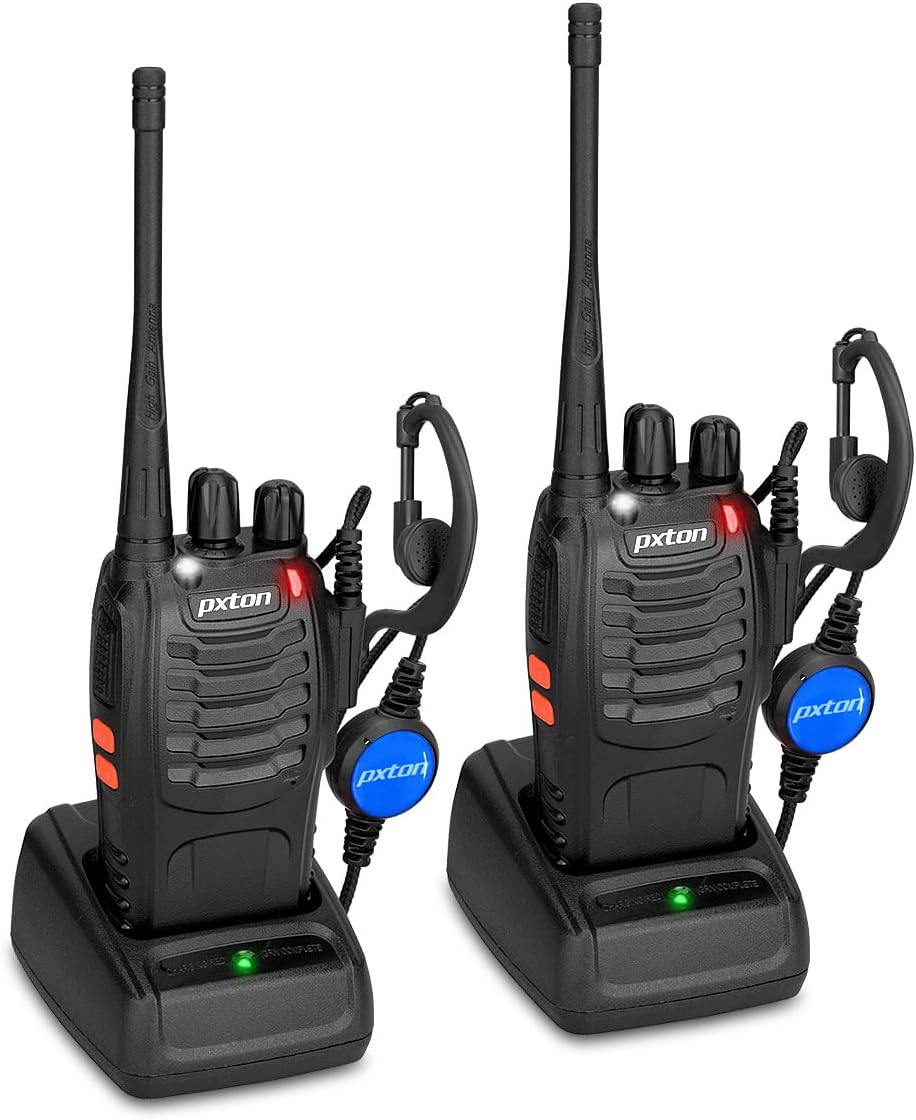
Image: Two pxton PX-8S-01 two-way radios with charging bases and earpieces.
የጥቅል ይዘቶች
ሁሉም እቃዎች በጥቅልዎ ውስጥ መኖራቸውን ያረጋግጡ፡-
- pxton PX-8S-01 Two-Way Radio (2 units)
- Lithium-Ion Battery (2 units)
- USB Charger (2 units)
- Upgraded Earpiece (2 units)
- ቀበቶ ክሊፕ (2 ክፍሎች)
- Wrist Strap (2 units)
- አንቴና (2 ክፍሎች)
- የተጠቃሚ መመሪያ (1 ክፍል)

Image: Contents of the pxton PX-8S-01 package.
ምርት አልቋልview
Familiarize yourself with the components of your pxton PX-8S-01 two-way radio:

Image: Labeled diagram of the pxton PX-8S-01 two-way radio components.
- Integrated Sensitive Antenna: ምልክቶችን ለማስተላለፍ እና ለመቀበል.
- የሰርጥ መቀየሪያ፡- ከ16ቱ የሚገኙ ቻናሎች አንዱን ለመምረጥ የሮታሪ ኖብ።
- የኃይል መቀየሪያ/ድምጽ መቆጣጠሪያ፡- ሬዲዮውን ለማብራት/ለማጥፋት እና ድምጹን ለማስተካከል የሮታሪ ቁልፍ።
- የእጅ ባትሪ፡ ለማብራት አብሮ የተሰራ የ LED መብራት።
- የ LED አመልካች፡- የሬዲዮ ሁኔታን ያሳያል (ለምሳሌ ማስተላለፍ፣ መቀበል፣ መሙላት)።
- PTT ቁልፍ (ለመናገር ግፋ)፦ ለማስተላለፍ ተጭነው ይያዙ፣ ለመቀበል ይልቀቁ።
- MONI Button (Monitor): Press to temporarily disable squelch and listen for weak signals.
- የእጅ ባትሪ አዝራር፡- አብሮ የተሰራውን የእጅ ባትሪ ያነቃቃል።
- የSP/MIC ጃኮች፡ Ports for connecting external audio accessories like earpieces or speaker microphones.
- Clear Speaker: ውጤቶች ኦዲዮ ተቀብለዋል።
- አብሮ የተሰራ ማይክሮፎን; ለማስተላለፍ ድምጽዎን ይቀርፃል።
ማዋቀር
1. የባትሪ ጭነት
- ሬዲዮው መጥፋቱን ያረጋግጡ።
- የባትሪውን ጥቅል በሬዲዮው ጀርባ ላይ ካለው ግሩቭስ ጋር ያስተካክሉ።
- ቦታው ላይ ጠቅ እስኪደረግ ድረስ የባትሪውን ጥቅል ወደ ላይ ያንሸራትቱ።
- ለማስወገድ የመልቀቂያውን ቁልፍ (ካለ) ይጫኑ እና ባትሪውን ወደ ታች ያንሸራትቱ።
2. ባትሪውን በመሙላት ላይ
- Connect the USB charger to a power source.
- Place the radio with the battery installed into the charging cradle.
- The LED indicator on the charger will show the charging status (e.g., red for charging, green for fully charged).
- A full charge from 0 capacity typically takes 3-4 hours.
3. መለዋወጫዎችን ማያያዝ
- አንቴና፡ Screw the antenna clockwise onto the connector on top of the radio until it is finger-tight. Do not overtighten.
- ቀበቶ ክሊፕ፡ Attach the belt clip to the designated slot on the back of the radio using the provided screws.
- የጆሮ ማዳመጫ Insert the earpiece plug into the SP/MIC jacks on the side of the radio. Ensure it is fully inserted for proper connection.
የአሠራር መመሪያዎች
1. የኃይል ማብሪያ / ማጥፊያ እና የድምጽ ማስተካከያ
- To power on the radio, rotate the Power Switch/Volume Control knob clockwise. You will hear a "click" and a voice prompt indicating the current channel.
- ድምጹን ለመጨመር ማዞሪያውን በሰዓት አቅጣጫ ማሽከርከርዎን ይቀጥሉ እና እሱን ለመቀነስ በተቃራኒ ሰዓት አቅጣጫ።
- To power off, rotate the knob counter-clockwise until you hear a "click."
2. የሰርጥ ምርጫ
- ከሚገኙት 16 ቻናሎች ውስጥ አንዱን ለመምረጥ የቻናል መቀየሪያውን ቁልፍ ያሽከርክሩት።
- The radio will announce the selected channel number.
- በቡድንዎ ውስጥ ያሉ ሁሉም ሬዲዮኖች ለግንኙነት ወደተመሳሳይ ቻናል መዘጋጀታቸውን ያረጋግጡ።
3. ማስተላለፍ እና መቀበል
- ለማስተላለፍ፣ ተጭነው ይያዙት። PTT (ወደ ግፋ-ወደ-ንግግር) button. Speak clearly into the microphone. The LED indicator will illuminate red.
- ማስተላለፍን ለማቆም እና ወደ መቀበያ ሁነታ ለመመለስ የ PTT አዝራሩን ይልቀቁ። የ LED አመልካች ምልክት ሲቀበል አረንጓዴ ይሆናል።
4. የVOX (በድምጽ የሚሰራ ልውውጥ) ተግባር
The VOX function allows hands-free operation. When activated, the radio will automatically transmit when it detects your voice, without needing to press the PTT button.
- VOX settings are typically programmed via software. Refer to advanced programming instructions if available.
- When using VOX, ensure the microphone is positioned correctly to pick up your voice effectively.
Image: VOX/Handfree function icon.
5. የባትሪ ብርሃን ተግባር
- የወሰኑትን ይጫኑ የባትሪ ብርሃን አዝራር to turn the built-in LED flashlight on or off.
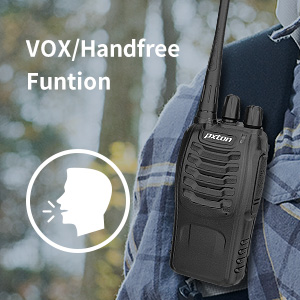
Image: Flashlight function icon.
6. የቅኝት ተግባር
The scan function allows the radio to automatically scan through channels to find active transmissions.
- To activate the scan function, typically this is done via a programmed side key or by selecting a specific channel. Refer to your radio's programming guide for details.
- When scanning, the radio will stop on an active channel until the transmission ends, then resume scanning.
7. የአደጋ ጊዜ ደወል
The radio features an emergency alarm function for critical situations.
- To activate the emergency alarm, press the designated Emergency Alarm button (if programmed) or a specific key combination. This will typically emit a loud siren sound and/or transmit an alert signal.

Image: Emergency Alarm function icon.
8. የስኬልች ማስተካከያ
Squelch suppresses background noise when no signal is being received. The PX-8S-01 has an adjustable squelch feature.
- Squelch levels are typically set via programming software. A higher squelch level requires a stronger signal to open the receiver, reducing static but potentially missing weak signals.
- The MONI button can be used to temporarily override the squelch and listen to all signals, including weak ones or background noise.
Image: Squelch adjustment icon.
9. የግላዊነት ኮዶች (CTCSS/DCS)
The radio supports 165 privacy codes (50 CTCSS / 210 DCS) per programmable channel to help filter out unwanted conversations.
- When a CTCSS/DCS code is set, you will only hear transmissions from other radios using the same channel and the same CTCSS/DCS code.
- Similarly, other radios will only hear your transmissions if they are on the same channel and using the same code.
- These codes are typically programmed using specialized software.
Image: CTCSS/DCS privacy codes icon.
ጥገና
- ማጽዳት፡ ለስላሳ ይጠቀሙ, መamp የራዲዮውን ውጫዊ ገጽታ ለማጽዳት ጨርቅ. ኃይለኛ ኬሚካሎችን ወይም ፈሳሾችን አይጠቀሙ.
- የባትሪ እንክብካቤ
- ባትሪውን ከመጠን በላይ መሙላት ወይም ሙሉ በሙሉ መሙላት ያስወግዱ.
- ጥቅም ላይ በማይውልበት ጊዜ ባትሪዎችን በቀዝቃዛና ደረቅ ቦታ ያከማቹ.
- ሬዲዮው ረዘም ላለ ጊዜ ጥቅም ላይ የማይውል ከሆነ ባትሪውን ያስወግዱት።
- ማከማቻ፡ ራዲዮውን ከአቧራ በጸዳ ደረቅ አካባቢ ከከፍተኛ የሙቀት መጠን ያከማቹ።
- አንቴና፡ አንቴናውን አያጠፍፉ ወይም አይቀይሩት, ይህ በአፈፃፀም ላይ ተጽዕኖ ሊያሳድር ይችላል.
መላ መፈለግ
| ችግር | ሊሆን የሚችል ምክንያት | መፍትሄ |
|---|---|---|
| ሬዲዮ አይበራም። | ባትሪው ተሟጧል ወይም በትክክል አልተጫነም። | ባትሪውን ይሙሉት። ባትሪው ደህንነቱ በተጠበቀ ሁኔታ መጫኑን ያረጋግጡ። |
| ማስተላለፍም ሆነ መቀበል አይቻልም። | Incorrect channel selected. Battery low. Radio out of range. | Verify both radios are on the same channel. Charge battery. Move closer to the other radio. |
| ደካማ የድምጽ ጥራት ወይም የማይንቀሳቀስ። | Weak signal. Squelch level too low/high. Interference. | Move to an area with fewer obstructions. Adjust squelch level (if programmable). Check for sources of interference. |
| አጭር የግንኙነት ክልል። | እንቅፋቶች (ህንፃዎች፣ መሬት)። ዝቅተኛ ባትሪ። | ወደ ክፍት ቦታ ይሂዱ። ባትሪው ሙሉ በሙሉ መሙላቱን ያረጋግጡ። |
| Earpiece not working. | Earpiece not fully inserted. Faulty earpiece. | Ensure earpiece plug is fully inserted into the SP/MIC jack. Try a different earpiece if available. |
ዝርዝሮች
- ሞዴል፡ PX-8S-01
- FCC መታወቂያ 2AX68PX-888S
- የሰርጦች ብዛት፡- 16
- የድግግሞሽ ክልል፡ UHF
- ከፍተኛ የንግግር ክልል፡ Up to 5 miles (unobstructed)
- የግላዊነት ኮዶች 165 (50 CTCSS / 210 DCS)
- የባትሪ ዓይነት፡ ሊቲየም አዮን (ተጨምሯል)
- ባትሪ ቁtage: 3.7 ቮልት (ዲሲ)
- የባትሪ ህይወት፡ 8-96 hours standby, 8-12 hours continuous use (actual time varies with usage)
- የኃይል መሙያ ጊዜ: ከ3-4 ሰዓታት (ከ0 አቅም)
- የውሃ መቋቋም ደረጃ; የውሃ መቋቋም
- የምርት መጠኖች: 1.1" ዲ x 1.89" ዋ x 8.34" ኤች
- የእቃው ክብደት፡ 1.34 pounds (for the pair)
- ልዩ ባህሪያት፡ Rechargeable, VOX, TOT, Emergency Alarm, Battery Low Alert, Flashlight, Scan Function

Image: Size comparison of the pxton PX-8S-01 radio.
የደህንነት መረጃ
Your pxton PX-8S-01 walkie-talkie has been granted FCC transmission and reception certification and authorization (FCC ID: 2AX68PX-888S). This device is intended for use only within the frequency points authorized by the FCC certification range.
እባክዎ የሚከተሉትን የደህንነት መመሪያዎችን ያክብሩ።
- ራዲዮውን በሚፈነዳ አየር ውስጥ (ለምሳሌ ተቀጣጣይ ጋዞች፣ የአቧራ ቅንጣቶች፣ የብረት ዱቄቶች) ውስጥ አያሰራጩ።
- Do not modify the radio or its accessories. Unauthorized modifications can void your warranty and violate FCC regulations.
- ሬዲዮውን እና መለዋወጫዎቹን ከልጆች እጅ ያርቁ።
- Use only pxton-approved batteries and chargers. Using unapproved accessories can cause damage or injury.
- Avoid exposing the radio to extreme temperatures, direct sunlight, or moisture for prolonged periods.
- ሬዲዮው ጭስ ወይም ያልተለመደ ሽታ ካወጣ, ወዲያውኑ ኃይሉን ያጥፉ እና ባትሪውን ያስወግዱ. የደንበኛ ድጋፍን ያነጋግሩ።
ዋስትና እና ድጋፍ
pxton provides lifetime customer service for its walkie-talkies. If you encounter any questions or issues with your PX-8S-01 radio, please contact pxton customer support through the platform where you purchased the product. Our professional team is available to assist you with troubleshooting and support.
For further assistance, please refer to the official pxton webጣቢያ ወይም በቀጥታ የደንበኛ አገልግሎታቸውን ያግኙ።