
1. መግቢያ
Thank you for choosing the InFocus P120 INL412 Multimedia Projector. This manual provides essential information for the safe and efficient operation of your projector. Please read it thoroughly before using the device and retain it for future reference. The InFocus P120 INL412 is designed for versatile multimedia presentations, offering clear and vibrant images for various applications.
2. የደህንነት መረጃ
To ensure safe operation and prevent damage to the projector, please observe the following safety precautions:
- የአየር ማናፈሻ ክፍተቶችን አያግዱ. ከመጠን በላይ ሙቀትን ለመከላከል ለትክክለኛው የአየር ፍሰት በፕሮጀክተሩ ዙሪያ በቂ ቦታ መኖሩን ያረጋግጡ.
- l ጊዜ በቀጥታ ወደ ፕሮጀክተር ሌንስን ከመመልከት ተቆጠብamp ደማቅ ብርሃን የዓይን ጉዳት ሊያስከትል ስለሚችል በርቷል።
- Do not place the projector on an unstable cart, stand, or table. The projector may fall, causing serious injury to a child or adult, and serious damage to the unit.
- ፕሮጀክተሩ ለረጅም ጊዜ ጥቅም ላይ የማይውል ከሆነ የኃይል ገመዱን ከግድግዳው መውጫ ያላቅቁ።
- ሁሉንም አገልግሎቶች ብቁ ለሆኑ የአገልግሎት ሰራተኞች ያመልክቱ። ፕሮጀክተሩን እራስዎ ለመክፈት ወይም ለመጠገን አይሞክሩ.
- Keep the projector away from water or moisture. Do not expose it to rain or immerse it in liquid.
- Use only the power cord supplied with the projector or an authorized replacement.
3. የጥቅል ይዘቶች
Verify that all items listed below are included in your projector package:
- InFocus P120 INL412 Multimedia Projector
- የኃይል ገመድ
- የርቀት መቆጣጠሪያ ከባትሪዎች ጋር
- ቪጂኤ ገመድ
- የተጠቃሚ መመሪያ (ይህ ሰነድ)
- ፈጣን ጅምር መመሪያ
4. ምርት አብቅቷልview
Familiarize yourself with the main components of your InFocus P120 INL412 projector.
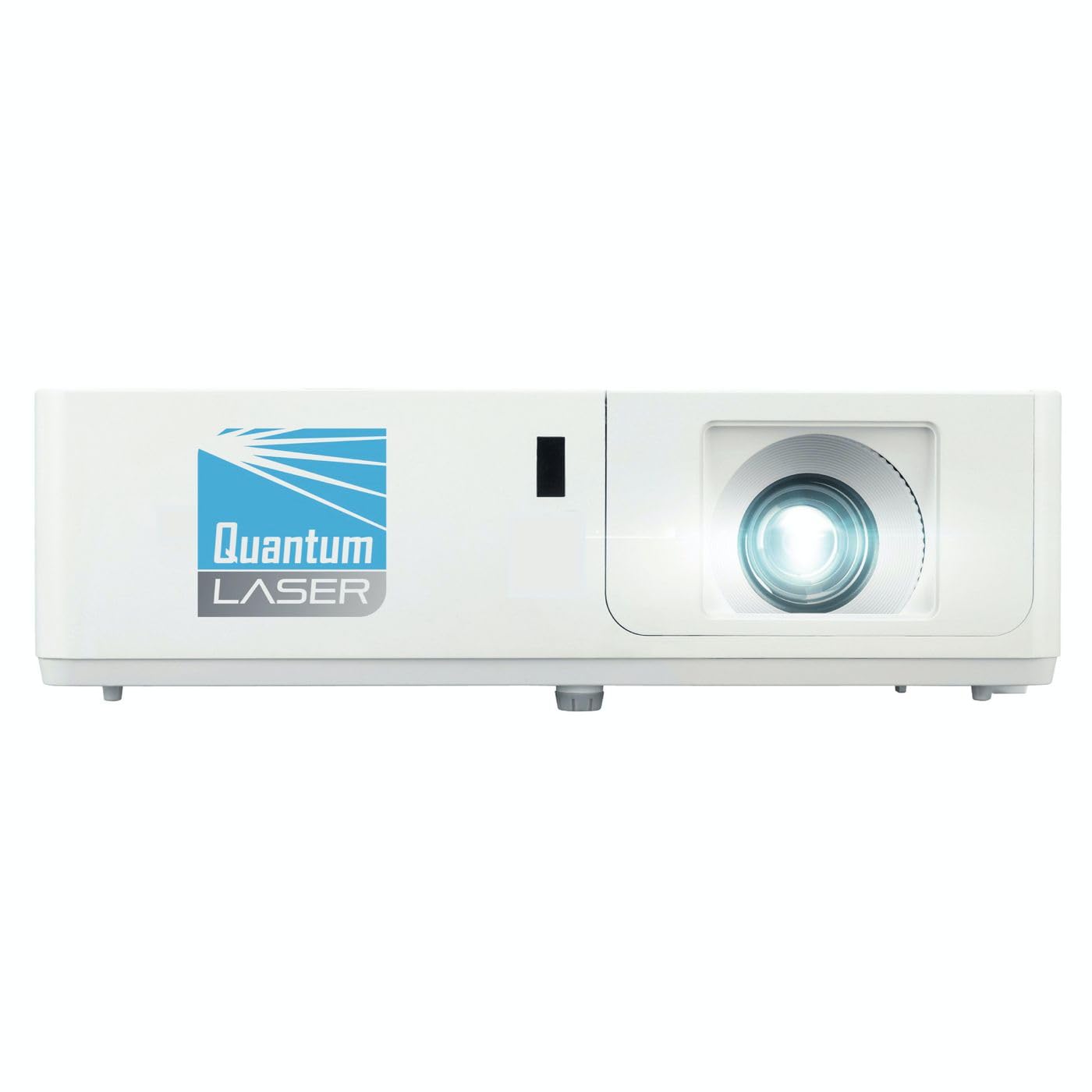
ምስል 1፡ ፊት view of the InFocus P120 INL412 Multimedia Projector, showing the lens and ventilation grilles.
4.1 የፊት ፓነል
- የፕሮጀክሽን ሌንስ፡ ምስሉን በስክሪኑ ላይ ያወጣል።
- የትኩረት ቀለበት የተገመተውን ምስል ግልጽነት ያስተካክላል።
- የማጉላት ቀለበት፡ የተገመተውን ምስል መጠን ያስተካክላል።
- የ IR መቀበያ; ከርቀት መቆጣጠሪያው ምልክቶችን ይቀበላል።
4.2 የላይኛው ፓነል
- የቁጥጥር ፓነል Buttons for power, menu navigation, source selection, and keystone correction.
- ጠቋሚ መብራቶች፡- Display the projector's status (e.g., power, lamp, temperature).
4.3 Rear Panel (Connectivity)
- የኤችዲኤምአይ ግቤት Connects to HDMI-enabled devices (laptops, Blu-ray players).
- ቪጂኤ ግቤት፡- ከቪጂኤ ውፅዓት ጋር ከኮምፒውተሮች ጋር ይገናኛል።
- የዩኤስቢ ወደብ፡ For service or connecting USB devices (if supported by model).
- ኦዲዮ ውጣ/ውጪ፡ For connecting external audio sources or speakers.
- የኃይል ማስገቢያ; የኃይል ገመዱን ያገናኛል።
5. ማዋቀር
ለፕሮጀክተርዎ የመጀመሪያ ዝግጅት እነዚህን ደረጃዎች ይከተሉ።
- አቀማመጥ፡- Place the projector on a stable, flat surface or mount it securely. Ensure the projector is positioned at an appropriate distance from the screen to achieve the desired image size.
- የኃይል ግንኙነት; Connect the power cord to the projector's power inlet and then to a grounded electrical outlet.
- ምንጭ መሣሪያን ያገናኙ፡ Connect your source device (e.g., laptop, DVD player) to the projector using an appropriate cable (HDMI, VGA, etc.). Ensure the cable is securely connected to both the source and the projector.
- አብራ፡ Press the power button on the projector's control panel or the remote control to turn on the projector. The power indicator light will illuminate.
- ትኩረትን እና ማጉላትን ያስተካክሉ፦ Once an image is projected, rotate the focus ring on the lens until the image is sharp and clear. Use the zoom ring to adjust the image size to fit your screen.
- የቁልፍ ድንጋይ ማስተካከያ If the image appears trapezoidal, use the keystone correction function (either via buttons on the projector/remote or through the on-screen menu) to square the image.
6. የአሠራር መመሪያዎች
6.1 ማብራት / ማጥፋት
- ለማብራት፡- Press the power button once. The projector will go through a warm-up sequence.
- ለማጥፋት፡- Press the power button twice. The first press will prompt a shutdown confirmation; the second press will initiate shutdown. Allow the projector to cool down completely before unplugging.
6.2 የምንጭ ምርጫ
Press the 'Source' button on the projector or remote control to cycle through available input sources (HDMI, VGA, etc.) until your desired source is displayed.
6.3 የምናሌ ዳሰሳ
Press the 'Menu' button to access the on-screen display (OSD) menu. Use the arrow buttons to navigate through options and 'Enter' or 'OK' to select. Use the 'Exit' or 'Menu' button to close the OSD.
- የምስል ቅንጅቶች፡- Adjust brightness, contrast, color, aspect ratio, and picture mode.
- ማሳያ ቅንብሮች: Configure keystone, projection mode (front/rear, desktop/ceiling), and resolution.
- የድምጽ ቅንብሮች፡- Control volume and audio output options.
- የስርዓት ቅንብሮች Manage language, timer, power-saving modes, and factory reset.
7. ጥገና
መደበኛ ጥገና ጥሩ አፈጻጸምን ያረጋግጣል እና የፕሮጀክተርዎን ዕድሜ ያራዝመዋል።
- የሌንስ ማጽዳት; የፕሮጀክተር ሌንሱን በተለይ ለእይታ ንጣፎች በተዘጋጀ ለስላሳ እና ከተሸፈነ ጨርቅ በቀስታ ይጥረጉ። ሻካራ ማጽጃዎችን ወይም ከመጠን በላይ ኃይልን አይጠቀሙ.
- የካቢኔ ጽዳት; የፕሮጀክተሩን ውጫዊ ክፍል ለማጽዳት ለስላሳ እና ደረቅ ጨርቅ ይጠቀሙ። ለጠንካራ ምልክቶች፣ dampen the cloth slightly with water. Avoid using harsh chemicals.
- የአየር ማጣሪያ ማፅዳት/መተካት Check the air filter periodically. If your model has a removable filter, clean it with a soft brush or vacuum cleaner. Replace the filter as recommended in the on-screen menu or when visibly dirty to maintain proper ventilation.
- Lamp መተካት፡ ፕሮጀክተር ኤልamp የተወሰነ የህይወት ዘመን አለው. መቼ lamp life indicator appears, or the image brightness significantly decreases, replace the lamp according to the instructions provided in the full service manual or by a qualified technician. Always allow the projector to cool down completely before attempting lamp መተካት.
8. መላ መፈለግ
ለጋራ ጉዳዮች እና መፍትሄዎቻቸው ከዚህ በታች ያለውን ሰንጠረዥ ይመልከቱ።
| ችግር | ሊሆን የሚችል ምክንያት | መፍትሄ |
|---|---|---|
| ምንም ምስል አልታየም። | Power cord disconnected, incorrect input source, source device off. | Check power connections. Select correct input source. Ensure source device is powered on. |
| ምስሉ ደብዛዛ ነው | ሌንስ ከትኩረት ውጪ፣ የተሳሳተ የፕሮጀክሽን ርቀት። | Adjust the focus ring on the lens. Reposition the projector closer or further from the screen. |
| ምስሉ ትራፔዞይድ ነው | ፕሮጀክተር ከማያ ገጹ ጋር ቀጥተኛ ያልሆነ። | Use keystone correction (manual or automatic) to square the image. |
| ፕሮጀክተር ይሞቃል እና ይዘጋል | Blocked ventilation, dirty air filter. | Ensure clear space around vents. Clean or replace the air filter. |
| የርቀት መቆጣጠሪያ አይሰራም | Dead batteries, obstruction between remote and projector, incorrect angle. | Replace batteries. Ensure clear line of sight to IR receiver. Point remote directly at the projector. |
9. ዝርዝሮች
Key technical specifications for the InFocus P120 INL412 Multimedia Projector:
| ባህሪ | ዝርዝር መግለጫ |
|---|---|
| የሞዴል ቁጥር | P120 INL412 (Item model number: 7296144) |
| የማሳያ ዓይነት | ዲኤልፒ |
| ቤተኛ ውሳኔ | 1280 x 800 |
| ከፍተኛው የማሳያ ጥራት | 1280 x 800 |
| የግንኙነት ቴክኖሎጂ | USB (and other standard inputs like HDMI, VGA) |
| የምርት ልኬቶች | 5.25 x 0.31 x 1.66 ኢንች |
| የእቃው ክብደት | 6.6 ፓውንድ |
| አምራች | በትኩረት |
10. ዋስትና እና ድጋፍ
The InFocus P120 INL412 Multimedia Projector comes with a standard manufacturer's warranty. Please refer to the warranty card included in your package for specific terms and conditions, including warranty duration and coverage details. For technical support, service, or further inquiries, please visit the official InFocus support webጣቢያ ወይም የደንበኞች አገልግሎት ክፍልን ያነጋግሩ።
በጣም ወቅታዊ የሆነውን የድጋፍ መረጃ ለማግኘት፣ እባክዎን የሚከተለውን ይጎብኙ፦ www.infocus.com/support