
1. መግቢያ
This manual provides detailed instructions for the safe and efficient operation of your InFocus P120 INL412 Multimedia Projector (Model INL4128). Please read this manual thoroughly before using the projector and keep it for future reference. This projector is designed for high-quality image projection, suitable for various applications including presentations, home entertainment, and gaming.
2. የደህንነት መረጃ
በፕሮጀክተሩ ላይ ጉዳት እንዳይደርስ ለመከላከል እና የተጠቃሚውን ደህንነት ለማረጋገጥ የሚከተሉትን የደህንነት ጥንቃቄዎች ያክብሩ።
- የአየር ማናፈሻ; Ensure adequate ventilation around the projector. Do not block ventilation openings. Maintain a minimum distance of 30 cm (12 inches) from walls or other objects.
- የኃይል ምንጭ፡- የተገለጸውን የኃይል አቅርቦት እና ጥራዝ ብቻ ይጠቀሙtagሠ. የኃይል ገመዱን ደህንነቱ በተጠበቀ ሁኔታ ያገናኙ።
- ሙቀት፡ The projector generates heat during operation. Do not touch the projector's vents or exhaust areas directly after use.
- የብርሃን ውፅዓት፡- l ጊዜ በቀጥታ ወደ ፕሮጀክተር ሌንስን አይመልከቱamp በርቷል ፣ ምክንያቱም ኃይለኛ ብርሃን የዓይን ጉዳት ያስከትላል።
- አቀማመጥ፡- ፕሮጀክተሩን በተረጋጋና ደልዳላ ቦታ ላይ ያስቀምጡት። በቀጥታ የፀሐይ ብርሃን፣ በሙቀት ምንጮች አቅራቢያ ወይም ከፍተኛ እርጥበት ወይም አቧራ ባለባቸው ቦታዎች ላይ አያስቀምጡት።
- ማጽዳት፡ ከማጽዳትዎ በፊት የኤሌክትሪክ ገመዱን ያላቅቁ. ለስላሳ እና ደረቅ ጨርቅ ይጠቀሙ. ፈሳሽ ወይም ኤሮሶል ማጽጃዎችን አይጠቀሙ.
- አገልግሎት መስጠት፡ ፕሮጀክተሩን እራስዎ ለማገልገል አይሞክሩ። ሁሉንም አገልግሎት ለሚሰጡ ብቁ የአገልግሎት ባለሙያዎች ይላኩ።
3. ምርት አብቅቷልview
3.1 Top Panel and Lens Area
The top panel features the control buttons for basic operation and the lens area with focus and zoom adjustments.

ምስል 3.1: ከፍተኛ view of the InFocus P120 INL412 projector, highlighting the control panel on the right and the lens adjustment area on the left. The InFocus logo is visible on the top surface.
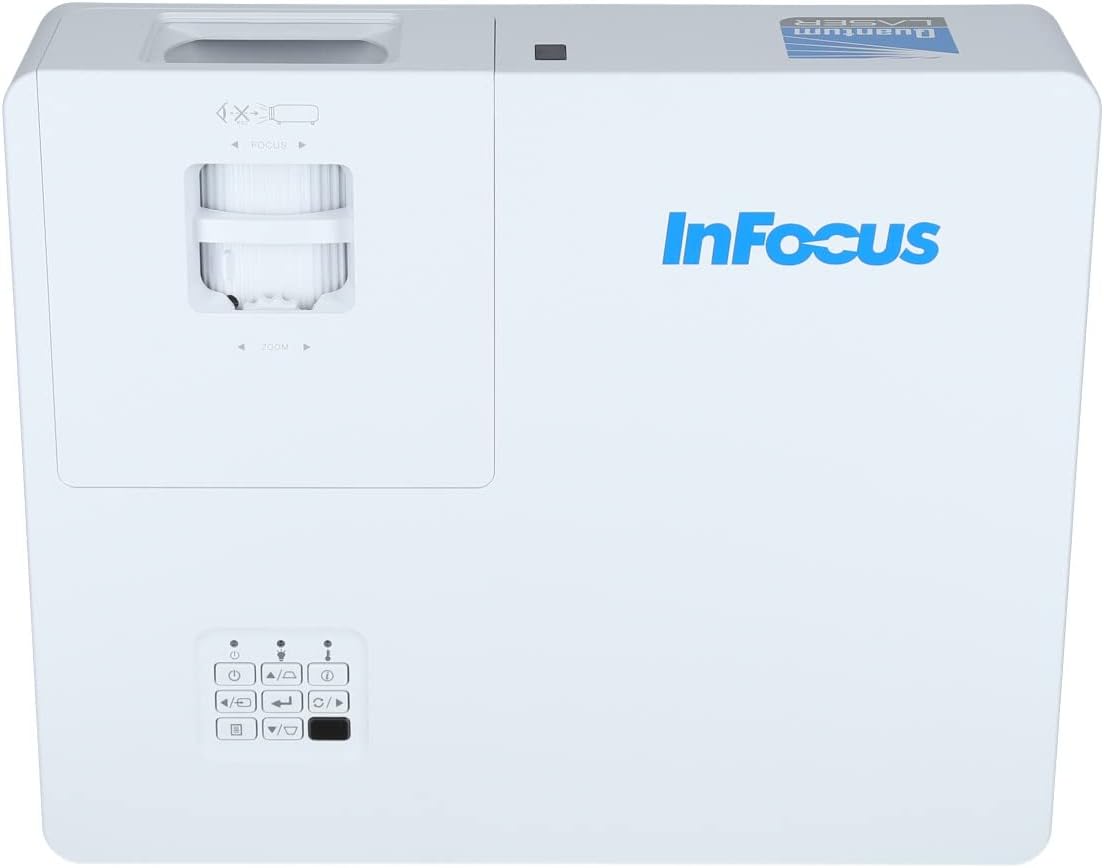
ምስል 3.2: ይበልጥ የቀረበ view of the projector's top panel, showing the focus and zoom rings near the lens opening and the array of control buttons for power, menu, source selection, and navigation.
3.2 የኋላ ፓነል ግንኙነቶች
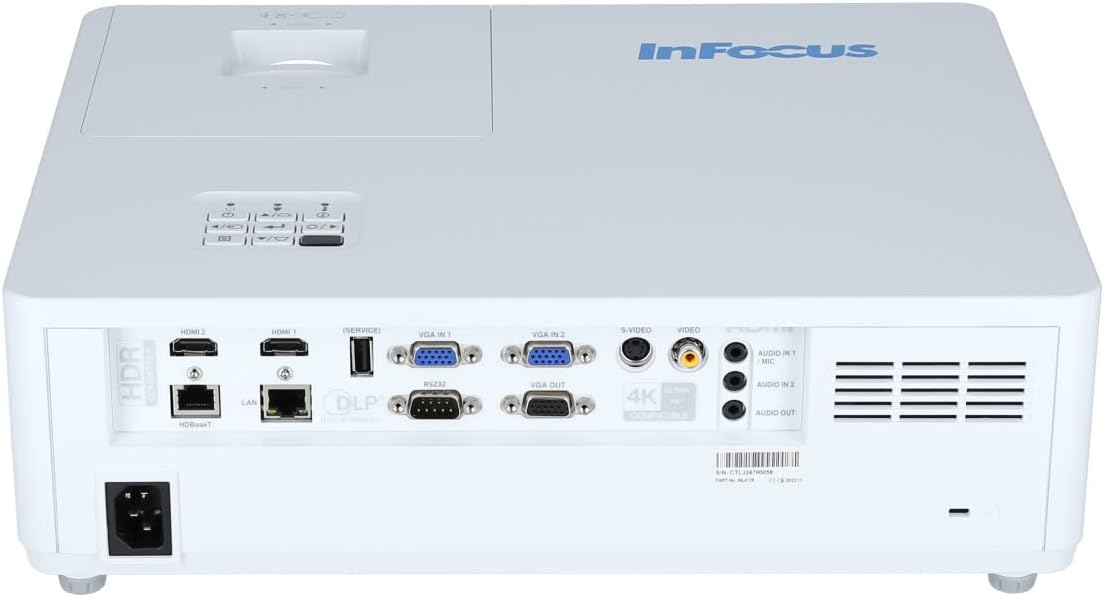
የኋላ ፓነል ውጫዊ መሳሪያዎችን ለማገናኘት የተለያዩ የግብአት እና የውጤት ወደቦች ያቀርባል.

Figure 3.3: Rear panel of the InFocus P120 INL412 projector, displaying a comprehensive array of connectivity options including HDMI (x2), USB, S-Video, Ethernet (LAN), VGA In (x2), VGA Out, RS232, and Audio In/Out ports. The power input is located on the bottom left.
Key ports include:
- HDMI 1 እና 2፡ For connecting high-definition digital video and audio sources.
- ዩኤስቢ፡ For connecting USB devices, potentially for media playback or firmware updates.
- ኤስ-ቪዲዮ: For connecting older video sources.
- VGA IN 1 & 2: For connecting computers or other devices with VGA output.
- ቪጂኤ ውጭ For connecting to an external monitor.
- ኤተርኔት (ላን) ፦ ለአውታረ መረብ ግንኙነት እና ቁጥጥር.
- Audio IN 1 & 2 / Audio OUT: For analog audio connections.
- RS232 ለተከታታይ ቁጥጥር.
- የኃይል ግቤት፡ የ AC የኤሌክትሪክ ገመድ ለማገናኘት.
3.3 Front and Side Panels
The front panel houses the projection lens and front ventilation, while the side panels feature additional ventilation grilles.

ምስል 3.4: የፊት view of the InFocus P120 INL412 projector, displaying the main projection lens on the right and the extensive front ventilation grille on the left, crucial for heat dissipation.
ምስል 3.5: ጎን view of the InFocus P120 INL412 projector, illustrating the side ventilation grilles that contribute to maintaining optimal operating temperature.
4. ማዋቀር
4.1 ፕሮጀክተር አቀማመጥ
Position the projector on a stable, flat surface or mount it securely. Ensure the projector is within the optimal projection distance for your screen size. Maintain clear space around the projector for proper ventilation.
4.2 ማገናኛ መሳሪያዎች
Before connecting any cables, ensure the projector and all source devices are powered off.
- የኤችዲኤምአይ ግንኙነት Connect an HDMI cable from your source device (e.g., laptop, Blu-ray player, gaming console) to either the HDMI 1 or HDMI 2 port on the projector.
- ቪጂኤ ግንኙነት፡- Connect a VGA cable from your computer to either VGA IN 1 or VGA IN 2. For audio, connect a separate audio cable from your computer's audio output to the corresponding Audio IN port on the projector.
- የዩኤስቢ ግንኙነት፡- Insert a USB drive into the USB port for media playback (if supported by firmware) or service functions.
- የኤተርኔት (LAN) ግንኙነት፡- Connect an Ethernet cable to the LAN port for network control or updates.
- የድምጽ ውፅዓት፡- If using external speakers, connect an audio cable from the Audio OUT port on the projector to your audio system.
4.3 የኃይል ግንኙነት
Connect the power cord to the projector's power input and then plug the other end into a grounded electrical outlet.
5. የአሠራር መመሪያዎች
5.1 ማብራት / ማጥፋት
- አብራ፡ የሚለውን ይጫኑ ኃይል በፕሮጀክተሩ የቁጥጥር ፓነል ወይም በርቀት መቆጣጠሪያው ላይ ያለው አዝራር። የኃይል አመልካች መብራቱ ይለወጣል።
- ኃይል ዝጋ: የሚለውን ይጫኑ ኃይል button again. A confirmation message may appear. Press the button a second time to confirm shutdown. Allow the projector to cool down before unplugging it.
5.2 የትኩረት እና የማጉላት ማስተካከያ
ምስሉ ስለታም እና ግልጽ እስኪመስል ድረስ የትኩረት ቀለበቱን በሌንስ ዙሪያ ያሽከርክሩት። የምስል መጠኑን ከማያ ገጽዎ ጋር እንዲስማማ ለማስተካከል የማጉላት ቀለበቱን ይጠቀሙ።
5.3 የግቤት ምንጭ መምረጥ
የሚለውን ይጫኑ ምንጭ button on the control panel or remote control to cycle through available input sources (HDMI 1, HDMI 2, VGA 1, VGA 2, S-Video, USB). Select the input corresponding to your connected device.
5.4 የምናሌ ዳሰሳ
የሚለውን ተጠቀም ምናሌ button to access the on-screen display (OSD) menu. Use the arrow buttons to navigate through menu options and the አስገባ ለመምረጥ አዝራር. ተጫን ምናሌ እንደገና ለመውጣት።
6. ጥገና
6.1 ሌንስን ማጽዳት
ሌንሱን ለኦፕቲካል ገጽታዎች በተለየ መልኩ በተዘጋጀ ለስላሳ፣ ከንጣፍ ነፃ በሆነ ጨርቅ በቀስታ ይጥረጉ። ሻካራ ማጽጃዎችን ወይም ከመጠን በላይ ኃይል አይጠቀሙ፣ ምክንያቱም ይህ ሌንሱን ሊቧጭር ይችላል።
6.2 Cleaning the Projector Exterior
የፕሮጀክተሩን ሲ ለማጽዳት ለስላሳ እና ደረቅ ጨርቅ ይጠቀሙasing. For stubborn dirt, dampen the cloth slightly with water, then wipe dry immediately. Avoid getting liquids into the projector's openings.
6.3 የአየር ማናፈሻ እንክብካቤ
Regularly check the projector's ventilation grilles for dust accumulation. Use a soft brush or a vacuum cleaner with a brush attachment to gently remove dust from the vents to ensure proper airflow and prevent overheating.
7. መላ መፈለግ
7.1 ምንም ምስል አልታየም።
- ፕሮጀክተሩ መብራቱን እና የኃይል አመልካች መብራቱን ያረጋግጡ።
- Verify that the video cable (HDMI, VGA, etc.) is securely connected to both the projector and the source device.
- ትክክለኛው የግቤት ምንጭ በፕሮጀክተሩ ላይ መመረጡን ያረጋግጡ።
- Confirm that the source device (laptop, player) is powered on and outputting a signal.
7.2 ምስሉ ደብዛዛ ነው ወይም ከትኩረት ውጪ ነው
- ምስሉ ሹል እስኪሆን ድረስ የትኩረት ቀለበቱን በፕሮጀክተር ሌንስ ላይ ያስተካክሉት።
- ፕሮጀክተሩ ከማያ ገጹ ትክክለኛው ርቀት ላይ መሆኑን ያረጋግጡ።
- የፕሮጀክተር ሌንስ ቆሻሻ መስሎ ከታየ ያጽዱ።
7.3 ድምጽ የለም
- If using HDMI, ensure the source device's audio output is set to HDMI.
- If using VGA, ensure a separate audio cable is connected from the source to the projector's Audio IN port.
- የድምጽ ቅንብሮችን በፕሮጀክተሩ እና በምንጭ መሣሪያው ላይ ያረጋግጡ።
- If using external speakers, ensure they are properly connected to the Audio OUT port and powered on.
8. ዝርዝሮች
| ባህሪ | ዝርዝር |
|---|---|
| የምርት ስም | ትኩረት |
| አምራች | በትኩረት |
| የሞዴል ስም | P120 INL412 |
| የሞዴል ቁጥር | INL4128 |
| አመት | 2023 |
| የሃርድዌር በይነገጽ | Ethernet, HDMI, S-Video, USB |
| የእቃዎች ብዛት | 1 |
| ምጥጥነ ገጽታ | 16፡9 |
| ዋትtage | 341 ዋት |
| ባትሪዎች ተካትተዋል። | አይ |
| ባትሪዎች ያስፈልጋሉ። | አይ |
| የቅጽ ምክንያት | ዴስክቶፕ |
| የመጫኛ አይነት | የጠረጴዛ መጫኛ |
| የርቀት መቆጣጠሪያ ተካትቷል። | አዎ |
| የምርት ልኬቶች | 56.13 x 46.48 x 25.15 ሴ.ሜ |
| የእቃው ክብደት | 5.5 ኪ.ግ |
| ከፍተኛው የምስል መጠን | 308.28 ኢንች |
| ዝቅተኛው የምስል መጠን | 910.63 ሚሊሜትር |
| መጀመሪያ የሚገኝ ቀን | ጥር 5 ቀን 2022 |
9. ዋስትና እና ድጋፍ
For warranty information and technical support, please refer to the documentation included with your purchase or visit the official InFocus webጣቢያ. ለዋስትና ጥያቄዎች የግዢ ማረጋገጫዎን ያስቀምጡ።