1. መግቢያ
The eufy Security Video Doorbell S330 is a wired dual-camera video doorbell designed to enhance your home security. It provides a comprehensive view of your doorstep, eliminating blind spots, and offers advanced features like Delivery Guard and 3-second preview videos. With 2K HDR resolution and local storage, it ensures clear recordings without the need for monthly subscription fees.
This manual provides detailed instructions for setting up, operating, and maintaining your eufy Security Video Doorbell S330.
2. የጥቅል ይዘቶች
እባክህ ከዚህ በታች የተዘረዘሩት ሁሉም እቃዎች በጥቅልህ ውስጥ መካተታቸውን አረጋግጥ፡
- Video Doorbell Dual (Wired)
- የበር በር ቺም
- ጥቅል ጥቅል
- የመጫን ቅንፍ
- የማይክሮ ዩኤስቢ ባትሪ መሙያ ገመድ
- Screw hole positioning card
- 15° mounting wedge
- ፒን በማላቀቅ ላይ
- ፈጣን ጅምር መመሪያ
- የምርት ካርድ
- 24/7 monitoring sticker
3. ምርት አብቅቷልview
The eufy Security Video Doorbell S330 features an innovative dual-camera system, providing both a wide-angle view of visitors and a dedicated low-angle camera for package monitoring. This design ensures comprehensive coverage of your porch area.
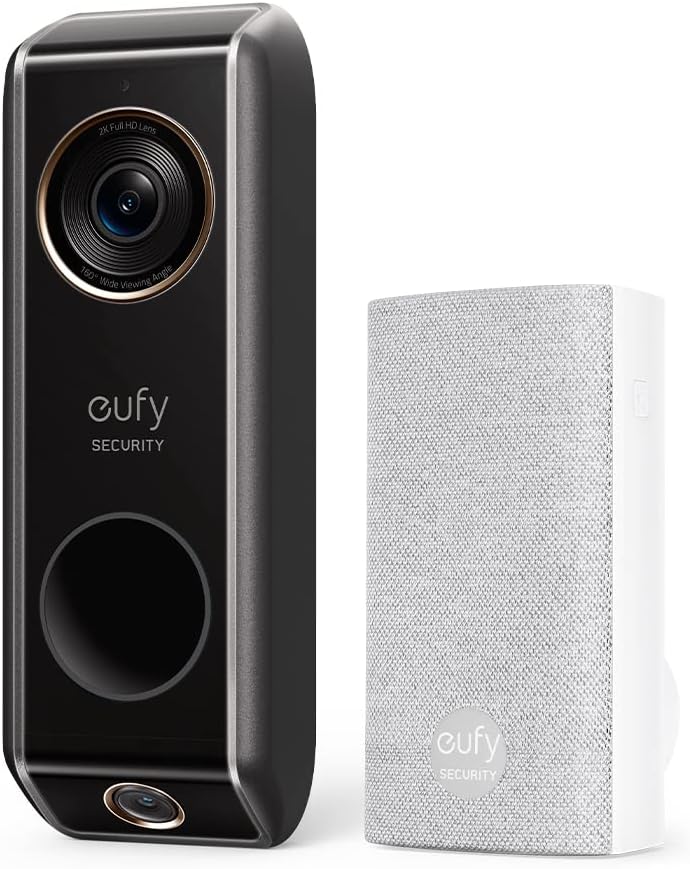
Image: The eufy Security Video Doorbell S330 (left) and its accompanying wireless chime (right).

Image: The eufy Video Doorbell S330 mounted on a wall, highlighting its dual camera design for zero blind spots.
4. የመጀመሪያ ደረጃ ማዋቀር
Before physical installation, ensure you have downloaded the eufy Security app on your smartphone or tablet. The app will guide you through the initial setup process, including connecting the doorbell to your 2.4GHz Wi-Fi network.
- አውርድ eufy ደህንነት መተግበሪያ ከመተግበሪያ መደብር (iOS) ወይም ከGoogle Play መደብር (አንድሮይድ)።
- መለያ ይፍጠሩ ወይም አስቀድመው ካለዎት ይግቡ።
- Follow the in-app instructions to add your new Video Doorbell S330. This typically involves scanning a QR code on the device.
- Connect the doorbell to your home's 2.4 ጊኸ Wi-Fi አውታረ መረብ as prompted by the app.
5. መጫን
The eufy Security Video Doorbell S330 is designed for wired installation, connecting to your existing doorbell wiring. It is crucial to ensure your transformer meets the power requirements for optimal performance.

Image: A hand connecting the eufy Video Doorbell S330 to existing doorbell wiring on a wall, with a diagram of a compatible transformer.
5.1 የኃይል መስፈርቶች
The Video Doorbell S330 requires a wired connection with a transformer providing 16-24VAC, 30VA or more. If your current transformer does not meet these specifications, it must be replaced. Consult a qualified electrician if you are unsure about your transformer's compatibility or need assistance with replacement.
5.2 የመጫኛ ደረጃዎች
- ኃይል ያጥፉ; ከመጀመርዎ በፊት፣ በወረዳ ማብሪያ / ማጥፊያው ላይ ያለውን ነባር የበር ደወል ኃይል ያጥፉ።
- Remove old doorbell: Carefully remove your existing doorbell from the wall.
- Install mounting bracket: Use the provided screw pack and positioning card to securely attach the mounting bracket to your wall. If needed, use the 15° mounting wedge to angle the doorbell for a better view.
- ገመዶችን ማገናኘት; Connect the existing doorbell wires to the terminals on the back of the eufy Video Doorbell.
- Mount doorbell: Snap the eufy Video Doorbell onto the mounting bracket.
- Bypass existing chime (if applicable): The Video Doorbell Dual is አይደለም compatible with existing mechanical chimes. Use the included jumper wire to bypass your existing chime inside your home.
- Install eufy Chime: Plug the included eufy Doorbell Chime into a power outlet inside your home. It will wirelessly connect to the doorbell.
- ኃይልን ወደነበረበት መመለስ; በወረዳው ተላላፊው ላይ ኃይሉን መልሰው ያብሩት።
- ሙከራ፡- Press the doorbell button to ensure it rings the eufy Chime and sends notifications to your app.
6. ኦፕሬሽን
Once installed, you can manage and interact with your eufy Security Video Doorbell S330 through the eufy Security app.
6.1 ቀጥታ ስርጭት View እና ባለሁለት መንገድ ንግግር
Access the live video feed from your doorbell at any time through the app. Use the two-way talk feature to communicate with visitors at your door from anywhere.
6.2 የእንቅስቃሴ ማወቂያ እና ማንቂያዎች
The doorbell is equipped with advanced motion detection. You will receive instant notifications on your smartphone when motion is detected. Customize detection zones and sensitivity settings within the app to reduce unwanted alerts.
6.3 Recorded Events
All detected events and doorbell presses are recorded and stored locally on the device's internal memory. You can review these recordings directly from the eufy Security app without any subscription fees.
7. ቁልፍ ባህሪያት
7.1 Dual Cam Technology
The dual camera system provides both a main 2K camera for a wide horizontal view and a lower 1080p camera to monitor the area directly in front of your door, effectively eliminating blind spots and ensuring you see everything from head to toe and packages on the ground.
7.2 Delivery Guard™
This intelligent feature detects when a package is delivered and notifies you. It also sends reminders to pick up your package and alerts you if anyone approaches your package, helping to prevent theft.

Image: The eufy app displaying a delivery person and a package, demonstrating the Delivery Guard feature.
7.3 3-Second Preview ቪዲዮዎች
Before a full recording begins, the doorbell captures a 3-second preview video. This allows you to see what triggered the recording and how visitors approached your door, providing crucial context.

Image: A person walking away from a door, representing the 3-second preview video feature that captures moments before a main recording.
7.4 2K with HDR
The main camera records in 2K HD resolution, ensuring clear and detailed surveillance. High Dynamic Range (HDR) technology improves image quality in varying lighting conditions, allowing you to identify visitors even when backlit by the sun.

Image: A family walking towards the camera, demonstrating the clear and detailed 2K Ultra-HD video quality.
7.5 No Monthly Fee & Local Storage
All recordings are stored locally on the doorbell's internal 8GB flash memory, eliminating the need for cloud storage subscriptions. You can access your recordings anytime without additional charges.

Image: A visual representation of '0' monthly fees, emphasizing the cost-saving benefit of local storage.
7.6 ስማርት ቤት ውህደት
The eufy Security Video Doorbell S330 is compatible with popular smart home ecosystems, including Amazon Alexa and Google Assistant. You can connect your doorbell to these voice assistants to check on your home's activity and receive alerts.

Image: An Amazon Echo Show device displaying a live feed from the eufy doorbell, illustrating its compatibility with Alexa and Google Assistant.
8. ጥገና
To ensure the longevity and optimal performance of your eufy Security Video Doorbell S330, follow these maintenance guidelines:
- ማጽዳት፡ የካሜራውን ሌንስ እና የበር ደወሉን ውጫዊ ክፍል በለስላሳ፣ d በየጊዜው ይጥረጉamp cloth to remove dust and smudges. Avoid using harsh chemicals or abrasive materials.
- የሶፍትዌር ማሻሻያ Keep your doorbell's firmware updated through the eufy Security app. Updates often include performance improvements, new features, and security enhancements.
- ሽቦን ይፈትሹ፡ Occasionally inspect the wiring connections to ensure they remain secure, especially after extreme weather conditions.
9. መላ መፈለግ
If you encounter issues with your eufy Security Video Doorbell S330, refer to the following common problems and solutions:
| ችግር | ሊሆን የሚችል ምክንያት / መፍትሄ |
|---|---|
| Doorbell not powering on or frequently disconnecting. |
|
| Cannot connect to Wi-Fi or frequent Wi-Fi drops. |
|
| No audio or poor audio quality during two-way talk. |
|
| Motion alerts are too frequent or not detecting. |
|
10. ዝርዝሮች
| ባህሪ | ዝርዝር |
|---|---|
| የሞዴል ቁጥር | E8203 |
| የቪዲዮ ቀረጻ ጥራት | 2K (Main Camera), 1080p (Lower Camera) |
| የኃይል ምንጭ | Wired (16-24VAC, 30VA or more) |
| የግንኙነት ፕሮቶኮል | ዋይ ፋይ (2.4GHz ብቻ) |
| የውስጥ ማከማቻ | 8 ጊባ ፍላሽ ማህደረ ትውስታ |
| ልኬቶች (L x W x H) | 6.22 x 1.97 x 1.06 ኢንች (15.8 x 5.0 x 2.7 ሴሜ) |
| የእቃው ክብደት | 7 አውንስ (0.44 ፓውንድ) |
| የቤት ውስጥ / የውጭ አጠቃቀም | ከቤት ውጭ (IP65 ደረጃ የተሰጠው) |
| የማንቂያ ዓይነት | እንቅስቃሴ ብቻ |
| ተስማሚ መሣሪያዎች | ስማርትፎን ፣ ታብሌት |
| ዩፒሲ | 194644096007 |
11. ዋስትና እና ድጋፍ
11.1 የዋስትና መረጃ
eufy Security products typically come with a standard manufacturer's warranty. For new products, this is generally 1 year from the date of purchase. Please retain your proof of purchase for warranty claims. Note that warranty periods may vary for refurbished or used products (e.g., 90 days for 'used-like new' items).
11.2 የደንበኛ ድጋፍ
For technical assistance, troubleshooting, or warranty inquiries, please contact eufy Security customer support. You can typically find contact information (phone, email, or live chat) within the eufy Security app or on the official eufy Security webጣቢያ (www.eufylife.com).
When contacting support, please have your product model number (E8203) and purchase details ready.