
1. ምርት አብቅቷልview
The OXS Soundbar S3 is designed to enhance your audio experience with immersive 3D surround sound. It features multiple connectivity options and sound modes to suit various content types.

Image: The OXS Soundbar S3 featuring 4 powerful speakers, delivering 96dB sound output and 80W power, creating an immersive audio environment.
ቁልፍ ባህሪዎች
- Immersive 3D Surround Sound System
- Dynamic Bass Boost with Special Port Tube Reflection
- Multiple Equalizer Modes: Movie, Music, News
- Maximum 96 dB of Room-Filling Crystal Clear Sound
- Low Total Harmonic Distortion (<1%) for Original Sound Reproduction
- Multiple Wireless (Bluetooth 5.0) and Wired Connections (USB, AUX, Optical, Coaxial)

Image: A living room setting with the OXS Soundbar S3 delivering an immersive 3D sound experience, indicated by virtual surround technology graphics.
2. የጥቅል ይዘቶች
ሁሉም እቃዎች በጥቅሉ ውስጥ መኖራቸውን ያረጋግጡ፡-
- OXS Soundbar S3 Unit
- የኃይል አስማሚ
- የርቀት መቆጣጠሪያ
- የጨረር ገመድ
- Coaxial ገመድ
- Auxiliary (Aux) Cable
- Wall Brackets (2)
- Expansion Tubes (for wall mounting)
- Screws (for wall mounting)
- የትምህርት መመሪያ (ይህ ሰነድ)
3. የማዋቀር መመሪያዎች
3.1 አቀማመጥ
Place the soundbar on a stable, flat surface in front of your television or mount it on the wall using the provided brackets. Ensure there are no obstructions in front of the speakers for optimal sound delivery.
3.2 ከቲቪዎ ጋር መገናኘት
The Soundbar S3 offers multiple connection options. Choose the method that best suits your television and desired audio quality.

Image: The rear panel of the OXS Soundbar S3 displaying various input ports including USB, AUX, Optical, and Coaxial, alongside Bluetooth 5.0 connectivity.
- የኦፕቲካል ግንኙነት (የሚመከር): Connect one end of the optical cable to the 'OPTICAL OUT' port on your TV and the other end to the 'OPTICAL IN' port on the soundbar. Select 'Optical' input on the soundbar.
- Coaxial ግንኙነት; Connect one end of the coaxial cable to the 'COAXIAL OUT' port on your TV and the other end to the 'COAXIAL IN' port on the soundbar. Select 'Coaxial' input on the soundbar.
- AUX ግንኙነት ፦ Connect one end of the 3.5mm AUX cable to the 'AUX OUT' port on your TV (or other audio source) and the other end to the 'AUX IN' port on the soundbar. Select 'AUX' input on the soundbar.
- የብሉቱዝ ግንኙነት
- በድምፅ አሞሌው ላይ ኃይል።
- Press the 'Bluetooth' button on the soundbar or remote control to enter Bluetooth pairing mode (indicator light will flash).
- On your device (e.g., smartphone, tablet), search for 'OXS Soundbar S3' in the Bluetooth settings and pair.
- Once connected, the indicator light will be solid.
- የዩኤስቢ ግንኙነት፡- ኦዲዮ የያዘ የዩኤስቢ አንጻፊ አስገባ files into the 'USB' port on the soundbar. The soundbar will automatically switch to USB mode and begin playback.
3.3 የኃይል ግንኙነት
Connect the power adapter to the 'DC IN' port on the soundbar and then plug the adapter into a wall outlet.
Video: This video demonstrates the various connection methods for the OXS Soundbar S3, including optical, coaxial, and Bluetooth pairing, and shows the power-on sequence.
4. የአሠራር መመሪያዎች
4.1 ማብራት / ማጥፋት
- የሚለውን ይጫኑ ኃይል መሳሪያውን ለማብራት ወይም ለማጥፋት በድምጽ አሞሌው ወይም በርቀት መቆጣጠሪያው ላይ ያለውን ቁልፍ ይጫኑ።
4.2 የግቤት ምርጫ
- የሚለውን ይጫኑ ምንጭ button on the soundbar or the remote control to cycle through available inputs: Bluetooth, USB, AUX, Optical, Coaxial.
4.3 የድምጽ መቆጣጠሪያ
- የሚለውን ተጠቀም + እና - ድምጹን ለማስተካከል በድምፅ አሞሌው ላይ ወይም በርቀት መቆጣጠሪያ ላይ ያሉ አዝራሮች።
4.4 የድምጽ ሁነታዎች
The Soundbar S3 offers three distinct equalizer modes to optimize your listening experience:
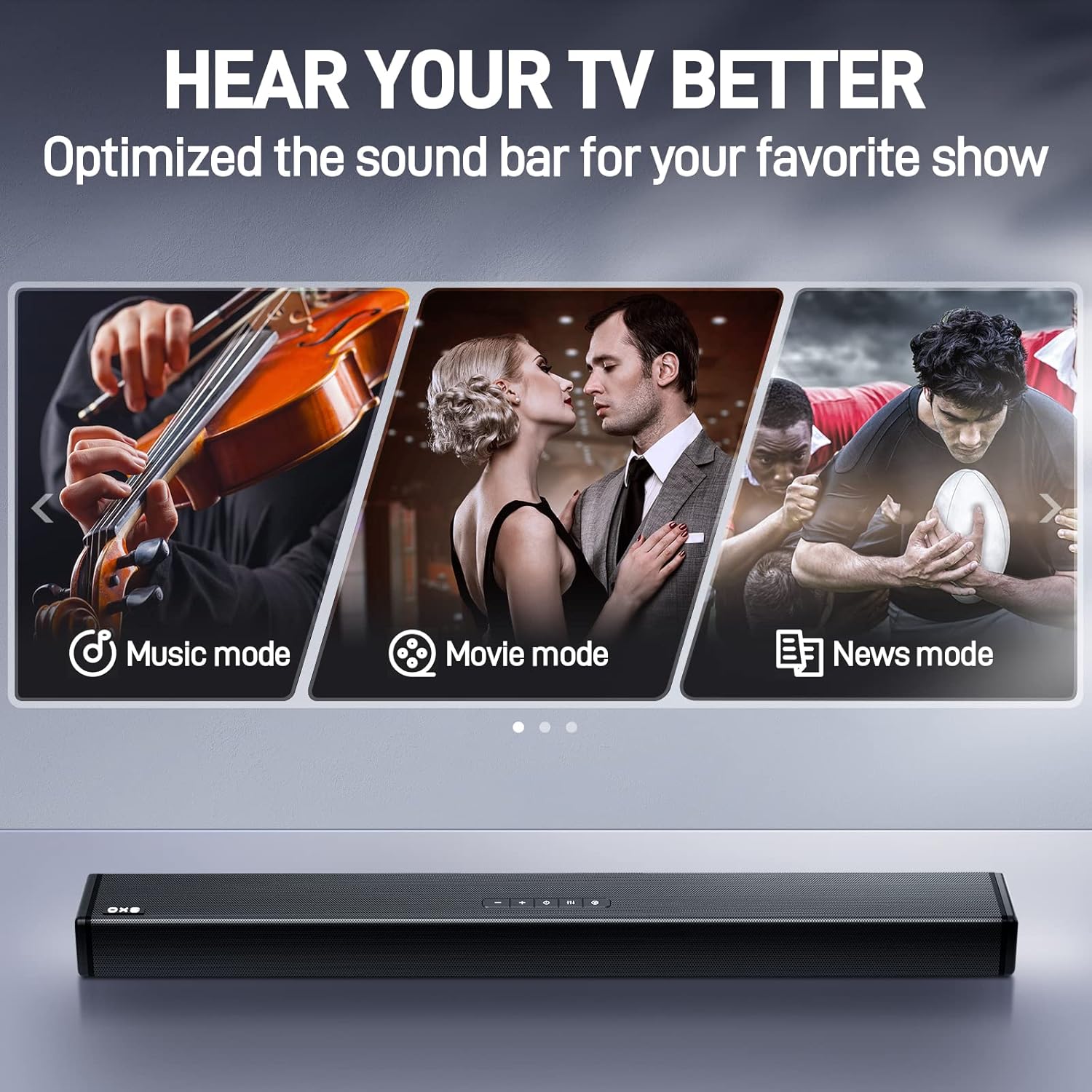
Image: The OXS Soundbar S3 with visual indicators for its three optimized sound modes: Music, Movie, and News, designed to enhance specific audio content.
- የሙዚቃ ስልት፡ Ideal for listening to music, providing a balanced audio profile.
- የፊልም ሁኔታ ሲኒማቲክ ኦዲዮን በተለዋዋጭ ክልል እና በዙሪያ ተፅዕኖዎች ያሻሽላል።
- የዜና ሁኔታ፡ Optimizes vocal clarity for news broadcasts and dialogue-heavy content.
የሚለውን ይጫኑ EQ button on the remote control to switch between these modes.

Image: A hand holding the remote control for the OXS Soundbar S3, demonstrating its use for controlling the device from a distance.
5. ጥገና
To ensure the longevity and optimal performance of your OXS Soundbar S3, follow these maintenance guidelines:
- ማጽዳት፡ የድምፅ አሞሌውን ወለል ለማጽዳት ለስላሳ እና ደረቅ ጨርቅ ይጠቀሙ። ፈሳሽ ማጽጃዎችን ወይም የማጽጃ ቁሳቁሶችን አይጠቀሙ፣ ምክንያቱም ጨርቁን ሊያበላሹ ይችላሉ።
- የአየር ማናፈሻ; የድምጽ አሞሌው በቂ የአየር ማናፈሻ መኖሩን ያረጋግጡ። የአየር ማናፈሻ ክፍተቶችን አያግዱ።
- ማከማቻ፡ የድምጽ አሞሌውን ረዘም ላለ ጊዜ ካስቀመጠ ከኃይል ጋር ያለውን ግንኙነት ያላቅቁት እና ከፀሀይ ብርሀን እና ከፍተኛ የሙቀት መጠን ርቆ በቀዝቃዛና ደረቅ ቦታ ያስቀምጡት።
6. መላ መፈለግ
በድምጽ አሞሌዎ ላይ ችግሮች ካጋጠሙዎት የሚከተሉትን የተለመዱ ችግሮች እና መፍትሄዎች ይመልከቱ፡
- ድምጽ የለም፡
- የድምፅ አሞሌው መብራቱን እና ድምጹ ድምጸ-ከል አለመደረጉን ወይም በጣም ዝቅተኛ መሆኑን ያረጋግጡ።
- Verify that the correct input source is selected on the soundbar (e.g., Optical, AUX, Bluetooth).
- Check all cable connections (Optical, Coaxial, AUX) between the soundbar and your TV/audio source. Ensure they are securely plugged in.
- Confirm that your TV's audio output settings are configured to send audio to the selected output (e.g., PCM for optical/coaxial).
- ደካማ የድምፅ ጥራት / የማይንቀሳቀስ፡
- Check for loose or damaged cables. Try replacing the audio cable if necessary.
- የድምፅ አሞሌው ጣልቃ ሊገቡ ከሚችሉ ሌሎች የኤሌክትሮኒክስ መሳሪያዎች ጋር በጣም ቅርብ አለመሆኑን ያረጋግጡ።
- Adjust the sound modes (Movie, Music, News) to see if a different mode improves clarity for your content.
- For Bluetooth connections, ensure your device is within range and there are no major obstructions.
- የርቀት መቆጣጠሪያ አይሰራም;
- በርቀት መቆጣጠሪያው ውስጥ ያሉት ባትሪዎች መተካት እንደሚያስፈልጋቸው ያረጋግጡ።
- በርቀት መቆጣጠሪያው እና በድምፅ አሞሌው ዳሳሽ መካከል ምንም እንቅፋቶች አለመኖራቸውን ያረጋግጡ።
- የብሉቱዝ ማጣመሪያ ጉዳዮች፡-
- Make sure the soundbar is in Bluetooth pairing mode (indicator light flashing).
- በመሳሪያዎ ላይ ብሉቱዝን ያሰናክሉ እና እንደገና ያስነሱ።
- Forget the soundbar from your device's Bluetooth list and attempt to pair again.
7. ዝርዝሮች
| የሞዴል ስም | Soundbar S3 |
| የድምጽ ማጉያ አይነት | 3D፣ የድምፅ አሞሌ፣ የዙሪያ ድምጽ |
| ልዩ ባህሪያት | Bass Boost, Display, Hi Res Audio, USB Port |
| የሚመከር አጠቃቀሞች | Volume control for various media |
| ተስማሚ መሣሪያዎች | ላፕቶፕ፣ የግል ኮምፒውተር፣ ቴሌቪዥን |
| የምርት ልኬቶች | 6.69" ዲ x 38.23" ዋ x 4.41" ኤች |
| የእቃው ክብደት | 7.73 ፓውንድ |
| የመቆጣጠሪያ ዘዴ | የርቀት መቆጣጠሪያ |
| ገመድ አልባ የመገናኛ ቴክኖሎጂ | ብሉቱዝ |
| የኃይል ምንጭ | ባለገመድ ኤሌክትሪክ |
| የድምጽ ማጉያ ከፍተኛ የውጤት ኃይል | 80 ዋት |
| የግንኙነት ቴክኖሎጂ | Auxiliary, Coaxial, Optical |
| የድምጽ ውፅዓት ሁኔታ | ዙሪያ |
| የመጫኛ አይነት | አሞሌ ተራራ |
8. ዋስትና እና ድጋፍ
For detailed warranty information and customer support, please refer to the warranty card included with your product packaging or visit the official OXS website. The manufacturer, ShenZhen Rango Innovation Technology Co.Ltd, provides support for this product.