
1. መግቢያ
This manual provides detailed instructions for the proper use and maintenance of your TOWILD ALC-01 Wireless Remote Control for Bicycle Light. Please read this manual thoroughly before use to ensure optimal performance and safety.
2. ምርት አብቅቷልview
The TOWILD ALC-01 is a compact wireless remote control designed to enhance the functionality of compatible TOWILD bicycle lights. It allows for convenient mode switching and brightness adjustments without needing to reach the light unit directly.


አካላት፡-
- ALC-01 Wireless Remote Control Unit
- Mounting Straps (rubber bands)
- የተጠቃሚ መመሪያ
3. ማዋቀር
Pairing the Remote Control with Your Bicycle Light:
- Ensure your TOWILD bicycle light is powered on.
- በርቀት መቆጣጠሪያው ላይ ኃይል.
- Long-press the switch button on the remote control for 3 seconds. The indicator on the remote will turn red (the light may flash once).
- While the indicator is red, long-press any button on the remote control. The indicator will change from red to blue/green, indicating successful pairing.
Video: Demonstrates the pairing process between the TOWILD ALC-01 remote control and a compatible bicycle light. Shows how to activate pairing mode on the remote and confirm successful connection.
4. የአሠራር መመሪያዎች
Once paired, the remote control allows for easy operation of your TOWILD bicycle light.
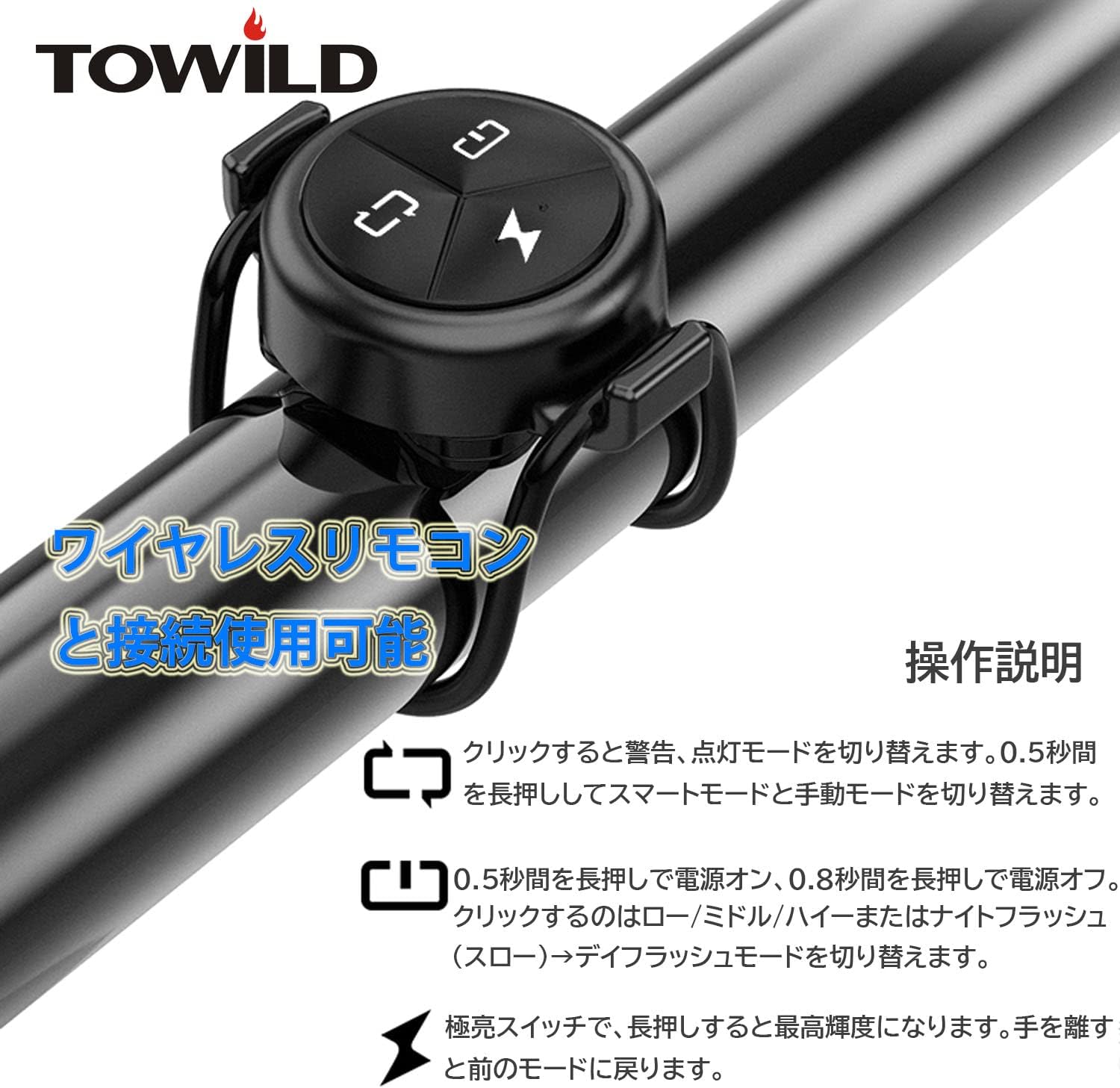
የአዝራር ተግባራት፡-
- Top Left Button (Mode Switch): Click to switch between warning and flashing modes. Long-press for 0.5 seconds to switch between smart mode and manual mode.
- Top Right Button (Power/Brightness): Long-press for 0.5 seconds to power on, long-press for 0.8 seconds to power off. Click to cycle through low/middle/high brightness modes or night flash (slow) to day flash mode.
- Bottom Button (Instant Max Brightness): Long-press for instant maximum brightness. Release the button to return to the previous mode.
Video: Demonstrates the various operating modes and button functions of the TOWILD ALC-01 remote control, including switching between brightness levels and flashing modes.
5. ጥገና
የባትሪ መተካት፡
The remote control uses a replaceable button cell battery. To replace the battery:
- First, remove the rubber mat from the bottom of the remote control.
- Apply force to the center of the remote control from the front to separate the main body from its case.
- Remove the soft cap from the main unit.
- Carefully remove the internal components and replace the battery. Ensure correct polarity.
- When reassembling, pay close attention to the alignment of the contacts to ensure proper function.
Video: Step-by-step guide on how to replace the battery in the TOWILD ALC-01 wireless remote control, including disassembly and reassembly instructions.
6. መላ መፈለግ
- የርቀት ምላሽ አለመስጠት፡- Ensure the remote control and bicycle light are both powered on. Check the remote control's battery and replace if necessary. Re-pair the remote control with the light.
- ብርሃን የማይለወጥ ሁነታዎች; Verify that the remote control is properly paired. Ensure there are no obstructions between the remote and the light.
- አጭር የባትሪ ዕድሜ; Ensure the remote is turned off when not in use. Replace with a fresh, high-quality battery.
7. ዝርዝሮች
| ባህሪ | ዝርዝር መግለጫ |
|---|---|
| የምርት ስም | TOWILD |
| ሞዴል | ALC-01 |
| የኃይል ምንጭ | Corded Electric (refers to the light, remote is battery-powered) |
| የውሃ መቋቋም ደረጃ | የውሃ መከላከያ |
| የእቃው ክብደት | 10 ግራም |
| የመጫኛ አይነት | Handlebar ተራራ |
| የቅንብሮች ብዛት | 1 (remote unit) |
| ዩፒሲ | 768497183278 |
| GTIN | 768497183278 |
8. ዋስትና እና ድጋፍ
For warranty information and customer support, please refer to the documentation included with your TOWILD bicycle light or visit the official TOWILD webጣቢያ. ለዋስትና ጥያቄዎች የግዢ ደረሰኝዎን ያስቀምጡ።