
1. መግቢያ
This manual provides detailed instructions for the setup, operation, maintenance, and troubleshooting of your YiBiChin Universal Replacement Remote Control, Model RU-12. This remote is designed to work seamlessly with various Roku Built-in TV models.
2. ምርት አብቅቷልview
The YiBiChin RU-12 is a dedicated infrared (IR) replacement remote control for Roku Built-in TVs. It offers direct access to popular streaming services through its 12 shortcut buttons.
2.1 ቁልፍ ባህሪያት
- No programming or pairing required.
- Compatible with a wide range of Roku Built-in TVs.
- 12 dedicated shortcut buttons for popular streaming apps: NETFLIX, Prime Video, Roku Channel, Disney+, Sling, Hulu, VUDU, YouTube, ESPN+, Fan-NOW, Google Play, and Spotify.
- Infrared (IR) technology for reliable control.
2.2 ተኳኋኝነት
This remote is compatible with the following Roku Built-in TV brands:
- TCL Roku ቲቪ
- ሂስንስ ሩኩ ቲቪ
- ONN Roku TV
- INSIGNIA Roku TV
- SHARP Roku TV
- Hitachi Roku TV
- ፊሊፕስ ራኩ ቲቪ
- Westinghouse Roku ቲቪ
- ኤለመንት Roku TV
- And other Roku Built-in TV models.
2.3 Important Incompatibilities
This remote is NOT compatible with:
- Roku Stick devices.
- Roku Player devices without an IR receiver.
- Any Roku player/box that does not have an IR receiver.
- This is an infrared (IR) remote; it does not feature a pairing button, microphone for voice control, or a headphone jack. It is not an RF (Radio Frequency) model.

Image 1: Front, side, and back views of the YiBiChin RU-12 remote control. The remote is black with blue navigation buttons and various colored shortcut buttons.

Image 2: Visual guide indicating that the remote is compatible with Roku players/boxes that have an IR receiver (labeled 'YES') and incompatible with Roku Built-in TVs, Roku Sticks, and Roku Players without an IR receiver (labeled 'NO').
3. ማዋቀር
Setting up your YiBiChin RU-12 remote control is straightforward and requires no complex programming.
3.1 የባትሪ ጭነት
- የባትሪውን ክፍል ከርቀት መቆጣጠሪያው ጀርባ ያግኙት።
- ተንሸራታች የባትሪውን ክፍል ሽፋን ይክፈቱ።
- ሁለት (2) AAA ባትሪዎችን አስገባ, በክፍሉ ውስጥ እንደተገለጸው ትክክለኛውን ፖላሪቲ (+ እና -) በማረጋገጥ.
- የባትሪውን ክፍል ደህንነቱ በተጠበቀ ሁኔታ ይዝጉ።
ማስታወሻ፡- ባትሪዎች ከርቀት መቆጣጠሪያው ጋር አልተካተቱም።
3.2 የመጀመሪያ አጠቃቀም
Once batteries are installed, the remote is ready for immediate use. No programming or pairing is necessary. Simply point the remote at your Roku Built-in TV and begin operating it.

Image 3: The remote control being used with a television, highlighting that no setup or programming is required after battery installation.
4. የአሠራር መመሪያዎች
Familiarize yourself with the buttons on your YiBiChin RU-12 remote control for optimal use.
4.1 Standard Controls
- Power (N/P buttons): ቴሌቪዥንዎን ያበራል ወይም ያጠፋዋል።
- Navigation Pad (Up, Down, Left, Right arrows): በምናሌዎች እና ምርጫዎች ውስጥ ያስሳል።
- እሺ አዝራር; ምርጫዎችን ያረጋግጣል።
- ተመለስ አዝራር፡- ወደ ቀዳሚው ማያ ገጽ ወይም ምናሌ ይመለሳል።
- መነሻ አዝራር፡- ወደ Roku መነሻ ማያ ገጽ ይመለሳል።
- አጫውት/ ለአፍታ አቁም፣ በፍጥነት ወደፊት ቀጥል፣ ወደኋላ መመለስ የሚዲያ መልሶ ማጫዎትን ይቆጣጠራል።
- የኮከብ ምልክት (*) አዝራር፡ Accesses options or settings within certain apps.
- Refresh/Replay Button: Replays the last few seconds of content.
4.2 አቋራጭ ቁልፎች
The remote features 12 dedicated shortcut buttons for quick access to popular streaming applications:
- NETFLIX
- ዋና ቪዲዮ
- የሮኩ ቻናል
- Disney+
- ወንጭፍ
- ሁሉ
- VUDU
- YouTube
- ESPN+
- Fan-NOW
- ጎግል ፕሌይ
- Spotify
Simply press the desired shortcut button to launch the corresponding application directly.

Image 4: Visual confirmation that the remote does not include features such as voice search, an earphone jack, or a pairing button.
5. ጥገና
Proper care and maintenance will ensure the longevity of your remote control.
5.1 ጽዳት
የርቀት መቆጣጠሪያውን ለማጽዳት፣ ለስላሳና ደረቅ ጨርቅ በቀስታ ይጥረጉት። ፈሳሽ ማጽጃዎችን፣ መሟሟቶችን ወይም የማጥፊያ ቁሳቁሶችን ከመጠቀም ይቆጠቡ፣ ምክንያቱም እነዚህ መሳሪያዎች የርቀት መቆጣጠሪያውን ገጽ ወይም የውስጥ ክፍሎችን ሊጎዱ ይችላሉ።
5.2 የባትሪ መተካት
የርቀት መቆጣጠሪያው ምላሽ ሲቀንስ ወይም መስራት ሲያቆም ባትሪዎቹን ይተኩ። ሁለቱንም የ AAA ባትሪዎች በአዲሶቹ በተመሳሳይ ጊዜ ይተኩ። አሮጌ እና አዲስ ባትሪዎችን ወይም የተለያዩ የባትሪ ዓይነቶችን አያቀላቅሉ።
5.3 ማከማቻ
When not in use for extended periods, it is recommended to remove the batteries to prevent leakage and potential damage to the remote.
6. መላ መፈለግ
If you encounter issues with your remote control, please refer to the following troubleshooting steps:
- የርቀት ምላሽ አለመስጠት፡-
- Ensure the batteries are correctly installed with the proper polarity.
- የድሮ ባትሪዎችን በአዲስ የ AAA ባትሪዎች ይተኩ።
- Check for any obstructions between the remote and your TV's IR receiver. Ensure a clear line of sight.
- Confirm that your TV is a Roku Built-in TV and not a Roku Stick or a Roku Player without an IR receiver.
- No voice control/headphone jack: This remote is an IR remote and does not support voice control, a headphone jack, or a pairing function. These are not malfunctions but inherent design characteristics.
- Shortcut buttons not working: Ensure your TV is powered on and connected to the internet for streaming apps to function correctly.
እነዚህን እርምጃዎች ከተከተሉ በኋላ ችግሮች ከቀጠሉ እባክዎ የደንበኛ ድጋፍን ያግኙ።
7. ዝርዝሮች
| የምርት ስም | YiBiChin |
| የሞዴል ቁጥር | RU-12 |
| ቀለም | ጥቁር |
| የግንኙነት ቴክኖሎጂ | ኢንፍራሬድ (IR) |
| ልዩ ባህሪያት | ምንም ፕሮግራሚንግ ወይም ማዋቀር አያስፈልግም |
| ተስማሚ መሣሪያዎች | Roku አብሮገነብ ቴሌቪዥኖች |
| ባትሪዎች ያስፈልጋሉ። | 2 x AAA (አልተካተተም) |
| ከፍተኛው ክልል | 10 ሜትር |
| የአዝራሮች ብዛት | Standard controls + 12 shortcut buttons |
| መጠኖች (በግምት) | ርዝመት፡ 13.9 ሴሜ (5.5 ኢንች) ስፋት፡ 4.1 ሴሜ (1.6 ኢንች) ውፍረት፡ 2.1 ሴሜ (0.8 ኢንች) |
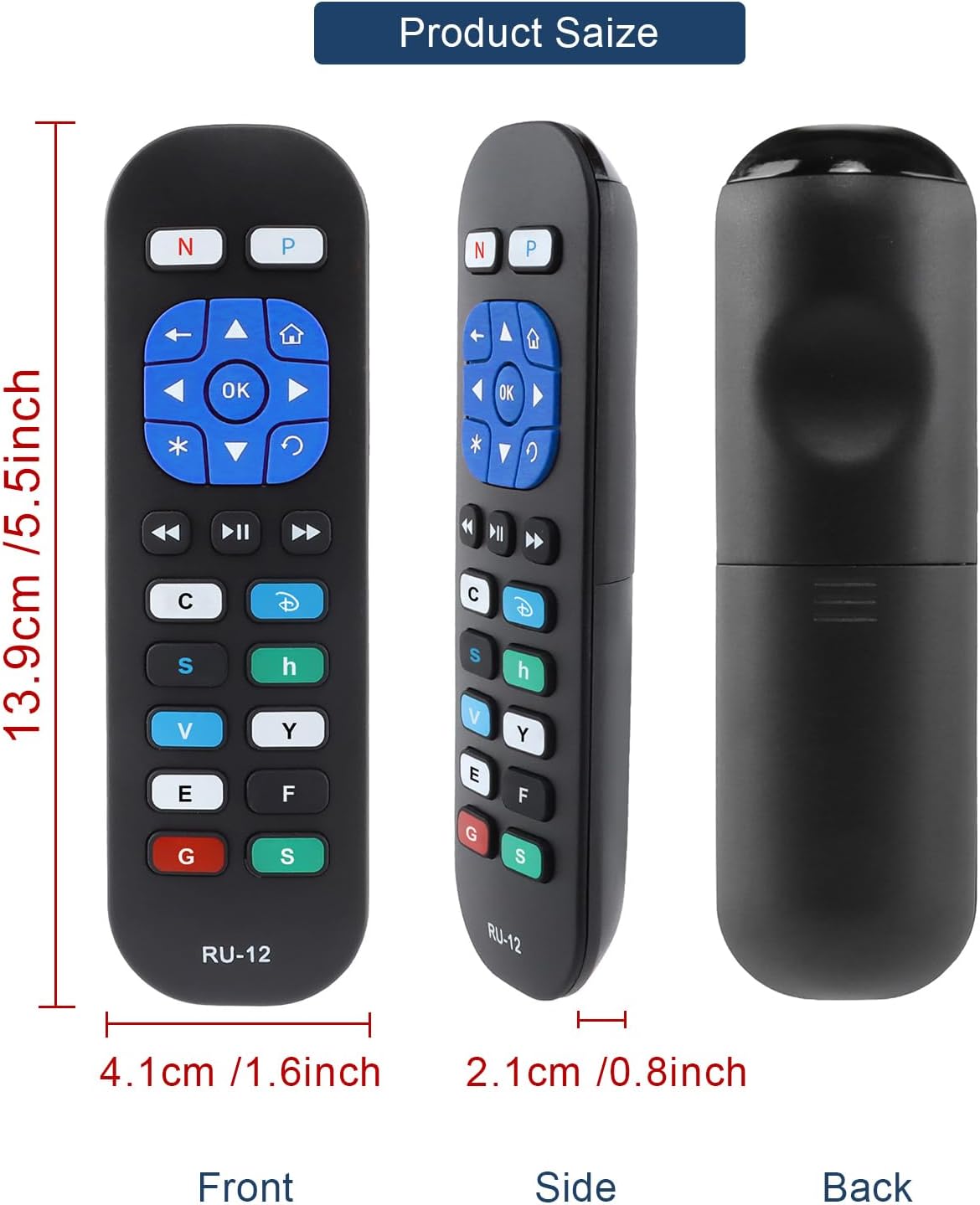
Image 5: Detailed dimensions of the remote control, indicating its length, width, and thickness.
8. የዋስትና መረጃ
Specific warranty details for the YiBiChin RU-12 Universal Replacement Remote Control are not provided in the product information. Please refer to your purchase documentation or contact the seller for any warranty-related inquiries.
9. ድጋፍ
For any questions regarding your YiBiChin RU-12 remote control, whether before purchase or during use, please do not hesitate to contact our customer support team. We aim to respond to all inquiries within 24 hours.
የእውቂያ መረጃ፡- Please refer to the seller's contact details on your purchase platform or documentation.