
1. መግቢያ
The UMLIFE STC-1000 is a versatile digital temperature controller designed for precise temperature management in various applications. This device features a clear LED display, NTC 10K thermistor sensor, and dual relay outputs for both heating and cooling control. This manual provides detailed instructions for installation, operation, and maintenance to ensure optimal performance and longevity of your temperature controller.
2. ምርት አብቅቷልview
2.1 ቁልፍ ባህሪያት
- Digital LED display for clear temperature readings.
- Wide temperature measurement and control range: -50°C to 99°C.
- High control accuracy of 0.1°C.
- Dual relay output for simultaneous heating and cooling control.
- Waterproof NTC 10K thermistor sensor for reliable measurements in various environments.
- የሙቀት መለኪያ ተግባር.
- Delay start protection for cooling control.
- ABS flame-retardant shell for enhanced safety.
2.2 ክፍሎች እና ማሳያ
Familiarize yourself with the main components and display interface of the STC-1000 controller.

ምስል 1፡ Front panel of the STC-1000 controller showing the digital display, power switch, UP button, Setting button, and DOWN button.
- ዲጂታል ማሳያ መስኮት፡- Shows current temperature and parameter settings.
- የኃይል መቀየሪያ መሣሪያውን ያበራል ወይም ያጠፋል.
- ወደ ላይ አዝራር (▲): እሴቶችን ይጨምራል ወይም ምናሌዎችን ያስሳል።
- የታች አዝራር (▼): እሴቶችን ይቀንሳል ወይም ምናሌዎችን ያስሳል።
- Setting Button (S): Enters parameter setting mode.
- Cool Indicator: Illuminates when cooling relay is active.
- የሙቀት አመልካች፡- Illuminates when heating relay is active.

ምስል 2፡ Physical dimensions of the STC-1000 controller and the included 1-meter NTC 10K waterproof sensor probe.
3. ዝርዝሮች
| መለኪያ | ዋጋ |
|---|---|
| ሞዴል | STC-1000 |
| የሙቀት መለኪያ ክልል | -50 ° ሴ እስከ 99 ° ሴ |
| የሙቀት መቆጣጠሪያ ክልል | -50 ° ሴ እስከ 110 ° ሴ |
| የመለኪያ ትክክለኛነት | ± 0.2 ° ሴ |
| ጥራት | 0.1 ° ሴ |
| ትክክለኛነትን ይቆጣጠሩ | ± 0.1 ° ሴ |
| ዳሳሽ | NTC 10K L=1M waterproof probe |
| የኃይል አቅርቦት | ዲሲ 12 ቪ |
| የኃይል ፍጆታ | <3 ዋ |
| የቅብብሎሽ አቅም | Cool (10A/220VAC), Heat (10A/220VAC) |
| የአካባቢ ሙቀት | ከ 0 ° ሴ እስከ 60 ° ሴ |
| የማከማቻ ሙቀት | -30 ° ሴ እስከ 75 ° ሴ |
| አንጻራዊ እርጥበት | 20-84% |
| የመጫኛ መጠን | 71 ሚሜ x 29 ሚሜ |
| የምርት ልኬቶች | 75 ሚሜ x 34.5 ሚሜ x 85 ሚሜ |
| የእቃው ክብደት | 7 አውንስ (198 ግ ገደማ) |
| ቁሳቁስ | አሲሪሎኒትሪል ቡታዲየን ስቲሪን (ኤቢኤስ) |
4. ማዋቀር እና መጫን
ጠቃሚ የደህንነት ማስታወቂያ፡- Installation should be performed by qualified personnel. Ensure power is disconnected before wiring to prevent electric shock. Strictly distinguish between power supply, sensor, and relay interfaces. Maintain proper distance between sensor down-lead and power wires to avoid interference.
4.1 የሽቦ ዲያግራም
Refer to the following diagram for correct wiring connections. This model operates on DC 12V power supply.
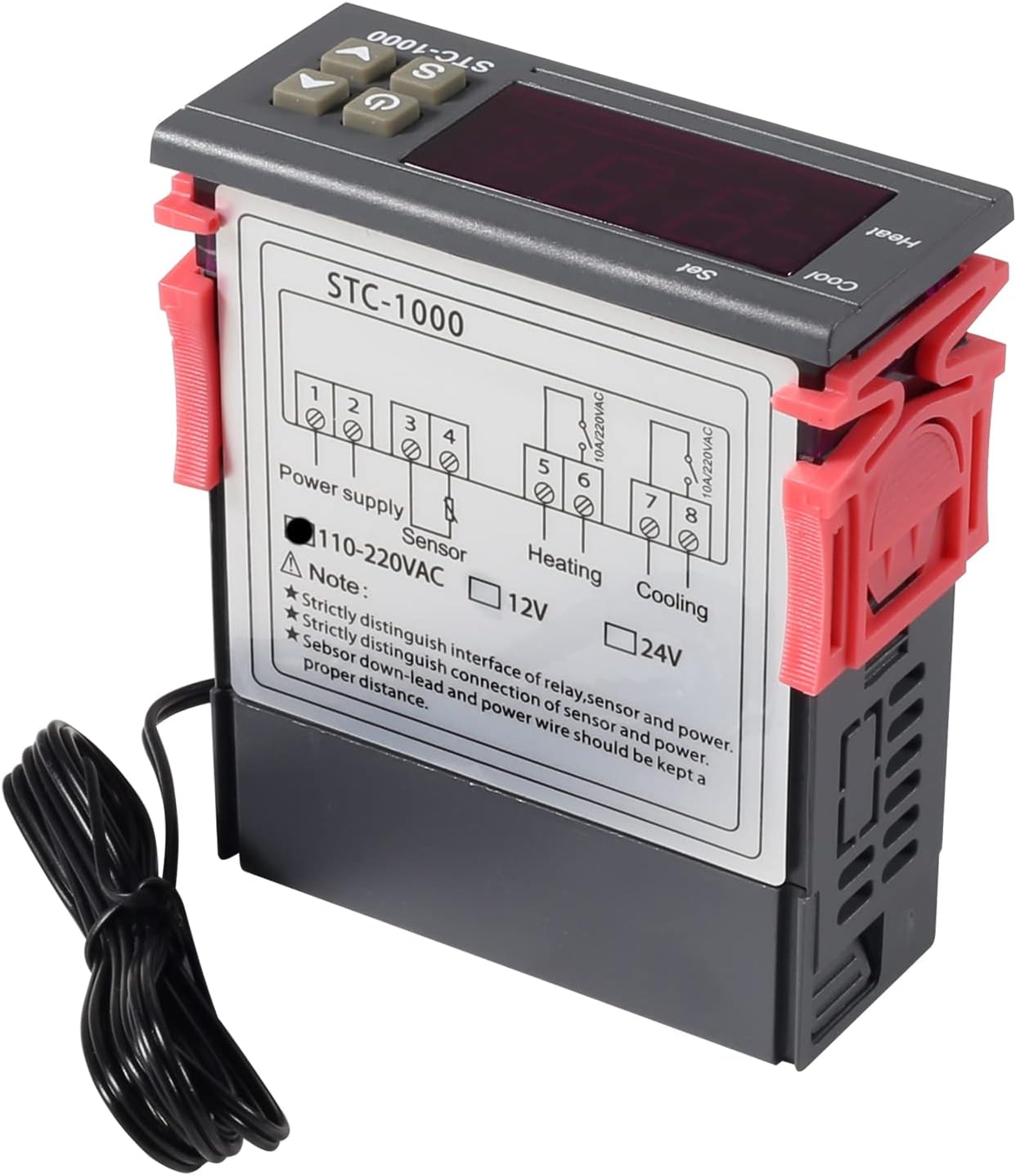
ምስል 3፡ Wiring diagram for the STC-1000 12V temperature controller. Connections are for power supply, NTC sensor, heating relay, and cooling relay.
- Terminals 1 & 2: Power Supply (DC 12V).
- Terminals 3 & 4: NTC Sensor connection.
- Terminals 5 & 6: Heating Relay Output (Connect to heating device).
- Terminals 7 & 8: Cooling Relay Output (Connect to cooling device).
Ensure all connections are secure and insulated. Verify the power supply voltage matches the controller's requirement (DC 12V for this model).
4.2 መጫን
The STC-1000 is designed for panel mounting. Cut an opening of 71mm x 29mm in your panel. Insert the controller and secure it using the provided clips or mounting brackets.
5. የአሠራር መመሪያዎች
The STC-1000 operates in Celsius only. It cannot be switched to Fahrenheit.
5.1 ማብራት / ማጥፋት
- የሚለውን ይጫኑ የኃይል መቀየሪያ button (marked with ⏻) to turn the controller on or off.
5.2 Setting Temperature Parameters
The controller has two main temperature settings: the Set Temperature (ST) እና የ Difference Temperature (DT), also known as hysteresis.
- ለ view the Set Temperature (ST): በአጭሩ ይጫኑ Setting (S) button. The display will show the current set temperature.
- To modify the Set Temperature (ST):
- ተጭነው ይያዙት። Setting (S) button for approximately 3 seconds until the display flashes.
- የሚለውን ተጠቀም ወደላይ (▲) or ታች (▼) buttons to adjust the desired set temperature.
- የሚለውን ይጫኑ የኃይል መቀየሪያ button to save the setting and exit, or wait for 10 seconds for it to save automatically.
5.3 Advanced Parameter Settings (F1-F4)
የላቁ መለኪያዎችን ለመድረስ እና ለማሻሻል፦
- ተጭነው ይያዙት። Setting (S) button for approximately 3 seconds until the display flashes.
- ማሳያው ብልጭ ድርግም እያለ፣ ይጫኑ Setting (S) button again (do not hold) to cycle through parameters F1, F2, F3, F4.
- የሚለውን ተጠቀም ወደላይ (▲) or ታች (▼) buttons to adjust the value of the selected parameter.
- የሚለውን ይጫኑ የኃይል መቀየሪያ button to save the setting and exit, or wait for 10 seconds for it to save automatically.
| መለኪያ | መግለጫ | ክልል | ነባሪ |
|---|---|---|---|
| F1 | Difference Temperature (Hysteresis): The difference between the set temperature and the temperature at which the relay switches off. | ከ 0.3 ° ሴ እስከ 10 ° ሴ | 2.0 ° ሴ |
| F2 | ከፍተኛው የተቀናበረ ነጥብ ገደብ: Limits the maximum adjustable set temperature. | Set Temp to 110°C | 110 ° ሴ |
| F3 | ዝቅተኛው የተቀናበረ ነጥብ ገደብ: Limits the minimum adjustable set temperature. | -50°C to Set Temp | -50 ° ሴ |
| F4 | የሙቀት መለኪያ: Adjusts the temperature reading to match a known accurate thermometer. | -10 ° ሴ እስከ 10 ° ሴ | 0.0 ° ሴ |
5.4 Heating and Cooling Modes
The STC-1000 automatically switches between heating and cooling based on the set temperature (ST) and difference temperature (DT).
- የማቀዝቀዝ ሁኔታ; If the current temperature is higher than (ST + DT), the cooling relay activates. It deactivates when the temperature drops to ST.
- የማሞቂያ ሁነታ; If the current temperature is lower than (ST - DT), the heating relay activates. It deactivates when the temperature rises to ST.
6. ጥገና
- ማጽዳት፡ የመቆጣጠሪያውን ገጽ ለስላሳና ደረቅ ጨርቅ ይጥረጉ። ሻካራ ማጽጃዎችን ወይም ሟሟቶችን አይጠቀሙ።
- የዳሳሽ እንክብካቤ Ensure the NTC sensor probe is clean and free from debris. While waterproof, avoid unnecessary physical damage to the probe or cable.
- ግንኙነቶች፡ Periodically check wiring connections for tightness and signs of corrosion.
- አካባቢ፡ Operate the controller within the specified ambient temperature and humidity ranges to ensure optimal performance and lifespan.
7. መላ መፈለግ
| ችግር | ሊሆን የሚችል ምክንያት | መፍትሄ |
|---|---|---|
| Display shows "EE" | Sensor error or open circuit. | የዳሳሽ ግንኙነትን ያረጋግጡ። ከተበላሸ ዳሳሹን ይተኩ. |
| Display shows "HHH" | Temperature exceeds upper limit of measurement range. | Ensure the environment temperature is within the sensor's range (-50°C to 99°C). |
| Display shows "LLL" | Temperature falls below lower limit of measurement range. | Ensure the environment temperature is within the sensor's range (-50°C to 99°C). |
| ተቆጣጣሪው እየበራ አይደለም። | የኃይል አቅርቦት የለም ወይም የተሳሳተ መጠን የለምtage. | Check power connections and ensure DC 12V is supplied. |
| ማሞቂያ/ማቀዝቀዝ አይሰራም | Incorrect temperature settings (ST, DT), wiring error, or device malfunction. | Verify ST and DT settings. Check heating/cooling device wiring. Ensure the device is within operating parameters. |
8. ዋስትና እና ድጋፍ
UMLIFE products are manufactured to high-quality standards. For warranty information or technical support, please contact UMLIFE customer service through your purchase platform or visit the official UMLIFE website. Please have your product model (STC-1000 12V) and purchase details ready when contacting support.
ለበለጠ እርዳታ፣ እርስዎም ሊመለከቱት ይችላሉ። UMLIFE Store on Amazon.